Skip to content
Desk & Dowel

HUB 05 · Small-Space Setups

Putting a Desk on Carpet

Carpet is compressible, and a desk standing on it is standing on four small springs. The fix is to spread the load and get weight off the top, in that order.

By Stephen V.Updated How we pick
#ad

We earn a commission when you buy through our Amazon links, at no extra cost to you. It never affects our rankings, and we say so when the cheaper product is the better buy. How this works.

A desk on carpet rocks for a reason that has nothing to do with the desk: carpet is compressible, so each leg is standing on a small spring, and the four springs do not have the same rate. The fix in order of effect is spread the load under each leg, then get weight off the desk top (a monitor on an arm instead of on the surface removes the mass that amplifies every movement), then deal with the chair, which on pile needs a bigger wheel rather than a softer one. If you are renting, there is a fourth job: the dents.

This matters more than it sounds in an apartment, because most rentals are carpeted and most desk advice silently assumes a hard floor. Our chair wheels guide is written for the opposite problem and says plainly that soft wheels are worse on deep pile. Our wobble guide ranks causes by likelihood and never names the floor. This page is the carpet version of both.

What decides it, in order

One: contact area, not leg length.On a hard floor a desk with four half-inch-square feet is stable because the floor does not move. On carpet those four small feet sink until the pile under them is compressed enough to push back, and because the pile is not perfectly uniform — near a seam, over an underlay join, where a previous piece of furniture stood — they sink by different amounts. Widen each contact patch and the desk settles on a bigger average: a two-inch square of hardboard, a furniture coaster or a plywood offcut under each foot does more for a rocking desk on carpet than any amount of tightening.

Two: where the weight sits.Mass high and far back on a desk top turns a small amount of leg movement into a visible screen shake, which is what people actually notice when they say the desk wobbles when they type. A 15-pound monitor on its own base at the back edge of a desk standing on springs is the worst case. Move it onto a clamped arm and the mass transfers to the desk’s structure rather than loading one corner of the top — and you get the depth back too.

Three: whether the desk is on the carpet or on the edge of it. A desk with two legs on a rug and two on the floor beneath it will never level, and no shim fixes it permanently because the rug compresses and the floor does not. Either all four legs are on the carpet or none are. The same rule applies to a desk half on a transition strip at a doorway.

Four: tighten before you shim. Carpet gets blamed for a lot of movement that is a loose flat-pack frame. Put the desk on its side, tighten every bolt in a cross pattern rather than one side at a time, and check the cross-brace if it has one. Then re-test. Carpet makes a loose desk feel much worse than the same desk on tile, so both problems usually need solving and only one of them costs money.

Five: the chair, which is a separate problem.Standard chair casters are hard nylon designed for commercial carpet tile, and on low-pile carpet they work fine. On thick domestic pile they do not, and the instinct to buy “soft” roller-blade wheels makes it worse: a soft tread deforms into the pile instead of riding over it, so the chair feels heavier. On carpet the spec that helps is wheel diameter— a three-inch wheel rolls over pile a two-inch wheel ploughs through.

Six: the dents, if you rent.Furniture standing on carpet for a year leaves compression marks, and a desk with small hard feet leaves the worst ones. Wide coasters that spread the load reduce them; moving the desk a few inches twice a year lets the pile recover; and crucially, do not run a power cord under the carpet or a rug to hide it — the Electrical Safety Foundation lists cords under rugs and carpets among its cord hazards, because a cord that cannot shed heat and gets walked on is a fire risk. Route it around the edge or over the top inside a cover, as in our floating desk guide.

Standing desks on carpet

A sit-stand frame on carpet is the hardest version of this, for two reasons. The frame’s feet are usually narrow steel plates with adjustable levelling screws, and those screws are designed to take out a few millimeters of floor unevenness, not a quarter-inch of pile compression that changes as you lean. And at full standing height the leverage on the base is at its greatest, so the same leg movement produces far more sway than it does seated. Level the frame at standingheight rather than seated, put something firm and wide under each foot, and keep the desk shallow — a deep top in open carpet is the worst combination. Our shallow standing desk picks are the right shape for it, and standing desk in a small room covers the clearance.

Standing on carpet is also not as comfortable as it sounds. Pile is soft but uneven, so your feet keep making small corrections, and the thing that actually helps is a firm level surface rather than a softer one. That is counter-intuitive and it is why a thin, firm anti-fatigue mat earns its place on a carpeted floor, not just a hard one.

The short answer

Quick picks

#ProductBest forScorePrice
01
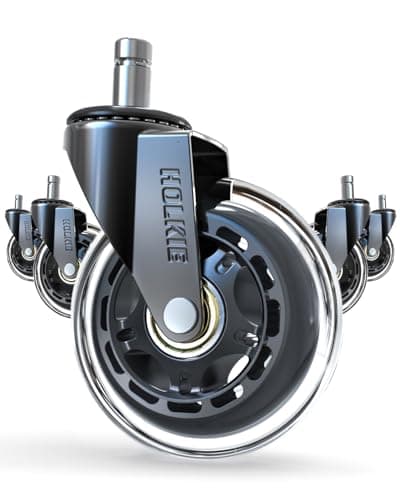
HOLKIE HOLKIE Roller Blade Office Chair Wheels (3in)
HOLKIE Roller Blade Office Chair Wheels (3in)

The only chair-wheel set we rank whose listing states carpet as well as hardwood, and at three inches it is the diameter that matters: a bigger wheel rides over pile instead of ploughing into it.

The chair that will not roll on pile
8.5
$15.99Amazon
02
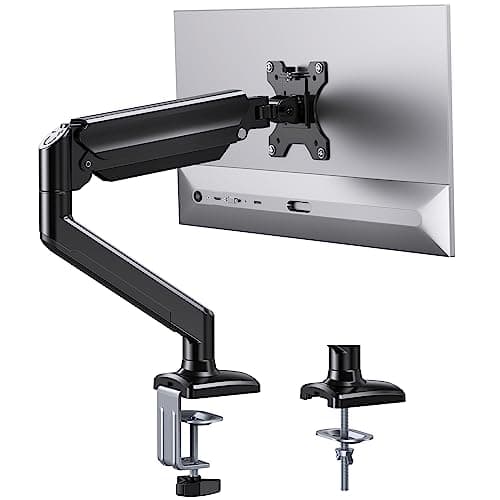
ErGear ErGear Single Monitor Arm (13–36in)
ErGear Single Monitor Arm (13–36in)

The single most effective thing you can do about a desk that shakes on carpet: take the monitor's mass off the top and put it through the frame, and get eight to ten inches of depth back in the process.

Stopping the screen shake at its cause
9.0
$35.99Amazon
03
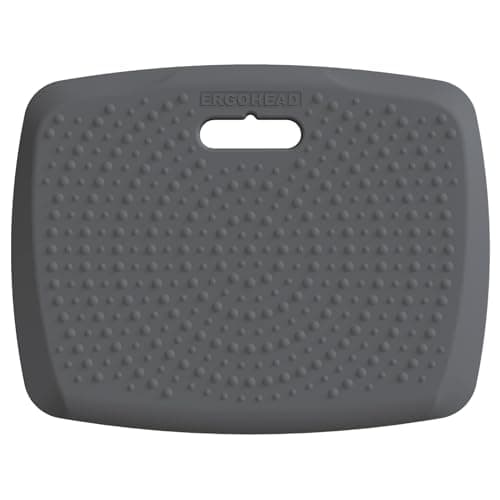
Ergohead Ergohead 3/4in Portable Standing Mat (17 x 22in)
Ergohead 3/4in Portable Standing Mat (17 x 22in)

On carpet a mat is not about softness, it is about getting a firm, level surface under your feet. Three quarters of an inch over 17 by 22 inches does that, and the handle means it stores against a wall.

Standing on a carpeted floor
9.2
$28.98Amazon
04
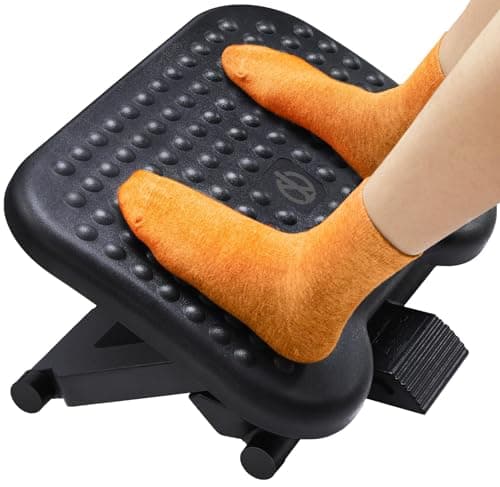
ErGear ErGear Adjustable Footrest (3 heights)
ErGear Adjustable Footrest (3 heights)

Carpet is a vague surface to brace against, and a footrest replaces it with a firm one at a chosen height. On a carpeted floor it does something it does not do on tile: it gives your feet a fixed reference.

A firm floor where there is only pile
8.4
$28.99Amazon

#ad · Live prices from the Amazon Product API, as of October 11, 2026. Where we have no verified live price we show none — we would rather leave a gap than print a number that has rotted.

In detail

The picks, in full

01
HOLKIE HOLKIE Roller Blade Office Chair Wheels (3in)

The chair that will not roll on pile

HOLKIE Roller Blade Office Chair Wheels (3in)

Wheel
3 in roller blade, rubber
Floors
Hardwood and carpet
Fit
Stated universal
Stem
Not published on listing
Set
5 casters
8.5/10

The only chair-wheel set we rank whose listing states carpet as well as hardwood, and at three inches it is the diameter that matters: a bigger wheel rides over pile instead of ploughing into it.

Rolls on pile
8.6
Fit certainty
7.6
Quiet
8.6
Build
8.2
Value
9.6

Pros

  • Rated by the maker for carpet as well as hard floors, which most roller-blade sets are not
  • A 3-inch diameter is the spec that decides rolling resistance on pile
  • Rubber tread is quieter than the hard nylon casters a chair ships with
  • Cheap enough to try before committing to a chair mat

Cons

  • The stem size is not published, so measure your existing caster first — 7/16 x 7/8 in is the common standard
  • On deep domestic pile no caster fully solves it; a hard surface under the chair does
  • Three-inch wheels raise the seat slightly, which matters if your desk is already low

Skip this if…

…your pile is deep and shaggy. At that point the honest answer is a hard surface under the chair, not a different wheel.

$15.99View on Amazon

Price as of October 11, 2026. Prices change — Amazon's is the one that counts.

#ad · we may earn a commission from this link to HOLKIE Roller Blade Office Chair Wheels (3in)

02
ErGear ErGear Single Monitor Arm (13–36in)

Stopping the screen shake at its cause

ErGear Single Monitor Arm (13–36in)

Screen fit
13–36 in
Weight limit
22 lb
Clamp range
0.39–2.76 in
Height travel
17.5 in
Reach
15.3 in
9.0/10

The single most effective thing you can do about a desk that shakes on carpet: take the monitor's mass off the top and put it through the frame, and get eight to ten inches of depth back in the process.

Reduces shake
9.2
Depth returned
9.6
Renter-safe
9
Fit range
7.6
Value
9.6

Pros

  • Removes the loaded monitor base from the desk surface, which is what amplifies leg movement into visible shake
  • Clamps on and off with no holes, so it leaves the rental as it found it
  • 0.39 in clamp floor fits a thin flat-pack top, which is what most desks on carpet are
  • 17.5 in of height travel means the screen is set to you, not to the desk

Cons

  • It does not fix the wobble, it removes what you notice about it — the legs still need widening
  • 22 lb limit rules out the heaviest 32-inch panels
  • Needs two inches of clear rear edge for the clamp

Skip this if…

…your desk top is glass, or thicker than 2.76 inches. Our thick-desk arms publish wider clamp ranges.

$35.99View on Amazon

Price as of October 11, 2026. Prices change — Amazon's is the one that counts.

#ad · we may earn a commission from this link to ErGear Single Monitor Arm (13–36in)

03
Ergohead Ergohead 3/4in Portable Standing Mat (17 x 22in)

Standing on a carpeted floor

Ergohead 3/4in Portable Standing Mat (17 x 22in)

Size
17 × 22 in
Footprint
~2.6 sq ft
Thickness
3/4 in
Carry
Built-in handle
Surface
Non-slip, massage points
9.2/10

On carpet a mat is not about softness, it is about getting a firm, level surface under your feet. Three quarters of an inch over 17 by 22 inches does that, and the handle means it stores against a wall.

Level surface
8.8
Footprint
9.8
Comfort
8.4
Storability
9.6
Value
9.4

Pros

  • Gives a flat reference surface over uneven pile, which is the actual problem with standing on carpet
  • 2.6 sq ft is the smallest footprint of any mat we rank — it fits a studio
  • Stores upright by its handle rather than living underfoot
  • Non-slip underside, so it does not creep across the pile

Cons

  • A 17-inch depth means you stand in one place rather than shifting about
  • 3/4 in adds a step at its edge, which you will find with a heel occasionally
  • Less cushioning than a full-size mat if you stand for hours

Skip this if…

…you stand for long stretches at a wide desk. A full-size or contoured mat suits that better, at three to four times the floor area.

$28.98View on Amazon

Price as of October 11, 2026. Prices change — Amazon's is the one that counts.

#ad · we may earn a commission from this link to Ergohead 3/4in Portable Standing Mat (17 x 22in)

04
ErGear ErGear Adjustable Footrest (3 heights)

A firm floor where there is only pile

ErGear Adjustable Footrest (3 heights)

Heights
3 positions
Surface
Textured, tiltable
Use
Seated, under desk
Base
Non-slip
Adjustment
Manual, tool-free
8.4/10

Carpet is a vague surface to brace against, and a footrest replaces it with a firm one at a chosen height. On a carpeted floor it does something it does not do on tile: it gives your feet a fixed reference.

Level surface
8.4
Footprint
7.4
Comfort
8.2
Adjustability
8.8
Value
9

Pros

  • Three set heights, so it works whether you lowered the chair or raised it
  • Replaces a compressible surface with a firm one, which is what a braced foot needs
  • Keeps your heels off carpet, which is also the part that wears
  • Cheap, and useful regardless of how the desk itself turns out

Cons

  • One more object in the footwell of a small desk
  • It slides on very deep pile unless the base can grip
  • Does nothing for the desk itself

Skip this if…

…your feet already sit flat with the chair at the right height. A footrest is a fix for a height mismatch, not an upgrade.

$28.99View on Amazon

Price as of October 11, 2026. Prices change — Amazon's is the one that counts.

#ad · we may earn a commission from this link to ErGear Adjustable Footrest (3 heights)

The order to do it in

StepWhyCost
Tighten every bolt, on its side, in a cross patternCarpet exaggerates a loose frame; this is free and often enoughNothing
Widen each foot with a hard pad or coasterSpreads the load so the four legs settle on an average, not on four different springsA few dollars
Get the monitor onto an armRemoves the mass that turns leg movement into visible screen shakeThe price of an arm
Fix the chair separatelyDiameter beats softness on pile; a hard surface beats bothA caster set, or a board
Re-level at standing height, if it is a sit-stand deskSway is worst where leverage is greatestNothing

What not to do

Do not shim with folded card or paper. On a hard floor a shim works because the gap is constant. On carpet the gap changes every time you lean on the desk, so a shim either falls out or creates a new rocking point. Spread the load instead.

Do not buy soft roller-blade wheels for deep pile.This is the most common mistake, and our own hardwood page is explicit about it: a soft tread deforms into the pile rather than riding over it, so the chair gets heavier to move, not lighter. The polyurethane sets that are excellent on laminate — STEALTHO’s among them — make no carpet claim for exactly this reason, which is why they are not ranked on this page.

Do not run the power cord under the carpet or under a rug. It is the one genuinely unsafe shortcut in a home office. A buried cord cannot dissipate heat and gets walked on until the insulation wears.

Do not fix anything to the floor. Adhesive raceway, carpet tacks and screwed-down guards are all deposit problems. Everything in this guide lifts out, which is the standing position across our renter-friendly setup guide.

If the desk still rocks

Two structural causes survive everything above, and both are about the desk rather than the floor. A desk with no cross-brace or back panel relies on its top to resist racking, and a thin top cannot; adding a brace or a back panel is the real fix and our wobble guidecovers it. And a desk with a long unsupported span — a 47-inch top on two end frames — flexes in the middle regardless of what is under the legs. On carpet that flex is what you feel.

If you are still choosing the desk, two specs predict how it will behave on carpet: a wide foot or a flat plate rather than a point, and a published load rating, which tells you the maker measured something. Four-legged desks on carpet beat pedestal desks; a desk on locking castors is the worst of all, because a caster on pile is a point load that sinks. Rolling desks are a hard-floor category and the page says so.

Protecting a carpet you do not own

Compression marks are not damage in most tenancies, but deep dents from small hard feet can be. Three habits cover it: spread each foot over at least two square inches, move the desk a few inches at least twice a year so the pile can recover, and lift rather than drag when you rearrange — dragging a loaded desk is what tears pile and pulls seams. Everything in moving-friendly desk gear is chosen to come apart for exactly this kind of handling.
How we picked

We do not run a testing lab

We compiled the published manufacturer specifications, did the footprint and clearance math ourselves, and read aggregated owner reviews, then scored each product against a published rubric. The scores are judgments from documented research — they are not measurements we took, because we do not have a lab and we are not going to pretend we do. Every spec traces back to a listing or manual named in Sources.

Questions

Frequently asked

Why does my desk wobble on carpet when it was fine on a hard floor?
Because carpet compresses and your four feet are standing on four small springs with slightly different rates — near a seam, over an underlay join, or where other furniture stood. The desk is not the problem; the contact patch is. Widen each foot with a hard pad or coaster so the load spreads, and tighten the frame first because carpet makes a loose desk feel far worse.
How do you stabilise a desk on carpet?
In order: tighten every bolt with the desk on its side, put something hard and at least two inches square under each foot, and move the monitor off the top onto a clamped arm so its mass stops amplifying the movement. Shimming with card does not work on carpet, because the gap changes as you lean.
Do you need a chair mat on carpet?
It is the most reliable fix for deep pile, because no caster fully solves thick carpet — a hard surface under the chair does. On low-pile or commercial-weight carpet, a larger-diameter wheel is usually enough. We do not rank chair mats; the thing to look for is a hard-surface mat with gripper spikes for carpet, not a smooth-backed one made for hard floors.
Do soft chair wheels work on carpet?
Less well than the hard ones your chair came with. A soft tread deforms into the pile instead of rolling over it, so the chair feels heavier. On carpet the spec that helps is wheel diameter — three inches rather than two — and a listing that actually states a carpet rating.
Can you use a standing desk on carpet?
Yes, with two adjustments. Level the frame at standing height rather than seated, because that is where leverage and sway are greatest, and put something firm and wide under each foot — a sit-stand frame's levelling screws are designed for a few millimeters of floor unevenness, not for pile that compresses as you lean.
How do I stop a desk denting the carpet?
Spread each foot over at least two square inches with a wide coaster or a hardboard pad, and shift the desk a few inches twice a year so the pile can recover. Lift rather than drag when you rearrange — dragging a loaded desk is what tears pile and pulls seams, and that is damage rather than a mark.

Keep reading

Receipts

Sources

We do not run a testing lab, and we do not pretend to. Specifications come from the manufacturer or retailer listing; the footprint and clearance math is ours and reproducible. Where we could not verify a number, we say so on the page rather than quietly leaving it out. Read our full method.