Skip to content
Desk & Dowel

HUB 02 · Monitor Arms & Mounts

The Best Monitor Arms with a Laptop Tray

Your laptop is a second screen that is sitting in the worst possible place. Four mounts that lift it beside the monitor and give the desk back.

By Stephen V.Updated How we pick
#ad

We earn a commission when you buy through our Amazon links, at no extra cost to you. It never affects our rankings, and we say so when the cheaper product is the better buy. How this works.

If you work on a laptop plus an external monitor, your desk is currently hosting the worst possible arrangement: a screen at eye level next to a screen at chest level, with the laptop claiming 10 inches of the surface you do not have. A monitor arm with a laptop tray fixes both problems at once — the laptop goes up beside the monitor, and the desk underneath becomes usable again.

There are two shapes of product here and they are not interchangeable. A combination arm holds a VESA monitor on one arm and the laptop on a tray on another, so one clamp does everything. A tray-only accessorybolts to the VESA plate of an arm you already own, which is far cheaper if you have a spare arm but useless if you do not. Check which you are buying — the listings are easy to confuse.

Our pick is the HUANUO monitor arm with laptop tray: a 13–32 inch monitor up to 22 lb on one side, a ventilated 14 × 12-inch tray on the other, and a clamp that fits desks from 0.39 to 3.07 inches. If you want a laptop plus two screens, the VIVO STAND-V013Ldoes all three. Every tray dimension below is the manufacturer’s published figure.

The short answer

Quick picks

#ProductBest forScorePrice
01
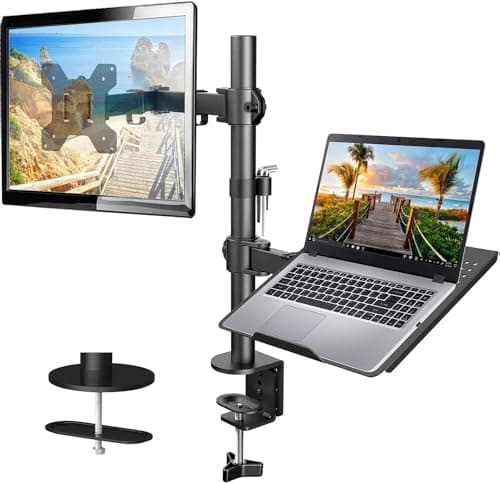
HUANUO HUANUO Monitor Arm with Laptop Tray
HUANUO Monitor Arm with Laptop Tray

The complete answer in one clamp: a 13–32 inch monitor up to 22 lb on one arm, a ventilated 14 × 12-inch laptop tray on the other, and 17 inches of height range for both.

Best overall
8.7
$39.99Amazon
02
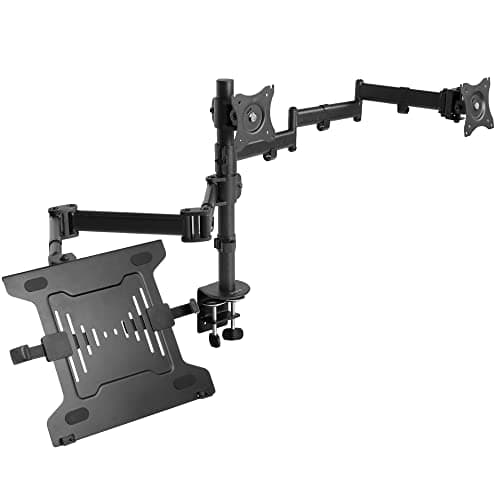
VIVO VIVO Dual Monitor + Laptop Mount (STAND-V013L)
VIVO Dual Monitor + Laptop Mount (STAND-V013L)

Three screens off one clamp: two 13–27 inch monitors plus a ventilated laptop tray, with stacking VESA plates that let you line all three up properly.

Best for laptop plus two screens
8.5
$89.99Amazon
03
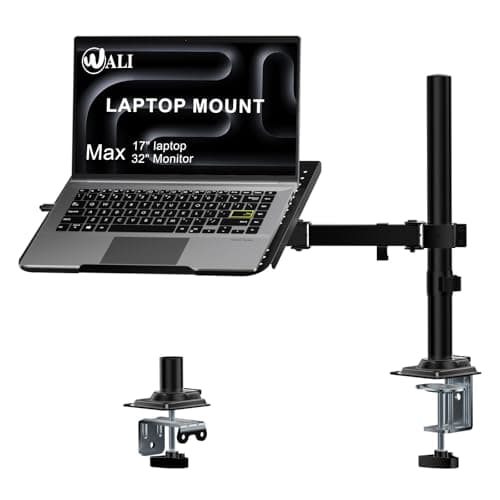
WALI WALI Adjustable Laptop Desk Mount
WALI Adjustable Laptop Desk Mount

A single arm that takes either a laptop up to 17 inches or a monitor up to 32 — the flexible choice when the laptop is your only screen today and might not be next year.

Best laptop-only arm
8.4
$29.99Amazon
04
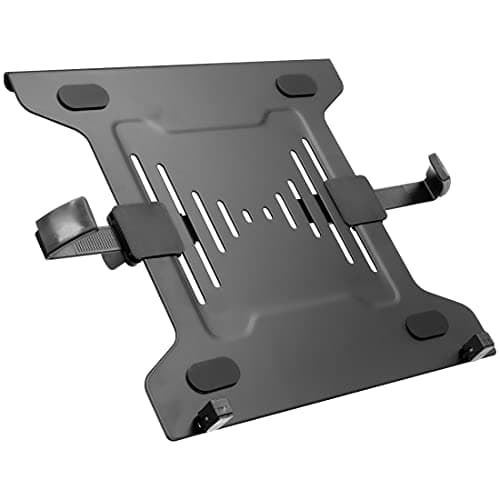
Mount-It! Mount-It! VESA Laptop Tray (arm accessory)
Mount-It! VESA Laptop Tray (arm accessory)

The cheapest route if you already own an arm: a ventilated steel tray that bolts onto any 75 × 75 or 100 × 100 VESA head and turns it into a laptop mount.

Best add-on for an arm you own
8.2
$27.99Amazon

#ad · Live prices from the Amazon Product API, as of Aug 11, 2026. Where we have no verified live price we show none — we would rather leave a gap than print a number that has rotted.

In detail

The picks, in full

01
HUANUO HUANUO Monitor Arm with Laptop Tray

Best overall

HUANUO Monitor Arm with Laptop Tray

Monitor fit
13–32 in, up to 22 lb
Laptop tray
14 × 12 in, ventilated
Tray lip
0.8 in
Clamp fits
0.39–3.07 in (grommet 0.39–2.36 in)
Motion
±45° tilt, ±90° swivel, 360° rotate
8.7/10

The complete answer in one clamp: a 13–32 inch monitor up to 22 lb on one arm, a ventilated 14 × 12-inch laptop tray on the other, and 17 inches of height range for both.

Desk freed
9.2
Tray size
8.6
Adjustment
8.8
Build
8
Value
8.8

Pros

  • One clamp for both screens — no second mounting point needed
  • Ventilated tray with a raised lip stops the laptop creeping forward
  • Wide clamp range fits thick and thin desk tops
  • Integrated cable management on both arms

Cons

  • Two arms on one clamp put real leverage on the desk edge
  • 22 lb monitor limit rules out large heavy panels

Skip this if…

your desk top is thin or hollow-core. Two loaded arms on a single clamp is the most demanding mount in this roundup — check the top can take it first.

$39.99View on Amazon

$54.9927% off

Price as of Aug 11, 2026. Prices change — Amazon's is the one that counts.

#ad · we may earn a commission from this link to HUANUO Monitor Arm with Laptop Tray

02
VIVO VIVO Dual Monitor + Laptop Mount (STAND-V013L)

Best for laptop plus two screens

VIVO Dual Monitor + Laptop Mount (STAND-V013L)

Monitor fit
2 × 13–27 in, up to 15.4 lb each
Laptop fit
10–15.6 in, up to 9.9 lb
Alignment
VESA plates adjust ±1.1 in
Clamp fits
Up to 3.2 in (grommet up to 1.6 in)
Motion
+90°/−45° tilt, 180° swivel
8.5/10

Three screens off one clamp: two 13–27 inch monitors plus a ventilated laptop tray, with stacking VESA plates that let you line all three up properly.

Desk freed
9.6
Tray size
8
Adjustment
9
Build
8
Value
7.8

Pros

  • Runs a genuine triple-screen setup from a single desk clamp
  • Independent 1.1-inch plate adjustment gets the screens level
  • Ventilated, width-adjustable laptop tray with rubber grips
  • Handles desks up to 3.2 inches thick

Cons

  • 15.4 lb per monitor is modest — no heavy 27-inch panels
  • Three loads on one pole needs a genuinely solid desk

Skip this if…

your desk is under about 40 inches wide. Three screens on one pole need width to spread into or they overlap; check the geometry before buying.

$89.99View on Amazon

Price as of Aug 11, 2026. Prices change — Amazon's is the one that counts.

#ad · we may earn a commission from this link to VIVO Dual Monitor + Laptop Mount (STAND-V013L)

03
WALI WALI Adjustable Laptop Desk Mount

Best laptop-only arm

WALI Adjustable Laptop Desk Mount

Laptop fit
Up to 17 in, 22 lb
Tray size
14 × 11 in, 0.6 in lip
Also fits
VESA 75 × 75 / 100 × 100 mm
Clamp fits
0.4–4 in (grommet 0.4–2.2 in)
Height travel
16 in
8.4/10

A single arm that takes either a laptop up to 17 inches or a monitor up to 32 — the flexible choice when the laptop is your only screen today and might not be next year.

Desk freed
8.4
Tray size
8
Adjustment
8.6
Build
8
Value
9.2

Pros

  • Mount plates are detachable — laptop today, monitor later
  • Clamp range up to 4 inches, the widest here
  • Ventilated tray positioned over the laptop's own fan exhaust
  • 16 inches of height adjustment plus full tilt and swivel

Cons

  • Holds one device, not a laptop and a monitor together
  • Tray is an inch shallower than the HUANUO's

Skip this if…

you want the laptop and a monitor both lifted. This is a one-device arm; the HUANUO or VIVO combos are what you want.

$29.99View on Amazon

$37.9921% off

Price as of Aug 11, 2026. Prices change — Amazon's is the one that counts.

#ad · we may earn a commission from this link to WALI Adjustable Laptop Desk Mount

04
Mount-It! Mount-It! VESA Laptop Tray (arm accessory)

Best add-on for an arm you own

Mount-It! VESA Laptop Tray (arm accessory)

Fits laptops
9.5–16.5 in wide (adjustable clips)
Mounts to
VESA 75 × 75 / 100 × 100 mm
Tray
Ventilated steel, traction pads
Weight
3.2 lb
Warranty
Lifetime
8.2/10

The cheapest route if you already own an arm: a ventilated steel tray that bolts onto any 75 × 75 or 100 × 100 VESA head and turns it into a laptop mount.

Desk freed
8.2
Tray size
8.4
Adjustment
7
Build
8.6
Value
9

Pros

  • A fraction of the cost of a whole combination arm
  • Steel tray with vents, side clips and traction pads
  • Turns a spare single arm into a laptop mount in minutes
  • Lifetime warranty and US support

Cons

  • Requires an existing monitor arm — none is included
  • Adds its own 3.2 lb to whatever the arm is already carrying

Skip this if…

you do not already own a spare arm or VESA head. Bought together with an arm, this route usually costs more than the HUANUO combo — check both totals.

$27.99View on Amazon

Price as of Aug 11, 2026. Prices change — Amazon's is the one that counts.

#ad · we may earn a commission from this link to Mount-It! VESA Laptop Tray (arm accessory)

Measure your laptop, not its screen size

Trays are specified by physical widthand sometimes by clip range, and a “15.6-inch laptop” can be 14 inches wide or 14.5 depending on the bezel. The numbers to compare are the tray dimensions (14 × 12 in on the HUANUO, 14 × 11 on the WALI) and the clip range where one is given (9.5–16.5 in on the Mount-It). Also check the weight: the VIVO tray is rated to 9.9 lb, which covers most 15-inch laptops but not a heavy 17-inch workstation.

The height that makes this worth doing

The point of lifting the laptop is to stop looking down at it. Aim to get the top of the laptop screen roughly level with the top of your monitor, with both about an arm’s length away. That usually means the tray sits noticeably higher than the desk — 6 to 10 inches — and it means you type on an external keyboard, because the laptop keyboard is now out of reach. Budget for that keyboard if you do not already have one; a mounted laptop with no separate keyboard is an ergonomics downgrade, not an upgrade.

Heat, and why every good tray has holes

Laptops vent downward and sideways, and a solid tray traps that air against the chassis. Every pick here uses a ventilated tray for that reason, and the WALI positions its venting over the fan exhaust specifically. If you are choosing between two otherwise similar trays, take the one with more open area — a laptop running warm throttles, and a throttled laptop is a slower laptop.

What this does for a small desk

A 14-inch laptop occupies roughly 1 sq ftof desk, right in the prime typing zone. Lift it and that comes back. Combine it with the monitor already being on an arm and a 40-inch desk suddenly has room for a full-size keyboard, a mousepad and a notebook — which is the entire argument of this site in one purchase. If your desk is shallow, check the clamp requirements first in our compatibility guide, and if you also want the keyboard out of the way when you are done, an under-desk keyboard tray is the natural next step.
How we picked

We do not run a testing lab

We compiled the published manufacturer specifications, did the footprint and clearance math ourselves, and read aggregated owner reviews, then scored each product against a published rubric. The scores are judgments from documented research — they are not measurements we took, because we do not have a lab and we are not going to pretend we do. Every spec traces back to a listing or manual named in Sources.

Questions

Frequently asked

Is a laptop tray on an arm better than a laptop stand?
It frees more desk, because the laptop leaves the surface entirely rather than standing on it. A laptop stand is cheaper, needs no clamp and travels; an arm-mounted tray gets the laptop to true eye level beside a monitor. Our stand vs arm comparison covers the trade in full.
Do I need an external keyboard if the laptop is mounted?
Yes. Once the laptop is at eye level its keyboard is unusable, so a separate keyboard and mouse are required, not optional. Factor that into the budget before you buy the mount.
Will a laptop tray fit my existing monitor arm?
If the arm has a standard 75 × 75 mm or 100 × 100 mm VESA head, usually yes — that is what the Mount-It tray is for. Check the arm's remaining capacity too: the tray itself is 3.2 lb before the laptop goes on it.
Can one clamp really hold a monitor and a laptop?
Yes, and all our combination picks are designed for it — but the desk becomes the limiting factor. Two loaded arms multiply the leverage at the clamp, so you want a solid, adequately thick top. Check yours with our desk-compatibility guide before ordering.

Keep reading

Receipts

Sources

We do not run a testing lab, and we do not pretend to. Specifications come from the manufacturer or retailer listing; the footprint and clearance math is ours and reproducible. Where we could not verify a number, we say so on the page rather than quietly leaving it out. Read our full method.