Skip to content
Desk & Dowel

HUB 05 · Small-Space Setups

The Studio Corner Office Build

One corner, six parts, and about four square feet of floor. This is the shopping list version of a studio workspace — what to buy, in what order, at three budgets.

By Stephen V.Updated How we pick
#ad

We earn a commission when you buy through our Amazon links, at no extra cost to you. It never affects our rankings, and we say so when the cheaper product is the better buy. How this works.

A studio corner office is a solved problem, and the solution is six objects. A narrow desk against the wall, the monitor on a clamp arm so the desk keeps its depth, a clamp lamp so the surface keeps its corner, one power feed, storage under the top rather than beside it, and a chair that disappears under the desk when you stand up. Buy those six to the right dimensions and roughly four square feet of a studio becomes a real workspace.

This is the parts list. If you have not decided where the corner goes yet, read fit a workspace into a studio apartment first — that guide zones the room; this one fills the corner. The list below is in build order, not rank order: the score on each part is how well it suits this specific build.

The short answer

Quick picks

#ProductBest forScorePrice
01
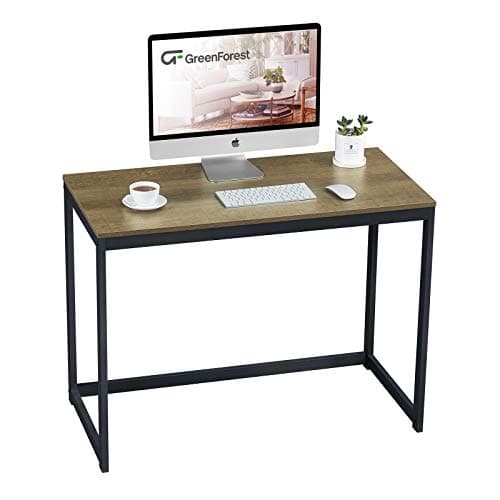
GreenForest GreenForest 40″ Small Computer Desk
GreenForest 40″ Small Computer Desk

39.4 × 15.7 in — about 4.3 sq ft of floor, wide enough for a monitor and a keyboard, shallow enough to keep the walkway past it open.

The desk
9.4
$49.56Amazon
02
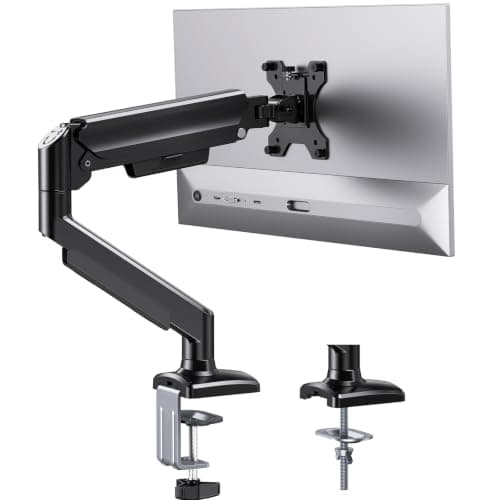
ErGear ErGear Single Monitor Arm (13–36in)
ErGear Single Monitor Arm (13–36in)

The part that makes a 15.7-inch-deep desk workable: the monitor base disappears and the whole depth comes back for your keyboard and hands.

The screen lift
9.3
$32.99Amazon
03
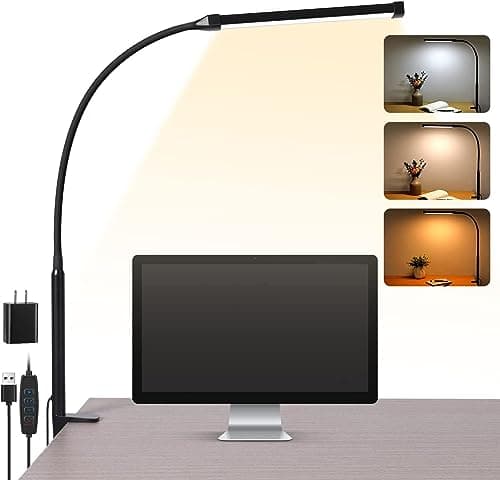
Voncerus Voncerus LED Clamp Desk Lamp
Voncerus LED Clamp Desk Lamp

Clamps to the desk edge and lights the work without claiming the corner a base lamp would take. In a studio it also lets you work without lighting the whole room.

The light
9.0
$22.99Amazon
04
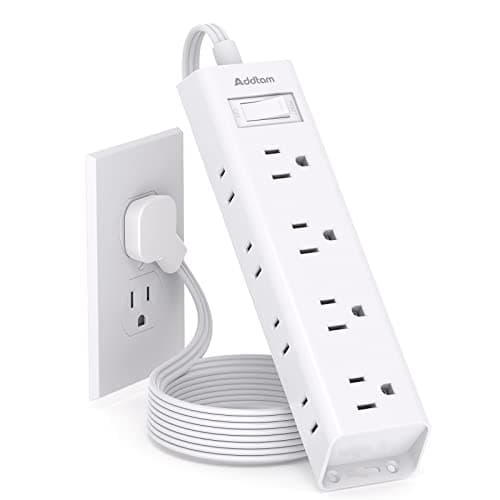
Addtam Addtam Flat-Plug Power Strip (12 outlets)
Addtam Flat-Plug Power Strip (12 outlets)

One feed for the whole corner, on a 0.35-inch flat plug so the desk can sit flush against the wall instead of two inches off it.

The power
9.2
$11.99Amazon
05
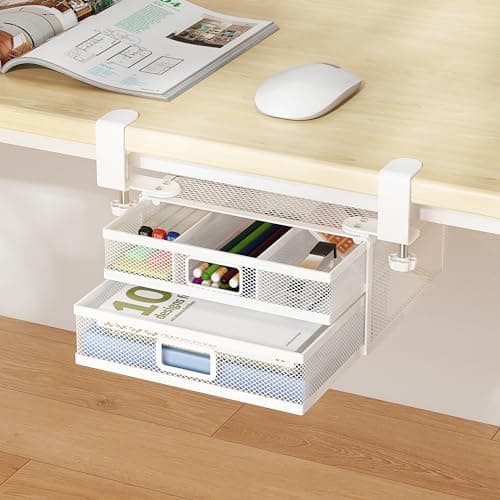
Homeify Homeify Clamp-On Under-Desk Drawer
Homeify Clamp-On Under-Desk Drawer

Adds two drawers in the empty air under a desk that has no storage, without adding a second piece of furniture to the floor.

The storage
8.8
$27.99Amazon
06
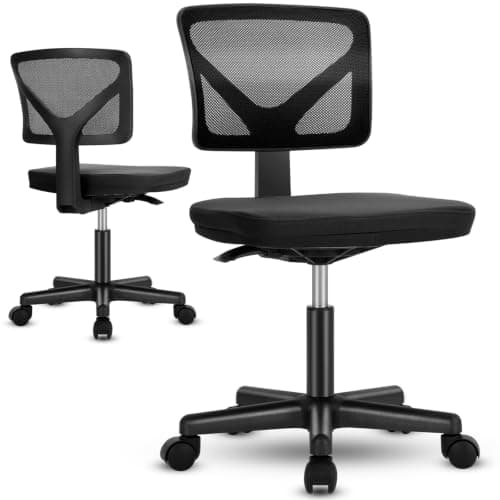
OLIXIS OLIXIS Armless Ergonomic Small Desk Chair
OLIXIS Armless Ergonomic Small Desk Chair

Armless is the whole point: the chair slides completely under the desk when you stand up, so the corner stops being furniture and goes back to being floor.

The chair
9.1
$32.94Amazon

#ad · Live prices from the Amazon Product API, as of Sep 7, 2026. Where we have no verified live price we show none — we would rather leave a gap than print a number that has rotted.

In detail

The picks, in full

01
GreenForest GreenForest 40″ Small Computer Desk

The desk

GreenForest 40″ Small Computer Desk

Width
39.4 in
Depth
15.7 in
Height
29.5 in
Footprint
4.3 sq ft
Frame
Powder-coated steel
9.4/10

39.4 × 15.7 in — about 4.3 sq ft of floor, wide enough for a monitor and a keyboard, shallow enough to keep the walkway past it open.

Fit for this build
9.6
Footprint
9.4
Renter-safe
8.8
Value
9.6

Pros

  • 15.7 in of depth is the number that makes this work in a studio — a 24 in desk eats the walkway
  • 39.4 in still takes a 24–27 in monitor plus a keyboard once the screen is on an arm
  • Steel frame rather than the all-particleboard construction usual at this price
  • Free-standing, so nothing is attached to the apartment

Cons

  • No storage at all — that is what the under-desk drawer further down is for
  • 15.7 in of depth is too shallow for a monitor on its own stand; the arm is not optional here

Skip this if…

you cannot put the monitor on an arm. On a 15.7 in desk a monitor stand leaves you nowhere to put your hands — take a 20+ in deep desk instead.

$49.56View on Amazon

Price as of Sep 7, 2026. Prices change — Amazon's is the one that counts.

#ad · we may earn a commission from this link to GreenForest 40″ Small Computer Desk

02
ErGear ErGear Single Monitor Arm (13–36in)

The screen lift

ErGear Single Monitor Arm (13–36in)

Screen fit
13–36 in
Weight limit
22 lb
Height travel
17.5 in
Reach
15.3 in
Clamp range
0.39–2.76 in
9.3/10

The part that makes a 15.7-inch-deep desk workable: the monitor base disappears and the whole depth comes back for your keyboard and hands.

Fit for this build
9.2
Footprint
9.6
Renter-safe
8.8
Value
9.6

Pros

  • Returns the 8–10 in of depth a monitor stand occupies, which is over half this desk
  • 22 lb limit carries a 27 in panel with headroom
  • Clamps to the rear edge — no drilling, and it leaves with you
  • 17.5 in of height travel means the screen height is set to you, not to the desk

Cons

  • The clamp needs a few inches of clearance behind the desk to close
  • Your monitor must have 75 or 100 mm VESA holes

Skip this if…

your screen has no VESA pattern. There is a workaround, but check it before you buy the arm.

$32.99View on Amazon

Price as of Sep 7, 2026. Prices change — Amazon's is the one that counts.

#ad · we may earn a commission from this link to ErGear Single Monitor Arm (13–36in)

03
Voncerus Voncerus LED Clamp Desk Lamp

The light

Voncerus LED Clamp Desk Lamp

Mount
C-clamp to desk edge
Reach
Adjustable arm + head
Color temp
3 modes, warm to cool
Controls
Touch dimming + memory
Desk footprint
None (clamped)
9.0/10

Clamps to the desk edge and lights the work without claiming the corner a base lamp would take. In a studio it also lets you work without lighting the whole room.

Fit for this build
8.8
Footprint
9.2
Renter-safe
9.6
Value
8.4

Pros

  • Zero desk surface used, on a desk where surface is the whole constraint
  • Dimming matters in a studio — the desk can be lit while the room stays dark
  • Warm-to-cool modes let the light match the time of day
  • Unclamps and packs flat when the lease ends

Cons

  • Modes rather than published Kelvin values
  • Shares the rear desk edge with the monitor arm — plan which side each one takes

Skip this if…

the corner has a shelf directly above the desk. A clamp arm needs vertical room; an under-shelf LED strip is the fix there.

$22.99View on Amazon

Price as of Sep 7, 2026. Prices change — Amazon's is the one that counts.

#ad · we may earn a commission from this link to Voncerus LED Clamp Desk Lamp

04
Addtam Addtam Flat-Plug Power Strip (12 outlets)

The power

Addtam Flat-Plug Power Strip (12 outlets)

Outlets
12, on 3 sides
Plug
0.35 in flat
Cord
5 ft
Surge rating
1050 joules
Mounting
4 screws included
9.2/10

One feed for the whole corner, on a 0.35-inch flat plug so the desk can sit flush against the wall instead of two inches off it.

Fit for this build
8.8
Footprint
9
Renter-safe
9.4
Value
9.6

Pros

  • The flat plug buys back the two inches a standard brick costs behind a desk
  • Twelve outlets on three sides swallow the wall-warts a desk collects
  • 1050 joules of surge protection for a monitor, a laptop and a lamp
  • Can be mounted under the desk later to get it off the floor entirely

Cons

  • No USB ports — everything charges through its own adapter
  • 5 ft of cord is short if the studio's only free outlet is across the room

Skip this if…

the nearest outlet is more than about four feet away. Take a clamp-on strip with a 10 ft cord instead.

$11.99View on Amazon

Price as of Sep 7, 2026. Prices change — Amazon's is the one that counts.

#ad · we may earn a commission from this link to Addtam Flat-Plug Power Strip (12 outlets)

05
Homeify Homeify Clamp-On Under-Desk Drawer

The storage

Homeify Clamp-On Under-Desk Drawer

Mount
Clamp-on (no drill)
Drawers
2 slide-out
Material
Mesh metal
Dimensions
18.5 x 12 x 4.5 in
Install
Tool-free
8.8/10

Adds two drawers in the empty air under a desk that has no storage, without adding a second piece of furniture to the floor.

Fit for this build
8.6
Footprint
9
Renter-safe
9.2
Value
8.4

Pros

  • Uses space that is already empty rather than floor you do not have
  • Keeps the desk surface clear, which is what makes a 39 in desk feel adequate
  • Clamps on, so no holes in furniture you may not own
  • Tool-free install for a household with no toolbox

Cons

  • Costs a little knee clearance under a 29.5 in desk
  • Mesh drawers hold stationery, not files or hardware

Skip this if…

you are tall enough that knee clearance is already tight. A rolling cart beside the desk is the alternative when the floor allows it.

$27.99View on Amazon

Price as of Sep 7, 2026. Prices change — Amazon's is the one that counts.

#ad · we may earn a commission from this link to Homeify Clamp-On Under-Desk Drawer

06
OLIXIS OLIXIS Armless Ergonomic Small Desk Chair

The chair

OLIXIS Armless Ergonomic Small Desk Chair

Arms
None
Class
Small ergonomic desk chair
Base
Swivel, casters
Tuck-under
Full
Use
Home office / bedroom
9.1/10

Armless is the whole point: the chair slides completely under the desk when you stand up, so the corner stops being furniture and goes back to being floor.

Fit for this build
8.8
Footprint
9.4
Renter-safe
9
Value
9.2

Pros

  • Tucks fully under the desk, which recovers the walkway every evening
  • Small footprint compared with a full task chair
  • Casters make it easy to move out of the way entirely
  • Cheap enough that it does not dominate the budget for the build

Cons

  • No armrests — a genuine ergonomic compromise on a long working day
  • Support and build are basic; this is a space decision, not a comfort one

Skip this if…

you work eight-hour days at this desk. Buy the best chair your floor can accommodate instead and accept that it will not tuck away.

$32.94View on Amazon

$39.9918% off

Price as of Sep 7, 2026. Prices change — Amazon's is the one that counts.

#ad · we may earn a commission from this link to OLIXIS Armless Ergonomic Small Desk Chair

The three budget tiers

Same six roles, three levels of spend. The middle column is the build above — the one we would actually put in a studio. We do not print totals: prices in this category move weekly, so add up the live numbers on the buy rows rather than trusting a figure typed in September.

RoleBudget tierThe build (mid)Keep-it-forever tier
DeskSub-$100 40 in deskGreenForest 39.4 × 15.7 inSolid-wood narrow desk
Screen liftLaptop standErGear gas-spring armErgotron LX class arm
LightCOB LED stripVoncerus clamp lampMonitor light bar
PowerFlat-plug stripAddtam 12-outlet flat plugClamp-on strip with USB-C
StorageAdhesive drawer setHomeify clamp-on drawerRolling cart with a work-surface top
ChairArmless stool or dining chairOLIXIS armlessCompact task chair, flip-up arms

Measure the corner first — three numbers

Before any of this: wall run (how much clear wall the desk sits against, minus a couple of inches at each end), depth to the walkway (keep about 30 in of clear path past the desk), and rear clearance (a few inches behind the desk so the monitor arm clamp can close). A 15.7-inch-deep desk in a corner with 45 inches to the walkway leaves 29 inches to walk through; a 24-inch desk leaves 21, which is a squeeze you will feel every day. The full sizing tables are in what size desk for a small room, and the room-by-room version is in desk dimensions by room size.

Build order matters

  1. Desk first, sized to the corner — everything else attaches to it.
  2. Arm second, before you decide the desk is too small. On a shallow desk the arm is what makes the depth usable.
  3. Power third.Route it once, properly, before anything else is plugged in — retrofitting cable management around a finished desk is miserable.
  4. Light, storage, chair. These are comfort and tidiness; they can wait a paycheck without the setup being unusable.

What this build deliberately leaves out

A standing desk. In a studio, sit-stand costs money and floor for a feature many people stop using; if you want it, the realistic version is in standing desk in a small room. A second monitor.On a 39-inch desk two screens are possible but tight — see two monitors on a small desk before you commit. Wall shelving. Useful, but it is a separate decision with a renter-specific answer in no-drill wall storage.

The renter version

Every part above is free-standing or clamped, so this build is already deposit-safe: no anchors, no holes, nothing that has to be patched. The one thing to be careful with is cable routing — adhesive raceways on a painted wall are the usual cause of damage at move-out. The method that avoids it is in cable management without wall damage.

How we picked

We do not run a testing lab

We compiled the published manufacturer specifications, did the footprint and clearance math ourselves, and read aggregated owner reviews, then scored each product against a published rubric. The scores are judgments from documented research — they are not measurements we took, because we do not have a lab and we are not going to pretend we do. Every spec traces back to a listing or manual named in Sources.

Questions

Frequently asked

How much space do you need for a corner office in a studio?
About four square feet of floor for the desk, plus roughly 36 inches behind it to sit down and stand up. A 39 × 16 in desk claims 4.3 sq ft and leaves a 30-inch walkway if the corner has around 45 inches of depth to the path through the room. Measure the wall run and the walkway before shopping.
What do I actually need to buy for a studio desk setup?
Six things: a narrow desk, a monitor arm (or a laptop stand if you work laptop-only), a clamp light, one power strip, under-desk storage and a chair that tucks fully away. That is a complete workspace; everything else is refinement.
Do I need a monitor arm in a studio?
On a desk under about 20 inches deep, yes — a monitor stand takes 8 to 10 inches of that depth and leaves you nowhere to put your hands. On a deeper desk it is optional. The fitment checks are in will a monitor arm fit my desk.
What is the cheapest way to build this?
Substitute a laptop stand for the arm, a COB LED strip for the clamp lamp, an adhesive drawer set for the clamp-on drawer, and a dining chair you already own. The desk is the one part not to cut — a wobbly top ruins everything mounted to it. Start from small desks under $100.
Will this work in a rented studio?
Yes. Nothing here is drilled: the desk is free-standing, the arm and lamp clamp, the drawer clamps, the strip sits on the floor or clamps under the desk. The wider renter argument is in renter-friendly desk setup.
How do I stop the corner looking like an office in the evening?
Clear the top, tuck the armless chair fully under, and turn the clamp lamp off rather than the room light on — a lit desk in a dark studio is what makes the room feel like work at 9pm. The end-of-day reset is covered in fit a workspace into a studio apartment.

Keep reading

Receipts

Sources

We do not run a testing lab, and we do not pretend to. Specifications come from the manufacturer or retailer listing; the footprint and clearance math is ours and reproducible. Where we could not verify a number, we say so on the page rather than quietly leaving it out. Read our full method.