Skip to content
Desk & Dowel

HUB 04 · Space-Saving Accessories

The Best Monitors for a Small Desk

Depth decides screen size, not budget. Five 22 and 24-inch monitors ranked on stand footprint, VESA mounting and panel type — the specs a shallow desk actually cares about.

By Stephen V.Updated How we pick
#ad

We earn a commission when you buy through our Amazon links, at no extra cost to you. It never affects our rankings, and we say so when the cheaper product is the better buy. How this works.

Monitor advice almost always says buy the biggest screen you can afford. On a small desk that is wrong, and the reason is depth rather than width. A screen has a comfortable viewing distance, and if your desk is 20 inches deep the screen ends up closer than that distance whether you like it or not — so you spend the day with your eyes tracking across a panel that fills too much of your field of view.

The rule of thumb that survives contact with reality is roughly an arm's lengthfrom your eyes to the panel, adjusted so the whole screen sits inside a comfortable field of view. On a 24-inch-deep desk that is achievable with a 24-inch screen once the monitor is pushed to the back. On a 20-inch desk it is not, unless the screen goes on an arm and overhangs the back edge — which is exactly what a monitor arm is for. Our size and distance guide has the full table.

The other specification a small-desk buyer should read first is VESA. A panel without VESA holes can never go on an arm or a wall mount, which forecloses the single most effective small-desk upgrade there is. Every pick below states its VESA support where the listing publishes it. Live prices are shown against each; the methodology explains the scoring.

The short answer

Quick picks

#ProductBest forScorePrice
01
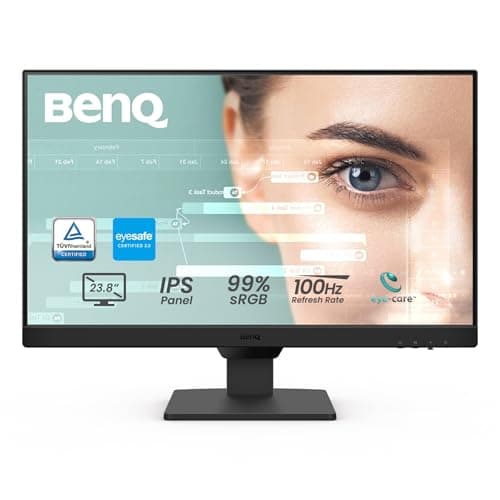
BenQ BenQ GW2490 24in IPS Monitor
BenQ GW2490 24in IPS Monitor

The small-desk specification sheet in one product: 24 inches, IPS, thin bezel, published VESA mounting, eye-care features and built-in speakers so no separate set takes desk space.

Best overall
8.8
$99.99Amazon
02
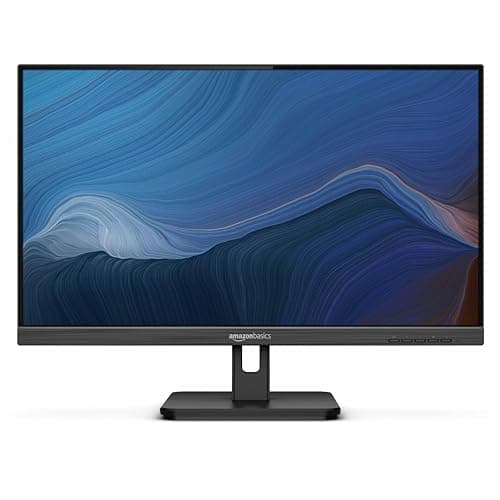
Amazon Basics Amazon Basics 24in Full HD IPS Monitor
Amazon Basics 24in Full HD IPS Monitor

The value IPS pick with an adjustable stand and VESA support — the height adjustment is the part that matters, because a fixed stand on a shallow desk is a permanent compromise.

Best value
8.5
$96.09Amazon
03
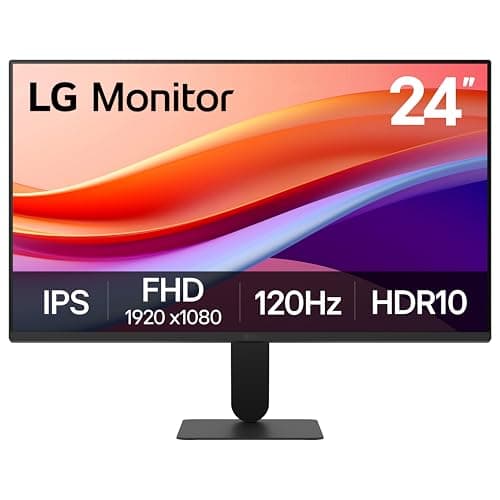
LG LG 24U411A-B 24in IPS Monitor (slim stand base)
LG 24U411A-B 24in IPS Monitor (slim stand base)

The one with the smallest published stand: LG specifies a slim stand base, which on a 20-inch-deep desk is worth more than any panel specification on the sheet.

Best factory stand for a shallow desk
8.4
$89.99Amazon
04
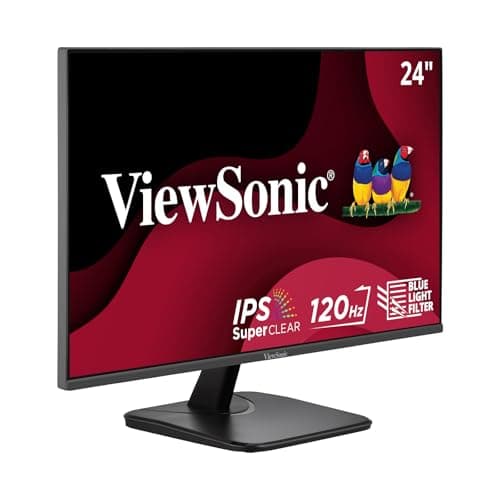
ViewSonic ViewSonic VA2456A-MHD 24in IPS Monitor
ViewSonic VA2456A-MHD 24in IPS Monitor

The connectivity pick: HDMI, DisplayPort and VGA on a 120Hz IPS panel with eye-care technology, which covers a work laptop and an older desktop from the same screen.

Best connectivity
7.9
$109.99Amazon
05
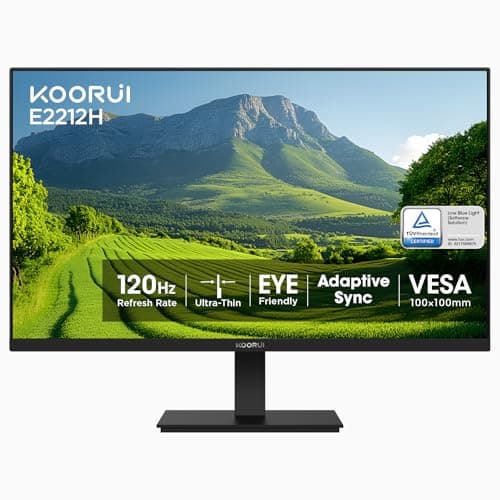
KOORUI KOORUI 22in VESA Monitor (E2212H)
KOORUI 22in VESA Monitor (E2212H)

The smallest screen here, and on a desk under about 20 inches deep that is a feature rather than a compromise — 22 inches at a comfortable distance beats 27 inches too close.

Best for the shallowest desk
8.8
$89.99Amazon

#ad · Live prices from the Amazon Product API, as of Sep 7, 2026. Where we have no verified live price we show none — we would rather leave a gap than print a number that has rotted.

In detail

The picks, in full

01
BenQ BenQ GW2490 24in IPS Monitor

Best overall

BenQ GW2490 24in IPS Monitor

Size
24 in
Panel
IPS, 1920 × 1080, 100 Hz
Mounting
VESA wall/arm compatible
Bezel
Thin
Audio
Built-in speakers
8.8/10

The small-desk specification sheet in one product: 24 inches, IPS, thin bezel, published VESA mounting, eye-care features and built-in speakers so no separate set takes desk space.

Fits a small desk
9
Stand footprint
7.6
Mountability
9.6
Panel quality
8.6
Value
9

Pros

  • VESA support published, so it can go on an arm on day one or later
  • Thin bezel matters when two screens sit side by side on a narrow desk
  • Built-in speakers remove two more objects from the desktop
  • Low blue light and adaptive brightness on a mainstream-priced panel

Cons

  • 1080p at 24in is standard rather than sharp — text is fine, not crisp
  • Factory stand is a plate, so it still occupies desk depth until you mount it

Skip this if…

you edit photographs or video for a living. This is a good general-purpose office panel, not a color-critical one.

$99.99View on Amazon

Price as of Sep 7, 2026. Prices change — Amazon's is the one that counts.

#ad · we may earn a commission from this link to BenQ GW2490 24in IPS Monitor

02
Amazon Basics Amazon Basics 24in Full HD IPS Monitor

Best value

Amazon Basics 24in Full HD IPS Monitor

Size
24 in
Panel
IPS, 1080p, 75 Hz
Stand
Adjustable
Mounting
VESA compatible
Inputs
HDMI, DisplayPort, VGA
8.5/10

The value IPS pick with an adjustable stand and VESA support — the height adjustment is the part that matters, because a fixed stand on a shallow desk is a permanent compromise.

Fits a small desk
8.6
Stand footprint
7
Mountability
9.4
Panel quality
8
Value
9.4

Pros

  • Adjustable stand sets screen height without a riser or an arm
  • VESA compatible, so the arm route stays open
  • Three inputs, including VGA for an older machine
  • Built-in speakers save desk space

Cons

  • 75Hz rather than the 100–120Hz of the newer panels here
  • An adjustable stand has a larger base than a fixed one

Skip this if…

you already own a monitor arm. You are paying for a stand mechanism you will remove — the Philips or KOORUI is the cheaper starting point.

$96.09View on Amazon

Price as of Sep 7, 2026. Prices change — Amazon's is the one that counts.

#ad · we may earn a commission from this link to Amazon Basics 24in Full HD IPS Monitor

03
LG LG 24U411A-B 24in IPS Monitor (slim stand base)

Best factory stand for a shallow desk

LG 24U411A-B 24in IPS Monitor (slim stand base)

Size
24 in
Panel
IPS, 1920 × 1080, 120 Hz
Stand
Slim base
Extras
HDR10, Reader Mode, Flicker Safe
Input
HDMI
8.4/10

The one with the smallest published stand: LG specifies a slim stand base, which on a 20-inch-deep desk is worth more than any panel specification on the sheet.

Fits a small desk
9.2
Stand footprint
9.2
Mountability
6
Panel quality
8.8
Value
8.8

Pros

  • Slim stand base is the specification a shallow desk cares about most
  • 120Hz makes scrolling text noticeably easier to read
  • Flicker Safe and Reader Mode address the eye-comfort side directly
  • LG panel quality control is a step up from the budget brands here

Cons

  • HDMI only — no DisplayPort
  • Listing does not confirm VESA mounting, so check before planning an arm

Skip this if…

an arm is part of your plan. Where VESA support is not published we will not assume it; the BenQ and Amazon Basics both state theirs.

$89.99View on Amazon

$99.9910% off

Price as of Sep 7, 2026. Prices change — Amazon's is the one that counts.

#ad · we may earn a commission from this link to LG 24U411A-B 24in IPS Monitor (slim stand base)

04
ViewSonic ViewSonic VA2456A-MHD 24in IPS Monitor

Best connectivity

ViewSonic VA2456A-MHD 24in IPS Monitor

Size
24 in
Panel
IPS, 1080p, 120 Hz
Inputs
HDMI, DisplayPort, VGA
Extras
Eye Care technology
Use
Home and office productivity
7.9/10

The connectivity pick: HDMI, DisplayPort and VGA on a 120Hz IPS panel with eye-care technology, which covers a work laptop and an older desktop from the same screen.

Fits a small desk
8.6
Stand footprint
7
Mountability
6.4
Panel quality
8.8
Value
8.6

Pros

  • Three inputs means one screen serves a work laptop and a personal machine
  • 120Hz IPS at a mainstream price
  • Eye-care features address the flicker and blue-light side
  • ViewSonic panels are a known quantity in office use

Cons

  • Listing does not publish stand dimensions or VESA support
  • 1080p at 24in, like everything else at this price

Skip this if…

you only ever connect one laptop over USB-C. You are paying for input flexibility you will not use — and none of these has USB-C video, so a dock is the answer either way.

$109.99View on Amazon

Price as of Sep 7, 2026. Prices change — Amazon's is the one that counts.

#ad · we may earn a commission from this link to ViewSonic VA2456A-MHD 24in IPS Monitor

05
KOORUI KOORUI 22in VESA Monitor (E2212H)

Best for the shallowest desk

KOORUI 22in VESA Monitor (E2212H)

Size
22 in
Panel
VA, FHD, 120 Hz
Mounting
VESA
Extras
Low blue light
Model
E2212H
8.8/10

The smallest screen here, and on a desk under about 20 inches deep that is a feature rather than a compromise — 22 inches at a comfortable distance beats 27 inches too close.

Fits a small desk
9.6
Stand footprint
8.6
Mountability
9
Panel quality
7.4
Value
9.4

Pros

  • 22in sits comfortably at arm's length on a genuinely shallow desk
  • VESA published, so an arm remains an option
  • 1080p on a 22in panel is sharper than the same resolution at 24in
  • The cheapest screen in the roundup

Cons

  • VA panel has narrower viewing angles than the IPS picks
  • 22in feels small if you regularly work with two documents side by side

Skip this if…

you work with two windows side by side all day. At 22 inches that is genuinely cramped — go to 24, and put it on an arm to find the distance.

$89.99View on Amazon

Price as of Sep 7, 2026. Prices change — Amazon's is the one that counts.

#ad · we may earn a commission from this link to KOORUI 22in VESA Monitor (E2212H)

Depth decides the screen size

Desk depthOn the factory standOn a monitor arm
18–20 in22 in24 in
22–24 in24 in27 in
28 in and up27 in27 in or an ultrawide

The arm column is a full size larger throughout, and the reason is simple: an arm lets the panel sit behind the back edge of the desk rather than on it, which buys back the several inches a stand base occupies plus a little more. That is the mechanism by which a monitor arm makes a bigger screen usable on the same desk, and it is why we rank VESA support so highly above. The detail is in monitor size and distance.

The stand base is a specification nobody publishes

A monitor stand base is typically 8 to 10 inches deep, and on a 20-inch desk that is half your depth gone before anything else lands on it. Very few listings give the base dimensions, which is why we score it from what is stated: LG explicitly describes a slim stand base, so it scores highest there, and the adjustable stands score lower because height mechanisms need a broader foot. If a listing publishes nothing, assume a conventional base and plan for an arm or a riser instead.

Two 24s or one 27?

On a small desk, two 24-inch screens need roughly 44 to 48 inches of width to sit side by side without overhanging, which most apartment desks do not have. A single 27, or a single 24 plus the laptop screen on a stand, is usually the better answer under 44 inches. Our two monitors on a small desk guide works the widths through, and desks for dual monitors covers the tops that genuinely take two.

What you can safely ignore at this size

Resolution above 1080p at 24 inches. The pixel density gain is real but modest, and scaling on Windows at intermediate resolutions still causes more trouble than it solves for most people. Refresh rates above 120Hz for office work: 100 to 120Hz makes scrolling text noticeably cleaner and everything past that is a gaming specification. Curvatureat 24 inches, which is marketing rather than geometry at that width. What you should not ignore is panel type — IPS has wider viewing angles than VA, and on a small desk you are often looking at the screen slightly off-axis because the desk is against a wall at an angle.

USB-C, and why none of these has it

Monitors with USB-C video input — one cable for picture, data and laptop charging — are excellent for a small desk and start well above the prices here. The cheaper route to the same result is a screen with HDMI plus a USB-C docking station, which gets you one cable to the laptop for a fraction of the price difference and works with any monitor you buy later. That is the combination we would build on a budget.

How we picked

We do not run a testing lab

We compiled the published manufacturer specifications, did the footprint and clearance math ourselves, and read aggregated owner reviews, then scored each product against a published rubric. The scores are judgments from documented research — they are not measurements we took, because we do not have a lab and we are not going to pretend we do. Every spec traces back to a listing or manual named in Sources.

Questions

Frequently asked

What size monitor is best for a small desk?
Match it to desk depth rather than budget. On an 18 to 20-inch-deep desk, 22 inches on the factory stand or 24 on an arm; on a 22 to 24-inch desk, 24 on the stand or 27 on an arm. A screen closer than roughly an arm's length fills too much of your field of view and is tiring regardless of how good the panel is.
Is a 27-inch monitor too big for a small desk?
On the factory stand and a desk under about 24 inches deep, yes — it ends up too close. On a monitor arm, which lets the panel sit back over the desk edge, a 27 works on a 22 to 24-inch desk. The arm is what changes the answer, which is why it is usually the better first purchase. See monitor arms for small desks.
How much desk space does a monitor stand take?
Typically 8 to 10 inches of depth, which on a 20-inch-deep desk is half your surface. Very few listings publish the figure, so it is worth measuring in a shop or planning around an arm. Removing the stand and mounting the screen is the single biggest surface gain available on a small desk.
Do I need a VESA-compatible monitor?
If there is any chance you will want an arm or a wall mount, yes - and on a small desk there usually is. A panel without VESA holes can only ever sit on its own stand, which forecloses the most effective small-desk upgrade. Where a listing does not state VESA support, treat it as absent rather than assuming.
Is 1080p enough on a 24-inch monitor?
For office work, yes. Text is comfortably legible and Windows scaling behaves predictably at 100 percent, which is not always true at intermediate scaling on a higher-resolution panel of the same size. Spend the difference on a monitor arm instead, which changes how the desk works rather than how the pixels look.

Keep reading

Receipts

Sources

We do not run a testing lab, and we do not pretend to. Specifications come from the manufacturer or retailer listing; the footprint and clearance math is ours and reproducible. Where we could not verify a number, we say so on the page rather than quietly leaving it out. Read our full method.