Skip to content
Desk & Dowel

HUB 02 · Monitor Arms & Mounts

Clamp vs Grommet: Which Monitor Mount Should You Use?

Nearly every arm ships with both bases and most people never open the second bag. On a thin or hollow desk, the one you pick decides whether the desk survives.

By Stephen V.Updated How we pick
#ad

We earn a commission when you buy through our Amazon links, at no extra cost to you. It never affects our rankings, and we say so when the cheaper product is the better buy. How this works.

Almost every monitor arm sold ships with two mounting bases: a C-clamp that grips the desk edge like a workbench vise, and a grommet mountthat passes a bolt down through a hole in the desktop and clamps from underneath. Most people fit the clamp because it needs no hole and never think about it again. On a solid desk, that is fine. On a thin, hollow-core or laminate top — which describes most compact desks — the choice is the difference between a mount that holds for years and a dented desktop.

The short answer

Use the clamp if your desk is solid, between roughly 0.6 and 3 inches thick, you are renting, or you expect to move the arm. Use the grommetif your desk already has a cable hole, if the top is thin or hollow-core, if the screen is heavy, or if the arm will be at full extension — a grommet spreads load through the desktop instead of pinching a narrow strip of its edge.

The decision table

FactorC-clampGrommet
Hole requiredNoneYes — existing or drilled
Typical desk thickness0.4–3.4 in depending on modelUsually up to ~2.2 in
Load spreadingPinches a narrow strip of edgeSpreads through the top
Stability at full reachGoodBetter
Risk to a thin topDenting or crushingLow
Renter / reversibleFully — leaves no markOnly if the hole already exists
RepositioningMove anywhere along the edgeFixed at the hole
Rear clearance neededYes — for the clamp blockMinimal

Why the load-spreading row matters most

A clamp concentrates the entire holding force into two small pads pressing on maybe two square inches of desk edge. On solid wood or a thick laminate top, that is no problem. On a hollow-core desk — a thin veneer over a cardboard honeycomb, which is how a lot of budget desks are built — those pads sit over an unsupported void, and a 17 lb screen on a 20-inch arm can crush the surface. The dent appears slowly, so it is usually blamed on the arm.

A grommet bolt passes through the desktop with a wide washer or plate on each face, so the load is carried by the full thickness of the material over a much larger area. That is the right answer whenever the top is questionable. If your desk has no hole and you are willing to drill one, a 1.5–2in hole saw through a laminate top is a five-minute job — but obviously not in a rental, and not in a desk you might resell.

The renter case

A clamp is completely reversible: unscrew the wing nut and the desk is exactly as it was. That is why our no-drill monitor arm picks are all clamp mounts, and why the clamp is the default recommendation for anyone whose desk came with the apartment. If a clamp is not safe on your desk and you cannot drill it, the remaining options are a wall-mounted arm or a freestanding stand — not a tighter clamp.

Three checks before you fit either

  1. Thickness.Measure your desktop and compare it against the arm’s published range. Note that the clamp and grommet ranges usually differ on the same arm — the ErGear here fits 0.39–2.76in by clamp but only 0.39–2.17in by grommet.
  2. Clearance.A clamp needs a few inches of clear space behind the desk for the block, and nothing underneath the edge — no drawer box, apron or cross-rail.
  3. What the top is made of. Tap it. A solid sound means solid material; a hollow one means a honeycomb core, and you want the grommet or a load-spreading plate. More detail in will a monitor arm fit my desk.

The short answer

Quick picks

#ProductBest forScorePrice
01
HUANUO HUANUO FlowLift Single Monitor Mount
HUANUO FlowLift Single Monitor Mount

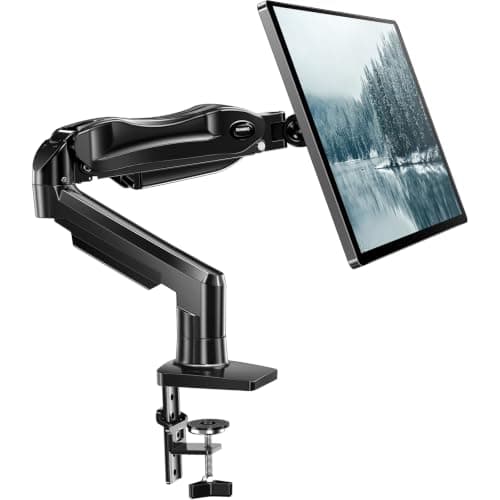
The clamp case, done properly: both bases in the box, 4.4-19.8 lb across 13-32in screens, and a listing that states plainly it wants a solid wood-style top and a clear underside.

Best clamp-or-grommet arm
8.8
$35.99Amazon
02
Ergotron Ergotron LX Desk Mount Monitor Arm
Ergotron LX Desk Mount Monitor Arm

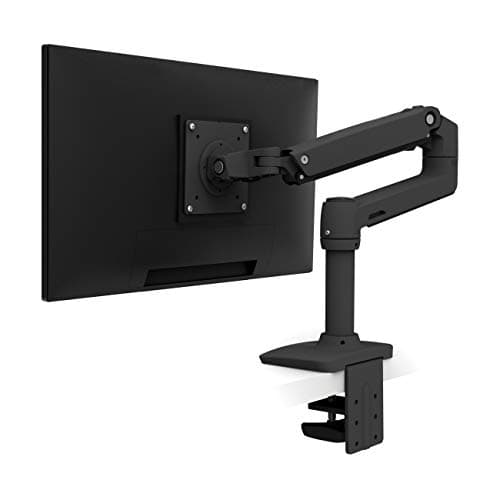
The grommet case: Ergotron's constant-force arm is the one most likely to sit at full extension all day, which is exactly when a through-desk grommet mount outperforms an edge clamp.

Best with a grommet
8.4
$219.00Amazon

#ad · Live prices from the Amazon Product API, as of Aug 12, 2026. Where we have no verified live price we show none — we would rather leave a gap than print a number that has rotted.

In detail

The picks, in full

01
HUANUO HUANUO FlowLift Single Monitor Mount

Best clamp-or-grommet arm

HUANUO FlowLift Single Monitor Mount

Screen fit
13–32 in
Weight range
4.4–19.8 lb
Mount
C-clamp or grommet, both included
VESA
75 × 75 / 100 × 100 mm
Install
One-piece, ~3 min
8.8/10

The clamp case, done properly: both bases in the box, 4.4-19.8 lb across 13-32in screens, and a listing that states plainly it wants a solid wood-style top and a clear underside.

Mount flexibility
9.4
Stability
8.6
Desk protection
8
Install ease
9.2
Value
8.8

Pros

  • Both mounting options supplied — decide after you inspect the desk
  • Listing is explicit about desk requirements, which is rare
  • One-piece design installs in about three minutes
  • Covers the full standard weight band

Cons

  • Hollow or thin tops are discouraged for the clamp
  • Clamp needs a clear underside with no apron or rail

Skip this if…

your desk is glass. Neither base is right for a glass top — use a freestanding stand or a wall mount.

$35.99View on Amazon

$47.9925% off

Price as of Aug 12, 2026. Prices change — Amazon's is the one that counts.

#ad · we may earn a commission from this link to HUANUO FlowLift Single Monitor Mount

02
Ergotron Ergotron LX Desk Mount Monitor Arm

Best with a grommet

Ergotron LX Desk Mount Monitor Arm

Lift
Constant-force (CF)
Mount
C-clamp or grommet
Motion
Full tilt, pan, rotate
Build
Aluminium and steel
Warranty
Long manufacturer warranty
8.4/10

The grommet case: Ergotron's constant-force arm is the one most likely to sit at full extension all day, which is exactly when a through-desk grommet mount outperforms an edge clamp.

Mount flexibility
8.8
Stability
9.6
Desk protection
9
Install ease
8
Value
6.4

Pros

  • Holds position at full reach where a clamp is most stressed
  • Both mounting bases supplied
  • Aluminium build and a long warranty
  • The smoothest repositioning in the category

Cons

  • Several times the price of budget arms
  • Grommet install means committing to a hole position

Skip this if…

your desk has no grommet hole and you cannot drill one — you would be paying for stability you cannot fully use.

$219.00View on Amazon

Price as of Aug 12, 2026. Prices change — Amazon's is the one that counts.

#ad · we may earn a commission from this link to Ergotron LX Desk Mount Monitor Arm

How to decide in one minute

  1. Does your desk already have a cable hole? If yes, and the arm fits it, use the grommet. It is the better mount and it costs you nothing.
  2. Are you renting, or is the desk not yours? Clamp. It leaves no trace.
  3. Tap the desktop. Hollow sound plus a heavy screen? Grommet, or a load-spreading plate under the clamp.
  4. Is there anything under the front edge? A drawer box, apron or rail blocks a clamp. Grommet, or a different mounting point.

The middle option people forget

If a clamp is your only choice but the top is marginal, spread the load rather than abandoning the mount. A flat steel plate or a large fender washer between the clamp pad and the desk surface distributes pressure over several times the area, which is often enough to make a thin laminate top safe. It costs a couple of dollars and it is what we would do before giving up on a clamp.

Neither works? Then the desk is the problem

Glass tops, very thin tops and desks with a full-width rear rail defeat both bases. Do not force it. The alternatives are a wall-mounted arm, which takes the desk out of the equation completely and frees even more surface, or a freestanding stand that needs no fixing at all. If neither appeals, a riser lifts the screen without asking anything of the desk edge.
How we picked

We do not run a testing lab

We compiled the published manufacturer specifications, did the footprint and clearance math ourselves, and read aggregated owner reviews, then scored each product against a published rubric. The scores are judgments from documented research — they are not measurements we took, because we do not have a lab and we are not going to pretend we do. Every spec traces back to a listing or manual named in Sources.

Questions

Frequently asked

Is a clamp or grommet mount better for a monitor arm?
A grommet mount is more stable and spreads the load through the desktop rather than pinching its edge, so it is better for heavy screens, thin or hollow-core tops, and arms used at full extension. A clamp is better if you are renting, if the desk has no hole, or if you want to move the arm - it leaves no trace.
Do I need to drill a hole for a grommet mount?
Only if your desk does not already have one. Many desks ship with a cable grommet that fits, in which case the mount costs you nothing extra. Drilling a 1.5-2 inch hole through a laminate top with a hole saw is a five-minute job - but not one to do in a rental or in a desk you plan to resell.
Will a monitor arm clamp damage my desk?
It can on a hollow-core or thin laminate top, because the clamp concentrates its force into about two square inches of edge. Spread the load with a flat steel plate or a large fender washer under the clamp pad, or use the grommet mount instead. Check what your top is made of first — the tap test is in will a monitor arm fit my desk.
What desk thickness does a monitor arm clamp fit?
Most clamps fit tops between roughly 0.4 and 3.4 inches, but the exact range varies by model and the grommet range on the same arm is usually narrower - one arm here fits 0.39-2.76in by clamp and 0.39-2.17in by grommet. Measure your desktop and check both figures on the listing before ordering.
Can you use a monitor arm on a glass desk?
Not safely with either base — a clamp concentrates pressure on glass and a grommet requires a hole you cannot drill. Use a wall-mounted arm, a freestanding stand with a weighted base, or a riser that simply sits on the surface.

Keep reading

Receipts

Sources

We do not run a testing lab, and we do not pretend to. Specifications come from the manufacturer or retailer listing; the footprint and clearance math is ours and reproducible. Where we could not verify a number, we say so on the page rather than quietly leaving it out. Read our full method.