Skip to content
Desk & Dowel

HUB 03 · Desk Lighting

The Best Desk Lamps with USB Ports

One outlet, two jobs. A lamp with charging built in removes a plug and a cable from a small desk — here is which ones do it without compromising the light.

By Stephen V.Updated How we pick
#ad

We earn a commission when you buy through our Amazon links, at no extra cost to you. It never affects our rankings, and we say so when the cheaper product is the better buy. How this works.

On a small desk the scarcest resource after surface is outlets. A lamp with USB ports built into its base solves a real problem: one wall socket now runs the light and charges a phone, which removes a charging brick from the outlet and a cable from the floor. The trap is buying a bad lamp because it has a port, so we ranked light quality first and charging second.

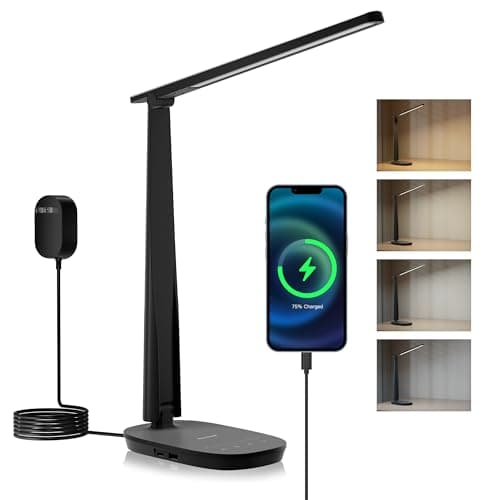
Our pick is the ZAPLIT 15W lamp— USB-A and USB-C, three colour temperatures, five brightness levels and four auto-off timers, on a 3.5-inch head with 60 LEDs. The Sailstar adds a Qi wireless charging pad in the base and publishes 95 CRI. The Honeywell HWT-H2 is the best light here on paper at CRI94; the Bostitch VLF100 is the clamp option that takes no desk at all; and the deeloop is the wide asymmetric architect lamp.

One honest caveat, covered in detail below: USB ports on desk lamps are slow. They are for topping up a phone, a watch or earbuds overnight, not for fast-charging a laptop. Specs below come from the manufacturer listings; the methodology explains the scoring.

The short answer

Quick picks

#ProductBest forScorePrice
01
ZAPLIT ZAPLIT 15W LED Desk Lamp with USB Ports
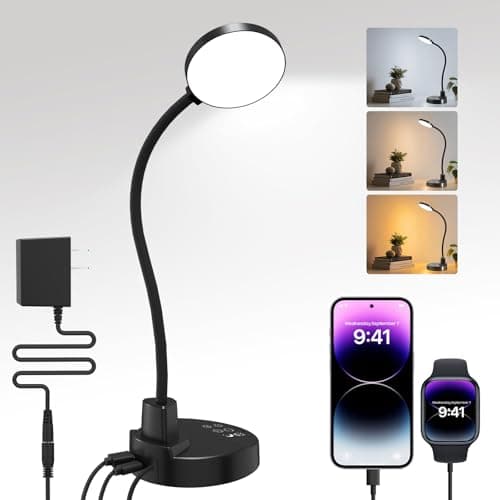
ZAPLIT 15W LED Desk Lamp with USB Ports

The best balance of light and charging: USB-A plus USB-C in the base, three colour temperatures, five brightness levels and four auto-off timers on a flicker-free 60-LED head.

Best overall
8.4
$17.99Amazon
02
Sailstar Sailstar Wireless Charging Desk Lamp
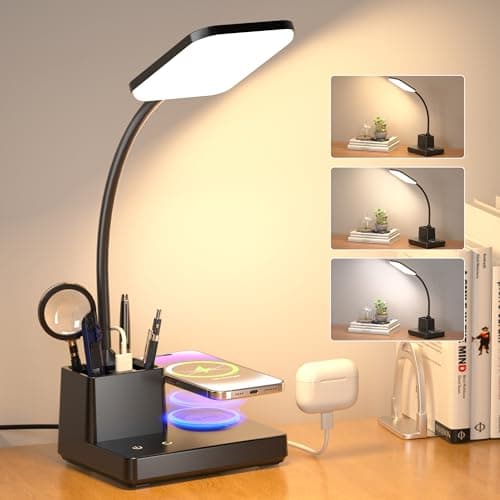
Sailstar Wireless Charging Desk Lamp

Charging without a cable at all: a Qi pad in the base plus a switchable USB port, under an 8W head putting out 800 lumens at 95 CRI, with a pen holder built in.

Best wireless charging
8.2
$33.97Amazon
03
Honeywell Honeywell HWT-H2 LED Desk Lamp
Honeywell HWT-H2 LED Desk Lamp

The best light in this roundup: CRI94 full-spectrum with an RG1 low-blue-light rating, four colour temperatures from 2700K to 5700K, stepless dimming and both USB-A and USB-C.

Best light quality
8.1
$33.99Amazon
04
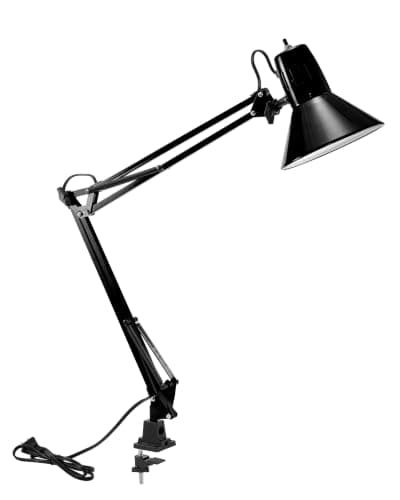
Bostitch Office Bostitch Office VLF100 Swing-Arm Clamp Lamp
Bostitch Office VLF100 Swing-Arm Clamp Lamp

The zero-footprint option: a dual-pivot swing arm that clamps to the desk edge with a USB charging port built in, so you get the ports without giving up any surface.

Best zero-footprint
8.3
$19.48Amazon
05
deeloop deeloop Dual-Arm Clamp Lamp with USB
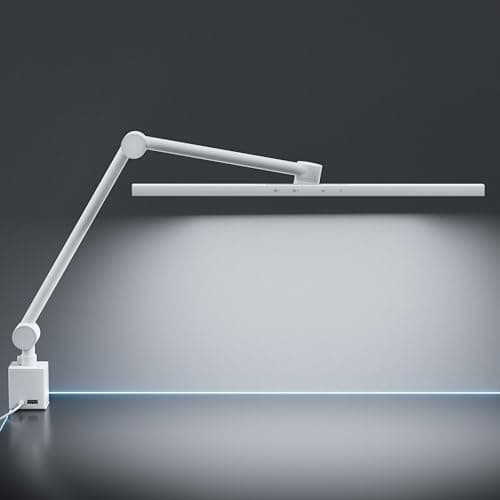
deeloop Dual-Arm Clamp Lamp with USB

The one designed around screens: a 45-degree asymmetric optic that lights the desk while keeping reflections off the display, on two arms with six joints, at CRI95+.

Best for screen work
8.2
$69.99Amazon

#ad · Live prices from the Amazon Product API, as of Aug 12, 2026. Where we have no verified live price we show none — we would rather leave a gap than print a number that has rotted.

In detail

The picks, in full

01
ZAPLIT ZAPLIT 15W LED Desk Lamp with USB Ports

Best overall

ZAPLIT 15W LED Desk Lamp with USB Ports

Power
15 W
Color temp
3000K / 4500K / 6000K
Brightness
5 levels
Ports
USB-A + USB-C (output only)
Timers
30 / 60 / 90 / 120 min
8.4/10

The best balance of light and charging: USB-A plus USB-C in the base, three colour temperatures, five brightness levels and four auto-off timers on a flicker-free 60-LED head.

Light quality
8.4
Charging
8.4
Footprint saved
6.6
Controls
9.2
Value
9.4

Pros

  • Both USB-A and USB-C, so most devices are covered
  • Three colour temperatures across the useful range
  • Four auto-off timers plus a one-tap night-light mode
  • 360° gooseneck aims light where the work is

Cons

  • Ports are output-only and do not support fast charging
  • Base sits on the desk, so it costs surface

Skip this if…

your desk is very shallow. A base lamp claims a patch of surface — a clamp lamp like the Bostitch does not.

$17.99View on Amazon

$19.9910% off

Price as of Aug 12, 2026. Prices change — Amazon's is the one that counts.

#ad · we may earn a commission from this link to ZAPLIT 15W LED Desk Lamp with USB Ports

02
Sailstar Sailstar Wireless Charging Desk Lamp

Best wireless charging

Sailstar Wireless Charging Desk Lamp

Output
8 W, up to 800 lm
Color rendering
95 CRI
Wireless
Qi pad in the base
USB port
5V/1A, switchable
Extras
Pen holder, 360° arm
8.2/10

Charging without a cable at all: a Qi pad in the base plus a switchable USB port, under an 8W head putting out 800 lumens at 95 CRI, with a pen holder built in.

Light quality
8.8
Charging
8.8
Footprint saved
6.8
Controls
8.2
Value
8.4

Pros

  • Lay a phone on the base and it charges — no cable at all
  • 95 CRI is excellent colour rendering for the price
  • 800 lumens from a compact 8W head
  • Pen holder consolidates two desk objects into one

Cons

  • USB port is only 5V/1A — slow even by lamp standards
  • Wireless charging surface means that part of the base is not usable for anything else

Skip this if…

your phone does not support Qi charging — you would be paying for a feature you cannot use.

$33.97View on Amazon

$35.996% off

Price as of Aug 12, 2026. Prices change — Amazon's is the one that counts.

#ad · we may earn a commission from this link to Sailstar Wireless Charging Desk Lamp

03
Honeywell Honeywell HWT-H2 LED Desk Lamp

Best light quality

Honeywell HWT-H2 LED Desk Lamp

Color rendering
CRI94, RG1 low blue light
Color temp
2700K–5700K, 4 modes
Dimming
Stepless 10–100%
Head width
11 in rectangular
Ports
USB-A + USB-C
8.1/10

The best light in this roundup: CRI94 full-spectrum with an RG1 low-blue-light rating, four colour temperatures from 2700K to 5700K, stepless dimming and both USB-A and USB-C.

Light quality
9.6
Charging
8.4
Footprint saved
6
Controls
9
Value
7.6

Pros

  • CRI94 and an RG1 photobiological safety rating
  • Eleven-inch head spreads light across a wide area
  • Stepless dimming rather than fixed steps
  • Both port types in the base

Cons

  • Wide head and base need real desk space
  • Costs more than the value picks here

Skip this if…

your desk is under about 20 inches deep. This is a lot of lamp for a compact top.

$33.99View on Amazon

Price as of Aug 12, 2026. Prices change — Amazon's is the one that counts.

#ad · we may earn a commission from this link to Honeywell HWT-H2 LED Desk Lamp

04
Bostitch Office Bostitch Office VLF100 Swing-Arm Clamp Lamp

Best zero-footprint

Bostitch Office VLF100 Swing-Arm Clamp Lamp

Mount
Clamp + swing arm
Reach
36 in
Color temp
Multiple modes
Brightness
Dimmable levels
Ports
USB charging port
8.3/10

The zero-footprint option: a dual-pivot swing arm that clamps to the desk edge with a USB charging port built in, so you get the ports without giving up any surface.

Light quality
8.4
Charging
7.4
Footprint saved
9.6
Controls
7.4
Value
8.8

Pros

  • Clamps to the edge — no base on the desk at all
  • 36-inch reach covers a whole compact desk
  • USB port at the desk without a brick in the outlet
  • Dual pivots position the head precisely

Cons

  • Needs a suitable desk edge for the clamp
  • Fewer preset niceties than the base lamps here

Skip this if…

your desk is glass, very thin or over about two inches thick at the edge — check the jaw range first.

$19.48View on Amazon

$21.6510% off

Price as of Aug 12, 2026. Prices change — Amazon's is the one that counts.

#ad · we may earn a commission from this link to Bostitch Office VLF100 Swing-Arm Clamp Lamp

05
deeloop deeloop Dual-Arm Clamp Lamp with USB

Best for screen work

deeloop Dual-Arm Clamp Lamp with USB

Mount
Clamp, dual arm
Joints
6 adjustable
Optic
45° asymmetric
Color rendering
CRI 95+
Ports
USB
8.2/10

The one designed around screens: a 45-degree asymmetric optic that lights the desk while keeping reflections off the display, on two arms with six joints, at CRI95+.

Light quality
9.4
Charging
7.2
Footprint saved
9.2
Controls
8.4
Value
7

Pros

  • Asymmetric optic keeps glare off the screen by design
  • CRI95+ for colour-critical work
  • Six joints across two arms give real positioning freedom
  • Long LED bar covers a wide area evenly

Cons

  • Most expensive lamp on this page
  • Two arms and six joints is a lot of hardware over a small desk

Skip this if…

you want something simple. This is an architect lamp, and it asks to be positioned rather than switched on.

$69.99View on Amazon

Price as of Aug 12, 2026. Prices change — Amazon's is the one that counts.

#ad · we may earn a commission from this link to deeloop Dual-Arm Clamp Lamp with USB

What a lamp USB port can and cannot do

Be realistic about the numbers. The Sailstar publishes 5V/1A — five watts. The ZAPLIT states plainly that its ports do not support fast charging. That is representative of the category: these are trickle ports designed to top up a phone overnight, run a desk fan, or keep earbuds and a watch charged. They will not fast-charge a modern phone, and they will not charge a laptop at all.

That is still genuinely useful on a small desk, because it removes a charging brick from a crowded outlet and a cable from the floor. Just do not buy a lamp expecting it to replace a proper charger. If you need real charging capacity at the desk, that is a job for a power strip with USB-C, and the lamp is then free to be chosen purely on light.

Judge the light first

A USB port is a convenience; the light is the product. Three specifications matter, and all three are published by the better lamps here:

  • CRI. Above 80 is fine for typing and reading; 90 and above matters for anything colour-critical. The Honeywell (CRI94) and deeloop (CRI95+) lead here.
  • Colour temperature range.A lamp that only does 6000K is unpleasant in the evening. Look for at least three modes spanning warm to cool — the reasoning is in our colour temperature guide.
  • Dimming. Stepless beats fixed steps, because the right brightness for a screen at night is much lower than for paperwork in daylight.

The footprint trade nobody mentions

Almost every lamp with USB ports is a baselamp, because the ports have to live in the base. On a small desk that is a real cost: a weighted base claims a six-to-eight-inch patch of the surface you are trying to protect. Two of our picks avoid it — the Bostitch and deeloop clamp to the edge and still carry a port — and that is worth seeking out if your desk is under 20 inches deep. The full argument is in clamp lamp vs base lamp.

Wireless charging: worth it?

A Qi pad in the base (the Sailstar) removes the cable entirely, which is the tidiest possible outcome on a small desk. Two caveats: your phone has to support Qi, and the pad area of the base cannot be used for anything else. It is a genuine win if you habitually put your phone down beside the keyboard anyway, and dead weight if you do not.

Where the lamp sits relative to the screen

On a desk with a monitor, a lamp aimed across a glossy screen washes it out. Position a base or clamp lamp to the side, angled down at the desk rather than at the display. A lamp with an asymmetric optic (the deeloop) is engineered to avoid it entirely, and a monitor light barsolves it by design — but a light bar has no USB ports, which is the trade you are making by shopping this page.
How we picked

We do not run a testing lab

We compiled the published manufacturer specifications, did the footprint and clearance math ourselves, and read aggregated owner reviews, then scored each product against a published rubric. The scores are judgments from documented research — they are not measurements we took, because we do not have a lab and we are not going to pretend we do. Every spec traces back to a listing or manual named in Sources.

Questions

Frequently asked

Can you charge a phone from a desk lamp's USB port?
Yes, slowly. Lamp USB ports are typically 5V/1A - about five watts - and several state outright that they do not support fast charging. They are for topping up a phone, watch or earbuds overnight rather than for a quick charge, and they cannot charge a laptop at all.
Are desk lamps with USB ports worth it?
On a small desk, yes — one wall outlet runs the light and charges a device, which removes a brick from a crowded socket and a cable from the floor. Judge the lamp on its light first, though: CRI, colour temperature range and dimming matter more day to day than the port. For real charging capacity, use a USB-C power strip instead.
Do USB desk lamps take up more desk space?
Usually, because the ports have to live in the base, and a weighted base claims a six-to-eight-inch patch of surface. Two clamp lamps here carry a USB port without a base at all, which is the better answer on a desk under 20 inches deep — see clamp lamp vs base lamp.
Is a wireless charging desk lamp any good?
It is the tidiest option if your phone supports Qi and you already put it down beside the keyboard - the cable disappears entirely. The trade is that the pad area of the base cannot be used for anything else, and Qi charging is slower than a cable. If your phone is not Qi-compatible, you are paying for a feature you cannot use.
What CRI should a desk lamp have?
Above 80 is fine for reading and typing. CRI 90 and above matters for design, art or anything colour-critical — the Honeywell here publishes CRI94 and the deeloop CRI95+. When a lamp does not publish a CRI figure at all, assume it is unremarkable.

Keep reading

Receipts

Sources

We do not run a testing lab, and we do not pretend to. Specifications come from the manufacturer or retailer listing; the footprint and clearance math is ours and reproducible. Where we could not verify a number, we say so on the page rather than quietly leaving it out. Read our full method.