Skip to content
Desk & Dowel

HUB 05 · Small-Space Setups

Your Desk Is Too Low: How to Fix It

Measure the gap before you buy anything. Most too-low desks are short by one to three inches, and that number decides which of the four fixes is the right one.

By Stephen V.Updated How we pick
#ad

We earn a commission when you buy through our Amazon links, at no extra cost to you. It never affects our rankings, and we say so when the cheaper product is the better buy. How this works.

If your desk is one to three inches too low — which is the usual amount — the cheapest honest fix is to raise the work surface rather than the desk: a slim desk converter whose bottom step is around two and a half inches sits on the desk you own and puts the keyboard where your elbows are. If the deficit is four inches or more, or you want it to stop being a problem, replace the height with a small electric desk. What you should not do is leave it and adapt, because a low desk is the one height error that forces your shoulders and wrists into the position they can least tolerate.

This is a different problem from the one most desk-height advice solves. The standard complaint is a desk that is too tall— most mass-market desks are built at 29 to 30 inches, which suits someone around 6 feet, so shorter users are the ones usually reaching up. Our desk height guide has the by-height table and the fixes for that case: a keyboard tray drops the typing surface two to four inches, a footrest restores the floor. Neither of those helps you. A tray makes a low desk lower, and a footrest makes the problem worse by raising your knees into it.

Step one: measure the deficit, in inches

Sit in your chair, set properly: feet flat, hips level with or slightly above your knees, back against the backrest. Let your upper arms hang straight down and bend your elbows to 90 degrees. Measure from the floor to the underside of your forearm — that is your correct desk height. Now measure your desk top. The difference is the number that decides everything below, and it is almost always smaller than people expect.

DeficitThe fix that fits
Under 1 inLower the chair instead, and raise the screen to match
1–3 inRaise the work surface with a slim converter on the existing desk
3–5 inConverter at a higher step, or leg risers if the desk takes them
Over 5 inThe desk is the wrong desk; replace the height

Step two: why the chair is the first thing to try

A desk is only too low relative to your chair. Most office chairs have four to five inches of seat-height travel, and almost nobody uses the bottom of it. Drop the seat until your forearms meet the desk at 90 degrees and check two things: whether your feet still reach the floor (if not, you have traded a desk problem for a footrest problem, and that is a bad trade in this direction — you want your feet down), and whether your thighs still clear the desk underside.

If the chair solves it, you have one job left: your eyes are now one to three inches lower than they were, and the screen has to come down with you or your neck pays. That is a riser with small increments, or an arm. Our monitor size and distance guide has the eye-level rule.

Step three: what decides it, in order

One: can the desk itself be raised?Look underneath. Some desks have adjustable or replaceable feet, and a desk with four square legs can take furniture risers under them. Two honest cautions: a desk raised on risers is less stable than the same desk on the floor, because you have lengthened the lever and usually narrowed the contact patch, and on carpet the risers sink unevenly — see a desk on carpet. A desk with a pedestal, a cross-brace at floor level, or castors cannot be raised this way at all.

Two: how much depth can you give up?A converter sitting on the desk uses depth. The slim ones here are 13.4 to 18.5 inches deep, which on a 20-inch desk leaves nothing behind them — so the monitor has to go on an arm or onto the converter’s own upper shelf. On a desk under about 18 inches deep, a converter is not realistic, and the answer moves to leg risers or a new desk.

Three: does the keyboard need to move with the surface? This is the detail that separates a converter from a plain riser. A converter raises a platform you put the keyboard on; a monitor riser raises only the screen. If the problem is your elbows, you need the first. If the problem is your neck after lowering the chair, you need the second.

Four: is the desk a dining table? Dining tables run 28 to 30 inches, which is usually tallerthan a desk, so a “too low” table is unusual — check you are not actually measuring a coffee table or a console. Our kitchen table office guide covers working at one properly.

Five: how long are you keeping the desk? If it is a sublet you leave in six months, spend $45 and move on. If it is yours, the money is better spent once on a frame whose height you set and forget.

The short answer

Quick picks

#ProductBest forScorePrice
01
Aconcept Aconcept Extra-Slim 24 x 14in Desk Converter
Aconcept Extra-Slim 24 x 14in Desk Converter

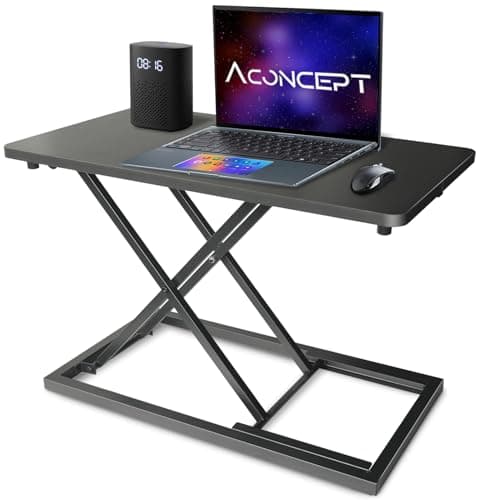
The published range starts at 2.4 inches, which is the only reason it leads: a one-to-three-inch deficit is exactly what the bottom two steps of this converter cover, and nothing else on this page can be set that low.

A deficit of one to three inches
8.9
$44.99Amazon
02
HUANUO HUANUO 32 x 19in Small Electric Standing Desk (ESD01N)
HUANUO 32 x 19in Small Electric Standing Desk (ESD01N)

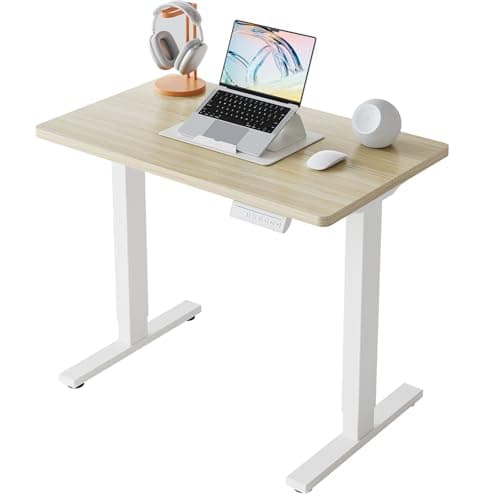
The permanent answer, and the reason it belongs on a page about a desk being too low: its range starts at 28.3 inches and ends at 46.5, so it is the one object here that fixes a desk that is too low and a desk that is too tall.

Making the height stop being a problem
7.7
$76.98Amazon
03
VIVO VIVO 24in Wooden Monitor & Laptop Riser
VIVO 24in Wooden Monitor & Laptop Riser

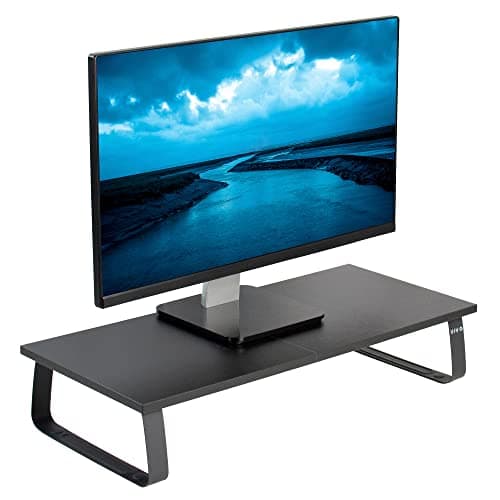
If you fix the desk by lowering the chair, this is the second half of the job: 24 inches of platform and a published 44 lb capacity to bring the screen back up to your new, lower eye level.

After you lower the chair
8.0
$34.99Amazon
04
Amazon Basics Amazon Basics 3-Level Monitor Riser
Amazon Basics 3-Level Monitor Riser

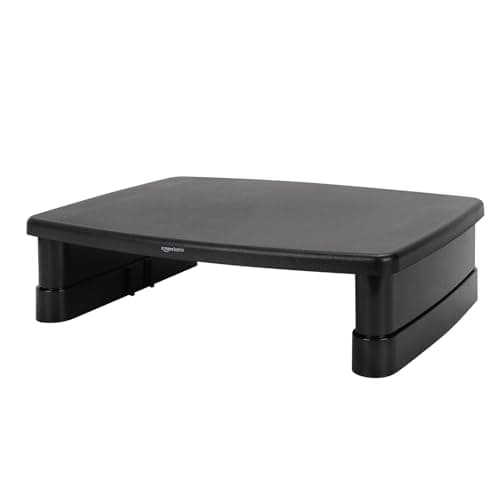
Three published heights of 2.87, 4.2 and 4.8 inches — small, specific increments, which is exactly what you want when you are trying to recover two inches of eye level rather than six.

Fine adjustment, for very little money
8.2
$21.59Amazon

#ad · Live prices from the Amazon Product API, as of October 11, 2026. Where we have no verified live price we show none — we would rather leave a gap than print a number that has rotted.

In detail

The picks, in full

01
Aconcept Aconcept Extra-Slim 24 x 14in Desk Converter

A deficit of one to three inches

Aconcept Extra-Slim 24 x 14in Desk Converter

Range
2.4–16 in
Heights
7 steps
Surface
23.6 × 13.4 in
Lift
Manual, vertical
Assembly
None — place it
8.9/10

The published range starts at 2.4 inches, which is the only reason it leads: a one-to-three-inch deficit is exactly what the bottom two steps of this converter cover, and nothing else on this page can be set that low.

Fits a small deficit
9.8
Desk space cost
9.6
Surface size
6
Setup
9.8
Value
9.2

Pros

  • A 2.4-inch bottom step is the whole point — most converters start at 5 inches or more and overshoot a small deficit
  • 13.4 inches deep, so it still leaves room behind it on a 20-inch desk
  • Vertical lift rather than an arc, so it does not creep toward you as it rises
  • No assembly: it goes on the desk and works

Cons

  • 23.6 inches wide takes a keyboard and a mouse and little else
  • Manual steps, so the height is a deliberate change rather than a casual one
  • It raises the surface it carries, not the desk — anything left on the desk stays low

Skip this if…

…your desk is under about 18 inches deep. The converter will have nowhere to sit without pushing the monitor off the back edge.

$44.99View on Amazon

Price as of October 11, 2026. Prices change — Amazon's is the one that counts.

#ad · we may earn a commission from this link to Aconcept Extra-Slim 24 x 14in Desk Converter

02
HUANUO HUANUO 32 x 19in Small Electric Standing Desk (ESD01N)

Making the height stop being a problem

HUANUO 32 x 19in Small Electric Standing Desk (ESD01N)

Height range
28.3–46.5 in
Top
32 × 19 in, two-piece
Load
176 lb
Presets
4
Warranty
2 yr motor / 5 yr frame
7.7/10

The permanent answer, and the reason it belongs on a page about a desk being too low: its range starts at 28.3 inches and ends at 46.5, so it is the one object here that fixes a desk that is too low and a desk that is too tall.

Fits a small deficit
9
Desk space cost
8
Surface size
7
Setup
6
Value
8.6

Pros

  • 18.2 inches of published travel — it will reach any seated height a person needs and then some
  • 32 × 19 in footprint fits a wall run under three feet, which most electric desks do not
  • 176 lb load rating published, well beyond two screens and a laptop
  • Four presets, so a shared desk can hold two people's seated heights

Cons

  • A 19-inch-deep top needs the monitor on an arm or a riser to be comfortable
  • Two-piece top has a seam across the middle
  • Costs twice the converter, and replaces a desk you may still like

Skip this if…

…your existing desk is otherwise right. Raising a surface costs $45; replacing a desk costs five or six times that and a Saturday.

$76.98View on Amazon

$89.9914% off

Price as of October 11, 2026. Prices change — Amazon's is the one that counts.

#ad · we may earn a commission from this link to HUANUO 32 x 19in Small Electric Standing Desk (ESD01N)

03
VIVO VIVO 24in Wooden Monitor & Laptop Riser

After you lower the chair

VIVO 24in Wooden Monitor & Laptop Riser

Top width
24 in
Capacity
44 lb total
Legs
Solid steel
Feet
Anti-slip silicone
Assembly
Minutes, hardware included
8.0/10

If you fix the desk by lowering the chair, this is the second half of the job: 24 inches of platform and a published 44 lb capacity to bring the screen back up to your new, lower eye level.

Fits a small deficit
7.4
Desk space cost
6.8
Surface size
8.6
Setup
8.6
Value
8.8

Pros

  • 44 lb published capacity takes a monitor and a laptop together, which the plastic risers will not
  • 24 inches wide spans a monitor base and leaves a slot for the keyboard underneath
  • Steel legs and silicone feet, so it does not skate on a laminate top
  • Creates storage under the screen on a desk with none

Cons

  • Fixed height — you choose it once when you buy, and it is not adjustable
  • Uses desk depth that a monitor arm would have returned
  • Does nothing for your elbows; this is a screen fix only

Skip this if…

…your deficit is at the desk rather than the screen. Raising the monitor on a low desk without lowering the chair just increases the gap you are reaching across.

$34.99View on Amazon

Price as of October 11, 2026. Prices change — Amazon's is the one that counts.

#ad · we may earn a commission from this link to VIVO 24in Wooden Monitor & Laptop Riser

04
Amazon Basics Amazon Basics 3-Level Monitor Riser

Fine adjustment, for very little money

Amazon Basics 3-Level Monitor Riser

Heights
2.87 / 4.2 / 4.8 in
Top surface
≈11.6 × 11 in
Capacity
22 lb
Material
ABS plastic
Feet
Non-skid
8.2/10

Three published heights of 2.87, 4.2 and 4.8 inches — small, specific increments, which is exactly what you want when you are trying to recover two inches of eye level rather than six.

Fits a small deficit
8.8
Desk space cost
7
Surface size
5.8
Setup
9.6
Value
9.6

Pros

  • Published increments under 5 inches, which is the right resolution for this problem
  • 22 lb covers the majority of 24 and 27-inch panels
  • Cheapest thing on this page by a distance
  • Stacks nothing, assembles in a minute, and can be re-set as your chair changes

Cons

  • An 11.6-inch top suits one monitor base and nothing wider
  • ABS plastic, so it looks its price next to the wooden riser
  • 22 lb limit rules out a 32-inch panel

Skip this if…

…your monitor base is wider than about 11 inches, or the screen is over 22 pounds. Both cases point at the VIVO or at an arm.

$21.59View on Amazon

Price as of October 11, 2026. Prices change — Amazon's is the one that counts.

#ad · we may earn a commission from this link to Amazon Basics 3-Level Monitor Riser

On leg risers, honestly

The first thing most people search for is something to put under the desk legs, and it is a legitimate fix for a one-to-three-inch deficit on a four-legged desk. We do not rank furniture risers or leg extenders, because we have not verified a set against this use and we are not going to put an unchecked product in front of you to fill a slot. If you buy them independently, three things matter: that the cup is wider than the leg rather than the same size, that the set is rated well above a quarter of your desk’s loaded weight, and that you then re-check the desk for wobble, because raising a desk always reduces its stability. How to stop a desk from wobbling covers what to do if it moves.

Why a low desk hurts in a specific way

A desk that is too tall makes you raise your shoulders and bend your wrists up. A desk that is too low makes you do something worse: you lean forward and down to reach it, which takes the weight of your head off your spine’s neutral line and puts it on the muscles at the back of your neck, and it rotates your forearms into a wrist extension you hold all day. This is why “desk too low back pain” and “desk too low shoulder pain” are both common searches and “desk too low wrist pain” is less so — the symptoms show up away from the contact point. The posture targets are the ones in the OSHA computer workstation eTool: forearms roughly parallel to the floor, wrists straight, shoulders relaxed.

Four fixes compared

FixGainsCostsBest when
Lower the chair, raise the screen1–4 in of effective heightA riser, or nothingYour feet still reach the floor afterwards
Slim desk converter2.4 in upward, in steps13–18 in of desk depthThe deficit is at your elbows
Leg risers (not ranked here)1–4 in, whole deskStability; needs four plain legsEverything on the desk should rise
Height-adjustable desk18 in of travel, set onceThe price of a deskYou are keeping the desk for years

The small-apartment version of this problem

Two cases come up constantly in a small flat and neither is a “proper” desk. The first is a console or a side table pressed into service, which is often 26 to 28 inches and genuinely low; a converter is the realistic fix because the furniture is doing another job in the room. The second is a desk bought short on purpose to fit under a window sill or a sloped ceiling — there, the height is a constraint rather than a mistake, and the answer is to lower the chair and raise the screen, because raising the desk defeats the reason you bought it. Our desk in front of a window guide covers the sill measurement.

If you are still choosing a desk, buy the height rather than fix it later. Our small desks under $200 page makes the case that an electric frame is the one feature in that band you cannot retrofit, and desks for short peopleranks the frames with the lowest published minimum heights — which is the same spec, read from the other end.
How we picked

We do not run a testing lab

We compiled the published manufacturer specifications, did the footprint and clearance math ourselves, and read aggregated owner reviews, then scored each product against a published rubric. The scores are judgments from documented research — they are not measurements we took, because we do not have a lab and we are not going to pretend we do. Every spec traces back to a listing or manual named in Sources.

Questions

Frequently asked

How do I raise a desk that is too low?
In order of cost: lower your chair and raise the monitor to match; put a slim desk converter on the top to lift the keyboard surface (the Aconcept here starts at 2.4 inches); put risers under the legs if the desk has four plain legs and you accept the stability cost; or replace the desk with a height-adjustable frame. Measure the deficit first — it is usually one to three inches.
What can I put under a desk to make it taller?
Furniture risers or leg extenders under each leg, if the desk has four plain legs. We do not rank a specific set because we have not verified one for this use. Whatever you buy, the cup should be wider than the leg, the set should be rated well above a quarter of the desk's loaded weight, and you should re-check the desk for wobble afterwards.
How much should a desk be raised by?
Exactly the gap between your desk top and the underside of your forearm when you sit properly with your elbows at 90 degrees. For most people with a too-low desk that is one to three inches. Overshooting is its own problem — a desk that is too tall forces your shoulders up and your wrists back.
Is it better to raise the desk or lower the chair?
Lower the chair first, because it is free and reversible. It only works if your feet still reach the floor afterwards and your thighs still clear the desk underside. If the chair runs out of travel, or your feet leave the floor, raise the surface instead.
Can a desk be too low for a monitor arm?
Not usually — an arm's own height travel (typically 12 to 18 inches) is measured from the clamp, so a low desk just means you use more of the upper part of the range. It is actually the better fix on a low desk than a riser, because the arm holds the screen above the surface without using any of the depth.
Why does a low desk cause shoulder and back pain?
Because you lean forward and down to reach it. That takes your head off the spine's neutral line and transfers its weight to the muscles at the back of your neck and upper back, and it holds your wrists in extension. The pain turns up away from the desk, which is why people often do not connect the two.

Keep reading

Receipts

Sources

We do not run a testing lab, and we do not pretend to. Specifications come from the manufacturer or retailer listing; the footprint and clearance math is ours and reproducible. Where we could not verify a number, we say so on the page rather than quietly leaving it out. Read our full method.