The short answer for a desk under about 48 inches wide: mount all three on one clamp. The VIVO STAND-V013L carries two 13–27-inch monitors and a laptop from a single centre pole, which is the only way to get three displays onto a compact desk without the laptop ending up in front of you where the keyboard should be. If you would rather not run three, the honest alternative is to treat the laptop as the second display — one monitor on an arm with a laptop tray beside it — and skip the second monitor entirely.
Start with the width, because it decides everything else. Two 24-inch monitors are about 21.3 inches wide each, so 42.6 inches of panel before you add bezels, arm joints or a gap. Add a 14-inch laptop at roughly 12.5 inches and you are at 55 inches of display across a desk that is probably 40. That is why the question “what size desk for 2 monitors and a laptop” usually gets answered with “60 inches”, and why the answer is wrong for a small apartment: you do not widen the desk, you stop using it for screens.
The three configurations, honestly
| Configuration | Desk width needed | Depth needed | Best when |
|---|
| All three on the desk, on their own stands | 55–60 in | 20+ in | You have the desk already |
| All three on one mount | 44–48 in | 16 in | Three live screens, small desk |
| One monitor on an arm, laptop on a tray | 36–40 in | 16 in | The laptop is genuinely screen two |
| Two monitors on arms, laptop closed | 44–48 in | 16 in | The laptop is just the computer |
Why the laptop is the hard one
It is at the wrong height and cannot be moved.A laptop screen is hinged to a keyboard sitting on the desk, which puts its centre around 8 inches above the surface — roughly 10 inches below where your monitors’ centres should be. Looking between them is a neck movement, repeated all day. A laptop tray on an arm fixes it by lifting the whole machine; a vertical stand fixes it by removing the screen from the problem.
Its angle is fixed by the hinge. You can tilt a monitor on an arm to face you from any position. A laptop lid can only tilt back, so placing the laptop at the side of a three-screen arc means looking at it off-axis, which on most laptop panels costs real contrast.
It leaves at 6pm.If the laptop is a work machine that goes in a bag, the mount has to release it quickly — which rules out anything bolted and makes a tray with rubber tabs or a vertical dock the practical choice.
The checks that decide which mount you can use
Clamp load, not just thickness.Three displays on one clamp is a lot of leverage on one point. The VIVO clamp takes tops up to 3.2 inches (grommet to 1.6); the HUANUO dual stand wants 0.59–3.54 inches and wooden tops only, with no cross beam underneath. On a 16-inch-deep particleboard desk, a triple mount is at the edge of sensible — use the grommet base if the desk has a hole.
Total weight.Add the two panels (without stands) and the laptop. Two 24-inch monitors at about 8 lb each plus a 3.5 lb laptop is 19.5 lb on one post. The VIVO rates 15.4 lb per monitor and 9.9 lb for the tray; the HUANUO dual rates 4.4–19.8 lb per arm. Work it out before ordering — our weight capacity guide explains how to find the stand-less figure.
The short answer
Quick picks
#ad · Live prices from the Amazon Product API, as of October 4, 2026. Where we have no verified live price we show none — we would rather leave a gap than print a number that has rotted.
In detail
The picks, in full
Best for three live screens
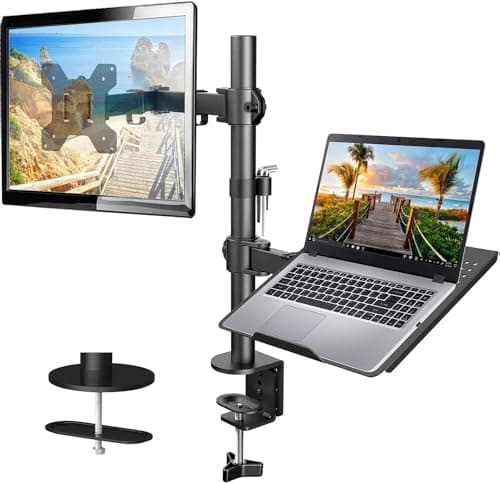
VIVO Dual Monitor + Laptop Mount (STAND-V013L)
- Monitors
- 2 × 13–27 in, up to 15.4 lb each
- Laptop tray
- 10–15.6 in, up to 9.9 lb
- VESA trim
- ±1.1 in per plate
- Mount
- Clamp to 3.2 in (grommet to 1.6 in)
- Motion
- +90° to −45° tilt, 180° swivel, 360° rotate
Three displays from one clamp: two 13-27in monitors plus a 10-15.6in laptop on a ventilated tray, with 1.1 inches of independent VESA height on each arm for alignment.
- Fits a small desk
- 9.2
- Alignment control
- 9.4
- Laptop handling
- 9
- Screen size range
- 7.4
- Value
- 8.6
Pros
- +One clamp point for three displays — the only way to do this on a desk under 48 inches
- +1.1 in of VESA trim per plate is what makes two different monitors line up properly
- +Ventilated laptop tray with rubber tabs: the machine comes off in a second for the commute
- +Padded clamp, and a grommet base in the box for desks with a cable hole
Cons
- −27 in is the monitor ceiling — two 32in panels will not fit this mount
- −Three screens on one post concentrates real leverage on a single clamp point
Skip this if…
…your desk top is hollow-core, glass or under about 0.6 inches thick. Three displays on one clamp is the worst case for a weak top.
Best when the laptop is screen two
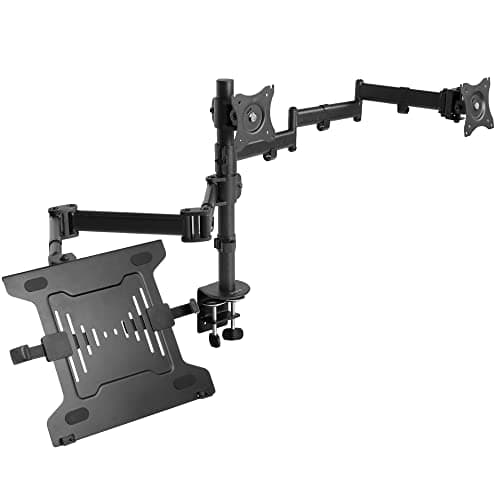
HUANUO Monitor Arm with Laptop Tray
- Monitor
- 13–32 in, up to 22 lb
- Laptop tray
- 14 × 12 in, 0.8 in lip
- Height
- Up to 17 in
- Extension
- Up to 16 in
- Mount
- Clamp 0.39–3.07 in / grommet 0.39–2.36 in
The two-display answer that most small desks are actually looking for: one 13-32in monitor up to 22 lb and the laptop on a 14 x 12in tray, both lifted off the surface.
- Fits a small desk
- 9.6
- Alignment control
- 8
- Laptop handling
- 9.2
- Screen size range
- 9
- Value
- 9.4
Pros
- +Takes a 32in monitor and 22 lb, which the triple mount does not
- +Ventilated tray with a 0.8 in lip, so the laptop cannot slide off when you knock the arm
- +0.39 in clamp minimum is the widest low-end range here — it fits thin flat-pack tops
- +Two displays instead of three is often the right call on a 40in desk, and this is the clean way to do it
Cons
- −Two displays, not three — if you genuinely need both monitors this is not the mount
- −Angles are set with screws rather than held by a gas spring
Skip this if…
…you need two external monitors running at once. Pair the HUANUO dual stand with a vertical dock instead.
Best for two monitors, laptop closed
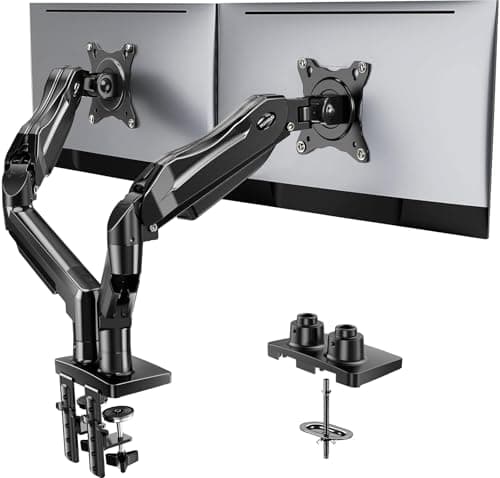
HUANUO FlowLift Dual Monitor Stand
- Monitors
- 2 × 13–32 in
- Weight range
- 4.4–19.8 lb per arm
- Lift
- Up to 15.75 in
- Mount
- Dual C-clamp or grommet, 0.59–3.54 in
- Motion
- +85°/−50° tilt, ±90° swivel, 360° rotate
Two monitors on one clamp with 4.4-19.8 lb per arm and 15.75 inches of lift — the right half of the setup when the laptop is going to be closed and docked.
- Fits a small desk
- 8.4
- Alignment control
- 8.8
- Laptop handling
- 4
- Screen size range
- 9.6
- Value
- 8.8
Pros
- +Takes two 32in panels at up to 19.8 lb each — far more headroom than a triple mount
- +Dual C-clamp on a larger base plate, which is what stops two screens wobbling as you type
- +15.75 in of lift puts both panels at eye level above a closed laptop
- +One-handed movement, so you can pull a screen forward for a spreadsheet and push it back after
Cons
- −Wooden desks only, and the underside must be free of cross beams
- −Does nothing for the laptop — you need a dock or a vertical stand alongside it
Skip this if…
…the laptop screen is one of your three working displays. Use the VIVO triple mount instead of this plus a dock.
Best for a docked laptop
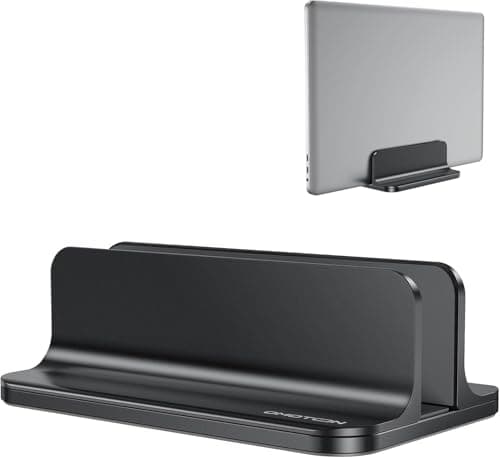
OMOTON Vertical Laptop Stand (adjustable)
- Slot range
- 0.55–2.71 in
- Footprint
- 5.9 × 3.7 in
- Height
- 1.9 in
- Material
- Anodized aluminium, CNC machined
- Protection
- Non-slip silicone mats
The cheapest way to delete the third screen: stands the closed laptop on its edge in a 5.9 by 3.7-inch footprint, with an adjustable slot from 0.55 to 2.71 inches.
- Fits a small desk
- 9.8
- Alignment control
- 6
- Laptop handling
- 8.6
- Screen size range
- 6
- Value
- 9.8
Pros
- +Reduces the laptop's desk footprint to about 22 square inches from roughly 150
- +Adjustable slot takes anything from a thin ultrabook to a chunky gaming machine
- +Silicone mats front and back, so the lid does not get scratched by daily docking
- +Costs a fraction of any mount on this page and needs no clamping
Cons
- −A closed laptop needs a dock or hub to drive two external monitors
- −Closed-lid operation runs warmer — check your machine tolerates it before committing
Skip this if…
…you need the laptop screen as a third display. A vertical stand is the opposite of that decision.
Arrange them in an arc, not a line
Three displays in a flat row puts the outer ones badly off-axis, which costs contrast on any panel and costs a lot on a laptop screen. The arrangement that works on a shallow desk is a shallow arc: the primary monitor square in front of you, the second angled in by about 15–20 degrees, and the laptop as the third element angled in further. On a mount with 360-degree rotation that is a two-minute adjustment; on monitor stands it is not possible at all, which is another reason to mount.
The depth consequence is the one people miss. An arc needs the outer screens further back than the centre one, and a 16-inch-deep desk does not have the depth to stagger three panels on its surface. On arms the staggering happens above the desk rather than on it, which is the whole reason this works on a small desk at all. Our monitor size and distance guide has the viewing distances by panel size.
One cable or five: the dock question
Three displays means three video leads, a power lead and whatever is plugged into the laptop — a tangle that moves every time the laptop is undocked. A single USB-C dock replaces all of it with one cable to the machine, which on a mounted laptop also means one lead following the tray instead of five. Check that your laptop supports the display count you want over one port before you buy the dock, because that is a limitation of the machine, not the hub. Our dock picks cover the options, and cable management covers the rest.
When three screens is the wrong answer
Worth saying plainly, because almost nothing written about multi-monitor setups will say it: on a desk under 44 inches wide, two screens arranged properly beat three screens arranged badly. Three displays on a narrow desk forces the outer ones so far off-axis, or so close to your face, that the third one ends up holding a chat window you glance at twice an hour. If that describes your third screen, you want the HUANUO monitor-plus-laptop arm and a tidier desk. If you genuinely drive all three, the VIVO triple mount is the way to fit them.
An ultrawide is the other way out: one panel in place of two, one arm, one cable, and no bezel down the middle. The trade-offs are covered in ultrawide vs dual monitors on a small desk, and the arms rated for one in best monitor arms for ultrawide.
Desk width, for the record
If you are buying the desk as well as the mounts: 44–48 inches of width is enough for two mounted monitors and a mounted laptop, and 36–40 is enough for one monitor plus a laptop. Depth can stay at 16 inches in both cases, because mounted screens need no base depth and the keyboard needs about 11 inches. That combination — wide and shallow — is exactly what our dual-monitor desk picks are selected for, and best narrow desks lists everything here under 20 inches deep.
How we picked
We do not run a testing lab
We compiled the published manufacturer specifications, did the footprint and clearance math ourselves, and read aggregated owner reviews, then scored each product against a published rubric. The scores are judgments from documented research — they are not measurements we took, because we do not have a lab and we are not going to pretend we do. Every spec traces back to a listing or manual named in Sources.
Questions
Frequently asked
What size desk do I need for two monitors and a laptop?+
About 55 to 60 inches if all three sit on the desk on their own stands, or 44 to 48 inches if all three are mounted. Depth can stay at 16 inches when they are mounted, because the monitor bases disappear and only the keyboard needs depth. For one monitor plus a laptop, 36 to 40 inches is enough.
Can you mount two monitors and a laptop on one stand?+
Yes. The VIVO STAND-V013L here carries two 13–27in monitors (up to 15.4 lb each) and a 10–15.6in laptop on a ventilated tray from a single centre pole. The constraint is the desk: three displays on one clamp is a lot of leverage, so you want a solid wooden top of at least 0.6 inches, or the grommet base if the desk has a cable hole.
Should I use my laptop screen as a third monitor?+
Only if you genuinely work on it. A laptop screen sits about 10 inches below where your monitors' centres should be and its angle is fixed by the hinge, so as a third display it is a neck movement you repeat all day. If it ends up holding a chat window, close it, dock it, and run two screens properly instead.
How do I line up two monitors and a laptop at the same height?+
Mount them, and use a mount with independent height trim on each plate — the VIVO here gives 1.1 inches per VESA plate, which is what lets two different monitors align. The laptop comes up to meet them on its tray. On stands and risers, matching three different screens is effectively impossible; see
two monitors on a small desk for the two-panel version of this problem.
Is an ultrawide better than two monitors and a laptop?+
On a small desk, often yes: one panel, one arm, one cable and no bezel in the middle, with the laptop closed in a vertical dock. The trade is that you cannot physically separate two full-screen windows the way two panels can. The full comparison is in
ultrawide vs dual monitors.
Receipts
Sources
We do not run a testing lab, and we do not pretend to. Specifications come from the manufacturer or retailer listing; the footprint and clearance math is ours and reproducible. Where we could not verify a number, we say so on the page rather than quietly leaving it out. Read our full method.