Skip to content
Desk & Dowel

HUB 04 · Space-Saving Accessories

The Best USB-C Docking Stations for a Small Desk

The tidiest desk change available: one cable to the laptop carrying video, power, data and network. Five docks ranked on display support and passthrough charging.

By Stephen V.Updated How we pick
#ad

We earn a commission when you buy through our Amazon links, at no extra cost to you. It never affects our rankings, and we say so when the cheaper product is the better buy. How this works.

On a small desk, cable clutter is a space problem rather than an aesthetic one. Five leads to a laptop means five things to unplug when the desk becomes a dining table, five things draped over the back edge, and a bundle that fouls the desk every time it moves. A USB-C dock collapses that into one cable: video to the monitor, power to the laptop, data to the peripherals and often Ethernet, all through a single connector.

Two specifications decide which one you need. Power delivery— whether the dock charges the laptop through the same cable, and at what wattage. Without it, you still need the laptop's own charger and the “one cable” promise is two. And display support— how many external screens, at what resolution and refresh rate. Dual-display support in particular depends on your laptop as much as on the dock, and we explain why below.

Our pick is the Anker 8-in-1 dual-monitor dock for the balance of ports and price. The Anker Nano 13-in-1 is the full-fat option with a detachable travel hub, the Anker Nano 8-in-1 is the budget dual-display pick, the Acer 9-in-1 has two HDMI outputs, and the UGREEN Revodok is the compact single-display choice. Live prices below; the methodology explains the scoring.

The short answer

Quick picks

#ProductBest forScorePrice
01
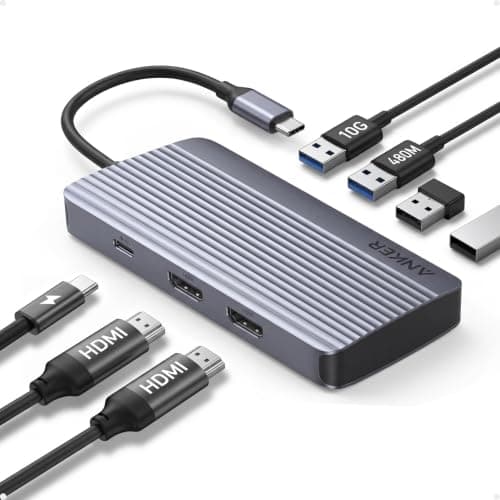
Anker Anker 8-in-1 USB-C Docking Station (dual monitor, 4K HDMI)
Anker 8-in-1 USB-C Docking Station (dual monitor, 4K HDMI)

The right amount of dock for a small desk: dual-display output, 4K HDMI, enough USB for a keyboard, mouse and drive, at half the price of the full docking stations.

Best overall
8.4
$39.99Amazon
02
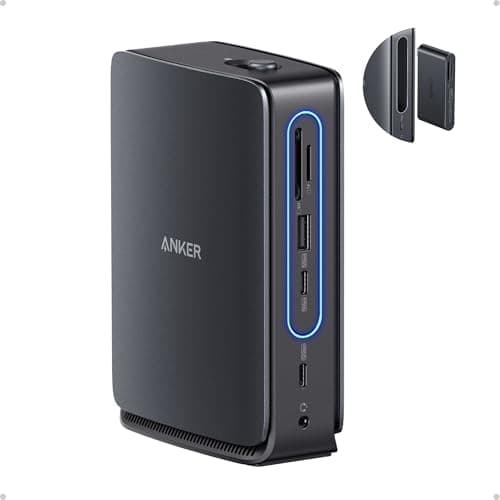
Anker Anker Nano 13-in-1 Docking Station (detachable hub)
Anker Nano 13-in-1 Docking Station (detachable hub)

A full dock with a 6-in-1 hub that detaches and travels — which means one purchase covers the desk setup and the coffee-shop setup instead of two.

Best full dock
8.6
$149.99Amazon
03
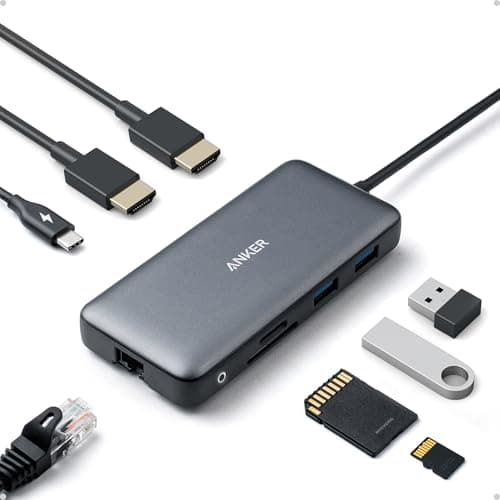
Anker Anker Nano 8-in-1 Dual Monitor Hub
Anker Nano 8-in-1 Dual Monitor Hub

Dual-display output at the lowest price in the roundup — the pick if the requirement is simply two screens plus a keyboard and mouse from one port.

Best budget dual display
8.4
$35.99Amazon
04
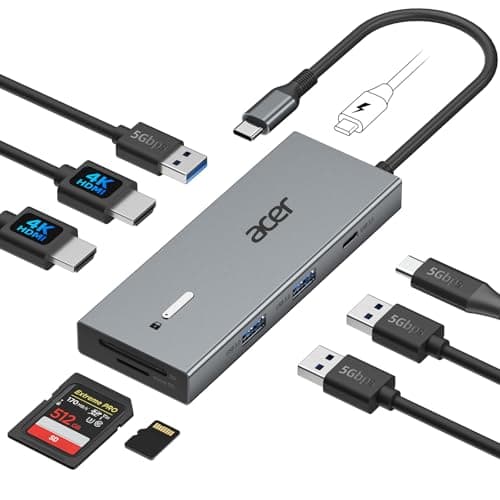
Acer Acer USB-C Docking Station (9-in-1, dual HDMI)
Acer USB-C Docking Station (9-in-1, dual HDMI)

Two HDMI outputs rather than an HDMI plus a DisplayPort, which matters because most budget monitors — including the ones in our monitor picks — are HDMI only.

Best for two HDMI monitors
8.5
$43.99Amazon
05
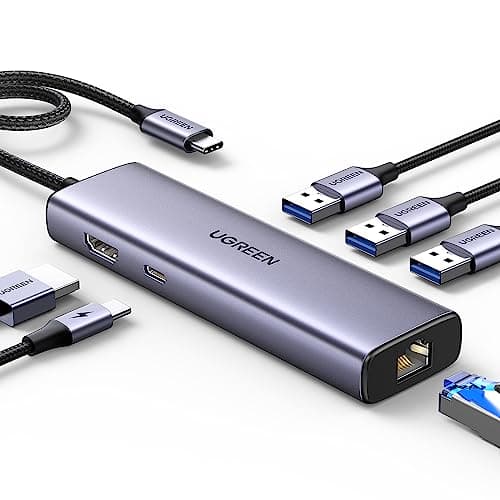
UGREEN UGREEN Revodok 6-in-1 USB-C Hub
UGREEN Revodok 6-in-1 USB-C Hub

The single-display option, with Gigabit Ethernet — which on a home-office desk is often the upgrade that matters more than the second monitor.

Best single display
7.9
$29.98Amazon

#ad · Live prices from the Amazon Product API, as of Sep 7, 2026. Where we have no verified live price we show none — we would rather leave a gap than print a number that has rotted.

In detail

The picks, in full

01
Anker Anker 8-in-1 USB-C Docking Station (dual monitor, 4K HDMI)

Best overall

Anker 8-in-1 USB-C Docking Station (dual monitor, 4K HDMI)

Ports
8-in-1
Displays
Dual monitor
Video
4K HDMI
Connection
USB-C to laptop
Format
Compact hub
8.4/10

The right amount of dock for a small desk: dual-display output, 4K HDMI, enough USB for a keyboard, mouse and drive, at half the price of the full docking stations.

Display support
9
Charging
6.8
Port count
8.4
Desk footprint
9
Value
9

Pros

  • Dual-display support without stepping up to a full desktop dock
  • 4K HDMI covers any monitor a small desk should carry
  • Small enough to sit behind a monitor stand rather than on the desk
  • Anker's support record is the best of the brands in this category

Cons

  • Hub form factor means charging passthrough is limited compared with a mains-powered dock
  • No dedicated power brick, so laptop charging depends on your own supply

Skip this if…

you want the laptop charged at full speed through the dock. A bus-powered hub cannot do that — the Nano 13-in-1 is the format that can.

$39.99View on Amazon

$53.9926% off

Price as of Sep 7, 2026. Prices change — Amazon's is the one that counts.

#ad · we may earn a commission from this link to Anker 8-in-1 USB-C Docking Station (dual monitor, 4K HDMI)

02
Anker Anker Nano 13-in-1 Docking Station (detachable hub)

Best full dock

Anker Nano 13-in-1 Docking Station (detachable hub)

Ports
13-in-1
Detachable
6-in-1 travel hub
Connection
USB-C
Class
Full docking station
Brand
Anker Nano
8.6/10

A full dock with a 6-in-1 hub that detaches and travels — which means one purchase covers the desk setup and the coffee-shop setup instead of two.

Display support
9.4
Charging
9.4
Port count
9.8
Desk footprint
7
Value
7.4

Pros

  • 13 ports covers displays, network, storage and charging together
  • Detachable hub means you do not buy a second device for travel
  • A proper dock delivers real charging wattage to the laptop
  • One cable to the machine, which is the whole point

Cons

  • The most expensive pick here by a wide margin
  • A full dock is a desk object, not something that hides behind a monitor foot

Skip this if…

you connect a monitor, a keyboard and a mouse and nothing else. Thirteen ports is a lot of dock for three cables — the 8-in-1 does that job.

$149.99View on Amazon

Price as of Sep 7, 2026. Prices change — Amazon's is the one that counts.

#ad · we may earn a commission from this link to Anker Nano 13-in-1 Docking Station (detachable hub)

03
Anker Anker Nano 8-in-1 Dual Monitor Hub

Best budget dual display

Anker Nano 8-in-1 Dual Monitor Hub

Ports
8-in-1
Displays
Dual monitor
Platform
Windows
Connection
USB-C
Format
Nano hub
8.4/10

Dual-display output at the lowest price in the roundup — the pick if the requirement is simply two screens plus a keyboard and mouse from one port.

Display support
8.4
Charging
6.4
Port count
8.2
Desk footprint
9.4
Value
9.6

Pros

  • Cheapest dual-display route here
  • Nano form factor is genuinely small on a crowded desk
  • Eight ports is enough for a normal home-office setup
  • Anker build quality at a budget price

Cons

  • Listed for Windows — dual-display behavior on macOS differs, see the guide below
  • Bus-powered, so charging capability is limited

Skip this if…

you use a MacBook and want two independent external displays. That is a platform limitation rather than a dock one, and it is explained below.

$35.99View on Amazon

Price as of Sep 7, 2026. Prices change — Amazon's is the one that counts.

#ad · we may earn a commission from this link to Anker Nano 8-in-1 Dual Monitor Hub

04
Acer Acer USB-C Docking Station (9-in-1, dual HDMI)

Best for two HDMI monitors

Acer USB-C Docking Station (9-in-1, dual HDMI)

Ports
9-in-1
Video
2 × HDMI
Displays
Dual monitor
Connection
USB-C
Brand
Acer
8.5/10

Two HDMI outputs rather than an HDMI plus a DisplayPort, which matters because most budget monitors — including the ones in our monitor picks — are HDMI only.

Display support
8.8
Charging
6.6
Port count
8.8
Desk footprint
9
Value
9.2

Pros

  • Two HDMI outputs suit budget monitors that lack DisplayPort
  • Nine ports at a price close to the single-display hubs
  • Compact enough to tuck behind a monitor riser
  • Acer hardware also appears in our monitor arm picks

Cons

  • No detachable travel hub
  • Listing does not state charging wattage

Skip this if…

your monitors have DisplayPort and you want the higher refresh rates it can carry. Then an HDMI-plus-DP dock is the better match.

$43.99View on Amazon

Price as of Sep 7, 2026. Prices change — Amazon's is the one that counts.

#ad · we may earn a commission from this link to Acer USB-C Docking Station (9-in-1, dual HDMI)

05
UGREEN UGREEN Revodok 6-in-1 USB-C Hub

Best single display

UGREEN Revodok 6-in-1 USB-C Hub

Ports
6-in-1
Video
4K HDMI
Network
Gigabit Ethernet
Connection
USB-C
Format
Compact hub
7.9/10

The single-display option, with Gigabit Ethernet — which on a home-office desk is often the upgrade that matters more than the second monitor.

Display support
6.6
Charging
6.4
Port count
7
Desk footprint
9.8
Value
9.6

Pros

  • Gigabit Ethernet fixes call quality problems Wi-Fi in a flat often causes
  • 4K HDMI for a single external screen
  • The smallest dock here — it disappears behind a laptop stand
  • Cheapest way to get one cable to a docked laptop

Cons

  • One display only
  • Six ports means choices about what stays plugged in

Skip this if…

you run two external monitors now or plan to. Buy the dual-display dock rather than replacing this one in six months.

$29.98View on Amazon

Price as of Sep 7, 2026. Prices change — Amazon's is the one that counts.

#ad · we may earn a commission from this link to UGREEN Revodok 6-in-1 USB-C Hub

Check your laptop first, not the dock

Two capabilities live in the computer rather than in the dock, and getting this wrong is the main reason docks get returned.

  • Does the USB-C port carry video?Not all do. The port needs DisplayPort Alt Mode, and manufacturers do not always label it. If your laptop's USB-C port does not carry video, no ordinary dock will produce a picture from it.
  • Does it charge over USB-C?Again, not all do, and a machine that charges only through a barrel connector will always need its own charger regardless of the dock's power delivery.
  • How many independent displays does it support? This is the one that surprises people. Many Windows laptops support two external displays over one USB-C connection; base-model Apple Silicon MacBooks have historically supported only one external display natively, and docks that appear to do more use DisplayLink software rather than the port itself. Check your specific machine before buying a dual-display dock for it.

Bus-powered hub or mains-powered dock?

Bus-powered hubMains-powered dock
Charges the laptopOnly by passing through your own chargerYes, at its rated wattage
Cables to the wallOne (your laptop charger, into the hub)One (the dock's own supply)
Desk footprintTiny — hides behind a standA visible object plus a power brick
Powers external drivesMarginallyReliably

On a small desk the hub form factor usually wins, because it hides. Take the mains-powered dock if you run bus-powered external drives, need full charging speed, or want to unplug exactly one cable when the desk changes jobs.

Where the dock should physically live

Not on the desktop. A dock is a small heavy object with cables radiating from it, which is the definition of clutter. The three good positions are: behind a monitor riser, where the riser hides it; adhesive-mounted under the desk near the back edge, which is the tidiest and takes two minutes; or on the underside of a wall shelf. Whichever you choose, the run to the laptop should be a short cable, and the run to the wall should go down through a cable channel rather than across the floor.

What a dock does for a small desk specifically

Three things beyond the cable count. It makes a vertical laptop dockpractical, since a closed laptop on its edge with one cable is tidy and the same laptop with five is not. It lets you buy a cheaper monitor, because HDMI plus a dock costs far less than a USB-C display and works with any screen you buy later — see our monitor picks. And it makes a folding or rolling desk genuinely usable, because packing the desk away becomes unplugging one connector.

Ethernet is the underrated port

In a flat with shared Wi-Fi and a router two rooms away, a Gigabit Ethernet port on the dock is often the single biggest improvement in daily working experience — calls stop dropping, large files stop stalling. Most laptops no longer have an Ethernet socket, so the dock is how you get one back. If your desk is anywhere near the router, run a cable; it is the cheapest performance upgrade in this entire category.
How we picked

We do not run a testing lab

We compiled the published manufacturer specifications, did the footprint and clearance math ourselves, and read aggregated owner reviews, then scored each product against a published rubric. The scores are judgments from documented research — they are not measurements we took, because we do not have a lab and we are not going to pretend we do. Every spec traces back to a listing or manual named in Sources.

Questions

Frequently asked

Will a USB-C dock work with my laptop?
Only if the laptop's USB-C port supports DisplayPort Alt Mode for video and, if you want charging through it, USB-C power delivery. Neither is universal and manufacturers do not always label the port clearly. Check your specific model's specification before buying, because the capability lives in the computer rather than in the dock.
Can a USB-C dock run two monitors?
It depends on the laptop more than on the dock. Many Windows machines drive two external displays over a single USB-C connection; base-model Apple Silicon MacBooks have historically supported one, with docks working around it using DisplayLink software. Confirm your own machine's limit before buying a dual-display dock for it.
Do I still need my laptop charger with a dock?
With a bus-powered hub, yes — the charger plugs into the hub and passes through, so the count of cables to the wall is unchanged. With a mains-powered dock, no: the dock's own supply charges the laptop through the same cable that carries video and data, which is the true one-cable setup.
Is a docking station worth it for a small desk?
It is one of the highest-value changes you can make, because on a small desk cable clutter is a space problem rather than a cosmetic one. It also makes a vertical laptop dock practical and makes packing a folding desk away a one-connector job.
USB-C hub or docking station — what is the difference?
Mostly power. A hub is bus-powered, small and cheap, and passes your own charger through; a docking station has its own mains supply, delivers real charging wattage and drives bus-powered peripherals reliably. On a small desk the hub usually wins because it hides behind a monitor stand and the dock does not.

Keep reading

Receipts

Sources

We do not run a testing lab, and we do not pretend to. Specifications come from the manufacturer or retailer listing; the footprint and clearance math is ours and reproducible. Where we could not verify a number, we say so on the page rather than quietly leaving it out. Read our full method.