Skip to content
Desk & Dowel

HUB 04 · Space-Saving Accessories

The Best Work-From-Home Gifts Under $50

Fifty dollars is the band where a desk gift stops being a stocking filler and starts changing how the day feels. It is also where compatibility starts to bite.

By Stephen V.Updated How we pick
#ad

We earn a commission when you buy through our Amazon links, at no extra cost to you. It never affects our rankings, and we say so when the cheaper product is the better buy. How this works.

The pick: the Quntis monitor light bar. It clips onto the top of any monitor, lights the desk without throwing glare at the screen, costs zero surface, and needs nothing measured beforehand. That combination is rare at this price, and it is why it beats the objectively more useful monitor arm below.

Under $50 you can buy the single biggest upgrade a cramped desk can get — a gas-spring monitor arm — but only if the desk edge cooperates. The ranking below weighs that risk honestly, with live prices on every row.

The short answer

Quick picks

#ProductBest forScorePrice
01
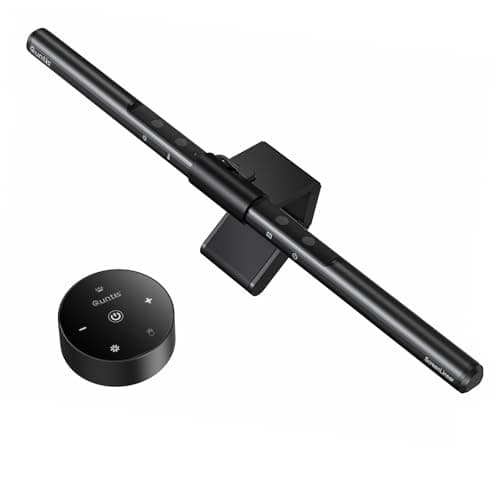
Quntis Quntis Monitor Light Bar
Quntis Monitor Light Bar

Clips on the top bezel and lights the desk without reflecting off the screen. Universal fit, zero surface cost, and it looks like a gift.

Best overall gift
9.1
$39.95Amazon
02
Amazon Basics Amazon Basics Single Monitor Arm (Gas Spring)
Amazon Basics Single Monitor Arm (Gas Spring)

The biggest genuine upgrade under $50 and the one with a compatibility window. Check the desk edge and the VESA holes before you wrap it.

Biggest upgrade, if it fits
8.9
$27.29Amazon
03
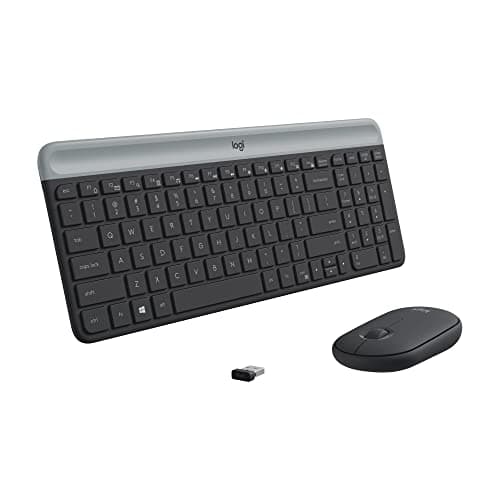
Logitech Logitech MK470 Slim Compact Keyboard & Mouse
Logitech MK470 Slim Compact Keyboard & Mouse

Two cables gone and several inches of desk width back, from a brand whose wireless actually works. The safest “proper present” here.

Best for a cramped desk
8.8
$34.88Amazon
04
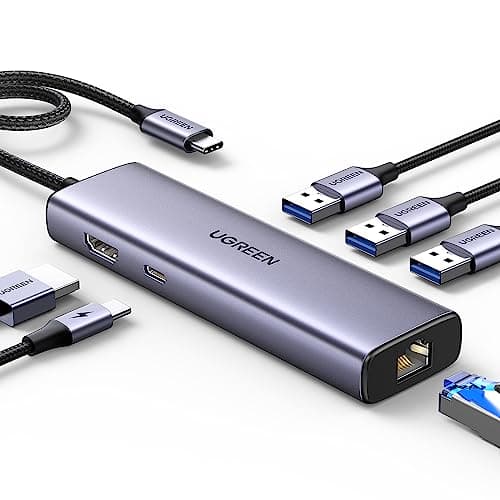
UGREEN UGREEN Revodok 6-in-1 USB-C Hub
UGREEN Revodok 6-in-1 USB-C Hub

The unglamorous fix for a work laptop with two ports. Adds a monitor output and wired ethernet without adding a box to the desk.

Best for a work laptop
8.7
$29.98Amazon
05
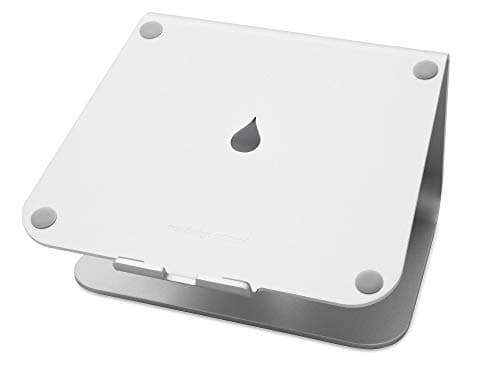
Rain Design Rain Design mStand Laptop Stand
Rain Design mStand Laptop Stand

A single piece of forged aluminum that will outlive three laptops. The gift for someone who notices how objects are made.

Best-made gift
8.6
$39.80Amazon
06
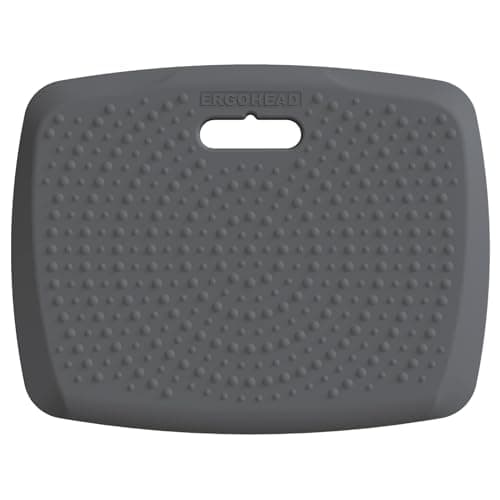
Ergohead Ergohead 3/4 in Portable Standing Mat (17 × 22 in)
Ergohead 3/4 in Portable Standing Mat (17 × 22 in)

For someone with a standing desk they have stopped raising. The reason people stop is their feet, and this is the smallest honest fix.

Best for a standing desk owner
8.5
$27.98Amazon

#ad · Live prices from the Amazon Product API, as of Sep 7, 2026. Where we have no verified live price we show none — we would rather leave a gap than print a number that has rotted.

In detail

The picks, in full

01
Quntis Quntis Monitor Light Bar

Best overall gift

Quntis Monitor Light Bar

Mount
Clip on bezel
Color temp
Adjustable, warm to cool
Optic
Asymmetric, no screen glare
Controls
Touch / remote
Power
USB-powered
9.1/10

Clips on the top bezel and lights the desk without reflecting off the screen. Universal fit, zero surface cost, and it looks like a gift.

Usefulness
8.8
Fits any desk
9.2
Giftability
9.4
Value
9

Pros

  • Fits essentially any flat monitor bezel — no thickness or VESA question to ask first
  • Asymmetric optic throws light forward onto the desk, not back into the panel
  • Takes no desk surface at all, unlike the base lamp it replaces
  • USB powered from the monitor or a hub, so it adds no wall plug

Cons

  • Does nothing for a laptop-only setup — it needs a monitor to sit on
  • Very curved or unusually thick bezels can sit the bar at an angle

Skip this if…

they work on a laptop with no external screen. A clamp lamp does the same job there, and it is on our clamp lamp ranking.

$39.95View on Amazon

Price as of Sep 7, 2026. Prices change — Amazon's is the one that counts.

#ad · we may earn a commission from this link to Quntis Monitor Light Bar

02
Amazon Basics Amazon Basics Single Monitor Arm (Gas Spring)

Biggest upgrade, if it fits

Amazon Basics Single Monitor Arm (Gas Spring)

VESA
75×75 / 100×100 mm
Mount
C-clamp + grommet
Fits
Up to 32 in
Weight
Up to ~17.6 lb
Motion
Gas spring
8.9/10

The biggest genuine upgrade under $50 and the one with a compatibility window. Check the desk edge and the VESA holes before you wrap it.

Usefulness
9.4
Fits any desk
8.2
Giftability
8.4
Value
9.4

Pros

  • Frees the 8–10 in of depth a monitor stand occupies — the whole point on a shallow desk
  • Gas spring means the screen moves with one hand and stays where it is put
  • Clamp or grommet mounting, so it suits most desks that have a free rear edge
  • Gas-spring arms at this price were not a thing three years ago

Cons

  • Needs VESA holes on the monitor; many budget screens do not have them
  • Up to ~17.6 lb is enough for a 24–27 in panel but tight for a heavy 32 in

Skip this if…

you cannot check their desk first. A clamp needs a flat rear edge with clearance behind it, and a hutch or a wall-flush desk kills it.

$27.29View on Amazon

$29.999% off

Price as of Sep 7, 2026. Prices change — Amazon's is the one that counts.

#ad · we may earn a commission from this link to Amazon Basics Single Monitor Arm (Gas Spring)

03
Logitech Logitech MK470 Slim Compact Keyboard & Mouse

Best for a cramped desk

Logitech MK470 Slim Compact Keyboard & Mouse

Connection
Wireless receiver
Included
Keyboard + mouse
Profile
Slim, low profile
Layout
Compact
Finish
Graphite (also off-white)
8.8/10

Two cables gone and several inches of desk width back, from a brand whose wireless actually works. The safest “proper present” here.

Usefulness
8.8
Fits any desk
8.8
Giftability
8.4
Value
9.2

Pros

  • Compact layout keeps the mouse closer, which matters on a 40-inch desk
  • One receiver for both devices — one USB port, not two
  • Slim profile slides under a monitor riser or into a keyboard tray
  • Removes two cables from the desk, which is half of visible clutter

Cons

  • Membrane switches, so it is quiet and cheap rather than satisfying to type on
  • Uses a proprietary receiver rather than Bluetooth — one port is permanently spoken for

Skip this if…

they care about typing feel. A mechanical board is the gift there, and there is one in the under-$100 list.

$34.88View on Amazon

$49.9930% off

Price as of Sep 7, 2026. Prices change — Amazon's is the one that counts.

#ad · we may earn a commission from this link to Logitech MK470 Slim Compact Keyboard & Mouse

04
UGREEN UGREEN Revodok 6-in-1 USB-C Hub

Best for a work laptop

UGREEN Revodok 6-in-1 USB-C Hub

Ports
6-in-1
Video
4K HDMI
Network
Gigabit Ethernet
Connection
USB-C
Format
Compact hub
8.7/10

The unglamorous fix for a work laptop with two ports. Adds a monitor output and wired ethernet without adding a box to the desk.

Usefulness
8.6
Fits any desk
9.4
Giftability
7.4
Value
9.4

Pros

  • Gigabit ethernet is the single best fix for bad apartment Wi-Fi on calls
  • 4K HDMI turns a laptop into a desktop with one cable
  • Small enough to live in a bag rather than permanently on the desk
  • Works with essentially any modern USB-C laptop

Cons

  • One HDMI output only — a dual-monitor setup needs a bigger dock
  • Passthrough charging wattage is modest for a power-hungry laptop

Skip this if…

they run two external monitors. That is a dual-output dock, which is a separate and pricier purchase.

$29.98View on Amazon

Price as of Sep 7, 2026. Prices change — Amazon's is the one that counts.

#ad · we may earn a commission from this link to UGREEN Revodok 6-in-1 USB-C Hub

05
Rain Design Rain Design mStand Laptop Stand

Best-made gift

Rain Design mStand Laptop Stand

Material
Forged aluminum
Adjustability
Fixed height
Riser height
~6 in
Laptop size
Up to 16 in
Footprint
10 x 7.5 in
8.6/10

A single piece of forged aluminum that will outlive three laptops. The gift for someone who notices how objects are made.

Usefulness
8.6
Fits any desk
8.6
Giftability
9.2
Value
8

Pros

  • Single-piece forged aluminum — no hinges, no flex, nothing to wear out
  • About 6 in of lift puts a laptop screen near eye level for most people
  • Looks like a designed object, which is exactly what a gift should look like
  • Cable slot at the back keeps the charger tidy

Cons

  • Fixed height — no adjustment for an unusually tall or short user
  • 10 × 7.5 in of permanent desk footprint, which is real on a narrow desk

Skip this if…

their desk is 16 inches deep or less. A fixed 10-inch-deep block eats too much of it; the MOFT in our tiny-apartment list folds flat instead.

$39.80View on Amazon

Price as of Sep 7, 2026. Prices change — Amazon's is the one that counts.

#ad · we may earn a commission from this link to Rain Design mStand Laptop Stand

06
Ergohead Ergohead 3/4 in Portable Standing Mat (17 × 22 in)

Best for a standing desk owner

Ergohead 3/4 in Portable Standing Mat (17 × 22 in)

Size
17 × 22 in
Footprint
~2.6 sq ft
Thickness
3/4 in
Carry
Built-in handle
Surface
Non-slip, massage points
8.5/10

For someone with a standing desk they have stopped raising. The reason people stop is their feet, and this is the smallest honest fix.

Usefulness
8.4
Fits any desk
8
Giftability
8.2
Value
9.4

Pros

  • About 2.6 sq ft — roughly half the floor of a standard 20 × 32 in mat
  • The built-in handle means it hangs on a hook when they sit back down
  • Standard 3/4 in thickness, so the small size costs no cushioning
  • Solves the actual reason standing desks stop getting used

Cons

  • Useless to anyone without a standing desk or converter
  • 17 in of depth is tight for someone who paces while standing

Skip this if…

you are not certain they have a sit-stand desk or converter. It is a very specific gift.

$27.98View on Amazon

Price as of Sep 7, 2026. Prices change — Amazon's is the one that counts.

#ad · we may earn a commission from this link to Ergohead 3/4 in Portable Standing Mat (17 × 22 in)

The compatibility question, in one table

At this budget the failure mode is not quality, it is fit. Here is exactly what you need to know about their setup before each gift is safe to buy.

GiftWhat you must know firstRisk if you guess
Monitor light barThat they use a monitorLow
Monitor armDesk edge 0.4–3 in, free rear edge, VESA holesHigh
Keyboard + mouse comboA free USB-A portLow
USB-C hubA USB-C laptop, one screenLow
Laptop standDesk deeper than ~18 inMedium
Standing matThat they own a sit-stand deskHigh

Why the light bar beats the monitor arm here

On our own monitor arm ranking the arm wins by a distance: it hands back the eight to ten inches of depth a monitor stand occupies, which is the largest single space win available to a small desk. As a giftit drops to second, because it can fail three separate compatibility checks — desk-edge thickness, rear clearance and VESA holes — and a present that has to be returned is not a present. Buy the arm for someone whose desk you have physically seen. Otherwise the light bar is the one that always works.

What a gas-spring arm needs from a desk

If you are buying the arm anyway, the three numbers are: a desk-edge thickness inside the clamp’s published range (about 0.4–3 in on most models), a few inches of clearance behind the desk so the clamp can close, and a monitor with 75 × 75 or 100 × 100 mm VESA holes on the back. The full check is in will a monitor arm fit my desk, and the workaround for a screen with no VESA pattern is in how to mount a monitor without VESA holes.

Where the other budgets live

Under $25 the shortlist changes completely — it is adhesive mounts and lighting rather than hardware, and it is on gifts under $25. Between $50 and $100 you reach mechanical keyboards, better light bars and an actual second monitor; that is gifts under $100. And if the person you are buying for is short of floor rather than money, the pages that matters is gifts for tiny-apartment workers.

How we picked

We do not run a testing lab

We compiled the published manufacturer specifications, did the footprint and clearance math ourselves, and read aggregated owner reviews, then scored each product against a published rubric. The scores are judgments from documented research — they are not measurements we took, because we do not have a lab and we are not going to pretend we do. Every spec traces back to a listing or manual named in Sources.

Questions

Frequently asked

What is the best work-from-home gift under $50?
A monitor light bar, for most people. It clips onto any monitor, lights the desk without glare, costs no desk surface and needs nothing measured first. A gas-spring monitor arm is a bigger upgrade but carries three compatibility checks, which makes it a worse gift and a better self-purchase.
Is a monitor arm a safe gift?
Only if you know the desk. The clamp has to match the desk-edge thickness (roughly 0.4–3 in on most arms), the desk needs clearance behind it for the clamp to close, and the monitor needs VESA holes. Miss any of the three and it goes back. The checks are listed in will a monitor arm fit my desk.
What should I get someone whose apartment Wi-Fi is bad on calls?
A USB-C hub with gigabit ethernet. Running a cable from the router beats every Wi-Fi tweak, and a 6-in-1 hub adds the port to a laptop that does not have one — plus an HDMI output for a monitor. It is the least exciting gift on the page and it fixes the most annoying daily problem.
Are cheap monitor light bars any good?
The specification that matters is the optic: a proper light bar throws light forward onto the desk and nothing back at the screen. Both bars we rank publish that asymmetric design. Beyond that you are paying for colour accuracy and controls — the differences are laid out in best monitor light bars.
Is a laptop stand or a monitor arm the better gift?
A laptop stand if they work on a laptop alone; a monitor arm if they run an external screen and you can confirm the fit. They solve the same problem — the screen is too low — for two different setups. The comparison is in laptop stand vs monitor arm.
What if they already have everything?
Buy the thing nobody buys for themselves: better light. A light bar or a good clamp lamp is the upgrade most home-office desks are still missing years in, because the ceiling bulb is technically working. Our eye-strain lighting page explains why that matters more than it sounds.

Keep reading

Receipts

Sources

We do not run a testing lab, and we do not pretend to. Specifications come from the manufacturer or retailer listing; the footprint and clearance math is ours and reproducible. Where we could not verify a number, we say so on the page rather than quietly leaving it out. Read our full method.