Skip to content
Desk & Dowel

HUB 04 · Space-Saving Accessories

Desk Upgrades Under $50 That Actually Matter

Not gifts — purchases. Ranked on how much the day changes per dollar, with the measurements you need to take before each one is safe to order.

By Stephen V.Updated How we pick
#ad

We earn a commission when you buy through our Amazon links, at no extra cost to you. It never affects our rankings, and we say so when the cheaper product is the better buy. How this works.

The pick: a gas-spring monitor arm.Nothing else under $50 changes a small desk as much — the monitor stand disappears, eight to ten inches of depth come back, and the screen finally sits at the height your neck wanted. Check the desk-edge thickness and VESA holes first; then buy it.

This is the buy-it-for-yourself list, which is why it is ranked differently from our gift list: you can measure your own desk, so the items that need measuring are allowed to win. Live prices below.

The short answer

Quick picks

#ProductBest forScorePrice
01
Amazon Basics Amazon Basics Single Monitor Arm (Gas Spring)
Amazon Basics Single Monitor Arm (Gas Spring)

The highest-impact sub-$50 purchase a small desk can take: the stand goes, the depth comes back, and the screen height stops being a compromise.

Biggest single change
9.2
$27.29Amazon
02
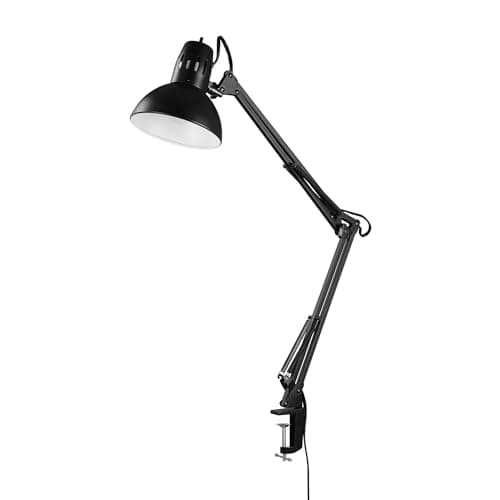
Globe Electric Globe Electric Architect 32in Swing-Arm Clamp Lamp
Globe Electric Architect 32in Swing-Arm Clamp Lamp

Thirty-two inches of reach on a clamp mount: proper task light exactly where the work is, for no desk surface at all.

Best light upgrade
8.9
$25.76Amazon
03
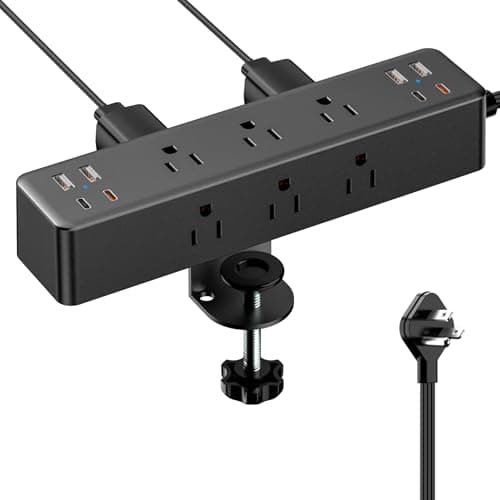
ACOZVIN ACOZVIN Desk Clamp Power Strip
ACOZVIN Desk Clamp Power Strip

Nine outlets and eight USB ports clamped to the desk edge, on a 10 ft flat-plug cord — power at hand height instead of on the floor behind the desk.

Best power fix
8.8
$29.99Amazon
04
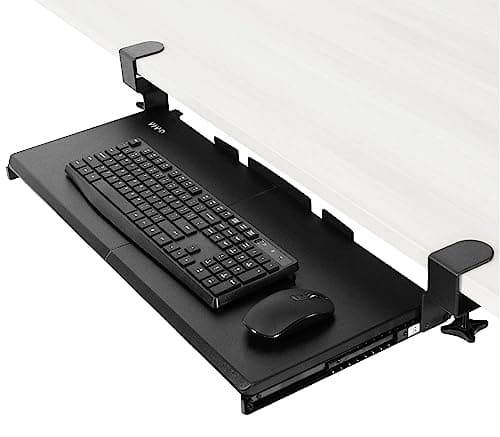
VIVO VIVO Clamp-On Keyboard Tray (MOUNT-KB05E)
VIVO Clamp-On Keyboard Tray (MOUNT-KB05E)

Moves the keyboard off the desk entirely and into the empty space beneath it — the second-biggest surface recovery available under $50.

Best depth recovery
8.6
$49.99Amazon
05
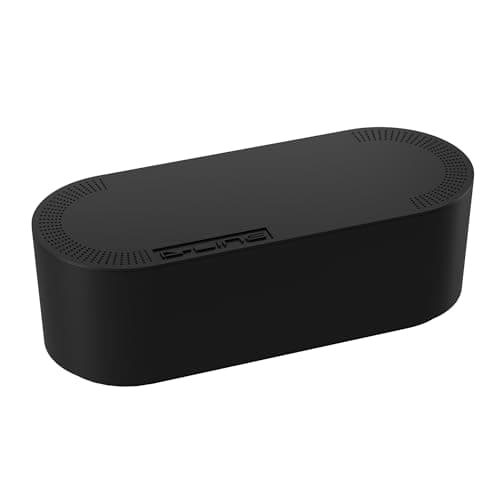
D-Line D-Line Cable Management Box (Large)
D-Line Cable Management Box (Large)

Puts the power strip and the wall-warts inside a closed box. The cheapest way to stop a studio desk reading as a nest of cables.

Best visual fix
8.5
$27.99Amazon
06
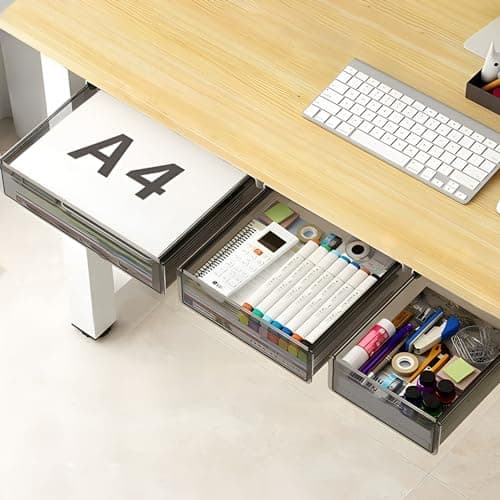
SVNNELP SVNNELP Under-Desk Drawer Set (3-Pack)
SVNNELP Under-Desk Drawer Set (3-Pack)

Three peel-and-stick drawers for the dead space under the desk — small, cheap storage that does not touch the surface or the walls.

Best cheap storage
8.4
$30.99Amazon

#ad · Live prices from the Amazon Product API, as of Sep 7, 2026. Where we have no verified live price we show none — we would rather leave a gap than print a number that has rotted.

In detail

The picks, in full

01
Amazon Basics Amazon Basics Single Monitor Arm (Gas Spring)

Biggest single change

Amazon Basics Single Monitor Arm (Gas Spring)

VESA
75×75 / 100×100 mm
Mount
C-clamp + grommet
Fits
Up to 32 in
Weight
Up to ~17.6 lb
Motion
Gas spring
9.2/10

The highest-impact sub-$50 purchase a small desk can take: the stand goes, the depth comes back, and the screen height stops being a compromise.

Daily impact
9.4
Space returned
9.6
Install ease
8.2
Value
9.4

Pros

  • Returns the 8–10 in of depth a monitor base occupies — on a 16 in desk that is transformative
  • Gas spring holds position, so height and distance become adjustable rather than fixed
  • Clamp or grommet mount covers most desks with a free rear edge
  • Also fixes the neck angle that a monitor sitting on its own stand usually gets wrong

Cons

  • ~17.6 lb limit rules out heavy 32 in panels — check your monitor's weight
  • Needs VESA holes, and a clamp needs clearance behind the desk

Skip this if…

your desk top is thicker than about 3 in, or your monitor has no VESA pattern. Both are checkable in two minutes with a tape measure.

$27.29View on Amazon

$29.999% off

Price as of Sep 7, 2026. Prices change — Amazon's is the one that counts.

#ad · we may earn a commission from this link to Amazon Basics Single Monitor Arm (Gas Spring)

02
Globe Electric Globe Electric Architect 32in Swing-Arm Clamp Lamp

Best light upgrade

Globe Electric Architect 32in Swing-Arm Clamp Lamp

Reach
32 in
Mount
Clamp-on
Light source
LED bulb included
Finish
Black
Adjustment
Two-section swing arm
8.9/10

Thirty-two inches of reach on a clamp mount: proper task light exactly where the work is, for no desk surface at all.

Daily impact
8.4
Space returned
9.4
Install ease
8.8
Value
8.8

Pros

  • 32 in of reach puts light over the keyboard from a clamp at the back of the desk
  • Two-section arm folds back out of the way when it is not needed
  • Uses a standard bulb, so the colour temperature is yours to choose
  • Costs zero desk surface, unlike the base lamp it replaces

Cons

  • Bulb-based, so brightness and colour depend on what you screw into it
  • A long arm needs the clamp to be tight and the desk edge to be solid

Skip this if…

you want integrated dimming and colour presets. A dedicated LED lamp gives you those; this gives you reach and a socket.

$25.76View on Amazon

Price as of Sep 7, 2026. Prices change — Amazon's is the one that counts.

#ad · we may earn a commission from this link to Globe Electric Architect 32in Swing-Arm Clamp Lamp

03
ACOZVIN ACOZVIN Desk Clamp Power Strip

Best power fix

ACOZVIN Desk Clamp Power Strip

Outlets
9 AC (1875W / 15A)
USB
8 ports (4 USB-A, 4 USB-C)
Cord
10 ft, 0.3in flat plug
Clamp
Fits tops up to 1.7 in
Charging
40W total, 2 × PD20W
8.8/10

Nine outlets and eight USB ports clamped to the desk edge, on a 10 ft flat-plug cord — power at hand height instead of on the floor behind the desk.

Daily impact
8.6
Space returned
9
Install ease
8.6
Value
9

Pros

  • Clamps to the desk, so plugging something in stops meaning crawling under it
  • Eight USB ports remove the wall-wart pile that eats an AC strip
  • 10 ft cord reaches the one outlet a rented room actually has
  • 0.3 in flat plug lets the desk sit flush to the wall

Cons

  • Clamp fits tops up to 1.7 in — thicker desks are out
  • 40 W total across eight USB ports is fine for phones, thin for a laptop

Skip this if…

you need to charge a laptop over USB-C at speed. This is a phones-and-peripherals strip; a laptop wants its own supply.

$29.99View on Amazon

Price as of Sep 7, 2026. Prices change — Amazon's is the one that counts.

#ad · we may earn a commission from this link to ACOZVIN Desk Clamp Power Strip

04
VIVO VIVO Clamp-On Keyboard Tray (MOUNT-KB05E)

Best depth recovery

VIVO Clamp-On Keyboard Tray (MOUNT-KB05E)

Tray size
26.8 × 11 in (32.5 in with clamps)
Slide travel
8.5 in from the edge
Capacity
Up to 11 lb
Desk thickness
1.25 in maximum
Mount
Two C-clamps, no drilling
8.6/10

Moves the keyboard off the desk entirely and into the empty space beneath it — the second-biggest surface recovery available under $50.

Daily impact
8.8
Space returned
9.2
Install ease
7.4
Value
9

Pros

  • Recovers roughly a foot of desk depth by moving the keyboard under the top
  • Clamps rather than screws — the only common keyboard tray format that suits a rental
  • 8.5 in of slide travel means it tucks away completely when not in use
  • 26.8 in tray takes a full-size board plus a mouse

Cons

  • 1.25 in maximum desk thickness is a hard limit and it excludes many desks
  • Needs 32.5 in of clear width under the desk for the clamps

Skip this if…

your desk has a drawer, an apron or a crossbar under the front edge. There has to be flat underside for the clamps to grip.

$49.99View on Amazon

Price as of Sep 7, 2026. Prices change — Amazon's is the one that counts.

#ad · we may earn a commission from this link to VIVO Clamp-On Keyboard Tray (MOUNT-KB05E)

05
D-Line D-Line Cable Management Box (Large)

Best visual fix

D-Line Cable Management Box (Large)

Type
Cable box
Material
ABS plastic
Dimensions
16.5 x 6.5 x 5.25 in
Cord slots
3 rear entry
Lid
Click-lock
8.5/10

Puts the power strip and the wall-warts inside a closed box. The cheapest way to stop a studio desk reading as a nest of cables.

Daily impact
8
Space returned
8.4
Install ease
8.8
Value
8.6

Pros

  • Hides the strip and the bricks, which is most of what makes a desk look messy
  • Click-lock lid stays shut when a cable is tugged
  • 16.5 in fits a standard strip with the plugs in
  • Works on a shelf, on the floor or clamped out of sight under the desk

Cons

  • It is a box — it hides cables rather than reducing them
  • Needs somewhere to sit; on a tiny floor that is a real consideration

Skip this if…

your cables are already routed under the desk on a tray. Then you are boxing up a problem you have already solved.

$27.99View on Amazon

Price as of Sep 7, 2026. Prices change — Amazon's is the one that counts.

#ad · we may earn a commission from this link to D-Line Cable Management Box (Large)

06
SVNNELP SVNNELP Under-Desk Drawer Set (3-Pack)

Best cheap storage

SVNNELP Under-Desk Drawer Set (3-Pack)

Mount
Adhesive (SEBS tape)
Drawers
3 (S / M / L)
Material
PET plastic
Capacity
~5 lb per drawer
Install
Peel-and-stick or screw
8.4/10

Three peel-and-stick drawers for the dead space under the desk — small, cheap storage that does not touch the surface or the walls.

Daily impact
7.6
Space returned
8.8
Install ease
8.6
Value
8.6

Pros

  • Three sizes, so pens, cables and a notebook each get somewhere to go
  • Sticks to the underside — no floor, no surface, no wall used
  • About 5 lb per drawer is enough for everything a desk drawer normally holds
  • Optional screws if you want a permanent install on your own furniture

Cons

  • ~5 lb per drawer is a real ceiling — this is not for tools or books
  • Adhesive needs a clean, smooth underside; raw particleboard is marginal

Skip this if…

you need a full drawer's worth of storage. A clamp-on drawer unit holds more, and a rolling cart holds far more.

$30.99View on Amazon

Price as of Sep 7, 2026. Prices change — Amazon's is the one that counts.

#ad · we may earn a commission from this link to SVNNELP Under-Desk Drawer Set (3-Pack)

Measure these four things before you order anything

Every item on this page attaches to a desk, and every return in this category is a measurement someone did not take. Four numbers cover all of them:

MeasurementHow to take itWhat it decides
Desk-top thicknessAt the edge, where a clamp would sitMonitor arm (0.4–3 in), keyboard tray (1.25 in max), clamp strip (1.7 in max)
Rear clearanceGap between desk back and wallWhether any clamp can close at all
Underside obstructionsLook for aprons, drawers, crossbarsKeyboard tray, under-desk drawers
Monitor VESA + weightBack of the screen; listing specWhether a monitor arm is possible

The full version of the first and last checks is in will a monitor arm fit my desk and desk thickness: what will clamp to your desk, which collects the published clamp ranges for every clamp-on product we rank.

Impact per dollar, in order

If you are buying one thing, buy the arm. On a 16–20 inch deep desk it returns more usable area than any other purchase at any price under $100, and it is the only one that also fixes screen height. If the desk cannot take a clamp, the keyboard tray is the next largest recovery, then the lamp — because a base lamp is quietly occupying the corner you keep wishing you had.

Cable management comes last on impact and first on satisfaction. It changes no dimension, but it is the difference between a workspace and a pile, and it takes an evening. The full method, including what to do in a rental, is in desk cable management and cable management without wall damage.

What we left off, and why

Desk pads. They cover surface rather than creating it. Monitor risers that stand on the desk.A riser lifts the screen but its legs still occupy the depth — only a clamp-on shelf or an arm gives depth back, which is the argument in best monitor risers. Footrests and cushions. Worth owning, but they change comfort rather than space, and they need sizing to you.

If you have more than $50

The next rung is a standing converter or a better chair, both of which start around $100 — see small standing desk converters and best small office chairs. And if the desk itself is the problem rather than what is on it, start at best small desks.
How we picked

We do not run a testing lab

We compiled the published manufacturer specifications, did the footprint and clearance math ourselves, and read aggregated owner reviews, then scored each product against a published rubric. The scores are judgments from documented research — they are not measurements we took, because we do not have a lab and we are not going to pretend we do. Every spec traces back to a listing or manual named in Sources.

Questions

Frequently asked

What is the best desk upgrade under $50?
A gas-spring monitor arm, on any desk that can take a clamp. It returns the 8–10 inches of depth the monitor stand occupies and sets the screen at the right height, which no other sub-$50 purchase does. Check your desk-edge thickness and that the monitor has VESA holes first.
Is a monitor arm worth it on a cheap desk?
Usually yes, with one caution: a thin, unbraced desk top can flex under an arm holding a heavy screen at full reach. Check the desk’s published load rating and keep the arm near a leg if you can. The weight question is covered in how much weight a desk can hold.
Do clamp-on keyboard trays work on any desk?
No — they need a flat, unobstructed underside and a desk top within the clamp range, which is 1.25 in maximum on the tray above. Desks with a front apron, a drawer or a crossbar under the front edge cannot take one. Check underneath before ordering, not after.
What is the cheapest upgrade that makes the biggest visual difference?
Cable management, closely followed by lighting. A cable box plus a handful of hook-and-loop ties costs very little and removes the single thing that makes a small setup look cluttered. Warm task light does the rest — see best clamp desk lamps.
Should I buy an under-desk drawer or a rolling cart?
A drawer if the desk has knee clearance to spare and you want small things within reach; a rolling cart if you need real capacity and have floor for it. Adhesive drawers hold around 5 lb each, which is pens and cables, not files. Both formats are ranked in best under-desk storage.
Are these good gifts too?
Some are, but the ranking would change: items needing measurements make poor presents. The gift-fit version of this same budget is work-from-home gifts under $50, where the light bar wins instead.

Keep reading

Receipts

Sources

We do not run a testing lab, and we do not pretend to. Specifications come from the manufacturer or retailer listing; the footprint and clearance math is ours and reproducible. Where we could not verify a number, we say so on the page rather than quietly leaving it out. Read our full method.