Skip to content
Desk & Dowel

HUB 04 · Space-Saving Accessories

Laptop Stand vs Monitor Arm: Which Should a Small Desk Buy First?

One costs less than a takeaway and travels in a bag. The other frees the desk completely. The right answer depends on whether you also run a monitor.

By Stephen V.Updated How we pick
#ad

We earn a commission when you buy through our Amazon links, at no extra cost to you. It never affects our rankings, and we say so when the cheaper product is the better buy. How this works.

If you work on a laptop at a small desk, two purchases claim to fix your posture and your clutter. A laptop stand raises the screen on the desk. A monitor arm with a laptop tray lifts it off the desk entirely. They cost very different amounts and they suit different setups, so the choice is worth two minutes.

The short answer

Laptop only, and you value portability: buy the stand. Laptop plus an external monitor, and you want both at eye level with a clear desk underneath: buy the arm with a tray. Both require a separate keyboard and mouse — once the screen is at the right height, the built-in keyboard is not.

The decision table

FactorLaptop standArm with laptop tray
Desk footprintSame as the laptop, roughly 1 sq ftNone — the laptop leaves the surface
Typical costLowSeveral times a stand
HeightFixed (5–6 in on most)Continuously adjustable
Also holds a monitor?NoYes, on the same clamp
Desk requirementsNoneClampable edge, solid top
SetupPut it down10–20 minutes, tension to set
TravelsSome fold flat for a bagNo
CoolingAluminium stands act as a heat sinkVentilated tray with airflow underneath

The space argument, precisely

A 14-inch laptop occupies roughly a square foot of desk, and a stand does not change that — it lifts the laptop within the same footprint and gives you a slot underneath for a keyboard, which is genuinely useful. An arm-mounted tray removes the footprint completely, because the laptop is now in the air over the back of the desk. On a 40-inch desk that is the difference between a tidy desk and a clear one; on a 31-inch desk it can be the difference between workable and not.

Height: fixed versus chosen

Most laptop stands lift by a set amount — the Rain Design mStand raises the screen 5.9 inches, which suits an average-height person at an average desk. That is usually a big improvement over flat on the desk, and it is not adjustable. An arm sets the screen exactly where your neck wants it and moves again when you switch chairs, add a monitor or start standing. If you have had neck pain rather than just felt untidy, the adjustability is the reason to spend more.

The pairing most people end up with

A laptop stand plus an external keyboard is the cheapest complete fix for a laptop-only desk, and it is where we would start. If a monitor arrives later, the honest upgrade is a combination arm with a laptop tray — one clamp holding the monitor and the laptop at matched heights, with the whole desk free underneath. Keep the stand for travel; it folds into a bag and the arm does not. Full rankings are in our laptop stand roundup and monitor arm roundup.
The short answer

Quick picks

#ProductBest forScorePrice
01
Rain Design Rain Design mStand Laptop Stand
Rain Design mStand Laptop Stand

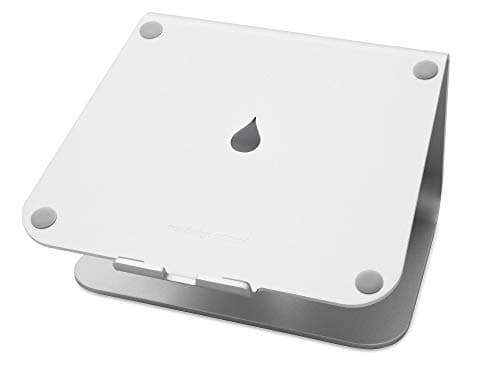
The stand case: a single piece of anodised aluminium that raises the screen 5.9 inches, acts as a heat sink, routes cables through a 2-inch hole and hides the keyboard underneath.

Best laptop stand
7.9
$39.90Amazon
02
HUANUO HUANUO Monitor Arm with Laptop Tray
HUANUO Monitor Arm with Laptop Tray

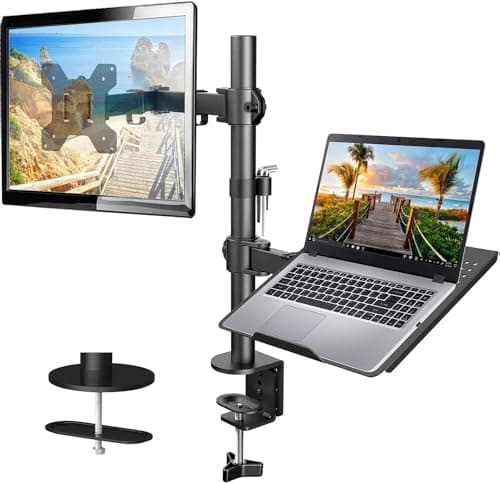
The arm case: a 13–32 inch monitor up to 22 lb on one arm and a ventilated 14 × 12-inch laptop tray on the other, both continuously adjustable through 17 inches of height.

Best arm-and-tray combo
7.3
$39.99Amazon

#ad · Live prices from the Amazon Product API, as of Aug 11, 2026. Where we have no verified live price we show none — we would rather leave a gap than print a number that has rotted.

In detail

The picks, in full

01
Rain Design Rain Design mStand Laptop Stand

Best laptop stand

Rain Design mStand Laptop Stand

Lift
5.9 in to screen height
Build
Single-piece aluminium
Cooling
Body acts as a heat sink
Cable hole
2 in diameter
Fits
Laptops under 10.4 in deep
7.9/10

The stand case: a single piece of anodised aluminium that raises the screen 5.9 inches, acts as a heat sink, routes cables through a 2-inch hole and hides the keyboard underneath.

Desk freed
6.8
Height control
6.4
Cost
9
Portability
7.6
Fits any desk
9.8

Pros

  • No clamp, no assembly, no desk requirements at all
  • Aluminium body draws heat away from the laptop
  • Keyboard stashes underneath when you use an external one
  • A fraction of the cost of an arm

Cons

  • Fixed height — no adjustment
  • Occupies the same desk footprint as the laptop did

Skip this if…

you also run an external monitor and want both screens at matched heights. That is a job for a combination arm, not a stand.

$39.90View on Amazon

Price as of Aug 11, 2026. Prices change — Amazon's is the one that counts.

#ad · we may earn a commission from this link to Rain Design mStand Laptop Stand

02
HUANUO HUANUO Monitor Arm with Laptop Tray

Best arm-and-tray combo

HUANUO Monitor Arm with Laptop Tray

Monitor fit
13–32 in, up to 22 lb
Laptop tray
14 × 12 in, ventilated
Height range
Up to 17 in
Clamp fits
0.39–3.07 in desk
Desk surface used
None
7.3/10

The arm case: a 13–32 inch monitor up to 22 lb on one arm and a ventilated 14 × 12-inch laptop tray on the other, both continuously adjustable through 17 inches of height.

Desk freed
9.4
Height control
9.2
Cost
7
Portability
4
Fits any desk
7

Pros

  • Laptop and monitor both leave the desk surface entirely
  • Continuous height adjustment for both screens
  • Ventilated tray keeps the laptop cooler than a solid shelf
  • One clamp does the whole job

Cons

  • Needs a clampable, solid desk edge
  • Costs several times a laptop stand

Skip this if…

your desk cannot be clamped, or you carry your setup around. A stand is the answer for glass tops, hutch desks and anyone who works in two places.

$39.99View on Amazon

$54.9927% off

Price as of Aug 11, 2026. Prices change — Amazon's is the one that counts.

#ad · we may earn a commission from this link to HUANUO Monitor Arm with Laptop Tray

How we picked

We do not run a testing lab

We compiled the published manufacturer specifications, did the footprint and clearance math ourselves, and read aggregated owner reviews, then scored each product against a published rubric. The scores are judgments from documented research — they are not measurements we took, because we do not have a lab and we are not going to pretend we do. Every spec traces back to a listing or manual named in Sources.

Questions

Frequently asked

Does a laptop stand save desk space?
It reorganises rather than reclaims: the laptop keeps its footprint, but you gain the slot underneath for a keyboard. If you need the footprint itself back, that requires an arm-mounted tray.
Do I need a separate keyboard with either of these?
Yes. Both raise the screen out of comfortable typing range, so an external keyboard and mouse are part of the purchase, not an optional extra. Budget for them.
Which is better for neck pain?
The arm, because it sets the screen height precisely and can be re-set as your chair or setup changes. A fixed stand at 5–6 inches of lift is still a large improvement on a laptop flat on the desk.
Can I use a laptop stand and a monitor arm together?
Yes, and it is a common setup: the monitor on the arm, the laptop on a stand beside it. It costs less than a combination arm and is easier to fit, but the laptop keeps its desk footprint. See our arms with laptop trays for the alternative.

Keep reading

Receipts

Sources

We do not run a testing lab, and we do not pretend to. Specifications come from the manufacturer or retailer listing; the footprint and clearance math is ours and reproducible. Where we could not verify a number, we say so on the page rather than quietly leaving it out. Read our full method.