Skip to content
Desk & Dowel

HUB 04 · Space-Saving Accessories

The Best Work-From-Home Gifts Under $100

The band where a desk gift becomes an object someone keeps for years. It is also where you can accidentally buy a second copy of something they already own.

By Stephen V.Updated How we pick
#ad

We earn a commission when you buy through our Amazon links, at no extra cost to you. It never affects our rankings, and we say so when the cheaper product is the better buy. How this works.

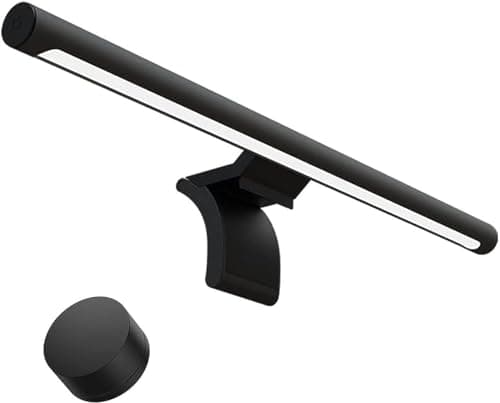
The pick: the Xiaomi monitor light bar.It publishes a 2700–6500K range and an asymmetric optic that keeps light off the panel, sits on any monitor, and takes no desk surface. At this budget it is the gift that is hard to already own and impossible to get wrong.

Above $50 the risk stops being fit and becomes duplication — a monitor, a keyboard or a dock is exactly the sort of thing someone may have bought themselves last month. Each entry below says what to check first. Live prices are in the table.

The short answer

Quick picks

#ProductBest forScorePrice
01
Xiaomi Xiaomi Computer Monitor Light Bar
Xiaomi Computer Monitor Light Bar

The light bar to buy when the budget stretches: a published 2700-6500K range, on-bar touch control, and no glare thrown back at the screen.

Best overall gift
9.0
$67.99Amazon
02
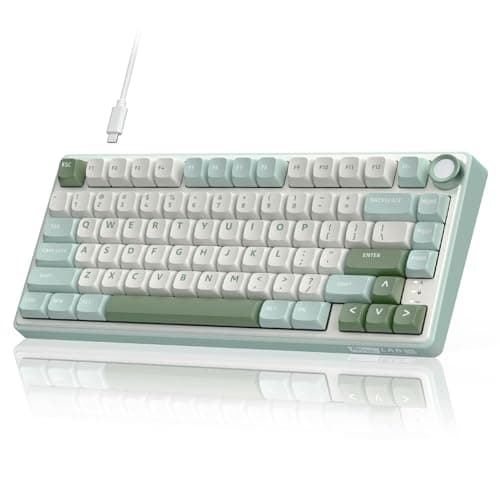
RK ROYAL KLUDGE RK ROYAL KLUDGE R75 (75% mechanical)
RK ROYAL KLUDGE R75 (75% mechanical)

A gasket-mounted 75% board with hot-swap switches and PBT keycaps — the gift for someone who types all day on whatever came in the box.

Best gift for a typist
8.8
$59.99Amazon
03
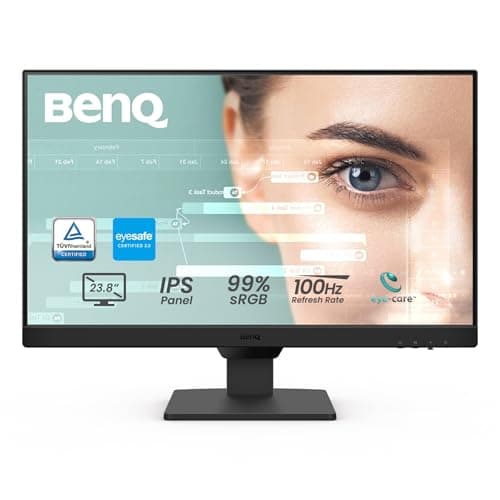
BenQ BenQ GW2490 24in IPS Monitor
BenQ GW2490 24in IPS Monitor

A second screen is the largest single upgrade to a laptop-only setup, and a 24-inch IPS panel with VESA holes is the version that still fits a small desk.

Biggest upgrade
8.7
$99.99Amazon
04
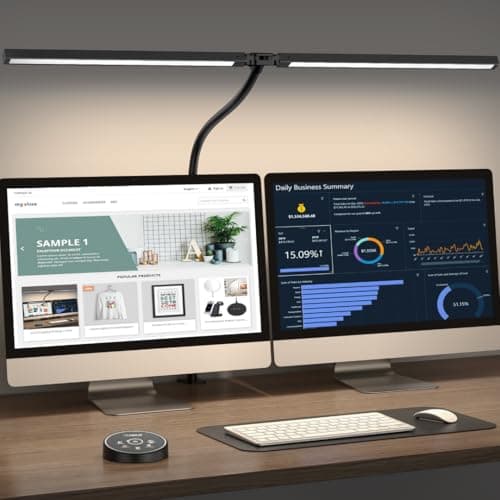
Pzloz Pzloz 24W Architect Clamp Lamp (dual-screen head)
Pzloz 24W Architect Clamp Lamp (dual-screen head)

24 watts on a long swing arm with a head wide enough to cover two screens, clamped to the desk edge so it costs no surface.

Best lamp gift
8.5
$69.49Amazon
05
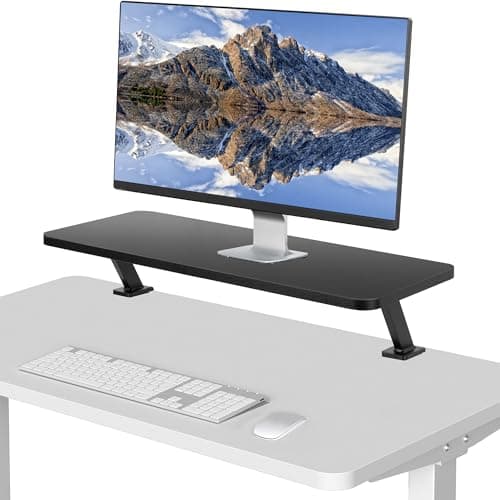
VIVO VIVO Clamp-On 26″ Monitor Shelf
VIVO Clamp-On 26″ Monitor Shelf

A 25.8-inch shelf that clamps to the back edge and lifts the monitor without standing on the desk — 44 lb rated, and the desk underneath stays usable.

Best for a shallow desk
8.4
$59.99Amazon

#ad · Live prices from the Amazon Product API, as of Sep 7, 2026. Where we have no verified live price we show none — we would rather leave a gap than print a number that has rotted.

In detail

The picks, in full

01
Xiaomi Xiaomi Computer Monitor Light Bar

Best overall gift

Xiaomi Computer Monitor Light Bar

Mount
Rests on monitor bezel
Color temp
2700–6500K
Optic
Asymmetric, no screen glare
Controls
On-bar touch
Desk footprint
None
9.0/10

The light bar to buy when the budget stretches: a published 2700-6500K range, on-bar touch control, and no glare thrown back at the screen.

Usefulness
8.8
Fits any desk
9.4
Giftability
9.2
Value
8.4

Pros

  • Publishes a real colour-temperature range rather than vague warm/cool modes
  • Asymmetric optic means the desk is lit and the panel is not
  • Sits on the bezel — no desk surface, no clamp, no compatibility question
  • The kind of object that gets noticed on a video call, which is half of a good gift

Cons

  • Costs roughly twice the entry-level bar for a refinement, not a transformation
  • Rests on the bezel by gravity, so it needs a reasonably flat top edge

Skip this if…

they already own any monitor light bar. This is an upgrade over a cheap one, not a new capability — buy the keyboard instead.

$67.99View on Amazon

Price as of Sep 7, 2026. Prices change — Amazon's is the one that counts.

#ad · we may earn a commission from this link to Xiaomi Computer Monitor Light Bar

02
RK ROYAL KLUDGE RK ROYAL KLUDGE R75 (75% mechanical)

Best gift for a typist

RK ROYAL KLUDGE R75 (75% mechanical)

Layout
75%
Mounting
Gasket
Switches
Hot-swappable, pre-lubed tactile
Keycaps
PBT, MDA profile
Extras
Volume knob, RGB
8.8/10

A gasket-mounted 75% board with hot-swap switches and PBT keycaps — the gift for someone who types all day on whatever came in the box.

Usefulness
8.4
Fits any desk
8.8
Giftability
9.4
Value
8.4

Pros

  • 75% layout keeps the arrows and function row while saving real desk width
  • Gasket mounting and pre-lubed switches at a price that used to buy neither
  • Hot-swap sockets mean the feel can be changed later without soldering
  • PBT keycaps do not go shiny the way cheap ABS does

Cons

  • Wired, so it adds a cable to a desk you may be trying to clear
  • Mechanical boards are audible — a poor choice for a shared room or an open call schedule

Skip this if…

they take calls in the same room as someone else. Tactile switches carry, and a quiet slim board is the kinder gift.

$59.99View on Amazon

Price as of Sep 7, 2026. Prices change — Amazon's is the one that counts.

#ad · we may earn a commission from this link to RK ROYAL KLUDGE R75 (75% mechanical)

03
BenQ BenQ GW2490 24in IPS Monitor

Biggest upgrade

BenQ GW2490 24in IPS Monitor

Size
24 in
Panel
IPS, 1920 × 1080, 100 Hz
Mounting
VESA wall/arm compatible
Bezel
Thin
Audio
Built-in speakers
8.7/10

A second screen is the largest single upgrade to a laptop-only setup, and a 24-inch IPS panel with VESA holes is the version that still fits a small desk.

Usefulness
9.2
Fits any desk
8.4
Giftability
8.4
Value
8.8

Pros

  • 24 in is the size that fits a 40-inch desk at a sane viewing distance
  • VESA holes mean it can move onto an arm later and give the depth back
  • IPS panel — colour and viewing angles hold up next to a laptop screen
  • Built-in speakers cover calls without adding another object to the desk

Cons

  • The stand base needs roughly 8–10 in of desk depth until it goes on an arm
  • 1080p at 24 in is standard rather than sharp; text is not Retina-crisp

Skip this if…

they already run an external monitor, or their desk is under 20 inches deep and they have no arm. Check both before buying a screen for someone.

$99.99View on Amazon

Price as of Sep 7, 2026. Prices change — Amazon's is the one that counts.

#ad · we may earn a commission from this link to BenQ GW2490 24in IPS Monitor

04
Pzloz Pzloz 24W Architect Clamp Lamp (dual-screen head)

Best lamp gift

Pzloz 24W Architect Clamp Lamp (dual-screen head)

Power
24 W
Color modes
5
Mount
Clamp
Head
Wide, dual-screen coverage
Adjustment
Flexible swing arm
8.5/10

24 watts on a long swing arm with a head wide enough to cover two screens, clamped to the desk edge so it costs no surface.

Usefulness
8.8
Fits any desk
8.2
Giftability
8.8
Value
8

Pros

  • A wide head covers a two-monitor desk from one lamp instead of two
  • Clamps on, so the light costs nothing on a surface that has no room
  • 24 W is genuinely bright — enough to work by with the ceiling light off
  • Reversible install for a rental; it unclamps at move-out

Cons

  • Needs a free desk edge with clearance behind it, like every clamp
  • A large lamp head is visually dominant on a small desk

Skip this if…

their desk sits flush against a wall with a hutch or shelf above. A light bar is the no-clearance answer.

$69.49View on Amazon

Price as of Sep 7, 2026. Prices change — Amazon's is the one that counts.

#ad · we may earn a commission from this link to Pzloz 24W Architect Clamp Lamp (dual-screen head)

05
VIVO VIVO Clamp-On 26″ Monitor Shelf

Best for a shallow desk

VIVO Clamp-On 26″ Monitor Shelf

Shelf size
25.8 × 10.2 in
Clearance below
5.1 in
Capacity
44 lb
Mount
Two C-clamps, desks up to 1.2 in
Uses desk surface
None
8.4/10

A 25.8-inch shelf that clamps to the back edge and lifts the monitor without standing on the desk — 44 lb rated, and the desk underneath stays usable.

Usefulness
9
Fits any desk
7.6
Giftability
8
Value
8.8

Pros

  • Clamps rather than stands, so the desk under the monitor stays available
  • 5.1 in of clearance underneath swallows a keyboard when it is not in use
  • 44 lb rating carries a monitor plus the usual pile on top of a riser
  • A cheaper route to a raised screen than an arm, with no VESA requirement

Cons

  • Clamps fit desks up to 1.2 in only — thicker tops are out, and that is a narrow window
  • Fixed height, unlike an arm

Skip this if…

you have not measured their desk top. 1.2 in is a tighter limit than most clamps and it excludes plenty of thick-topped desks.

$59.99View on Amazon

Price as of Sep 7, 2026. Prices change — Amazon's is the one that counts.

#ad · we may earn a commission from this link to VIVO Clamp-On 26″ Monitor Shelf

At this budget, duplication is the risk

Under $25 a gift fails because it does not fit. Between $50 and $100 it fails because they already own one. A monitor, a keyboard, a dock and a light bar are all things a person who works from home may have bought themselves in the last year, so the useful question is not “what is good?” but “what is missing?”

GiftCheck before buyingLikely already owned?
Monitor light barNothing — fits any monitorRarely
Mechanical keyboardWhether they share the roomSometimes
24-inch monitorDesk depth, and that they have noneOften
Architect clamp lampFree desk edge, rear clearanceRarely
Clamp-on monitor shelfDesk top no thicker than 1.2 inRarely

Why a monitor is ranked third, not first

A second screen changes a laptop-only day more than anything else on this page. It is ranked third because it is the easiest gift to get wrong: a 24-inch panel on its own stand wants roughly 8–10 inches of desk depth for the base, which a 16-inch-deep apartment desk does not have, and plenty of remote workers already have a screen. If you know both answers — no monitor, desk deep enough — move it to first. The sizing math is in monitor size and viewing distance for a small desk, and if the desk is too shallow, an arm fixes it: see best monitors for a small desk.

Keyboards and shared rooms

A mechanical keyboard is a lovely gift and an antisocial object. Tactile switches are clearly audible on a call and through a thin apartment wall, so if the person you are buying for works in a bedroom next to a sleeping partner or takes calls all day in a shared studio, buy the quiet slim combo from the under-$50 list instead. The full compact-board ranking, including quieter options, is in best compact keyboards.

Spending it on the desk instead

One alternative worth naming: at this budget you can buy a genuinely decent compact desk, not just an accessory for one. If the person you are buying for is working off a dining table or a bedside cabinet, that is the bigger gift — small desks under $100 is the honest starting point, and how to set up a desk in a small apartment is the order to buy things in.

How we picked

We do not run a testing lab

We compiled the published manufacturer specifications, did the footprint and clearance math ourselves, and read aggregated owner reviews, then scored each product against a published rubric. The scores are judgments from documented research — they are not measurements we took, because we do not have a lab and we are not going to pretend we do. Every spec traces back to a listing or manual named in Sources.

Questions

Frequently asked

What is a good work-from-home gift under $100?
A monitor light bar is the safest — it fits any monitor, needs no measurements and few people own one. A mechanical keyboard is the most personal, a 24-inch monitor is the biggest upgrade if they do not already have one, and a clamp lamp is the best fix for a desk still lit by the ceiling.
Should I buy someone a monitor as a gift?
Only if you know they do not have one and their desk is deep enough. A 24-inch monitor on its own stand needs roughly 8–10 inches of desk depth for the base, which rules out the shallow desks common in apartments unless they also have a monitor arm. The sizing rules are in monitor size and viewing distance.
Is a mechanical keyboard a good gift for someone who works from home?
For a solo home office, yes — it is the object they touch most and rarely the one they upgrade. For anyone working in a shared room, a studio, or taking calls all day near someone else, it is a mistake: tactile switches are audible on a call and through a wall. A slim wireless board is the considerate version.
What is the difference between a $30 and a $70 monitor light bar?
Mostly published colour range and control. The cheaper bars describe warm and cool “modes”; the pricier ones publish an actual range, hold colour more consistently and offer better dimming. The asymmetric optic that keeps light off the screen is present on both — that is the feature that defines the category, and it is explained in monitor light bar vs desk lamp.
What if I do not know their desk at all?
Buy from the top of this page rather than the bottom. The light bar and the keyboard fit any setup; the clamp shelf and the clamp lamp both have desk-edge requirements, and the shelf’s 1.2-inch clamp limit is tight. When in doubt, the whole under-$25 list is chosen for fitting everything.
Is it better to buy one $100 gift or several small ones?
One good object usually wins, with one exception: if they are setting up a desk from scratch, a bundle of small things — light, cable tidy, headphone mount, power strip — completes a setup that a single expensive item does not. Our small-apartment setup guide lists what a complete build actually needs, in order.

Keep reading

Receipts

Sources

We do not run a testing lab, and we do not pretend to. Specifications come from the manufacturer or retailer listing; the footprint and clearance math is ours and reproducible. Where we could not verify a number, we say so on the page rather than quietly leaving it out. Read our full method.