Skip to content
Desk & Dowel

HUB 03 · Desk Lighting

The Best Desk Lamps for Eye Strain

The fix is contrast, glare and flicker — three things a lamp can genuinely change. Five picks ranked on the published specs that matter, and what a lamp cannot do.

By Stephen V.Updated How we pick
#ad

We earn a commission when you buy through our Amazon links, at no extra cost to you. It never affects our rankings, and we say so when the cheaper product is the better buy. How this works.

Almost everyone who describes tired eyes at a desk is describing the same physical situation: a bright screen surrounded by a much darker room. Your pupils spend the day adjusting between the two, and the muscles that do it get tired. That is the strain, and it is a lighting problem before it is a screen problem — which is good news, because it is fixable for the price of a lamp.

Three lamp specifications address it directly. Where the light goes: a lamp that puts light on the desk without reflecting off the screen raises the surrounding brightness and lowers the contrast ratio your eyes have to bridge. Flicker: cheap LED drivers pulse at mains frequency, which some people perceive as fatigue rather than as visible flicker. Color rendering: a high-CRI light makes edges and text easier to resolve, so you squint less.

What a lamp cannot fix is the rest of it — screen distance, screen brightness, and the fact that you have not blinked properly since lunch. We cover those below, because the honest answer is that a lamp is one of four things and not the whole answer. Our pick is the BenQ ScreenBar Halo 2, which is the only format here that puts light on the desk and none of it on the screen.

The short answer

Quick picks

#ProductBest forScorePrice
01
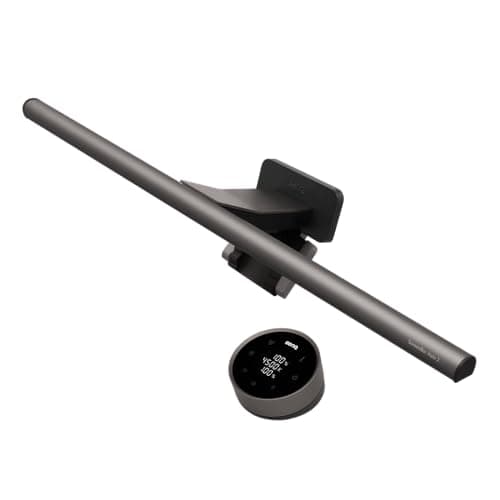
BenQ BenQ ScreenBar Halo 2
BenQ ScreenBar Halo 2

The format that beats every desk lamp on this specific problem: an asymmetric optic that throws light down onto the desk and none of it forward onto the screen, plus a rear glow that lifts the wall behind the monitor.

Best overall
9.0
$199.00Amazon
02
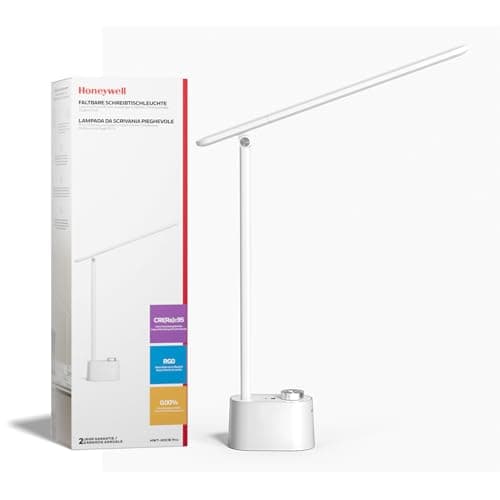
Honeywell Honeywell H01 Pro Sunturalux Full-Spectrum Desk Lamp
Honeywell H01 Pro Sunturalux Full-Spectrum Desk Lamp

A full-spectrum compact lamp from a maker that publishes its optical claims — the conventional desk lamp to buy if the light bar format does not suit your setup.

Best conventional lamp
8.1
$41.99Amazon
03
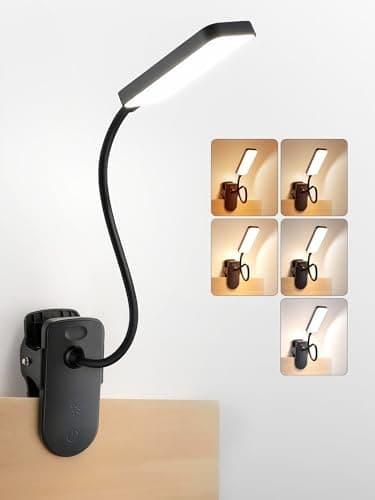
ReinHoo ReinHoo Rechargeable Clip-On Light (CRI ≥ 90)
ReinHoo Rechargeable Clip-On Light (CRI ≥ 90)

The best published color rendering in our lighting picks at CRI ≥ 90, on a clip that costs no desk space and needs no outlet nearby.

Best color rendering
8.7
$19.99Amazon
04
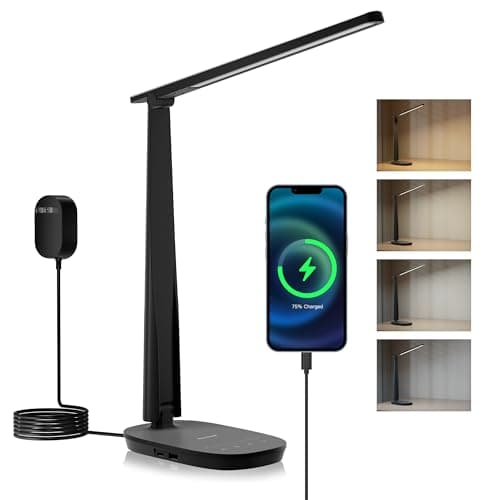
Honeywell Honeywell HWT-H2 LED Desk Lamp
Honeywell HWT-H2 LED Desk Lamp

The value pick from the same maker: an adjustable LED desk lamp that covers the basics — even output, dimming, and a head that can be aimed away from the screen.

Best value
7.8
$33.99Amazon
05
AILBTON AILBTON LED Architect Clamp Lamp
AILBTON LED Architect Clamp Lamp

A clamped architect head with dimming and color tuning, which lets you set the lamp just above the screen's brightness rather than fighting it — the practical anti-contrast setup.

Best adjustable clamp
8.6
$31.57Amazon

#ad · Live prices from the Amazon Product API, as of Sep 7, 2026. Where we have no verified live price we show none — we would rather leave a gap than print a number that has rotted.

In detail

The picks, in full

01
BenQ BenQ ScreenBar Halo 2

Best overall

BenQ ScreenBar Halo 2

Format
Monitor light bar
Optics
Asymmetric — no screen glare
Backlight
Rear ambient glow
Desk footprint
None
Control
Wireless dial
9.0/10

The format that beats every desk lamp on this specific problem: an asymmetric optic that throws light down onto the desk and none of it forward onto the screen, plus a rear glow that lifts the wall behind the monitor.

Glare control
9.8
Contrast fix
9.6
Color quality
8.8
Footprint saved
9.8
Value
6.8

Pros

  • Asymmetric optic is the only design that guarantees no reflection on the panel
  • Rear glow raises the wall brightness behind the screen, which is the real contrast fix
  • Occupies zero desk, which on a 40in top is the second reason to buy it
  • Auto-dimming responds to ambient light so the setting stays right all day

Cons

  • The most expensive pick here by a distance
  • Needs a monitor with a top bezel it can sit on — no good for a laptop screen alone

Skip this if…

you work on paper as much as on screen. A light bar lights the desk in front of the monitor well and the far corners poorly — a swing-arm lamp covers a drawing board better.

$199.00View on Amazon

Price as of Sep 7, 2026. Prices change — Amazon's is the one that counts.

#ad · we may earn a commission from this link to BenQ ScreenBar Halo 2

02
Honeywell Honeywell H01 Pro Sunturalux Full-Spectrum Desk Lamp

Best conventional lamp

Honeywell H01 Pro Sunturalux Full-Spectrum Desk Lamp

Spectrum
Full spectrum
Format
Compact desk lamp
Source
Integrated LED
Placement
Free-standing
Range
H01 Pro series
8.1/10

A full-spectrum compact lamp from a maker that publishes its optical claims — the conventional desk lamp to buy if the light bar format does not suit your setup.

Glare control
8
Contrast fix
8.6
Color quality
9.2
Footprint saved
6.4
Value
8.4

Pros

  • Full-spectrum output renders text and color cleanly
  • Compact body suits a desk that has no room for an architect lamp
  • Honeywell publishes more optical detail than most in this price band
  • Works as a room light as well as a task light in a small room

Cons

  • Stands on the desk, so it costs surface a clamp lamp would not
  • A conventional head can reflect on a glossy screen if badly aimed

Skip this if…

your desk is under about 36 inches wide. On a very small top, take a clamp or light-bar format and keep the surface.

$41.99View on Amazon

Price as of Sep 7, 2026. Prices change — Amazon's is the one that counts.

#ad · we may earn a commission from this link to Honeywell H01 Pro Sunturalux Full-Spectrum Desk Lamp

03
ReinHoo ReinHoo Rechargeable Clip-On Light (CRI ≥ 90)

Best color rendering

ReinHoo Rechargeable Clip-On Light (CRI ≥ 90)

Color rendering
CRI ≥ 90
Output
48 LEDs, up to 450 lm
Power
4000 mAh, cordless
Mount
Clip
Gooseneck
11.8 in
8.7/10

The best published color rendering in our lighting picks at CRI ≥ 90, on a clip that costs no desk space and needs no outlet nearby.

Glare control
8.4
Contrast fix
7
Color quality
9.6
Footprint saved
9.6
Value
9

Pros

  • CRI ≥ 90 published — most lamps in this price band publish nothing
  • Clips to the edge, so nothing stands on the desk
  • Cordless, which matters when the desk is nowhere near an outlet
  • 45 color-and-brightness combinations with memory

Cons

  • 450 lumens is task light, not room light — it will not lift a dark room on its own
  • Needs a clampable edge

Skip this if…

the dark-room contrast is your main complaint. A 450-lumen clip light fixes the page, not the room — pair it with a light bar or a brighter lamp.

$19.99View on Amazon

Price as of Sep 7, 2026. Prices change — Amazon's is the one that counts.

#ad · we may earn a commission from this link to ReinHoo Rechargeable Clip-On Light (CRI ≥ 90)

04
Honeywell Honeywell HWT-H2 LED Desk Lamp

Best value

Honeywell HWT-H2 LED Desk Lamp

Source
Integrated LED
Format
Adjustable desk lamp
Control
Dimming
Placement
Free-standing
Brand series
HWT-H2
7.8/10

The value pick from the same maker: an adjustable LED desk lamp that covers the basics — even output, dimming, and a head that can be aimed away from the screen.

Glare control
7.8
Contrast fix
8
Color quality
7.2
Footprint saved
6.6
Value
9.2

Pros

  • Dimming means you can match the lamp to the screen rather than overpower it
  • Adjustable head lets you aim light away from the panel
  • Cheapest route to an even, driver-controlled LED source
  • Small enough for a bedside or a dorm desk as well

Cons

  • No published CRI figure
  • Base occupies desk surface

Skip this if…

color accuracy matters for your work. Where CRI is not published, assume it is unremarkable — the ReinHoo publishes ≥ 90.

$33.99View on Amazon

Price as of Sep 7, 2026. Prices change — Amazon's is the one that counts.

#ad · we may earn a commission from this link to Honeywell HWT-H2 LED Desk Lamp

05
AILBTON AILBTON LED Architect Clamp Lamp

Best adjustable clamp

AILBTON LED Architect Clamp Lamp

Mount
Clamp
Arm
Adjustable swing arm
Control
Dimming + color tuning
Desk footprint
None
Use
Office / home desk
8.6/10

A clamped architect head with dimming and color tuning, which lets you set the lamp just above the screen's brightness rather than fighting it — the practical anti-contrast setup.

Glare control
8.6
Contrast fix
8.8
Color quality
7.4
Footprint saved
9.4
Value
8.6

Pros

  • Dimming plus color tuning is the combination that lets you match the screen
  • Clamped, so no desk surface is lost
  • Swing arm aims light across the desk rather than at your eyes
  • Bright enough to light a small room, not just the desk

Cons

  • No published CRI or flicker figure
  • Clamp needs a desk edge within its jaw range

Skip this if…

your desk is glass or has a lipped edge. Check the jaw range first — the same measurement that decides a monitor arm.

$31.57View on Amazon

$39.9921% off

Price as of Sep 7, 2026. Prices change — Amazon's is the one that counts.

#ad · we may earn a commission from this link to AILBTON LED Architect Clamp Lamp

The contrast problem, and the fix

A monitor at a comfortable brightness in a dark room can be many times brighter than the wall behind it. Your pupils cannot be two sizes at once, so they settle somewhere between, and the constant readjustment is what people report as tired, aching eyes by mid-afternoon. The correction is not to dim the screen into uselessness — it is to raise everything else. Light the desk, light the wall behind the monitor, and the ratio your eyes bridge drops sharply.

This is why the BenQ ranks first here despite being a light bar rather than a lamp: its rear glow lights the wall behind the screen, which is the single most effective change you can make. A cheaper version of the same idea is a warm LED stripfixed behind the monitor or under a shelf — bias lighting costs very little and addresses exactly this.

Flicker: what to look for when nothing is published

LEDs are driven by a converter, and cheap converters let mains ripple through as a pulsing output. Most people cannot see it, but sustained exposure to flicker at these frequencies is associated in the published literature with headaches and visual fatigue. Almost no budget listing publishes a flicker figure, so use two proxies. First, prefer lamps with continuous dimming over ones with a few fixed steps — smooth dimming usually implies a constant-current driver rather than crude switching. Second, use the camera on your phone: point it at the lamp at its lowest setting and look for banding on the preview. It is a rough test, not a measurement, but it reliably catches the worst offenders.

What the lamp cannot do

Cause of strainFixed by a lamp?What actually fixes it
Dark room, bright screenYesTask light plus bias light behind the monitor
Reflections on the panelPartlyAim the lamp; move the desk out of a window's line
Screen too closeNoCorrect viewing distance — an arm buys the depth back
Not blinking enoughNoBreaks; the 20-20-20 habit
Uncorrected visionNoAn optometrist

Screen distance is the one small-desk buyers most often get wrong, because a shallow desk physically forces the monitor closer than it should be. Our guide on monitor size and viewing distance works out what depth each screen size needs, and a monitor armis often the only way to find it on a 20-inch-deep top — pushing the screen back over the desk edge is exactly what an arm makes possible.

Color temperature through the day

Cool light around 5000–6000K keeps you alert and suits focused daytime work. Warm light around 2700–3000K is more comfortable in the evening and less likely to interfere with winding down. That is why four of the five picks here are tunable; a lamp you set once is a lamp that is wrong for half the day. The full explanation of which number to pick and when is in our color temperature guide.

Brightness: enough, not more

Over-lighting a desk is its own kind of strain. The target is a desk surface bright enough that the screen no longer dominates — not a lamp that makes you squint. Our lumens guide sets out the ranges by task, and the practical rule is simple: dim the lamp until the screen and the desk look like they belong in the same room. That point is usually lower than people expect.
How we picked

We do not run a testing lab

We compiled the published manufacturer specifications, did the footprint and clearance math ourselves, and read aggregated owner reviews, then scored each product against a published rubric. The scores are judgments from documented research — they are not measurements we took, because we do not have a lab and we are not going to pretend we do. Every spec traces back to a listing or manual named in Sources.

Questions

Frequently asked

What kind of desk lamp is best for eye strain?
One that raises the brightness of everything around the screen without reflecting off it. A monitor light bar with an asymmetric optic does this by design; a clamp or swing-arm lamp aimed across the desk from the side does it nearly as well. Dimming and adjustable color temperature matter, because a lamp that is right at 9am is wrong at 9pm.
Does a desk lamp actually help with eye strain?
It helps with the largest single cause, which is the contrast between a bright screen and a dark room. It does nothing for the other causes — screen distance, blink rate and uncorrected vision. Treat it as one of four changes rather than the fix, and pair it with correct viewing distance.
Is blue light the reason my eyes hurt at a desk?
Probably not on its own. The dominant, well-documented mechanism is contrast: a bright display in a dim room keeps your pupils adjusting all day. Raising ambient and task light addresses that directly, which is why the lamps here are ranked on where their light goes rather than on blue-light filtering claims.
What is bias lighting and does it help?
Bias lighting is a light placed behind the monitor that illuminates the wall, so the area surrounding the screen is not dark. It reduces the contrast ratio your eyes have to bridge and is one of the cheapest changes available — a warm LED strip behind the screen costs very little. The BenQ pick above builds the same idea into the light bar.
How bright should a desk lamp be to avoid eye strain?
Bright enough that the screen stops being the brightest thing in your field of view, and no brighter. In practice that means dimming the lamp until the desk and the display look like they belong in the same room. Our lumens guide gives the ranges by task, but the comparison against your own screen is the check that matters.

Keep reading

Receipts

Sources

We do not run a testing lab, and we do not pretend to. Specifications come from the manufacturer or retailer listing; the footprint and clearance math is ours and reproducible. Where we could not verify a number, we say so on the page rather than quietly leaving it out. Read our full method.