
Skip to content
Desk & Dowel

HUB 02 · Monitor Arms & Mounts

The Best Monitor Arms for a Small Desk

Six clamp-on monitor arms that free a small desk, ranked by motion, build, fit range and value — with live prices and the clamp facts that decide the fit.

By Stephen V.Updated How we pick
#ad

We earn a commission when you buy through our Amazon links, at no extra cost to you. It never affects our rankings, and we say so when the cheaper product is the better buy. How this works.

The best monitor arm for a small desk is the one that buys back the most surface for the least fuss — a clamp that grips the back edge, lifts the screen off the desk, and leaves the space under it for a keyboard, a notebook, or nothing at all. On a 16″-deep top, that reclaimed depth is the difference between a workspace and a laptop shelf.

Our pick for most people is the Amazon Basics gas-spring single arm: a full-motion, no-drill clamp that fits the widest range of small desks and costs less than the surface it frees. If you want an arm to outlast the desk, the Ergotron LX is the premium standard. The Humanscale M2.1 is the one to buy on looks and mechanism, the VIVO ultrawide holds a 38″ panel, and the HUANUO dual stacks two screens on one clamp.

We do not run a lab; every spec below traces to the manufacturer listing, and the scores are editorial judgments about motion, build, fit range and value for a small desk. For the desk itself, see the best small desks; to run one screen or two, start with single arms or dual arms.

The short answer

Quick picks

#ProductBest forScorePrice
01
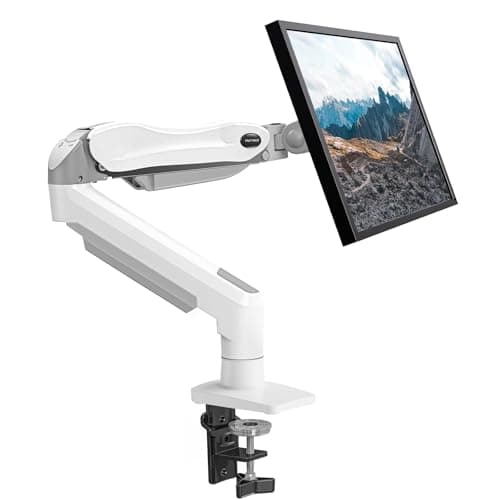
Amazon Basics Amazon Basics Single Monitor Arm (Gas Spring)
Amazon Basics Single Monitor Arm (Gas Spring)

The most arm for the fewest dollars and no holes in anything: a full-motion gas-spring clamp that fits the widest range of small desks and frees the depth a stand would eat.

Best overall value
8.9
$29.99Amazon
02
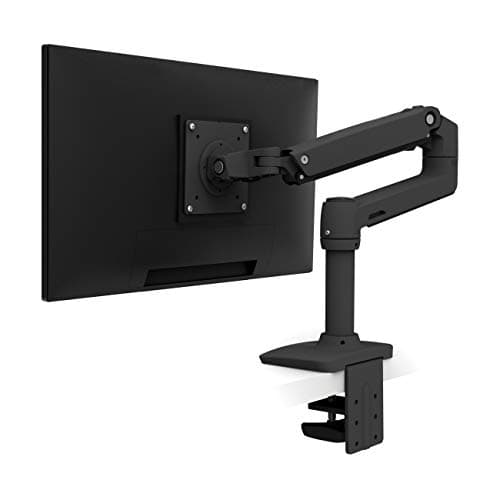
Ergotron Ergotron LX Desk Mount Monitor Arm
Ergotron LX Desk Mount Monitor Arm

The arm that outlasts the desk. Ergotron's Constant Force lift glides one-handed, takes the heaviest screens here, and is the one still working after three moves — you pay for it.

Best premium
8.8
$190.00Amazon
03
HUANUO HUANUO Single Monitor Mount (Gas Spring)
HUANUO Single Monitor Mount (Gas Spring)

The budget gas-spring pick: the same lift-with-one-finger motion as the pricier arms and a wide 13–32 in fit range, in a build that is lighter-duty but fine for a single monitor.

Best budget gas-spring
8.4
$37.98Amazon
04
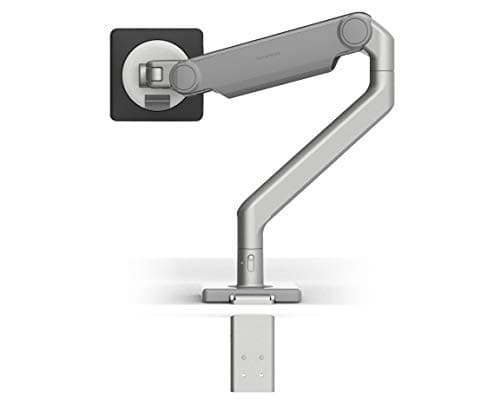
Humanscale Humanscale M2.1 Monitor Arm
Humanscale M2.1 Monitor Arm

The one to buy on mechanism and looks. Humanscale's weight-tuned mechanical spring has no gas cylinder to leak, and the arm reads as furniture rather than office kit — at a furniture price.

Best design/build
8.6
$250.00Amazon
05
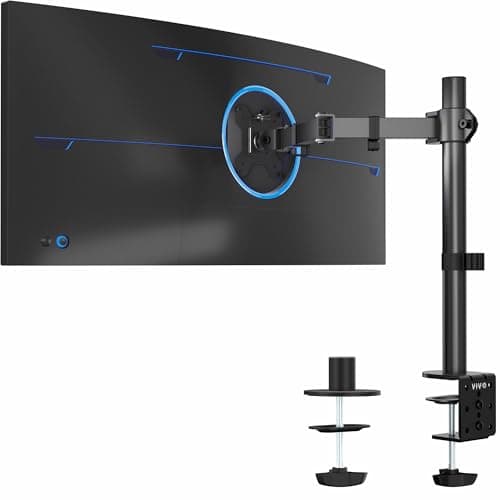
VIVO VIVO Single Ultrawide Monitor Arm
VIVO Single Ultrawide Monitor Arm

The arm for a big panel on a small desk: rated to a 38 in ultrawide and up to ~26 lb, so the one screen that replaces two sits on a single clamped edge.

Best for ultrawide
8.5
$29.99Amazon
06
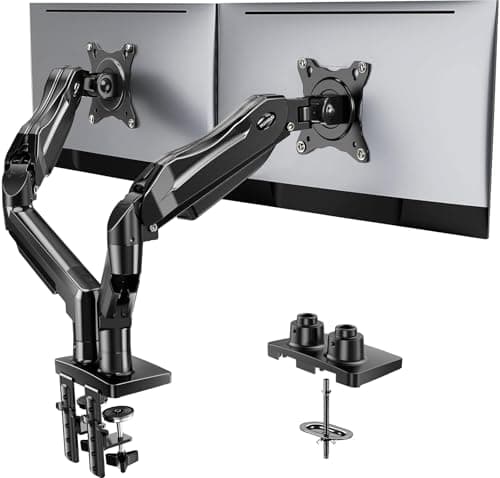
HUANUO HUANUO Dual Monitor Stand
HUANUO Dual Monitor Stand

Two screens on one clamp for the price of a decent single arm. Independent gas-spring lift on each side, a wide fit range, and the smallest-footprint way to run dual monitors.

Best dual
8.2
$59.99Amazon

#ad · Live prices from the Amazon Product API, as of Jul 24, 2026. Where we have no verified live price we show none — we would rather leave a gap than print a number that has rotted.

In detail

The picks, in full

01
Amazon Basics Amazon Basics Single Monitor Arm (Gas Spring)

Best overall value

Amazon Basics Single Monitor Arm (Gas Spring)

VESA
75×75 / 100×100 mm
Mount
C-clamp + grommet
Fits
Up to 32 in
Weight
Up to ~17.6 lb
Motion
Gas spring
8.9/10

The most arm for the fewest dollars and no holes in anything: a full-motion gas-spring clamp that fits the widest range of small desks and frees the depth a stand would eat.

Motion
8.8
Build
8.6
Fit range
8.8
Value
9.4

Pros

  • Full-motion gas spring lifts, tilts, swivels and rotates
  • C-clamp or grommet mount means no drilling for renters
  • Wide fit range suits most single monitors up to 32 in
  • Costs less than the desk depth it frees

Cons

  • Gas tension needs re-setting if you swap to a much lighter screen
  • Plastic covers feel less premium than the Ergotron

Skip this if…

your monitor is heavier than the stated range — an over-loaded gas spring drifts downward. Size the arm to the panel, or step up to the Ergotron LX.

$29.99View on Amazon

Price as of Jul 24, 2026. Prices change — Amazon's is the one that counts.

#ad · we may earn a commission from this link to Amazon Basics Single Monitor Arm (Gas Spring)

02
Ergotron Ergotron LX Desk Mount Monitor Arm

Best premium

Ergotron LX Desk Mount Monitor Arm

VESA
75×75 / 100×100 mm
Mount
C-clamp + grommet
Fits
Up to 34 in
Weight
7–25 lb
Motion
Constant Force spring
8.8/10

The arm that outlasts the desk. Ergotron's Constant Force lift glides one-handed, takes the heaviest screens here, and is the one still working after three moves — you pay for it.

Motion
9.2
Build
9.4
Fit range
9
Value
7.6

Pros

  • Constant Force lift is smooth and holds position for years
  • Handles the heaviest screens here, up to 25 lb
  • All-metal build survives repeated re-mounting across moves
  • Clamp or grommet mount, tool-free height on the pole

Cons

  • Priciest single arm in the roundup
  • Tension adjustment needs the included hex key, not one-handed

Skip this if…

you want the lowest price or you will replace the setup in a year — the LX earns its cost over the long haul, not on day one. The Amazon Basics arm does the same job for less.

$190.00View on Amazon

$219.0013% off

Price as of Jul 24, 2026. Prices change — Amazon's is the one that counts.

#ad · we may earn a commission from this link to Ergotron LX Desk Mount Monitor Arm

03
HUANUO HUANUO Single Monitor Mount (Gas Spring)

Best budget gas-spring

HUANUO Single Monitor Mount (Gas Spring)

VESA
75×75 / 100×100 mm
Mount
C-clamp + grommet
Fits
13–32 in
Weight
Up to ~19.8 lb
Motion
Gas spring
8.4/10

The budget gas-spring pick: the same lift-with-one-finger motion as the pricier arms and a wide 13–32 in fit range, in a build that is lighter-duty but fine for a single monitor.

Motion
8.4
Build
7.8
Fit range
8.4
Value
9

Pros

  • One-finger gas-spring height, same idea as pricier arms
  • Wide 13–32 in fit range for a single monitor
  • C-clamp or grommet, no drilling
  • Strong value for a full-motion arm

Cons

  • Lighter-duty build than the Ergotron or Humanscale
  • Gas spring can need re-tensioning out of the box

Skip this if…

you run a heavy 32 in panel at the top of the range — a sturdier arm holds a big screen more confidently. For a normal single monitor it is plenty.

$37.98View on Amazon

$49.9924% off

Price as of Jul 24, 2026. Prices change — Amazon's is the one that counts.

#ad · we may earn a commission from this link to HUANUO Single Monitor Mount (Gas Spring)

04
Humanscale Humanscale M2.1 Monitor Arm

Best design/build

Humanscale M2.1 Monitor Arm

VESA
75×75 / 100×100 mm
Mount
Clamp or bolt-through
Fits
Up to 32 in
Weight
Up to ~20 lb
Motion
Mechanical spring
8.6/10

The one to buy on mechanism and looks. Humanscale's weight-tuned mechanical spring has no gas cylinder to leak, and the arm reads as furniture rather than office kit — at a furniture price.

Motion
9
Build
9.6
Fit range
8.4
Value
7.4

Pros

  • Weight-tuned mechanical spring, no gas cylinder to leak
  • Looks like furniture, not office hardware
  • Clean, minimal single-pivot motion
  • Clamp or bolt-through mount options

Cons

  • Furniture-grade price for a single arm
  • Set-weight mechanism is fiddlier to re-tune than a knob

Skip this if…

you want maximum reach and rotation for the money — the M2.1 is about elegance and mechanism, not the widest range of motion. The Ergotron articulates further.

$250.00View on Amazon

$356.0030% off

Price as of Jul 24, 2026. Prices change — Amazon's is the one that counts.

#ad · we may earn a commission from this link to Humanscale M2.1 Monitor Arm

05
VIVO VIVO Single Ultrawide Monitor Arm

Best for ultrawide

VIVO Single Ultrawide Monitor Arm

VESA
75×75 / 100×100 mm
Mount
C-clamp + grommet
Fits
13–38 in (ultrawide)
Weight
Up to ~26.4 lb
Motion
Gas spring
8.5/10

The arm for a big panel on a small desk: rated to a 38 in ultrawide and up to ~26 lb, so the one screen that replaces two sits on a single clamped edge.

Motion
8.2
Build
8
Fit range
9.4
Value
8.4

Pros

  • Rated for ultrawide panels up to 38 in
  • Higher weight ceiling, around 26 lb
  • C-clamp or grommet mount
  • Gas spring holds a big screen at any height

Cons

  • Overkill for a standard 24–27 in monitor
  • Long arm needs desk depth behind the clamp to swing

Skip this if…

your monitor is a normal 24–27 in screen — you are paying for reach and load you will not use. A standard single arm is cheaper and tidier.

$29.99View on Amazon

$34.9914% off

Price as of Jul 24, 2026. Prices change — Amazon's is the one that counts.

#ad · we may earn a commission from this link to VIVO Single Ultrawide Monitor Arm

06
HUANUO HUANUO Dual Monitor Stand

Best dual

HUANUO Dual Monitor Stand

VESA
75×75 / 100×100 mm
Mount
C-clamp + grommet
Fits
13–27 in each
Weight
Up to ~17.6 lb each
Motion
Gas spring, per arm
8.2/10

Two screens on one clamp for the price of a decent single arm. Independent gas-spring lift on each side, a wide fit range, and the smallest-footprint way to run dual monitors.

Motion
8
Build
7.8
Fit range
8.2
Value
8.8

Pros

  • Two independent gas-spring arms on one clamp
  • Smallest-footprint way to run two monitors
  • Wide fit range on each side
  • Much cheaper than two separate single arms

Cons

  • Two screens still need roughly 47 in of desk width
  • Shared clamp means one point of failure for both

Skip this if…

your two monitors are very different sizes and weights that fight the shared pole — mismatched screens sit better on two separate single arms.

$59.99View on Amazon

$69.9914% off

Price as of Jul 24, 2026. Prices change — Amazon's is the one that counts.

#ad · we may earn a commission from this link to HUANUO Dual Monitor Stand

How to choose a monitor arm for a small desk

Work back from the desk, not the monitor. One:measure the back-edge thickness where the clamp bites — most C-clamps take roughly 0.4–3.4″, and a thick or bevelled edge is the usual reason a clamp will not close. Two:check the VESA pattern (75×75 or 100×100 mm) and your screen’s weight against the arm’s range; a gas-spring arm tuned for a light panel drifts up, a heavy one sags down. Three: decide gas spring or tension. Gas spring glides to any height one-handed; tension arms cost less and hold a set position. For a renter, favor a no-drill clamp over a bolt-through grommet mount.

Free the surface, then light it

The whole point of an arm on a small desk is the space underneath, so keep it clear: route the cable down the arm’s channel and tidy the slack with desk cable management, then light the screen with a monitor light barthat clamps to the top bezel and claims no desk at all. An arm, a light bar and a cable clip turn a 16″ top into a real workstation without adding a single square inch of clutter.

How we picked

We do not run a testing lab

We compiled the published manufacturer specifications, did the footprint and clearance math ourselves, and read aggregated owner reviews, then scored each product against a published rubric. The scores are judgments from documented research — they are not measurements we took, because we do not have a lab and we are not going to pretend we do. Every spec traces back to a listing or manual named in Sources.

Questions

Frequently asked

Do monitor arms save space on a small desk?
Yes — that is their main job here. A monitor stand sits on the desk and eats 8–10″ of depth; an arm clamps to the back edge and lifts the screen off the surface entirely, giving that depth back for a keyboard or a laptop. On a shallow small desk the reclaimed space is the point.
Will a monitor arm clamp fit my desk?
Most C-clamps fit a back edge between about 0.4 and 3.4 inches thick with a flat underside. Glass tops, thick bevelled edges and floating shelves are where clamps struggle — measure the edge before you buy, and check for a grommet-mount option if the clamp won't fit.
Gas spring or tension arm — which is better?
Gas-spring arms move to any height with a light touch and re-level quickly when you swap monitors; tension arms cost less and are happiest set once and left. For a screen you nudge between sitting and standing, gas spring is worth it; for a fixed position, tension is fine.
What VESA size do monitor arms use?
Nearly all use 75×75 or 100×100 mm, the two standard patterns, and most arms include both hole spacings on the plate. A monitor without VESA holes needs a clamp-on adapter bracket; check your screen's spec sheet for the pattern before buying.

Keep reading

Receipts

Sources

We do not run a testing lab, and we do not pretend to. Specifications come from the manufacturer or retailer listing; the footprint and clearance math is ours and reproducible. Where we could not verify a number, we say so on the page rather than quietly leaving it out. Read our full method.