Skip to content
Desk & Dowel

HUB 02 · Monitor Arms & Mounts

The Best Vertical Monitor Arms

Stacking two screens instead of setting them side by side is the small-desk answer to dual monitors. Five vertical mounts, ranked on height, rating and what they ask of your desk.

By Stephen V.Updated How we pick
#ad

We earn a commission when you buy through our Amazon links, at no extra cost to you. It never affects our rankings, and we say so when the cheaper product is the better buy. How this works.

Two monitors side by side need about 42 inches of desk width. Stack them vertically instead and they need the width of one — roughly 21 inches — because the second screen goes into space above the desk that was doing nothing anyway. On a 40-inch desk in an apartment, that is the difference between a dual-screen setup and a permanently cramped one.

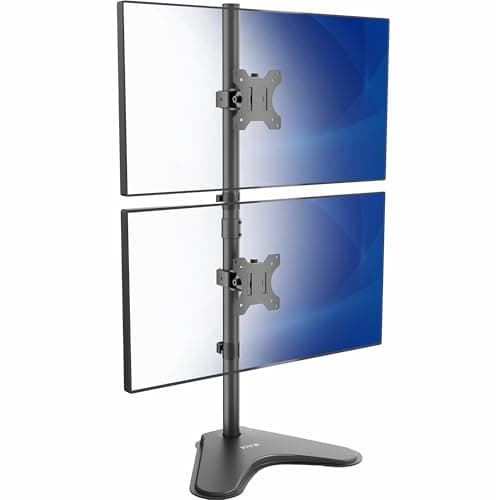
“Vertical” covers two related things, and this page ranks both: mounts that stack two screens one above the other, and single arms that rotate a screen into portrait for reading and code. Our pick is the HUANUO vertical dual mount— 17.6 lb per screen, 17–32in support, clamp or grommet. If you cannot clamp at all, the Mount-It! freestanding stacks two screens on a weighted base with no desk modification; the VIVO STAND-V002Ltakes ultrawides up to 34in and 22 lb each; and for single-screen portrait work the ErGear and VIVO single both rotate a full 360°.

The buying guide below covers the part nobody mentions: stacked screens have a real ergonomic cost at the top position, and there is a right way to arrange them. Specs are from the manufacturer listings; the methodology explains the scoring.

The short answer

Quick picks

#ProductBest forScorePrice
01
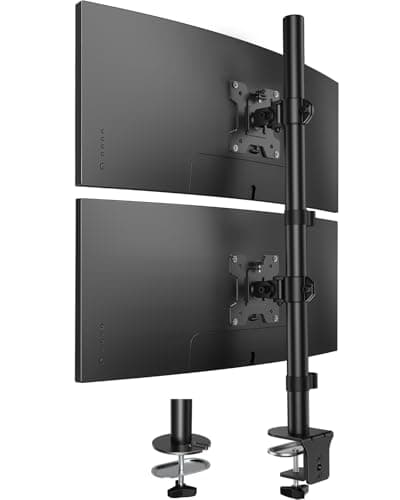
HUANUO HUANUO Vertical Dual Monitor Mount
HUANUO Vertical Dual Monitor Mount

The best-balanced stacked mount: two 17-32in screens at 17.6 lb each, full 360-degree rotation on both heads, and a clamp or grommet base that fits tops up to 3.14in.

Best overall
8.5
$37.99Amazon
02
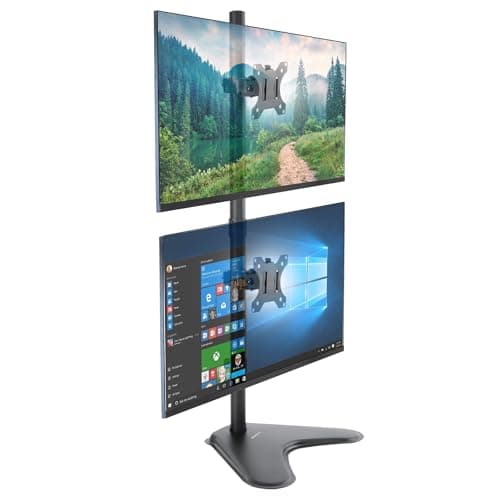
Mount-It! Mount-It! Freestanding Vertical Dual Stand
Mount-It! Freestanding Vertical Dual Stand

The no-clamp answer: a weighted 35-inch pole that simply sits on the desk, carrying two 17-32in screens at 17.6 lb each with independent height and full 180-degree rotation.

Best no-clamp
8.7
$48.99Amazon
03
VIVO VIVO Vertical Dual Stand (STAND-V002L)
VIVO Vertical Dual Stand (STAND-V002L)

The one with the highest rating: 22 lb per screen and support up to 34in, on a 15.4 x 12.4in weighted base with padding to protect the desk.

Best weight rating
8.8
$39.99Amazon
04
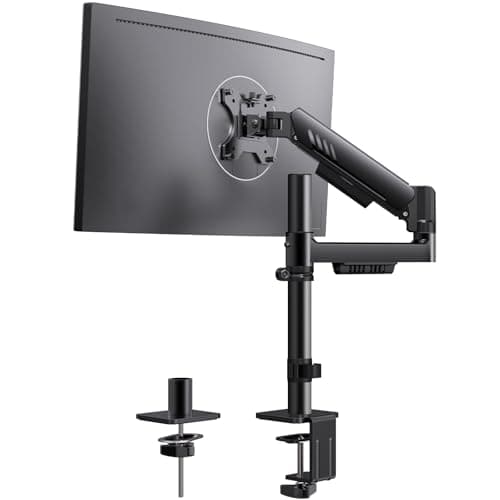
ErGear ErGear Single Monitor Arm (portrait-capable)
ErGear Single Monitor Arm (portrait-capable)

The single-screen portrait pick: 360-degree rotation with 22.6in of height travel and an integrated silicone-padded C-clamp, for 17-34in screens to 19.8 lb.

Best for portrait
8.6
$42.99Amazon
05
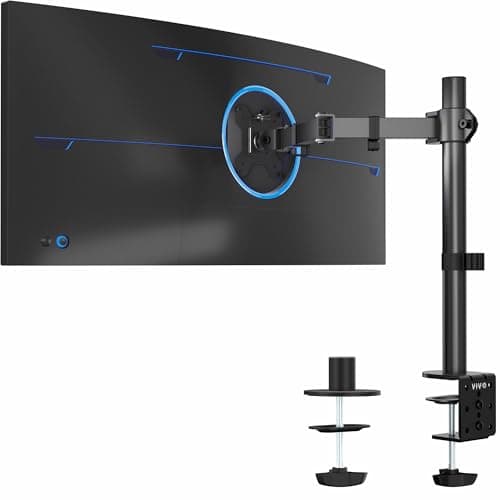
VIVO VIVO Single Monitor Arm (STAND-V001)
VIVO Single Monitor Arm (STAND-V001)

The budget way into portrait: 22 lb of capacity, ultrawide support to 38in, and full rotation, at a price that makes a second one for a stacked pair reasonable.

Best budget portrait
8.5
$34.99Amazon

#ad · Live prices from the Amazon Product API, as of Aug 12, 2026. Where we have no verified live price we show none — we would rather leave a gap than print a number that has rotted.

In detail

The picks, in full

01
HUANUO HUANUO Vertical Dual Monitor Mount

Best overall

HUANUO Vertical Dual Monitor Mount

Screen fit
17–32 in each
Weight
17.6 lb per screen
VESA
75 × 75 / 100 × 100 mm
Motion
±45° tilt, ±60° swivel, 360° rotate
Clamp range
Up to 3.14 in
8.5/10

The best-balanced stacked mount: two 17-32in screens at 17.6 lb each, full 360-degree rotation on both heads, and a clamp or grommet base that fits tops up to 3.14in.

Desk width saved
9.6
Weight rating
7.8
Adjustability
8.8
Desk compatibility
7.6
Value
8.8

Pros

  • Two screens on one desk clamp — width of a single monitor
  • Both heads rotate fully, so either can go portrait
  • 3.14in clamp range covers thick tops
  • Clamp or grommet base included

Cons

  • Needs a clampable desk edge with clearance behind
  • 17.6 lb per screen rules out heavy 32in panels

Skip this if…

your desk is glass, hollow-core or has a rear cross-rail. The Mount-It! freestanding needs no clamp at all.

$37.99View on Amazon

$52.9928% off

Price as of Aug 12, 2026. Prices change — Amazon's is the one that counts.

#ad · we may earn a commission from this link to HUANUO Vertical Dual Monitor Mount

02
Mount-It! Mount-It! Freestanding Vertical Dual Stand

Best no-clamp

Mount-It! Freestanding Vertical Dual Stand

Screen fit
17–32 in each
Weight
17.6 lb per arm
Pole height
35 in
Motion
±45° tilt, ±90° swivel, ±180° rotate
Mount
Freestanding weighted base
8.7/10

The no-clamp answer: a weighted 35-inch pole that simply sits on the desk, carrying two 17-32in screens at 17.6 lb each with independent height and full 180-degree rotation.

Desk width saved
8.8
Weight rating
7.8
Adjustability
9.2
Desk compatibility
9.6
Value
8.2

Pros

  • No clamp, no drilling — works on glass and thin tops
  • Tallest pole here, so the upper screen genuinely clears the lower
  • Each head slides independently along the pole
  • Both screens can be flipped to portrait separately

Cons

  • The weighted base does occupy desk area a clamp would not
  • Freestanding stands rock more than a clamped mount if knocked

Skip this if…

your desk is very shallow. A weighted base needs real estate at the back that a 16-inch-deep desk cannot spare.

$48.99View on Amazon

Price as of Aug 12, 2026. Prices change — Amazon's is the one that counts.

#ad · we may earn a commission from this link to Mount-It! Freestanding Vertical Dual Stand

03
VIVO VIVO Vertical Dual Stand (STAND-V002L)

Best weight rating

VIVO Vertical Dual Stand (STAND-V002L)

Screen fit
13–34 in each
Weight
22 lb per screen
Base
15.4 × 12.4 in, padded
Motion
±45° tilt, 360° swivel, 360° rotate
Mount
Freestanding
8.8/10

The one with the highest rating: 22 lb per screen and support up to 34in, on a 15.4 x 12.4in weighted base with padding to protect the desk.

Desk width saved
8.4
Weight rating
9.4
Adjustability
8.6
Desk compatibility
9.4
Value
8.4

Pros

  • 22 lb per screen — the most headroom in this roundup
  • Handles 34in ultrawides, not just standard panels
  • Padded base protects the desk surface
  • Removable VESA plates make mounting simpler

Cons

  • Large base footprint on an already small desk
  • 28.5in pole is shorter than the Mount-It!, limiting upper-screen height

Skip this if…

desk surface is your scarcest resource. A clamp mount gives the same stacking with no base at all.

$39.99View on Amazon

Price as of Aug 12, 2026. Prices change — Amazon's is the one that counts.

#ad · we may earn a commission from this link to VIVO Vertical Dual Stand (STAND-V002L)

04
ErGear ErGear Single Monitor Arm (portrait-capable)

Best for portrait

ErGear Single Monitor Arm (portrait-capable)

Screen fit
17–34 in
Weight limit
19.8 lb
Height travel
22.6 in
Reach
20.6 in
Motion
+80°/−50° tilt, ±90° swivel, 360° rotate
8.6/10

The single-screen portrait pick: 360-degree rotation with 22.6in of height travel and an integrated silicone-padded C-clamp, for 17-34in screens to 19.8 lb.

Desk width saved
8.2
Weight rating
8
Adjustability
9.6
Desk compatibility
8.4
Value
8.6

Pros

  • 22.6in of height travel — the most here, which portrait needs
  • Full 360° rotation for landscape-to-portrait flips
  • Integrated C-clamp with anti-slip silicone padding
  • Hand-tightened VESA screws, no tools needed

Cons

  • One screen only — this is not a stacking mount
  • A tall portrait screen needs real height clearance above the desk

Skip this if…

you want two screens. Stack them with the HUANUO or Mount-It! instead of buying two of these.

$42.99View on Amazon

Price as of Aug 12, 2026. Prices change — Amazon's is the one that counts.

#ad · we may earn a commission from this link to ErGear Single Monitor Arm (portrait-capable)

05
VIVO VIVO Single Monitor Arm (STAND-V001)

Best budget portrait

VIVO Single Monitor Arm (STAND-V001)

Screen fit
13–38 in ultrawide
Weight limit
22 lb
VESA
75 × 75 / 100 × 100 mm
Motion
Tilt, swivel, 360° rotate
Mount
C-clamp or grommet
8.5/10

The budget way into portrait: 22 lb of capacity, ultrawide support to 38in, and full rotation, at a price that makes a second one for a stacked pair reasonable.

Desk width saved
8.2
Weight rating
9
Adjustability
7.6
Desk compatibility
8.4
Value
9.6

Pros

  • 22 lb rating at the lowest price in this roundup
  • Handles ultrawide panels a standard arm will not
  • Rotates fully for portrait orientation
  • Clamp and grommet options both supported

Cons

  • Less height travel than the dedicated portrait arms
  • Basic movement quality compared with premium arms

Skip this if…

you want smooth one-hand repositioning several times a day. A constant-force arm is far nicer to live with.

$34.99View on Amazon

Price as of Aug 12, 2026. Prices change — Amazon's is the one that counts.

#ad · we may earn a commission from this link to VIVO Single Monitor Arm (STAND-V001)

The width arithmetic that makes stacking worth it

LayoutDesk width neededHeight needed above desk
Two 24in screens, side by side~42 in~15 in
Two 24in screens, stacked~21 in~30 in
One 27in screen, portrait~14 in~24 in

Stacking trades width you do not have for height you are not using. That trade is almost always right on a small desk — but check the height column against your room. A shelf above the desk, a sloped ceiling, or a wall-mounted cabinet can make 30 inches of vertical clearance impossible, and that is the constraint that kills stacked setups. Measure from the desktop up before ordering.

The honest ergonomic cost

Standard guidance puts the top of your main screen at or just below eye level. In a stacked pair, only the lower screen can meet that; the upper one sits above eye level and asks you to tilt your head back to read it. Over a full workday, that is a real strain.

So arrange stacked screens deliberately: put the display you look at moston the bottom at proper eye height, and reserve the top for reference material you glance at — chat, monitoring, documentation, a video call. Tilt the upper screen down toward you (every mount here tilts) so you are reading it square rather than at an angle. Set up that way, a stacked pair is comfortable. Set up with your main screen on top, it is not.

Portrait: who it is actually for

Rotating a single screen 90 degrees suits long documents, code, logs, chat and social feeds — anything where you scroll vertically and want to see more at once. It is poor for video, spreadsheets and most photo work. Two practical notes: a 27-inch panel in portrait is roughly 24 inches tall, so the arm needs real height travel (the ErGear’s 22.6in is there for this), and not every monitor’s panel looks good rotated — colour and contrast shift with viewing angle on some panel types more than others.

Clamp or freestanding

A clamped mount saves the most desk because nothing sits on the surface, but it needs an edge it can grip — solid, the right thickness, with clearance behind. A freestanding pole works on glass, hollow-core and thin tops where no clamp is safe, and it moves in seconds with no re-tensioning, which suits a rental. It costs you the base footprint, and it will rock if knocked in a way a clamped mount will not. If your desk can take a clamp, clamp it. Check yours with will a monitor arm fit my desk.

Two screens, three ways

Stacking is one of three answers to dual monitors on a small desk, and it is not always the right one. A side-by-side dual arm is better if you have the width and switch between screens constantly. Two single arms give the most placement freedom. And the full width-and-depth arithmetic for all three is in two monitors on a small desk. Check the per-screen weight rating against both your panels before choosing any of them — the method is in how much weight a monitor arm can hold.
How we picked

We do not run a testing lab

We compiled the published manufacturer specifications, did the footprint and clearance math ourselves, and read aggregated owner reviews, then scored each product against a published rubric. The scores are judgments from documented research — they are not measurements we took, because we do not have a lab and we are not going to pretend we do. Every spec traces back to a listing or manual named in Sources.

Questions

Frequently asked

What is a vertical monitor arm?
Two related things. A stacked or vertical dual mount holds two screens one above the other on a single pole or arm, so the pair occupies the desk width of one monitor. A portrait-capable single arm rotates one screen 90 degrees so it stands tall rather than wide. Both trade desk width for vertical space.
Is stacking monitors bad for your neck?
It can be, if you put your main screen on top. Standard guidance puts the top of your primary display at or just below eye level, and only the lower screen in a stacked pair can meet that. Put the screen you use most on the bottom, reserve the top for reference material you glance at, and tilt the upper screen down toward you.
How much desk space does stacking two monitors save?
Two 24-inch screens side by side need about 42 inches of desk width. Stacked, they need about 21 - the width of one. In exchange you need roughly 30 inches of clear height above the desktop, so check for shelves, cabinets or a sloped ceiling before ordering.
Can any monitor be used in portrait mode?
Physically, any monitor with a VESA pattern can be rotated on an arm that offers 360° rotation, and both operating systems can rotate the image. Whether it looks good is another matter — some panel types shift in colour and contrast when viewed from the new angle. Portrait suits documents, code and chat; it is poor for video and spreadsheets.
Do I need a clamp for a vertical monitor stand?
No. Freestanding stacked stands (the Mount-It! and VIVO here) sit on a weighted base and need no desk modification, which makes them the answer for glass, hollow-core or thin tops, and for rentals. A clamped mount saves more surface but needs a solid edge — check yours with will a monitor arm fit my desk.

Keep reading

Receipts

Sources

We do not run a testing lab, and we do not pretend to. Specifications come from the manufacturer or retailer listing; the footprint and clearance math is ours and reproducible. Where we could not verify a number, we say so on the page rather than quietly leaving it out. Read our full method.