Skip to content
Desk & Dowel

HUB 04 · Space-Saving Accessories

The Best Keyboard Trays for Standing Desks

A tray that works on a fixed desk can foul the lift column, the crossbar or the controller on a sit-stand one. Four that do not, with each maker's published clearances.

By Stephen V.Updated How we pick
#ad

We earn a commission when you buy through our Amazon links, at no extra cost to you. It never affects our rankings, and we say so when the cheaper product is the better buy. How this works.

Our pick is the EUREKA ERGONOMIC slide-out tray, and the reason is written on its own listing: it is the one tray here that says in plain terms that it fits desks with beamsand that you should check it will not interfere with the desk motors. Everything else in this category is designed for a flat, clear underside, which a sit-stand desk does not have — it has a crossbar, two lift columns and usually a controller box somewhere in the middle of the span.

The Mount-It! slide-out is the pick if you want the tray bolted rather than clamped: screws into the underside of the top, so it rises and falls with the desk and there is nothing at the edge to work loose. The HUANUO has the most height adjustment of the four at 6.3 inches and publishes exact crossbar clearances, and the VIVO clamp-onis the budget option — with the caveat that it needs 32.5 inches of uninterrupted desk edge.

What a sit-stand desk changes

One: the tray must attach to the top, not the frame. Bolt it to a crossbar and the keyboard stays where it is while the desk goes up, which is exactly backwards. Every tray below fixes to the underside of the top or clamps its edge.

Two: it has to clear the hardware.Measure from the front edge of the desk back to the first obstruction — crossbar, cable tray, controller box, motor housing. HUANUO wants no crossbar or at least 14.17 inches to it (16.22 if the tray must slide all the way under); EUREKA publishes a 17.8-inch bracket depth and asks for a desk at least 20 inches deep. That number, not the tray size, is what decides compatibility.

Three: it needs its own height adjustment.The correct typing plane standing is not the correct one seated — the desk changes but your forearm angle requirement does not, and a tray fixed at one drop below the top will be right in one posture and wrong in the other. Three of the four here adjust (6.3 in, 5.5 in, and the EUREKA’s continuous range); the VIVO does not.

The short answer

Quick picks

#ProductBest forScorePrice
01
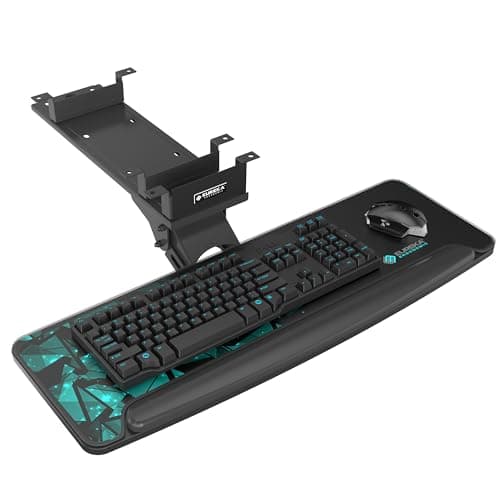
EUREKA ERGONOMIC EUREKA ERGONOMIC 28 × 10in Slide-Out Keyboard Tray
EUREKA ERGONOMIC 28 × 10in Slide-Out Keyboard Tray

The only tray here whose listing addresses a sit-stand frame directly — it states that it fits desks with beams and tells you to check clearance against the desk motors.

Best overall for sit-stand
8.8
$119.99Amazon
02
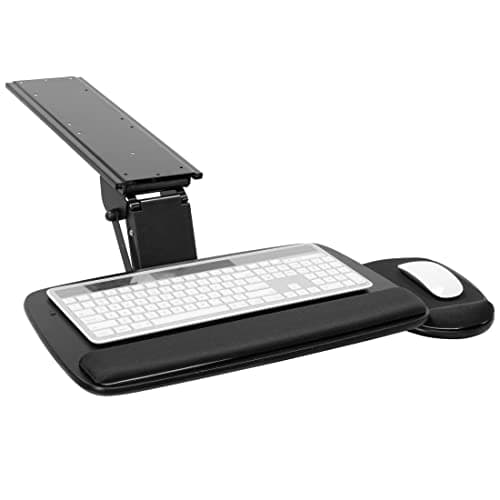
Mount-It! Mount-It! Slide-Out Keyboard Tray with Wrist Rest
Mount-It! Slide-Out Keyboard Tray with Wrist Rest

Bolted to the underside of the top with the supplied screws, so it travels with the desk and has nothing at the edge to loosen. 5.5 inches of height adjustment and a lifetime warranty.

Best bolt-on
8.1
$102.99Amazon
03
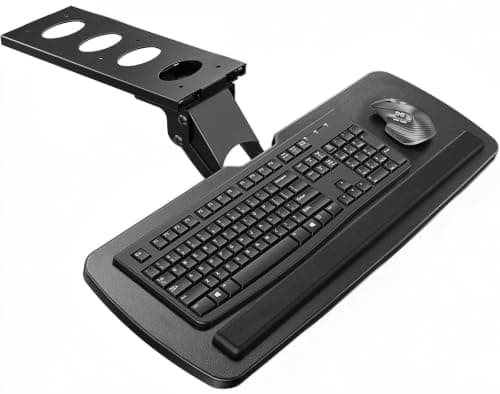
HUANUO HUANUO Under-Desk Keyboard Tray
HUANUO Under-Desk Keyboard Tray

The most height adjustment here — 6.3 inches — and the clearest published clearance figures, which is what you need to check a sit-stand frame before you spend anything.

Best height range
8.7
$69.99Amazon
04
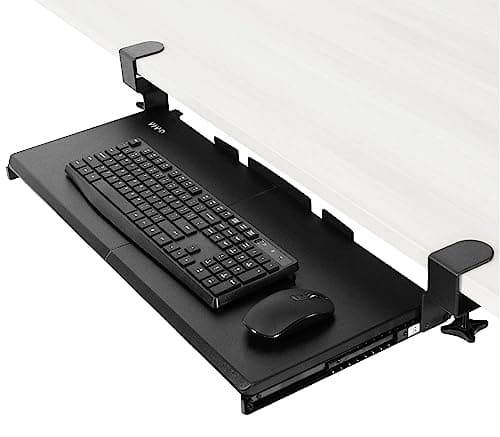
VIVO VIVO Clamp-On 27 × 11in Keyboard Tray (MOUNT-KB05E)
VIVO Clamp-On 27 × 11in Keyboard Tray (MOUNT-KB05E)

No screws into the desk at all — two C-clamps on the front edge, which is the right answer on a sit-stand top you do not want to drill. Fixed drop, so set it for one posture.

Best no-drill option
8.0
$49.99Amazon

#ad · Live prices from the Amazon Product API, as of October 4, 2026. Where we have no verified live price we show none — we would rather leave a gap than print a number that has rotted.

In detail

The picks, in full

01
EUREKA ERGONOMIC EUREKA ERGONOMIC 28 × 10in Slide-Out Keyboard Tray

Best overall for sit-stand

EUREKA ERGONOMIC 28 × 10in Slide-Out Keyboard Tray

Tray size
28.3 × 10.2 in
Bracket depth
17.8 in
Min desk thickness
0.71 in
Motion
360° swivel, 43° tilt, height adjustable
Desk minimum
20 × 39.5 × 29.1 in (D×L×H)
8.8/10

The only tray here whose listing addresses a sit-stand frame directly — it states that it fits desks with beams and tells you to check clearance against the desk motors.

Frame clearance
9.4
Height adjustment
9
Tray size
9
Fit data published
9.2
Value
7.2

Pros

  • Explicitly rated for desks with beams, which is the whole sit-stand problem
  • Publishes a 17.8 in bracket depth, so you can check it against your crossbar before buying
  • 43° of tilt and 360° swivel — enough to set a correct wrist angle at both desk heights
  • Gravity self-locking slide stops the tray creeping out while the desk is moving

Cons

  • Wood or MDF only — glass, stone and plastic tops are excluded by the maker
  • The most expensive tray in this roundup

Skip this if…

…your desk is under 20 inches deep. The 17.8-inch bracket needs that span, and on a shallow sit-stand top it will sit proud of the front edge.

$119.99View on Amazon

Price as of October 4, 2026. Prices change — Amazon's is the one that counts.

#ad · we may earn a commission from this link to EUREKA ERGONOMIC 28 × 10in Slide-Out Keyboard Tray

02
Mount-It! Mount-It! Slide-Out Keyboard Tray with Wrist Rest

Best bolt-on

Mount-It! Slide-Out Keyboard Tray with Wrist Rest

Tray size
20.5 W × 11 D in
Height adjust
Up to 5.5 in
Tilt / swivel
+20° to −25°, 360°
Slide
15 in on a 17.25 in track
Warranty
Lifetime (manufacturer)
8.1/10

Bolted to the underside of the top with the supplied screws, so it travels with the desk and has nothing at the edge to loosen. 5.5 inches of height adjustment and a lifetime warranty.

Frame clearance
7.6
Height adjustment
8.6
Tray size
8
Fit data published
8.4
Value
8

Pros

  • Screw mount means no clamp at the desk edge to work loose as the desk cycles up and down
  • 5.5 in of height adjustment covers the seated and standing typing planes
  • Mouse platform mounts either side, and both platforms have padded wrist support
  • Lifetime manufacturer warranty, which is well beyond this category's usual two to three years

Cons

  • Excluded by the maker on crossbar desks — check the underside before ordering
  • Drilling pilot holes in the underside of the top is permanent, so not a rental-furniture job

Skip this if…

…your sit-stand desk has a front-to-back crossbar where the bracket needs to go. Mount-It! rules that out explicitly; the EUREKA is the beam-tolerant option.

$102.99View on Amazon

Price as of October 4, 2026. Prices change — Amazon's is the one that counts.

#ad · we may earn a commission from this link to Mount-It! Slide-Out Keyboard Tray with Wrist Rest

03
HUANUO HUANUO Under-Desk Keyboard Tray

Best height range

HUANUO Under-Desk Keyboard Tray

Tray size
25 W × 9.84 D in
Height adjust
6.3 in total
Crossbar clearance
None, or ≥14.17 in (16.22 to fully retract)
Width clearance
≥25 in (35.4 in to rotate)
Min desk thickness
0.6 in
8.7/10

The most height adjustment here — 6.3 inches — and the clearest published clearance figures, which is what you need to check a sit-stand frame before you spend anything.

Frame clearance
8.2
Height adjustment
9.6
Tray size
7.4
Fit data published
9.6
Value
8.6

Pros

  • 6.3 in of height adjustment — the widest range in this roundup
  • Publishes four separate clearance numbers, so compatibility is checkable rather than hopeful
  • 180° swivel plus 6° up and 22° down tilt
  • Wrist rest included rather than sold separately

Cons

  • 9.84 in deep suits keyboards up to about 17.3 × 5.5 in — check yours and the mouse space left
  • Needs the knob tightened before typing, which is one more habit to keep

Skip this if…

…your crossbar sits closer than 14.17 inches to the front edge. HUANUO states the limit; believe it rather than measuring optimistically.

$69.99View on Amazon

$89.9922% off

Price as of October 4, 2026. Prices change — Amazon's is the one that counts.

#ad · we may earn a commission from this link to HUANUO Under-Desk Keyboard Tray

04
VIVO VIVO Clamp-On 27 × 11in Keyboard Tray (MOUNT-KB05E)

Best no-drill option

VIVO Clamp-On 27 × 11in Keyboard Tray (MOUNT-KB05E)

Tray size
26.8 × 11 in (32.5 in with clamps)
Max desk thickness
1.25 in
Extension
8.5 in from the edge
Capacity
11 lb
Mount
Two C-clamps, no drilling
8.0/10

No screws into the desk at all — two C-clamps on the front edge, which is the right answer on a sit-stand top you do not want to drill. Fixed drop, so set it for one posture.

Frame clearance
9
Height adjustment
4
Tray size
8.6
Fit data published
8.8
Value
9.6

Pros

  • Clamps on, so nothing is drilled into a desk you may be renting or reselling
  • Clamps to the front edge — nowhere near the crossbar, motors or controller
  • 11 in deep gives real mouse room beside a full-size keyboard
  • Cheapest tray here by a wide margin

Cons

  • No height adjustment, so one drop has to serve both sitting and standing
  • Needs 32.5 in of clear, un-beveled front edge — beveled tops are excluded by VIVO

Skip this if…

…you want the typing plane to change when the desk does. A fixed-drop tray is a compromise on a sit-stand desk; the HUANUO or EUREKA adjusts.

$49.99View on Amazon

Price as of October 4, 2026. Prices change — Amazon's is the one that counts.

#ad · we may earn a commission from this link to VIVO Clamp-On 27 × 11in Keyboard Tray (MOUNT-KB05E)

The three measurements to take before you order

MeasureHowWhy it decides the purchase
Front edge to first obstructionTape measure under the desk, front to crossbar or controllerHUANUO needs 14.17 in; EUREKA’s bracket is 17.8 in deep
Top thickness at the mount pointCalipers or a ruler at the front edgeHUANUO ≥0.6 in, EUREKA ≥0.71 in, VIVO ≤1.25 in
Clear width under the topBetween the lift columns, at the frontHUANUO needs 25 in, or 35.4 in to rotate the tray

Why a keyboard tray is worth more on a standing desk, not less

People assume a height-adjustable desk makes a tray redundant. It does the opposite. A sit-stand desk sets one height for the whole surface, and the correct height for your screen is 4–6 inches above the correct height for your keyboard— which is why the standing posture that puts the monitor at eye level usually has you typing slightly uphill. A tray splits those two planes, so the desk can serve the screen and the tray can serve your forearms. That is the same argument our desk height guide makes for a fixed desk, and it gets stronger when the desk moves.

The second gain is depth. A sit-stand desk in a small apartment is usually a shallow one — the models in our shallow standing desk roundup are 19 to 20 inches deep. Moving the keyboard and mouse below the top gives back about 11 inches of that, which is the difference between a monitor at a sensible distance and a monitor in your face. Pair it with an arm rated for a standing desk and the whole top is free.

Clamp or bolt, on a desk that moves

On a fixed desk this is mostly a question of whether you are allowed to drill. On a sit-stand desk there is a mechanical argument too: the desk cycles up and down thousands of times, and a clamp at the front edge sees a small amount of load reversal every cycle. Bolted brackets (Mount-It!) do not move at all; clamps (VIVO) want a check with the supplied key every few months. Neither is a reason to avoid clamping — it is a reason to put the tightening check on the same list as the rest of your renter-friendly setup.

Cables: the thing that actually fails first

A tray adds 8–15 inches of travel to the keyboard and mouse leads, on a desk that already adds 18 inches of vertical travel to everything else. Wired keyboards get pulled taut at full desk height with the tray fully out, and the connector is what gives. Leave a deliberate service loop at the back of the desk and route the tray’s cables down the lift column rather than across the crossbar — our cable management picks cover the sleeve and raceway options, and the no-damage version covers doing it without adhesive on the wall.

Where this page stops

If your desk is a normal fixed one, the constraints above do not apply and the field is wider — go to best under-desk keyboard trays, which ranks on tray size and clamp range instead. If you are still choosing the desk, desks that come with a tray fitted avoids this problem entirely, and small standing desks is where the desk decision starts.
How we picked

We do not run a testing lab

We compiled the published manufacturer specifications, did the footprint and clearance math ourselves, and read aggregated owner reviews, then scored each product against a published rubric. The scores are judgments from documented research — they are not measurements we took, because we do not have a lab and we are not going to pretend we do. Every spec traces back to a listing or manual named in Sources.

Questions

Frequently asked

Can you put a keyboard tray on a standing desk?
Yes, as long as the tray fastens to the underside of the desktop rather than to the frame, so it rises with the desk. The limit is clearance: measure from the front edge back to the crossbar, controller box or motor housing, and check that against the tray's published bracket depth before ordering.
Will a keyboard tray hit the crossbar on my sit-stand desk?
It will if the crossbar is closer to the front edge than the bracket is deep. HUANUO publishes the limit as no crossbar at all, or at least 14.17 inches of clearance (16.22 inches if the tray has to retract fully). EUREKA states that its design fits desks with beams and asks for a desk at least 20 inches deep. Mount-It! excludes crossbar desks outright.
Do I still need a keyboard tray if I have a height-adjustable desk?
Often yes. A sit-stand desk sets one height for the whole top, but the correct keyboard height is 4 to 6 inches below the correct screen height. A tray separates the two planes. It also gives back about 11 inches of depth, which matters on the 19 to 20-inch-deep standing desks that fit a small apartment. See our desk height guide for the numbers.
Clamp-on or screw-in keyboard tray for a standing desk?
Screw-in if you own the desk: it cannot shift, and the desk's up-and-down cycling puts no load on a clamp that is not there. Clamp-on if you rent or resell, with a note in your calendar to check the clamp tightness every few months. The VIVO here is the no-drill option; Mount-It! is the bolted one.
How much desk space does a keyboard tray free up?
Roughly the tray's own depth — 10 to 11 inches on the picks here — across most of the desk's width. On a 20-inch-deep standing desk that is about half the usable surface, and it is the single cheapest way to make a shallow desk feel like a deep one.

Keep reading

Receipts

Sources

We do not run a testing lab, and we do not pretend to. Specifications come from the manufacturer or retailer listing; the footprint and clearance math is ours and reproducible. Where we could not verify a number, we say so on the page rather than quietly leaving it out. Read our full method.