Skip to content
Desk & Dowel

HUB 03 · Desk Lighting

LED Strip vs Monitor Light Bar: Which Does Your Desk Need?

They look like alternatives and they are not. One lights the desk in front of your screen; the other lights the wall behind it. Most small desks want both.

By Stephen V.Updated How we pick
#ad

We earn a commission when you buy through our Amazon links, at no extra cost to you. It never affects our rankings, and we say so when the cheaper product is the better buy. How this works.

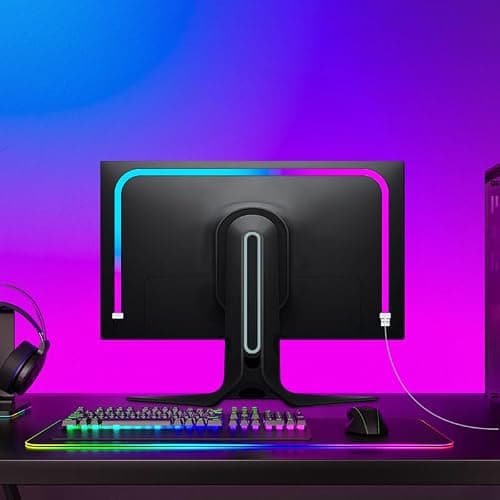
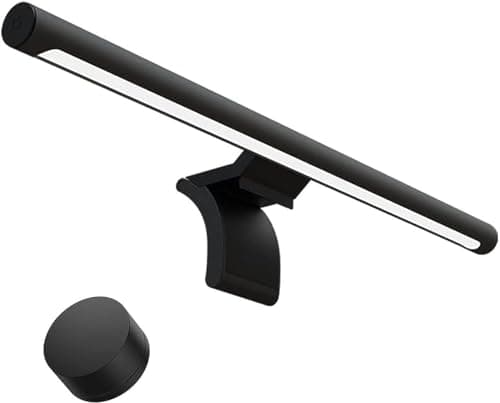
These two get compared constantly, and the comparison is usually framed wrongly. A monitor light bar sits on top of the screen and throws light forward onto the desk, using an asymmetric optic so none of it lands on the display. An LED strip stuck behind the monitor throws light backward onto the wall, producing a soft halo. The first is task lighting. The second is bias lighting. They solve different problems, and knowing which problem you have is the whole decision.

The short answer

If you cannot see your keyboard, your paperwork or your desk clearly, you need a light bar (or a lamp). If the desk is lit fine but your eyes are tired after evening screen work and the display feels like it is glowing in a dark room, you need a stripbehind the monitor. If both are true — which on a small desk in an apartment is common — buy the strip first, because it costs a fraction as much, then add the bar.

The decision table

FactorMonitor light barLED strip
LightsThe desk in front of youThe wall behind the screen
Glare on the screenNone — asymmetric opticNone — it faces away
Desk footprintNone — rests on the bezelNone — adhesive
Helps you read paperworkYesNo
Eases evening screen contrastPartlyYes — this is its job
Typical costMidLowest of any desk light
Needs a compatible bezelYesNo
Works with a laptop onlyRarely — needs a monitorYes, anywhere behind the screen

Why the asymmetric optic is the light bar’s real feature

Any lamp can put light on a desk. The difficulty next to a screen is doing it without throwing a reflection across the display, which washes out contrast and is the reason a badly placed desk lamp makes screen work worse rather than better. A light bar’s optic is cut so that the beam falls forward and down onto the desk and essentially nothing goes backward onto the panel. That is engineering you cannot replicate with a strip, and it is what you are paying the difference for.

What bias lighting actually fixes

Working on a bright screen in an otherwise dark room forces your eyes to keep adapting between two very different brightness levels, which is fatiguing over a long evening. A strip behind the monitor raises the brightness of the wall immediately around the screen and narrows that gap. It does nothing for your ability to see the desk — but for the specific complaint of tired eyes at night, it is the correct and much cheaper fix.

The small-desk angle

Both options share the property that makes them right for a compact desk: neither one touches the surface. A base lamp claims six to eight inches of desktop permanently; a light bar rests on a bezel you already own, and a strip sticks to a surface you already own. On a 40-inch desk that difference is worth more than a few extra lumens. If you want the full argument for footprint-first lighting, it is in best desk lamps.

When neither is the answer

If you work on a laptop with no external monitor, a light bar has nothing to sit on, and a strip behind a laptop lid does very little. Use a clamp lampinstead — it takes no desk surface either, and it puts light where you actually need it. And if there is no outlet at the desk at all, a rechargeable lamp is the only one of these options that works.

The short answer

Quick picks

#ProductBest forScorePrice
01
Xiaomi Xiaomi Computer Monitor Light Bar
Xiaomi Computer Monitor Light Bar

The light-bar case at its most affordable: rests on the monitor bezel, adjusts 2700K to 6500K, and uses an asymmetric optic so the desk is lit and the screen is not.

Best light bar
9.0
$67.99Amazon
02
RZJSKJZM RZJSKJZM Monitor LED Backlight
RZJSKJZM Monitor LED Backlight

The strip case: a 49.2in backlight sized for a 27-inch monitor, powered from the computer's USB and controlled by software, for a fraction of a light bar's price.

Best bias light
8.0
$18.98Amazon

#ad · Live prices from the Amazon Product API, as of Aug 12, 2026. Where we have no verified live price we show none — we would rather leave a gap than print a number that has rotted.

In detail

The picks, in full

01
Xiaomi Xiaomi Computer Monitor Light Bar

Best light bar

Xiaomi Computer Monitor Light Bar

Mount
Rests on monitor bezel
Color temp
2700–6500K
Optic
Asymmetric, no screen glare
Controls
On-bar touch
Desk footprint
None
9.0/10

The light-bar case at its most affordable: rests on the monitor bezel, adjusts 2700K to 6500K, and uses an asymmetric optic so the desk is lit and the screen is not.

Task light
9
Screen comfort
8.4
Footprint saved
9.6
Install ease
9.2
Value
8.8

Pros

  • Real task light on the desk with zero glare on the screen
  • Full warm-to-cool adjustment for day and evening
  • Takes no desk surface at all
  • Cheapest way into the light-bar format

Cons

  • Needs a compatible monitor bezel
  • On-bar controls rather than a remote dial

Skip this if…

you work on a laptop with no external monitor — there is nothing for the bar to rest on.

$67.99View on Amazon

Price as of Aug 12, 2026. Prices change — Amazon's is the one that counts.

#ad · we may earn a commission from this link to Xiaomi Computer Monitor Light Bar

02
RZJSKJZM RZJSKJZM Monitor LED Backlight

Best bias light

RZJSKJZM Monitor LED Backlight

Length
49.2 in (for 27in screens)
Power
USB from the computer
Control
PC/Mac software
Modes
Screen sync, music sync, static
Desk footprint
None
8.0/10

The strip case: a 49.2in backlight sized for a 27-inch monitor, powered from the computer's USB and controlled by software, for a fraction of a light bar's price.

Task light
3
Screen comfort
9
Footprint saved
9.8
Install ease
8.6
Value
9.6

Pros

  • Costs far less than any light bar
  • Powers and switches with the computer
  • Softens the contrast edge around the display
  • Works on any screen — no bezel requirement

Cons

  • Does not light the desk at all
  • Sync mode requires the maker's software running

Skip this if…

your problem is that you cannot see your keyboard or paperwork. That needs a light bar or a lamp, not bias lighting.

$18.98View on Amazon

Price as of Aug 12, 2026. Prices change — Amazon's is the one that counts.

#ad · we may earn a commission from this link to RZJSKJZM Monitor LED Backlight

Diagnose the problem first

  • “I cannot see what I am writing.” Task light problem. Light bar, or a clamp lamp if you have no monitor.
  • “My eyes are sore after two hours at night.” Contrast problem. Strip behind the screen.
  • “There is a reflection across my monitor.”Glare problem. The light causing it is in the wrong place — a light bar is designed not to, and the strip faces away entirely.
  • “The desk is dark and so is the room.” Both, and start with the strip because of the price.

Buying both is the normal outcome

These are complements more than competitors, and together they cost about what one decent base lamp costs — while taking none of the surface a base lamp would. On a compact desk with a monitor, a bar on the bezel plus a strip behind the screen is close to the ideal setup: task light where you work, bias light behind the display, and a desktop with nothing on it.

Check the bezel before you buy a bar

Light bars sit in a groove on the top edge of the monitor and are counterweighted for a typical bezel thickness. Very thick bezels, sharply curved screens and some ultrawides do not take them reliably. If yours does not, the strip route plus a clamp lamp gets you the same result. Our full rankings are in best monitor light bars and best LED strip lights for desks.
How we picked

We do not run a testing lab

We compiled the published manufacturer specifications, did the footprint and clearance math ourselves, and read aggregated owner reviews, then scored each product against a published rubric. The scores are judgments from documented research — they are not measurements we took, because we do not have a lab and we are not going to pretend we do. Every spec traces back to a listing or manual named in Sources.

Questions

Frequently asked

Is an LED strip as good as a monitor light bar?
For a different job, yes. A light bar lights the desk in front of you without glare on the screen; a strip behind the monitor lights the wall and reduces the contrast between a bright display and a dark room. A strip cannot replace a light bar for task lighting, and a light bar is a more expensive way to get bias light.
Do I need both a light bar and an LED strip?
On a small desk with a monitor, the pair is close to ideal: task light on the desk, bias light behind the screen, and nothing on the surface. Together they cost about what one decent base lamp costs, and take none of the six to eight inches of desktop a base lamp claims.
Which is better for eye strain?
It depends on the cause. If your eyes tire because a bright screen sits against a dark wall in the evening, a strip behind the monitor addresses exactly that. If they tire because you are squinting at paperwork on an unlit desk, a light bar is the answer. Glare across the display is a placement problem and both options avoid it by design.
Will a monitor light bar fit my screen?
It needs a bezel it can rest on and be counterweighted against. Very thick bezels, sharply curved panels and some ultrawides do not take one reliably. If yours does not, an LED strip plus a clamp lamp reaches the same result.
Do LED strips or light bars use much desk space?
Neither uses any. A light bar rests on the monitor bezel you already own and a strip sticks to a shelf or the back of the screen. That is why both beat a base lamp on a compact desk, where a weighted base claims six to eight inches of the surface permanently.

Keep reading

Receipts

Sources

We do not run a testing lab, and we do not pretend to. Specifications come from the manufacturer or retailer listing; the footprint and clearance math is ours and reproducible. Where we could not verify a number, we say so on the page rather than quietly leaving it out. Read our full method.