Skip to content
Desk & Dowel

HUB 02 · Monitor Arms & Mounts

Monitor Arm vs Monitor Stand: Which Frees More Desk?

A riser lifts the screen and keeps its footprint. An arm removes the footprint entirely. Here is when the cheaper option is still the right one.

By Stephen V.Updated How we pick
#ad

We earn a commission when you buy through our Amazon links, at no extra cost to you. It never affects our rankings, and we say so when the cheaper product is the better buy. How this works.

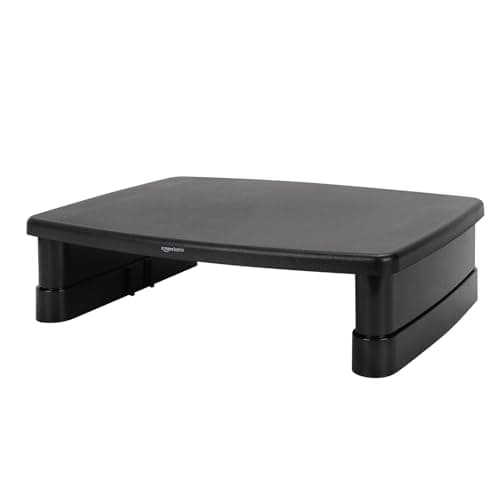
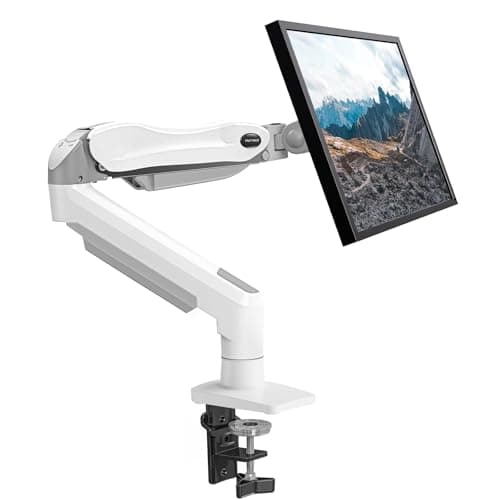
Both of these raise your monitor. Only one of them gives you desk space back. A monitor riser (or stand) is a small platform that sits on the desk, lifts the screen a few inches and creates a slot underneath for a keyboard. A monitor armclamps to the desk edge and holds the screen in the air, taking the 8–10 inches of depth the monitor base was using and handing it back.

The short answer

Buy an arm if your desk is shallow, if you want the screen at the right height rather than approximately the right height, or if you want the surface underneath completely clear. Buy a riserif your desk cannot be clamped (glass, hollow, too thin, or a rear rail in the way), if you want a shelf for storage as much as a lift, or if the budget is genuinely tight — a riser costs a fraction of an arm.

The decision table

FactorMonitor armMonitor riser / stand
Desk depth freedAll of it — the base leaves the deskNone — you gain the slot under the shelf
Height adjustmentContinuous, to your eye levelFixed, or 2–3 stepped heights
Typical costMid — several times a basic riserLowest in the category
Desk requirementsClampable edge, adequate thickness, solid topNone — it just sits there
Installation10–20 minutes, tension to setPlace it and go
Screen size limitSet by weight rating (17–44 lb)Set by platform width and rating (~22–48 lb)
Adds storageNoYes — the slot underneath, plus shelves on some
PortabilityUnclamp and re-tensionLift it off

The depth arithmetic

A monitor on its factory stand claims roughly 8–10 inches of depthat the back of the desk. A riser does not change that number — the platform sits in the same footprint. What a riser buys you is the space under the platform, which is where the keyboard goes when you are not typing, and that genuinely helps on a cluttered desk. An arm buys you the footprint itself, which is what matters on a 15–16 inch deep desk where a base and a keyboard cannot coexist. Shallow desk: arm. Deep-enough desk with clutter: riser.

Height, and the part people underestimate

Risers lift by a fixed amount — typically 2.9 to 5.5 inches. That is enough to fix a screen that was slightly too low; it is not enough to put a low-set 27-inch monitor at eye level for a tall person, and you cannot fine-tune it. An arm adjusts continuously, so the screen goes exactly where your neck wants it and moves again when you switch between sitting and standing. If you are buying for comfort rather than tidiness, that is the deciding difference.

When your desk decides for you

Some desks simply cannot take a clamp: glass tops, thin hollow-core tops, desks with a rear cross-rail, and leaning ladder desks that flex. In those cases the choice is a riser or a wall-mounted arm, and if the wall is solid, the wall mount is the better outcome — it frees the whole desk without asking anything of it. Check your top before you buy either with our desk-compatibility guide.
The short answer

Quick picks

#ProductBest forScorePrice
01
HUANUO HUANUO Single Gas-Spring Monitor Arm
HUANUO Single Gas-Spring Monitor Arm

The arm case: 13–32 inches and 4.4–19.8 lb on a gas spring, with a C-clamp or grommet base that the manufacturer says saves over 80% of the desktop a stand would use.

Best arm
8.4
$42.99Amazon
02
Amazon Basics Amazon Basics Adjustable Monitor Riser
Amazon Basics Adjustable Monitor Riser

The riser case at its cheapest: a three-height ABS platform with a storage slot underneath, supporting up to 22 lb and needing nothing at all from your desk.

Best riser
8.2
$16.19Amazon

#ad · Live prices from the Amazon Product API, as of Aug 11, 2026. Where we have no verified live price we show none — we would rather leave a gap than print a number that has rotted.

In detail

The picks, in full

01
HUANUO HUANUO Single Gas-Spring Monitor Arm

Best arm

HUANUO Single Gas-Spring Monitor Arm

Screen fit
13–32 in, 4.4–19.8 lb
VESA
75 × 75 / 100 × 100 mm
Mount
C-clamp or grommet
Lift
Gas spring, one-hand adjust
Install
Two-step, ~3 minutes
8.4/10

The arm case: 13–32 inches and 4.4–19.8 lb on a gas spring, with a C-clamp or grommet base that the manufacturer says saves over 80% of the desktop a stand would use.

Desk freed
9.4
Height control
9.2
Ease of setup
8
Value
8
Desk compatibility
7.2

Pros

  • Frees the whole monitor footprint, not just the space under a shelf
  • Continuous height and tilt adjustment to your eye level
  • Clamp or grommet mount included
  • Gas spring holds position without repeated screw tweaking

Cons

  • Needs a clampable, solid desk edge
  • Costs several times a basic riser

Skip this if…

your desk is glass, hollow-core or has a rear cross-rail where the clamp goes. Use a riser or a wall mount instead.

$42.99View on Amazon

$49.9914% off

Price as of Aug 11, 2026. Prices change — Amazon's is the one that counts.

#ad · we may earn a commission from this link to HUANUO Single Gas-Spring Monitor Arm

02
Amazon Basics Amazon Basics Adjustable Monitor Riser

Best riser

Amazon Basics Adjustable Monitor Riser

Top surface
≈11.6 × 11 in
Heights
2.87 / 4.2 / 4.8 in
Capacity
Up to 22 lb
Material
ABS plastic, non-skid feet
Install
None — place it
8.2/10

The riser case at its cheapest: a three-height ABS platform with a storage slot underneath, supporting up to 22 lb and needing nothing at all from your desk.

Desk freed
5.6
Height control
6.4
Ease of setup
9.8
Value
9.6
Desk compatibility
9.8

Pros

  • The cheapest way to raise a screen at all
  • Three stacked heights via detachable legs
  • Slot underneath swallows a keyboard when you are done
  • Works on glass, hollow and rail-backed desks that cannot be clamped

Cons

  • Does not free any desk depth — the footprint stays
  • Stepped heights only; no fine adjustment

Skip this if…

your desk is 16 inches deep or you need the screen at a specific height. A riser cannot solve either problem — an arm can.

$16.19View on Amazon

$21.5925% off

Price as of Aug 11, 2026. Prices change — Amazon's is the one that counts.

#ad · we may earn a commission from this link to Amazon Basics Adjustable Monitor Riser

How we picked

We do not run a testing lab

We compiled the published manufacturer specifications, did the footprint and clearance math ourselves, and read aggregated owner reviews, then scored each product against a published rubric. The scores are judgments from documented research — they are not measurements we took, because we do not have a lab and we are not going to pretend we do. Every spec traces back to a listing or manual named in Sources.

Questions

Frequently asked

Does a monitor stand save desk space?
Not in depth — the platform occupies the same footprint the monitor base did. What it saves is usable surface: the slot underneath takes a keyboard or a notebook. If you need the depth back rather than a storage slot, that requires an arm.
Is a monitor arm worth the extra money over a riser?
On a shallow desk, yes — it is the only one of the two that returns the 8–10 inches a monitor base uses. On a 24-inch-deep desk where clutter rather than depth is the problem, a riser at a fifth of the price does most of the useful work.
Which is better for your neck?
An arm, because the height is continuously adjustable to your eye level rather than fixed at whatever the riser's steps allow. A riser is still a large improvement over a screen sitting flat on the desk.
Can I use both?
There is no reason to. If the screen is on an arm, a riser underneath has nothing to lift. The useful pairing is an arm plus an under-desk keyboard tray, which clears the surface completely.

Keep reading

Receipts

Sources

We do not run a testing lab, and we do not pretend to. Specifications come from the manufacturer or retailer listing; the footprint and clearance math is ours and reproducible. Where we could not verify a number, we say so on the page rather than quietly leaving it out. Read our full method.