The short answer: put the desk so the window is to one side of you, not in front and not behind. If the room only allows one of those two, facing the windowis the lesser evil — you get no reflections on the screen, and the price is a bright background behind your monitor, which a monitor arm and a light bar can largely fix. Backing onto a window is the worst of the three, because daylight lands directly on the panel and no amount of screen brightness wins against it.
That is not a design preference; it is about what your eyes are being asked to do. Your pupil responds to the brightest thing in your field of view. With a window behind your screen, the pupil closes down for the daylight and the screen then reads as dim and muddy. With a window behind you, the glass of the panel does what glass does and shows you the window. Side-on, the bright source is outside the cone you are looking into, and the problem mostly stops existing.
What decides it, in order
One: which way the window faces.North-facing glass (in the northern hemisphere) gives soft, fairly constant light all day and is the easiest to work in front of. South-facing gives direct sun for hours. East and west are the difficult ones, because they deliver low, horizontal sun straight into your eyes or straight onto the screen for an hour or two at either end of the day — exactly when you are most likely to be working.
Two: how high the window sits relative to the screen.This is the one you can actually change. If the top of your monitor sits above the bottom of the window, the panel masks the brightest part of the view and the contrast problem shrinks. On a 16-inch-deep desk the way to raise the screen without losing depth is an arm, not a stand — which is why a monitor arm is the first thing on the list below rather than a blind.
Three: what happens at 4pm. This is the part people miss. A desk in front of a window is pleasant at noon and unpleasant at dusk, because the daylight that was balancing your screen disappears over about twenty minutes and leaves a bright panel in a dark room. That contrast gap is a well-documented cause of eye fatigue, and the fix is light behind and aroundthe screen rather than more screen brightness — a monitor light bar with a backlight, or a bias light.
Four: the radiator. In older apartments the window almost always has one under it, and a desk in front of the window usually means a desk in front of the radiator. That blocks the convection the radiator depends on, bakes the back of a monitor, and in winter is the single most common reason a window-facing desk gets moved again. Leave a gap, or choose a desk with an open back rather than a modesty panel.
Three orientations, honestly compared
| Desk position | What you get | What it costs | Fix |
|---|
| Window to one side | Daylight on the desk, nothing in the sightline | Needs a wall you may not have | None needed; this is the target |
| Facing the window | No reflections on the panel; a view | Bright background; squinting at low sun | Raise the screen, add a light bar, sheer curtain |
| Back to the window | Good light on paper and on your face for calls | Daylight reflects straight off the screen | Blackout or blind; matte screen; rotate the desk |
The one case where backing onto a window wins
Video calls. Light coming from behind the camera and onto your face is exactly what you want, and a window behind your monitor puts you in silhouette — which is why a desk facing a window produces the classic backlit-shadow call. If calls are most of your day and the desk must sit at a window, the practical compromise is to face the window for the screen’s sake and add a front light for the camera’s sake; our video call lighting picks cover that specifically.
The short answer
Quick picks
| # | Product | Best for | Score | Price |
|---|
| 01 | Amazon Basics Single Monitor Arm (Gas Spring)The structural fix: raise the panel so it masks the bright part of the window, and swivel it out of a reflection at 4pm without moving the desk. 20.5 inches of extension, clamp or grommet base. | Best first move | | $25.49·Amazon |
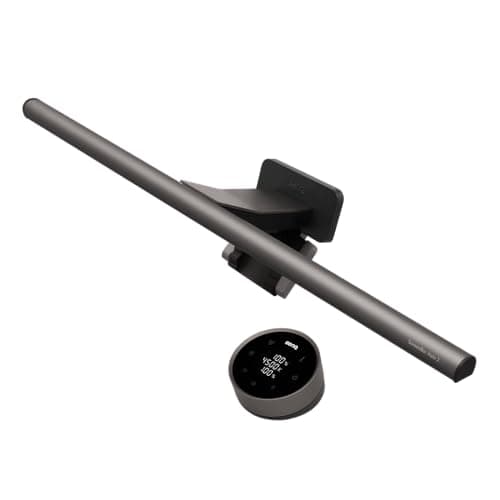
| 02 | BenQ ScreenBar Halo 2 Monitor Light BarBuilt for exactly the 4pm problem: an 18-degree anti-glare front throw that lights the desk without touching the screen, plus a rear backlight that closes the contrast gap when the window goes dark. | Best for the dusk contrast drop | | $199.00·Amazon |
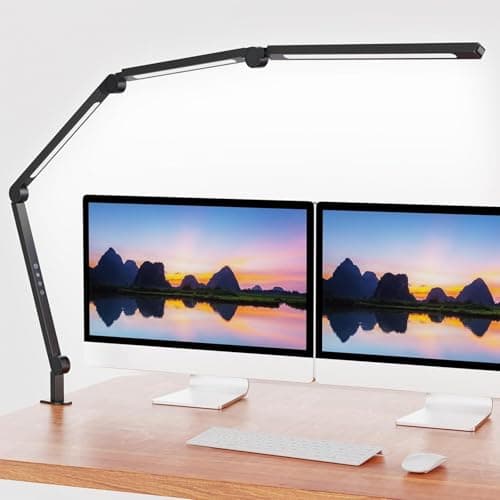
| 03 | AILBTON LED Architect Clamp LampThe cheap version of the same idea: a clamp-on swing arm you can aim at the paper rather than the screen, with four brightness levels and colour temperature control to track the fading daylight. | Best budget task light | | $39.99·Amazon |
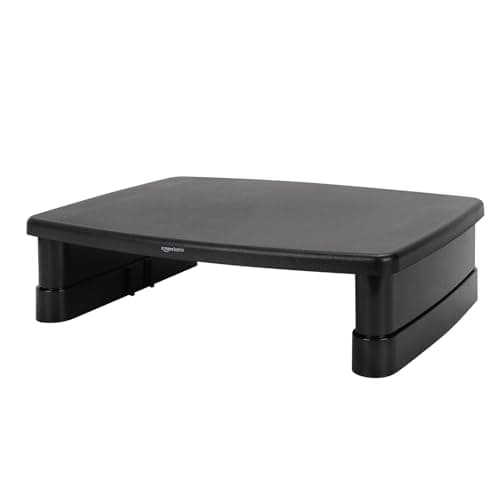
| 04 | Amazon Basics 3-Level Monitor RiserThe no-clamp way to raise the panel in front of the glass: three published heights at 2.87, 4.2 and 4.8 inches, on a top you can put on a glass or hollow desk. | Best when you cannot clamp | | $17.99·Amazon |
#ad · Live prices from the Amazon Product API, as of October 4, 2026. Where we have no verified live price we show none — we would rather leave a gap than print a number that has rotted.
In detail
The picks, in full
Best first move
Amazon Basics Single Monitor Arm (Gas Spring)
- Screen fit
- 15–27 in
- Weight range
- 4.4–15.4 lb
- Extension
- Up to 20.5 in
- Motion
- −90° to +85° tilt, ±90° swivel, 360° rotate
- Mount
- Clamp or grommet, 0.39–4 in
The structural fix: raise the panel so it masks the bright part of the window, and swivel it out of a reflection at 4pm without moving the desk. 20.5 inches of extension, clamp or grommet base.
- Glare reduction
- 8.8
- Flexibility
- 9.6
- Keeps desk depth
- 9.4
- Install ease
- 8.4
- Value
- 9.4
Pros
- +Height and tilt are what beat glare — and an arm gives both without costing desk depth
- +Swivel means you can turn the panel a few degrees out of a reflection and back again
- +Clamp and grommet bases included, so it works on a desk pushed flat to the window wall
- +Frees the 9–10 inches of depth the monitor stand was using
Cons
- −15.4 lb ceiling — check your panel's weight without its stand
- −Needs a solid top of at least 0.39 in; thin or hollow tops are out
Skip this if…
…your desk top is glass or hollow-core. A riser gets you the height with no clamping at all.
Best for the dusk contrast drop
BenQ ScreenBar Halo 2 Monitor Light Bar
- Front light
- 18° anti-glare angle (ASYM)
- Backlight
- Adjustable ambient
- Colour temp
- 2700–6500 K
- CRI
- > 95
- Monitor fit
- 0.17–2.36 in bezel; 1000R–1800R curved
Built for exactly the 4pm problem: an 18-degree anti-glare front throw that lights the desk without touching the screen, plus a rear backlight that closes the contrast gap when the window goes dark.
- Glare reduction
- 9.6
- Flexibility
- 9
- Keeps desk depth
- 9.8
- Install ease
- 9.4
- Value
- 6.4
Pros
- +The 18° throw is the whole point: desk light with no reflection coming back off the panel
- +Backlight reduces screen-to-wall contrast, which is the actual cause of dusk eye fatigue
- +2700–6500 K means you can follow the daylight down rather than fight it
- +Ambient-light sensor adjusts brightness as the window fades, without you touching anything
Cons
- −The most expensive thing on this page by a wide margin
- −Clamps to the monitor's top bezel — very thick or sharply curved backs are excluded
Skip this if…
…your desk is lit well enough already and the issue is only reflections. A blind or a sheer curtain costs a fraction of this.
Best budget task light
AILBTON LED Architect Clamp Lamp
- Mount
- Clamp — no desk surface used
- Arm
- Adjustable swing arm and head
- Dimming
- 4 levels
- Colour temp
- Adjustable (warm to cool)
- Light
- Flicker-free LED
The cheap version of the same idea: a clamp-on swing arm you can aim at the paper rather than the screen, with four brightness levels and colour temperature control to track the fading daylight.
- Glare reduction
- 7.6
- Flexibility
- 9.2
- Keeps desk depth
- 9.6
- Install ease
- 8.8
- Value
- 9.4
Pros
- +Clamps to the edge, so it costs no surface on a desk already shortened by the window sill
- +A swing arm lets you put the light where the daylight was, which is the point after sunset
- +Colour temperature control means the room does not jump from daylight to cold white at dusk
- +A fraction of the price of a monitor light bar
Cons
- −A lamp aimed badly becomes the reflection you were trying to avoid — aim it across, not at the screen
- −Listing publishes no lumen or CRI figure, so brightness and colour accuracy are unstated
Skip this if…
…your work is colour-critical. Without a published CRI figure we cannot tell you how faithful the light is — the BenQ publishes CRI > 95.
Best when you cannot clamp
Amazon Basics 3-Level Monitor Riser
- Heights
- 2.87 / 4.2 / 4.8 in
- Top surface
- ~11.6 × 11 in
- Capacity
- 22 lb
- Material
- ABS plastic
- Weight
- 2.56 lb
The no-clamp way to raise the panel in front of the glass: three published heights at 2.87, 4.2 and 4.8 inches, on a top you can put on a glass or hollow desk.
- Glare reduction
- 7.8
- Flexibility
- 6
- Keeps desk depth
- 4.4
- Install ease
- 9.8
- Value
- 9.6
Pros
- +Three stated heights, so you can plan how much of the window the panel will mask
- +22 lb capacity covers most panels up to 32 inches
- +No clamping, no drilling — works on glass, hollow-core and rented furniture
- +Cheapest fix here, and it adds storage space underneath
Cons
- −Costs you 11 inches of desk depth, which is the opposite of what an arm does
- −ABS plastic rather than wood or metal; it is light-duty by design
Skip this if…
…your desk is under about 18 inches deep. An 11-inch-deep riser plus a keyboard leaves nothing — use an arm instead.
The order to do things in
First, rotate the desk if you possibly can.Side-on to the window costs nothing and solves the whole problem. In a studio this often means accepting the desk on the short wall — see our studio workspace guide for how that usually plays out.
Second, raise the screen. Getting the top of the panel above the bottom of the window frame removes most of the background brightness without any window treatment at all. On a shallow desk use an arm; on a desk you cannot clamp, a riser.
Third, treat the window, not the screen. A sheer or voile layer diffuses direct sun while keeping the daylight, and costs a fraction of a monitor upgrade. A top-down blind is the renter-friendly version, since it kills the low sun without darkening the room. For anything that needs a fixing, check the tension-rod and adhesive routes in no-drill wall storage before you reach for a drill.
Fourth, add light for the evening.Not more of it — better placed. A light bar on the monitor, or a clamp lamp aimed across the desk rather than at it, plus something behind the screen to lift the wall. Monitor light bars and LED strips for bias lighting both do the job, and desk lamp colour temperature explains which number to set as the evening comes in.
Monitor settings that actually matter here
A window-facing desk is one of the few places where turning screen brightness upis right, because you are competing with daylight. The thing to avoid is leaving it there after dark. If your monitor has an ambient-light sensor, use it; if not, two saved presets (day and evening) takes ten seconds to set up and removes the decision. Matte panels beat glossy ones in a bright room by a wide margin, which is worth knowing before you buy a screen rather than after — see monitors for small desks.
The radiator, the sill and the cold
Three practical details that decide whether the arrangement survives winter. A desk hard against a radiator blocks its convection and warms the back of your monitor — leave two inches, or pick a desk with an open back. A deep sill can stop the desk going fully against the wall, which also means the clamp on a monitor arm has nowhere to go; a grommet base solves that, as covered in monitor arms for a desk against a wall. And single-glazed glass is cold to sit next to in January, which is the reason more window desks get relocated than glare ever was.
What we are not going to tell you
We have not measured lux levels on anyone’s desk, and the orientation advice above is the standard ergonomics position (bright sources out of the sightline, screen perpendicular to the window) rather than something we tested. Where a product publishes a figure — BenQ’s 18° throw angle and CRI > 95, the riser’s three heights — we quote it and name the source. Where it does not, as with the AILBTON’s brightness, we say so instead of estimating.
How we picked
We do not run a testing lab
We compiled the published manufacturer specifications, did the footprint and clearance math ourselves, and read aggregated owner reviews, then scored each product against a published rubric. The scores are judgments from documented research — they are not measurements we took, because we do not have a lab and we are not going to pretend we do. Every spec traces back to a listing or manual named in Sources.
Questions
Frequently asked
Should my desk face a window or a wall?+
Ideally neither — put the window to one side of you, so the brightest thing in the room is outside your sightline. If you must choose, face the window: you get no reflections on the screen, and the bright background can be managed by raising the monitor and adding a light bar. A wall behind you with a window behind the screen is the better of the two.
Is it bad to have a desk in front of a window?+
Not bad, just harder to get right. The two real problems are the bright background behind your screen during the day and the contrast collapse when the daylight goes. Both are fixable: raise the panel so it masks the lower part of the window, diffuse direct sun with a sheer layer, and add a
monitor light bar with a backlight for the evening.
How do I stop window glare on my monitor?+
If the window is behind you, the reflection is the problem and the fixes are mechanical: rotate the desk, tilt the panel a few degrees down, or cover the window. If the window is in front of you there is no reflection — the issue is background brightness, so raise the screen and treat the glass rather than the monitor.
What curtains work best for a desk at a window?+
A sheer or voile layer for daytime, because it diffuses direct sun without taking the daylight away, plus something heavier or a top-down blind for low morning and evening sun. Top-down blinds are the renter-friendly option: they block the horizontal sun that causes squinting while leaving the top of the window clear.
Can I put a desk in front of a radiator under the window?+
You can, but leave a couple of inches of air and prefer a desk with an open back rather than a modesty panel. A desk pressed against a radiator blocks the convection the radiator works by, and it puts warm air directly onto the back of your monitor. It is the most common reason a window desk gets moved in winter.
Does a desk at a window work for video calls?+
Facing the window is poor for calls — the light is behind your screen, so you appear in silhouette. Backing onto the window is good for calls and bad for the screen. If calls are most of your day, face the window for the screen and add a front light for the camera; see
our video call lighting picks.
Receipts
Sources
- BenQ ScreenBar Halo 2 — listing (18° ASYM anti-glare angle, CRI > 95, 2700–6500 K, 1000R–1800R curved)
- Amazon Basics gas-spring monitor arm — listing (15–27in, 4.4–15.4 lb, 20.5 in extension, clamp + grommet 0.39–4 in)
- AILBTON LED architect clamp lamp — listing (clamp mount, swing arm, 4-level dimming, adjustable colour temperature)
- Amazon Basics 3-level monitor riser — listing (2.87 / 4.2 / 4.8 in heights, 22 lb, ~11.6 × 11 in top)
- OSHA — Computer Workstations eTool: monitors, glare and lighting
We do not run a testing lab, and we do not pretend to. Specifications come from the manufacturer or retailer listing; the footprint and clearance math is ours and reproducible. Where we could not verify a number, we say so on the page rather than quietly leaving it out. Read our full method.