Skip to content
Desk & Dowel

HUB 05 · Small-Space Setups

How to Put a Desk in the Middle of a Room

Pull a desk off the wall and it stops being a furniture problem and starts being a cable problem. The clearance each side actually needs, and the one-cord rule that makes the rest tidy.

By Stephen V.Updated How we pick
#ad

We earn a commission when you buy through our Amazon links, at no extra cost to you. It never affects our rankings, and we say so when the cheaper product is the better buy. How this works.

A desk against a wall hides everything you do not want to look at: the cable drop, the power strip, the back of the monitor, the dust. Pull the same desk into the middle of the room and all four become part of the decor. The fix is one rule — exactly one cord leaves the desk— and the three measurements that decide whether the placement works at all.

This is not an indulgence layout in a small apartment. It is often the only one. A studio with windows on two walls and a radiator on a third may have no wall run long enough for a desk. A desk at the foot of a bed or behind a sofa does double duty as a divider, which is the cheapest way to get a second “room” out of one. And if the only free wall is the window wall, floating the desk a few feet in front of it is how you keep the daylight without working into the glare.

What decides it, in order

One: where the nearest outlet is, and what the cord has to cross to get there. This is the whole problem in one sentence. A desk against a wall sits next to its power. A floating desk is tethered to a wall it is deliberately not touching, and the tether has to cross open floor that people walk on. Measure the straight-line distance from the desk position to the outlet before you move any furniture; if it is more than about eight feet, or if the route crosses a doorway, pick a different spot. Most desk power strips ship with a five or six-foot lead, which is why the first pick below is a ten-foot one.

Two: clearance on three sides instead of one. Against a wall you need clearance behind the chair and nothing else. In the middle of a room you need the chair zone plus a route past the desk on at least one other side, or the desk becomes a traffic island people squeeze around. The numbers from our desk sizing guideapply as usual — roughly 24 inches behind the desk edge to sit, about 36 to push back and stand — and then add about 30 inches of walkway on whichever side people actually pass. A 47-inch desk with 36 inches behind it and a 30-inch route past one end claims a floor area of roughly 6 feet by 5 feet 6 inches. If the room cannot give that up, the desk belongs against a wall.

Three: the back of the desk is now a front.Whatever faces the room — the cable drop, the monitor’s rear, the power strip — is on display from the sofa, the bed or the door. This is the part people underestimate, and it is why the desk you choose matters: a desk with a modesty panel or a finished back hides most of it, and a desk on four open legs with a steel cross-brace hides none. If you are still choosing, a writing desk with a finished back is the easier object to float than a gaming-style frame.

Four: the floor it stands on. On hardwood or tile, a cord cover is a five-minute job. On a rug, you have a decision to make, because running a power cord under a rug is one of the few genuinely unsafe shortcuts in a home office. The Electrical Safety Foundation is explicit about it: cords under rugs and carpets cannot shed heat, which is how a worn cord becomes a fire. Route around the rug edge, or over it inside a cover rated for foot traffic.

Five: what is behind your monitor now.Against a wall, the background behind your screen is a flat, dim surface. In the middle of a room it might be a window, a lamp or a television — which means your eyes are adapting to a bright background all day and the screen reads as muddy. If the background is bright, raise the screen so the panel masks more of it, and light the desk itself rather than the room.

The short answer

Quick picks

#ProductBest forScorePrice
01
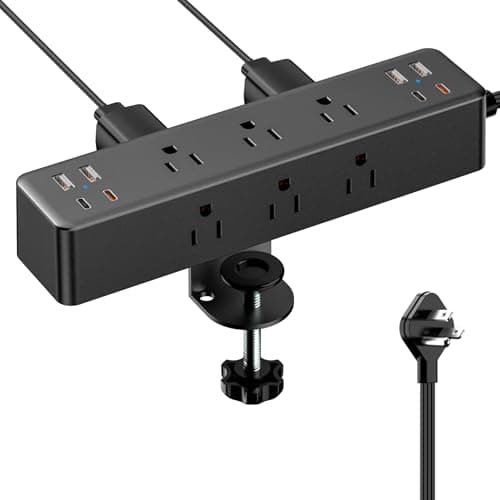
Acozvin Acozvin Desk Clamp Power Strip (10ft cord)
Acozvin Desk Clamp Power Strip (10ft cord)

The whole layout works or fails on this object: nine outlets and eight USB ports clamped to the desk edge, fed by a single ten-foot flat lead. Everything on the desk plugs in here, and one cord goes to the wall.

The one-cord rule, in one object
8.9
$26.99Amazon
02
D-Line D-Line 6ft Floor Cord Cover
D-Line 6ft Floor Cord Cover

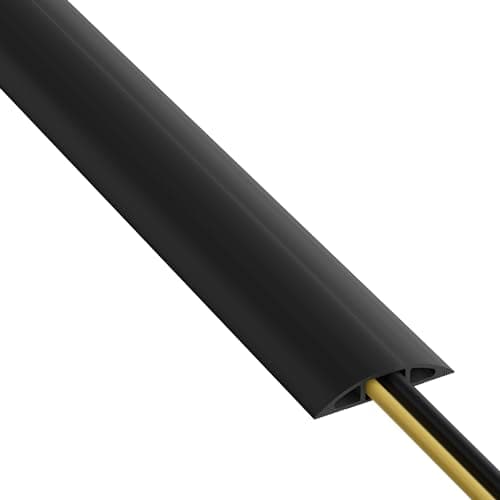
The one cord that does leave the desk has to cross a floor people walk on. A ribbed, non-slip PVC channel that needs no adhesive is the renter-correct way to do it, and it cuts to length with a utility knife.

The crossing
8.6
$16.79Amazon
03
JOTO JOTO Cable Management Sleeve (4-pack)
JOTO Cable Management Sleeve (4-pack)

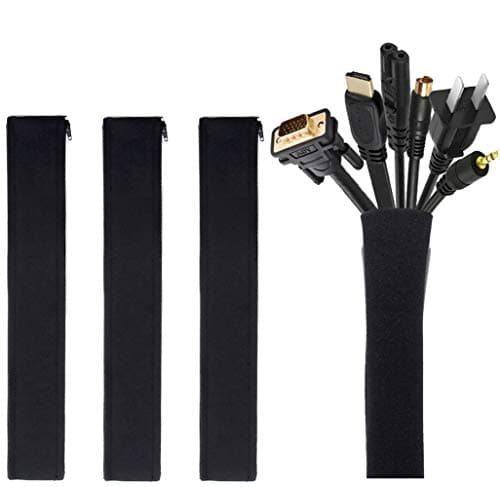
Under a floating desk, every cable is visible from three sides. Zipping the drop into one neoprene tube turns a visible tangle into a single dark line, for about the price of a sandwich.

The under-desk view
8.8
$8.49Amazon
04
Amazon Basics Amazon Basics Gas Spring Single Monitor Arm
Amazon Basics Gas Spring Single Monitor Arm

A floating desk has to be shallower than a wall desk, because its depth comes out of the walkway. An arm pushes the screen back over the rear edge and reclaims the difference, and it clamps or grommets up to a 4-inch top.

Getting the depth back
8.8
$25.49Amazon

#ad · Live prices from the Amazon Product API, as of October 7, 2026. Where we have no verified live price we show none — we would rather leave a gap than print a number that has rotted.

In detail

The picks, in full

01
Acozvin Acozvin Desk Clamp Power Strip (10ft cord)

The one-cord rule, in one object

Acozvin Desk Clamp Power Strip (10ft cord)

Outlets
9 AC (1875W, 15A) + 8 USB (4 A, 4 C)
Cord
10 ft, 0.3 in flat plug
Mount
Edge clamp, up to 1.7 in desktop thickness
USB output
40W total; 20W max per USB-C port
Position
Clamps to the back or side edge
8.9/10

The whole layout works or fails on this object: nine outlets and eight USB ports clamped to the desk edge, fed by a single ten-foot flat lead. Everything on the desk plugs in here, and one cord goes to the wall.

Reach
9.8
Tidiness
9.2
Capacity
9.4
Fit range
7.4
Value
8.6

Pros

  • Ten-foot lead is the specification that makes a floating desk practical - most strips ship with five or six
  • Clamping to the desk edge means the strip travels with the desk and never ends up on the floor
  • Eight USB ports remove eight wall-wart plugs from the equation, which is eight fewer things hanging off the back
  • The 0.3 in flat plug sits close to the wall, so furniture can still stand in front of the outlet
  • Nine AC outlets covers a monitor, a laptop supply, a lamp, a light bar and a dock with room left

Cons

  • Clamps to tops up to 1.7 in - thicker butcher-block and some solid-wood tops are excluded
  • 40W is the total USB budget across all eight ports, not per port, so it will not fast-charge a laptop and a phone at once
  • A 17-way strip on a small desk invites you to plug in more than a single 15A circuit wants

Skip this if…

…your desk top is thicker than 1.7 inches, or you want the strip hidden underneath rather than at the edge. Our desk power strip roundup ranks under-mount options too.

$26.99View on Amazon

$29.9910% off

Price as of October 7, 2026. Prices change — Amazon's is the one that counts.

#ad · we may earn a commission from this link to Acozvin Desk Clamp Power Strip (10ft cord)

02
D-Line D-Line 6ft Floor Cord Cover

The crossing

D-Line 6ft Floor Cord Cover

Length
6 ft, cuts to size
Profile
2.4 in W x 0.44 in H
Inner channel
0.63 in W x 0.31 in H
Capacity
Up to 2 cables of 0.31 in diameter
Fixing
Ribbed non-slip base, no adhesive needed
8.6/10

The one cord that does leave the desk has to cross a floor people walk on. A ribbed, non-slip PVC channel that needs no adhesive is the renter-correct way to do it, and it cuts to length with a utility knife.

Safety
9.6
Renter-safe
9.8
Capacity
6.6
Discreetness
7.8
Value
9

Pros

  • No adhesive and no screws - it stays put on its own ribbed base, so there is nothing to remove from a rented floor
  • Pre-split rear means you can lay cable in rather than threading it, including a cord with a moulded plug on the end
  • Flexible PVC supplied coiled and uncoils flat without heat, which the rigid aluminum alternatives do not
  • 0.44 in high with a shallow ramp either side: low enough to walk over without noticing
  • Cuts to exact length with a utility knife, so the run finishes where it should rather than where the box did

Cons

  • Takes two cables of 0.31 in diameter at most - this is for the single lead, not for a bundle
  • Black PVC on a light floor is visible; the same product exists in beige, gray and brown but you have to pick the right listing
  • Six feet is the longest single piece, so a longer crossing means joining two and accepting the seam

Skip this if…

…you were planning to run the cord under a rug instead. That is the thing to avoid rather than the thing to economize on - a covered cord cannot shed heat.

$16.79View on Amazon

$19.9916% off

Price as of October 7, 2026. Prices change — Amazon's is the one that counts.

#ad · we may earn a commission from this link to D-Line 6ft Floor Cord Cover

03
JOTO JOTO Cable Management Sleeve (4-pack)

The under-desk view

JOTO Cable Management Sleeve (4-pack)

Pack
4 sleeves, 19-20 in each
Diameter
1.2 in when zipped
Capacity
8-10 cables per sleeve
Material
Flexible neoprene, zip closure
Extendable
Two sleeves zip together for double capacity
8.8/10

Under a floating desk, every cable is visible from three sides. Zipping the drop into one neoprene tube turns a visible tangle into a single dark line, for about the price of a sandwich.

Safety
7
Renter-safe
9.8
Capacity
8.8
Discreetness
8.8
Value
9.6

Pros

  • Zip closure rather than a spiral wrap, so you can open the whole run to add a cable instead of unwinding it
  • Stretchy neoprene takes 8-10 cables and still pulls into a 1.2 in tube
  • Four in a pack covers the desk drop, the monitor arm run and the lead to the wall with one spare
  • Nothing is adhesive, screwed or permanent - it comes off the cables in seconds when you move
  • Black tube against a dark floor reads as a single shadow rather than as cabling

Cons

  • 19-20 in per sleeve: a long drop from a standing desk needs two zipped together
  • A tight neoprene bundle traps a little heat, so do not include a laptop power brick inside the sleeve
  • It tidies cables, it does not support them - a heavy run still wants a clip or a tray to carry the weight

Skip this if…

…your cables need to be separated and re-routed often. A sleeve is for a bundle that has settled; for a desk you keep reconfiguring, ties are less work.

$8.49View on Amazon

$16.9950% off

Price as of October 7, 2026. Prices change — Amazon's is the one that counts.

#ad · we may earn a commission from this link to JOTO Cable Management Sleeve (4-pack)

04
Amazon Basics Amazon Basics Gas Spring Single Monitor Arm

Getting the depth back

Amazon Basics Gas Spring Single Monitor Arm

Monitors
15-27 in, 4.4-15.4 lb
Mount
C-clamp or grommet, 0.39-4 in top
Extension
Up to 20.5 in
Motion
Tilt -90 to +85 degrees, swivel +/-90, 360 rotation
VESA
75x75 and 100x100 mm
8.8/10

A floating desk has to be shallower than a wall desk, because its depth comes out of the walkway. An arm pushes the screen back over the rear edge and reclaims the difference, and it clamps or grommets up to a 4-inch top.

Depth returned
9.4
Mount options
9.6
Renter-safe
8.8
Capacity
7
Value
9.2

Pros

  • Grommet option matters here: on a floating desk the clamp is visible from the room, and a grommet mount is not
  • 0.39-4 in clamp range covers essentially any desk top you would float
  • Pushing a 24 in screen back over the rear edge returns roughly 8-10 in of usable depth on the desk
  • Gas spring with adjustable tension, so the screen can be moved through the day rather than set once
  • Raising the panel lets it mask more of whatever bright thing is behind it, which is the usual problem in the middle of a room

Cons

  • 4.4 lb minimum load - a very light 22 in panel may be too light for the spring to hold position
  • 15.4 lb ceiling rules out most 32 in and heavy curved panels
  • The pole and arm are themselves visible from the room side; there is no version of this that disappears

Skip this if…

…your monitor is over 15.4 lb or larger than 27 inches. Our 32-inch arm roundup covers the heavier class, and the weight band is not a suggestion.

$25.49View on Amazon

$29.9915% off

Price as of October 7, 2026. Prices change — Amazon's is the one that counts.

#ad · we may earn a commission from this link to Amazon Basics Gas Spring Single Monitor Arm

The one-cord rule

The rule is simple enough to hold in your head while you shop: every powered thing on the desk plugs into a strip fixed to the desk, and exactly one cord leaves the desk for the wall. Everything else in this guide is in service of that sentence.

It works because of what it removes. A floating desk with five separate leads to the wall has five trip hazards, five things to cover, five cords that get caught when the desk moves an inch, and a visual mess from every angle in the room. The same desk with one lead has one of each. It also makes the desk movable: unplug one plug and the whole workstation can be pulled out to clean behind, or turned ninety degrees when the room changes.

The practical order is: clamp the strip to the back or side edge of the desk; plug the monitor, the laptop supply, the lamp and anything else into it; zip the drop from the desktop down to the strip into one sleeve; run the single ten-foot lead to the outlet along the shortest sensible route; and cover the part that crosses open floor.

Clearance, measured properly

SideWhat it needsWhy
Behind the chair~36 inTo push back and stand without hitting the bed, the sofa or the wall
The walking side~30 inA route past the desk that people will actually use rather than detour around
The far side18 in minimumEnough to get at the back of the desk to plug something in without moving it
In front (the desk face)Whatever is leftThis is the side that can be tight, because nobody stands there

Those are the same numbers our desk dimensions by room size guide uses, applied to more sides than usual. The honest conclusion for most small apartments is that a floating desk needs a room about two feet wider in each direction than a wall-mounted one, and that a desk narrower than about 40 inches is much easier to place centrally than a wide one.

Three layouts that actually work

The divider.The desk sits with its back to the room, dividing a studio into a sleeping half and a working half, or standing behind a sofa as a console. This is the strongest version of the idea because the desk earns its floor twice — it is furniture and a wall. It wants a desk with a finished back, and it is the layout most likely to need a cord crossing a walkway.

Floating in front of the window. Pull the desk two or three feet off the window wall and turn it side-on. You keep the daylight on your desk and off your screen, which is the orientation our window placement guide recommends anyway, and the gap behind you is where the radiator, the curtain and the cord run all live.

The corner diagonal.Setting a desk at 45 degrees across a corner is usually a bad idea in a small room — it wastes the triangle behind it — with one exception: when that triangle is exactly where the cord run, the tower and a bin want to go. If you are considering a corner at all, a small corner desk against the two walls is almost always the better use of the same floor.

What not to do

Do not run the cord under a rug. The Electrical Safety Foundation International puts cords under rugs, carpets and furniture on its list of cord hazards for a specific reason: a cord that cannot dissipate heat, and that gets walked on until the insulation wears, is a fire that starts under something flammable. A surface cover rated for foot traffic is the correct answer, and it costs less than the rug.

Do not daisy-chain extension cords to make up the distance. If ten feet does not reach, move the desk or use a single longer cord of the right gauge.

Do not fix anything to the floor. Adhesive raceway on a floor is a deposit problem in a rental and a refinishing problem in an owned flat. Everything in this guide is removable, which is the standing position across our renter-friendly setup guide and cable management without wall damage.

Standing desks in the middle of a room

A sit-stand desk in open floor is the hardest version of this. The cord has to tolerate 18 or more inches of vertical travel on top of the horizontal run, which means a deliberate service loop at the back of the desk and a sleeve that can take the movement. Clamp the strip to the desk, never to the wall, so the whole powered assembly rises and falls together — the same principle that governs keyboard trays on a sit-stand desk. A frame in open floor is also visible from every angle, which is the aesthetic argument for a shallow standing desk over a wide one.

Where this page stops

If the desk can go against a wall after all, it probably should, and monitor arms for a desk against a wall covers the mounting problem that placement creates. If the room is a living room and the desk has to coexist with a sofa, desks for a small living room ranks the furniture that survives being looked at all evening. And for the general version of the cable problem, our cable management picks cover the box, the ties and the raceway.
How we picked

We do not run a testing lab

We compiled the published manufacturer specifications, did the footprint and clearance math ourselves, and read aggregated owner reviews, then scored each product against a published rubric. The scores are judgments from documented research — they are not measurements we took, because we do not have a lab and we are not going to pretend we do. Every spec traces back to a listing or manual named in Sources.

Questions

Frequently asked

Is it bad to put a desk in the middle of a room?
Not in itself. It costs more floor than a desk against a wall - you need chair clearance behind and a walkway past at least one side - and it turns the back of the desk into something people look at. In a studio or an awkwardly shaped apartment it is often the only placement available, and used as a divider it can make a single room work as two.
How do you run power to a desk in the middle of a room?
Clamp a power strip to the desk, plug everything on the desk into that, and run exactly one cord to the wall. Pick a strip with a long lead — ten feet rather than the usual five or six — and cover the section that crosses open floor with a floor cord cover. Our desk power strip picks cover the clamp and under-mount options.
Can you run an extension cord under a rug?
No. The Electrical Safety Foundation lists cords under rugs, carpets and furniture among its cord hazards, because a cord that cannot shed heat and gets walked on is a fire risk. Run the cord around the edge of the rug, or over it inside a floor cord cover designed for foot traffic.
How much space do you need around a desk in the middle of a room?
Roughly 36 inches behind the chair to stand up, about 30 inches of walkway on whichever side people pass, and at least 18 inches on the far side so you can reach the back of the desk. A 47-inch desk placed centrally therefore wants about 6 feet by 5 feet 6 inches of floor, which is the figure that decides whether the idea is realistic in your room.
Does a desk in the middle of a room need a different monitor setup?
Usually, for two reasons. The desk has to be shallower than a wall desk because its depth comes out of the walkway, so a monitor arm that pushes the screen back over the rear edge earns more here than anywhere else. And the background behind your screen is no longer a blank wall - it may be a window or a lamp - so raising the panel to mask more of it helps. See our monitor arm picks.
Can you use a standing desk in the middle of a room?
Yes, with two adjustments. Fix the power strip to the desk rather than the wall so everything travels with the top, and leave a deliberate service loop in the lead so 18 inches of vertical travel does not pull the cord taut at full height. A frame in open floor is also visible from every side, so a shallow desk looks considerably less imposing than a wide one.

Keep reading

Receipts

Sources

We do not run a testing lab, and we do not pretend to. Specifications come from the manufacturer or retailer listing; the footprint and clearance math is ours and reproducible. Where we could not verify a number, we say so on the page rather than quietly leaving it out. Read our full method.