Skip to content
Desk & Dowel

HUB 04 · Space-Saving Accessories

The Best Compact Keyboards for a Small Desk

Losing the number pad gives you back four to six inches of desk and brings your mouse hand back in line with your shoulder. Five compact layouts, ranked.

By Stephen V.Updated How we pick
#ad

We earn a commission when you buy through our Amazon links, at no extra cost to you. It never affects our rankings, and we say so when the cheaper product is the better buy. How this works.

The number pad is the single largest piece of unexamined desk furniture most people own. A full-size keyboard is a wide object — typically around 17 to 18 inches for a 104-key layout — and on a 36 or 40-inch desk it takes roughly half the width. Worse, it pushes the mouse out to the right of the number pad, which means your mouse arm works at an angle away from your shoulder all day. Dropping to a shorter layout fixes both problems at once, for the price of a keyboard.

The layouts, in order of what they remove. A tenkeyless (TKL, 87 keys) drops the number pad and keeps everything else, which is the easy win. A 75 percent (around 84 keys) keeps the function row and the arrow keys but compresses the gaps. A 65 percent drops the function row and keeps the arrows. A 60 percent (around 61 keys)drops both, and everything missing lives on a modifier layer. Widths vary between models and switch types, so measure a specific board rather than trusting the percentage — but the direction is consistent and the saving is real.

For most people working from a small apartment desk, a compact wireless board is the correct answer rather than the smallest possible one: the cable is as much of a desk problem as the width. Our pick is the Logitech K480, which is compact, multi-device and cheap. Live prices below; the methodology explains the scoring.

The short answer

Quick picks

#ProductBest forScorePrice
01
Logitech Logitech K480 Multi-Device Bluetooth Keyboard
Logitech K480 Multi-Device Bluetooth Keyboard

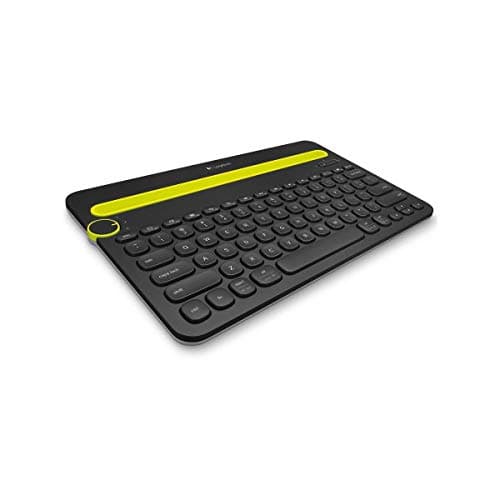
Compact, wireless and switches between three devices with a dial — which on a small desk means one keyboard for the laptop, the tablet and the phone instead of three surfaces holding three things.

Best overall
9.0
$29.99Amazon
02
Logitech Logitech MK470 Slim Compact Keyboard & Mouse
Logitech MK470 Slim Compact Keyboard & Mouse

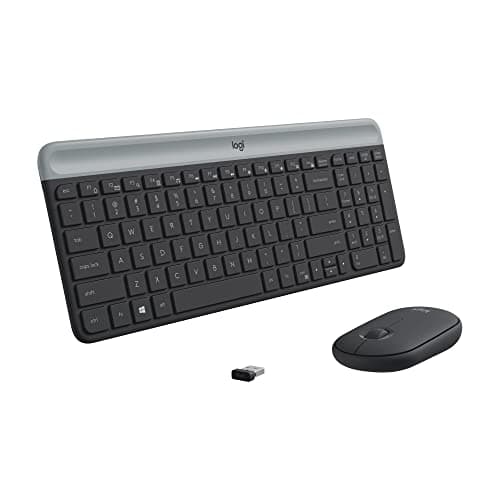
A slim compact board and a matching mouse on one receiver, which is the tidiest way to furnish a small desk in a single purchase.

Best keyboard-and-mouse set
8.6
$34.88Amazon
03
No image
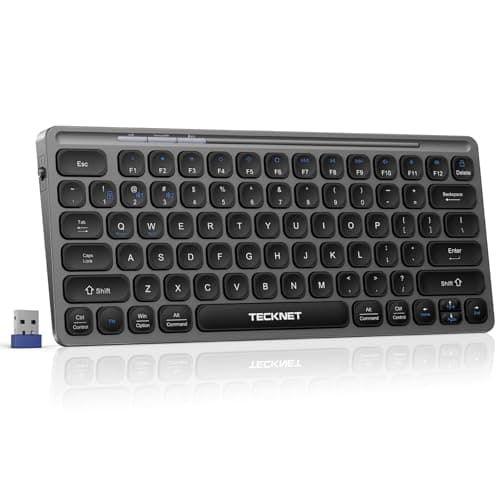
TECKNET Rechargeable 4-Device Compact Keyboard

Four paired devices, three of them Bluetooth plus a 2.4GHz receiver, on a rechargeable small-format board — the most connectivity per dollar in the roundup.

Best budget wireless
9.0
Check price →
04
RK ROYAL KLUDGE RK ROYAL KLUDGE R75 (75% mechanical)
RK ROYAL KLUDGE R75 (75% mechanical)

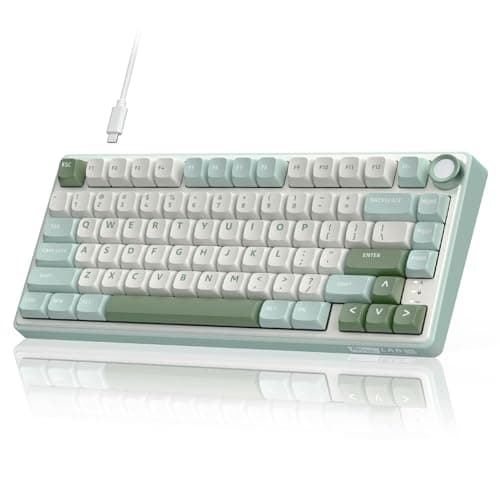
The 75 percent layout done properly: gasket mounting, PBT keycaps, hot-swappable pre-lubed switches and a volume knob, in a board that keeps the function row and the arrows.

Best mechanical
7.6
$59.99Amazon
05
AULA AULA WIN60 HE (60%, 61 keys)
AULA WIN60 HE (60%, 61 keys)

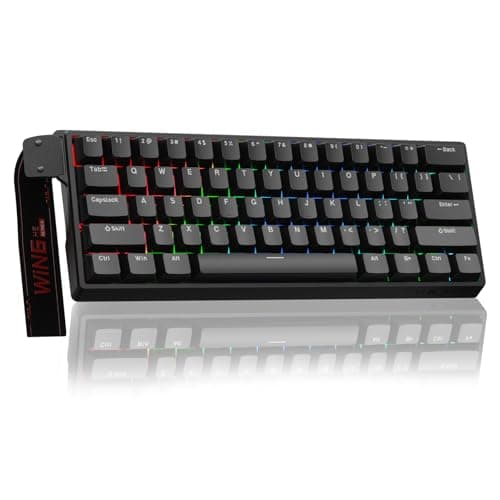
The narrowest board here at 61 keys, with magnetic switches and adjustable actuation — the maximum-width-saving option if you are willing to learn a layer.

Best for the smallest desk
7.4
$37.61Amazon

#ad · Live prices from the Amazon Product API, as of Sep 7, 2026. Where we have no verified live price we show none — we would rather leave a gap than print a number that has rotted.

In detail

The picks, in full

01
Logitech Logitech K480 Multi-Device Bluetooth Keyboard

Best overall

Logitech K480 Multi-Device Bluetooth Keyboard

Connection
Bluetooth
Devices
3, switched by dial
Platforms
Windows, macOS, iPadOS, Android, ChromeOS
Extras
Integrated device cradle
Power
Batteries (long life)
9.0/10

Compact, wireless and switches between three devices with a dial — which on a small desk means one keyboard for the laptop, the tablet and the phone instead of three surfaces holding three things.

Width saved
8.4
Typing comfort
8
Cable-free
9.6
Versatility
9.6
Value
9.2

Pros

  • One board for laptop, tablet and phone — a real desk saving, not just a keyboard saving
  • Built-in cradle holds a phone or tablet upright without a separate stand
  • No dongle needed, so a laptop USB port stays free
  • Long battery life on replaceable cells rather than a charge cycle to remember

Cons

  • Thicker than a slim board because of the cradle
  • Keys are membrane, not mechanical — quiet but less positive

Skip this if…

you want the thinnest possible profile. The cradle adds height; the MK470 is the flat option.

$29.99View on Amazon

Price as of Sep 7, 2026. Prices change — Amazon's is the one that counts.

#ad · we may earn a commission from this link to Logitech K480 Multi-Device Bluetooth Keyboard

02
Logitech Logitech MK470 Slim Compact Keyboard & Mouse

Best keyboard-and-mouse set

Logitech MK470 Slim Compact Keyboard & Mouse

Connection
Wireless receiver
Included
Keyboard + mouse
Profile
Slim, low profile
Layout
Compact
Finish
Graphite (also off-white)
8.6/10

A slim compact board and a matching mouse on one receiver, which is the tidiest way to furnish a small desk in a single purchase.

Width saved
8.6
Typing comfort
8.4
Cable-free
9.4
Versatility
7.2
Value
9.4

Pros

  • Low profile keeps the wrist angle flat without a wrist rest
  • One receiver for both devices, so only one USB port is used
  • Quiet keys, which matters in a studio or a shared room
  • Cheaper than buying a comparable keyboard and mouse separately

Cons

  • Uses a USB receiver rather than Bluetooth — a dongle to lose
  • One device only; no switching between a laptop and a tablet

Skip this if…

your laptop is short of USB ports. A Bluetooth board like the K480 or TECKNET leaves the port free — or add a hub.

$34.88View on Amazon

$49.9930% off

Price as of Sep 7, 2026. Prices change — Amazon's is the one that counts.

#ad · we may earn a commission from this link to Logitech MK470 Slim Compact Keyboard & Mouse

03
No image

Best budget wireless

TECKNET Rechargeable 4-Device Compact Keyboard

Connection
2.4 GHz + 3 × Bluetooth
Devices
4
Power
Rechargeable
Layout
Small format
Switching
Dedicated keys
9.0/10

Four paired devices, three of them Bluetooth plus a 2.4GHz receiver, on a rechargeable small-format board — the most connectivity per dollar in the roundup.

Width saved
8.8
Typing comfort
7.6
Cable-free
9.4
Versatility
9.4
Value
9.6

Pros

  • Four devices covers a work laptop, a personal laptop, a tablet and a phone
  • 2.4GHz option for machines with poor Bluetooth
  • Rechargeable rather than eating AA cells
  • The cheapest multi-device board we can find

Cons

  • Rechargeable means a dead battery is a cable, not a spare cell
  • Less established than the Logitech boards for long-term support

Skip this if…

you want a keyboard you will still be using in eight years. The Logitech boards have the better track record for exactly that.

Check price on Amazon →

We don't have a verified live price for this right now, so we aren't showing one.

#ad · we may earn a commission from this link to TECKNET Rechargeable 4-Device Compact Keyboard

04
RK ROYAL KLUDGE RK ROYAL KLUDGE R75 (75% mechanical)

Best mechanical

RK ROYAL KLUDGE R75 (75% mechanical)

Layout
75%
Mounting
Gasket
Switches
Hot-swappable, pre-lubed tactile
Keycaps
PBT, MDA profile
Extras
Volume knob, RGB
7.6/10

The 75 percent layout done properly: gasket mounting, PBT keycaps, hot-swappable pre-lubed switches and a volume knob, in a board that keeps the function row and the arrows.

Width saved
8.8
Typing comfort
9.6
Cable-free
4
Versatility
7.4
Value
8

Pros

  • Keeps the function row and arrow keys — no learning curve at all
  • Hot-swap sockets mean you can change the feel without a new keyboard
  • PBT keycaps do not go shiny the way ABS does
  • Gasket mounting makes it noticeably quieter than a plate-mounted board

Cons

  • Wired, so it is one more cable on the desk
  • Mechanical switches are audible in a shared room, gasket or not

Skip this if…

you take calls from a shared room, or your desk is in a studio someone else sleeps in. Take the MK470 or K480 and keep the peace.

$59.99View on Amazon

Price as of Sep 7, 2026. Prices change — Amazon's is the one that counts.

#ad · we may earn a commission from this link to RK ROYAL KLUDGE R75 (75% mechanical)

05
AULA AULA WIN60 HE (60%, 61 keys)

Best for the smallest desk

AULA WIN60 HE (60%, 61 keys)

Layout
60% (61 keys)
Switches
Magnetic, hot-swappable
Actuation
Adjustable, rapid trigger
Polling
8000 Hz
Connection
Wired
7.4/10

The narrowest board here at 61 keys, with magnetic switches and adjustable actuation — the maximum-width-saving option if you are willing to learn a layer.

Width saved
9.8
Typing comfort
8.2
Cable-free
4
Versatility
6.4
Value
8.6

Pros

  • 61 keys is the narrowest mainstream layout — the biggest desk saving available
  • Adjustable actuation depth is genuinely useful for typing feel, not just gaming
  • Hot-swappable switches
  • Leaves the most room for a mouse of anything here

Cons

  • No arrow keys or function row — both live on a modifier layer
  • Wired, and mechanical, so neither quiet nor cable-free

Skip this if…

you use arrow keys constantly — spreadsheets, code editing, document review. The layer works but it is a real cost, every day.

$37.61View on Amazon

$39.996% off

Price as of Sep 7, 2026. Prices change — Amazon's is the one that counts.

#ad · we may earn a commission from this link to AULA WIN60 HE (60%, 61 keys)

The desk arithmetic

Work out what you actually have. Take your desk width, subtract anything permanently parked on it (a laptop on a stand, a speaker, a lamp base), and what remains is the keyboard and mouse zone. A mouse needs roughly 8 to 10 inches of free movement to be comfortable at a normal sensitivity. On a 36-inch desk with a laptop stand at one end, a full-size keyboard leaves you a mouse pad's worth of space and no more.

LayoutKeysWhat it removesSuits
Full size104Nothing48in+ desks, heavy numeric entry
Tenkeyless87Number pad40–48in desks; the easy first step
75%~84Number pad, spacing36–40in desks; keeps every key
65%~68Also the function row32–36in desks
60%~61Also the arrow keysUnder 32in, or a keyboard tray

The shoulder argument, which matters more than the desk one

A number pad sits between the letter keys and your mouse, so your mouse hand works four to six inches further right than your shoulder. Sustained reaching to the side loads the shoulder and upper back rather than the wrist, and it is a common cause of the ache people blame on their chair. Removing the number pad brings the mouse back toward the centerline for free. If you genuinely need numeric entry, a separate wireless number pad on the leftis the standard fix — it comes out for the hour a month you need it and lives in a drawer the rest of the time.

Reach is one half of it; the angle your forearm holds once your hand gets there is the other. Vertical and contoured shells rotate the wrist out of the flat, palm-down position, and the better ones publish a grip angle you can actually compare — Desk & Daylight ranks the best ergonomic mice on exactly that number. Fix the reach first, though: it is the change that costs nothing.

Wireless, wired, and the cable question

On a small desk, a keyboard cable is not a trivial thing: it runs across the surface, it gets caught under the board when you slide it aside, and it is one more line to route. Bluetooth boards leave your laptop's USB ports free, which matters on machines that have two. Receiver-based boards are more reliable on desktops with poor Bluetooth but cost you a port — recoverable with a docking station or an arm-mounted hub. If you go wired, our cable management kit covers getting the lead off the surface.

Compact keyboards and keyboard trays

A compact board is what makes an under-desk keyboard traygenuinely practical. Most trays are sized for a keyboard alone or a keyboard plus a small mouse area, and a full-size board plus mouse simply does not fit on the common widths. A 75 or 65 percent board and a mouse do. That combination — compact keyboard on a tray — is the single most effective way to reclaim a small desktop, because it moves the largest two objects off the surface entirely.

Noise, which is a small-apartment specification

In a studio, a shared flat or a bedroom desk, keyboard noise is a real constraint and mechanical keyboards are loud. If the desk is in a room someone else uses, the membrane and scissor-switch boards here are the pragmatic choice; if you want mechanical feel with less noise, gasket-mounted boards with pre-lubed linear switches are considerably quieter than plate-mounted clicky ones. Neither is silent. Consider where the desk is before you consider how the switches feel.
How we picked

We do not run a testing lab

We compiled the published manufacturer specifications, did the footprint and clearance math ourselves, and read aggregated owner reviews, then scored each product against a published rubric. The scores are judgments from documented research — they are not measurements we took, because we do not have a lab and we are not going to pretend we do. Every spec traces back to a listing or manual named in Sources.

Questions

Frequently asked

How much desk space does a compact keyboard save?
Dropping the number pad removes roughly four to six inches of width depending on the model, and going further to a 60 percent layout removes more again. Exact widths vary between boards, so measure the specific keyboard - but the direction is consistent, and on a 36-inch desk the saving is the difference between a cramped mouse area and a comfortable one.
Is a tenkeyless keyboard better for a small desk?
It is the best first step, because it removes the widest unused component and changes nothing about how you type. Everything you know stays in the same place. Going smaller than tenkeyless starts moving keys onto modifier layers, which is a genuine adjustment - worth it on a very small desk, unnecessary on a 44-inch one.
What is the downside of a 60% keyboard?
No function row and no dedicated arrow keys — both are reached by holding a modifier. For writing prose it is a minor irritation; for spreadsheets, code editing or anything with heavy cursor navigation it is a daily tax. A 65 or 75 percent board keeps the arrows and still saves most of the width.
Should I get a wireless or a wired keyboard for a small desk?
Wireless, in most small-desk cases. A cable across a 36-inch desk is disproportionately annoying, and it fouls the board every time you slide it aside to make room for something. Bluetooth also leaves your laptop's USB ports free. Wired is worth it only if you want a mechanical board and are not prepared to pay the wireless premium.
Can you still use a number pad with a compact keyboard?
Yes — a separate wireless numeric pad. Put it on the left of the keyboard so your mouse hand stays close to your shoulder, and put it away when you are not doing numeric entry. That arrangement gives you the number keys on the days you need them and the desk space on all the others.

Keep reading

Receipts

Sources

We do not run a testing lab, and we do not pretend to. Specifications come from the manufacturer or retailer listing; the footprint and clearance math is ours and reproducible. Where we could not verify a number, we say so on the page rather than quietly leaving it out. Read our full method.