Skip to content
Desk & Dowel

HUB 03 · Desk Lighting

Where to Put a Desk Lamp

Opposite your writing hand, behind the plane of the screen, and about 15 inches above the desk. The reasons for each, and what to do when there is no room for a lamp at all.

By Stephen V.Updated How we pick
#ad

We earn a commission when you buy through our Amazon links, at no extra cost to you. It never affects our rankings, and we say so when the cheaper product is the better buy. How this works.

Put the lamp on the side opposite your writing hand, set back so the head sits behind the plane of your screen, and roughly 15 inches above the desk— about eye level when you are seated. That combination is what stops your own hand casting a shadow on what you are reading, keeps the bulb out of your field of view, and keeps light off the front of the monitor. On a small desk there is a fourth rule that overrides all three: if the lamp needs desk surface you do not have, clamp it to the edge instead, because a lamp in the wrong place is worse than no lamp.

This page is about where. How much light to aim for is in desk lamp lumens, and what color in desk lamp color temperature. Get the position wrong and neither of those will save you: the most common lighting complaint at a desk is not darkness, it is a bright reflection in the screen, and that is a placement problem.

What decides it, in order

One: which side. Opposite the hand you write with. If you are right-handed, the lamp goes on the left, so your hand and pen do not sit between the light and the paper. This is the one rule that is genuinely about handedness and it is the one most people get wrong, because the socket is usually on the other side.

Two: how far back. The lamp head should sit behind the front face of your monitor, not level with it and never in front of it. Anything forward of the screen plane throws light onto the panel, and a matte screen turns that into a milky haze while a glossy one turns it into a mirror of the bulb. Pushing the lamp back also keeps the hot spot on the desk rather than in your eyes.

Three: how high. About 15 inches above the desk surface for a task lamp, which puts the head near seated eye level, with the shade angled down and inward at the work. Higher than that and the pool of light widens and weakens; lower and the bulb itself comes into view at the edge of your vision, which is the thing that causes the low-grade eye ache people blame on the screen. If the lamp has a visible bulb or a very bright diffuser, the test is simple: sit normally and look straight ahead. If you can see the light source, it is too low or too far forward.

Four: how far across.Far enough that the head is not over your keyboard hand, close enough that the pool of light covers what you actually look at. On a desk under 40 inches wide that usually means the lamp at the back corner with the arm reaching inward — which is why a swing arm or a gooseneck beats a fixed shade on a small desk. The fixture that stays at the back and reaches in is doing two jobs at once.

Five: what the lamp is standing on.This is the small-apartment constraint that trumps the rest. A base lamp claims a circle of desk you cannot use for anything else — typically 5 to 7 inches across at the back corner, which is where people also want the monitor base, the speaker or the pen pot. Our clamp lamp vs base lamp comparison does the arithmetic; the short version is that on a desk under about 20 inches deep, the clamp wins on footprint alone.

Three positions to avoid

Behind the screen, pointing at you.This is the most common mistake in a small room, usually because the socket is on that wall. A light source immediately behind the monitor puts a bright field behind a darker screen, your pupils adapt to the bright thing, and the screen reads as dull and muddy. If a lamp has to be back there, turn it to wash the wall rather than face you — indirect light behind a screen is helpful; direct light is not.

Directly above the screen, as a general light.A lamp overhanging the panel drops light down the front of it. The fixture designed to sit there is a monitor light bar, which solves it with an asymmetric optic that throws light forward onto the desk and deliberately not down onto the screen — see monitor light bar vs desk lamp. A normal lamp in that position has no such optic.

On the same side as a window. Doubling up the brightest two sources on one side leaves the other side of your work in relative shadow all morning and gives you nothing at dusk. Put the lamp on the side away from the daylight; our desk in front of a window guide covers the daylight half of the problem, including the contrast collapse when the sun goes.

The short answer

Quick picks

#ProductBest forScorePrice
01
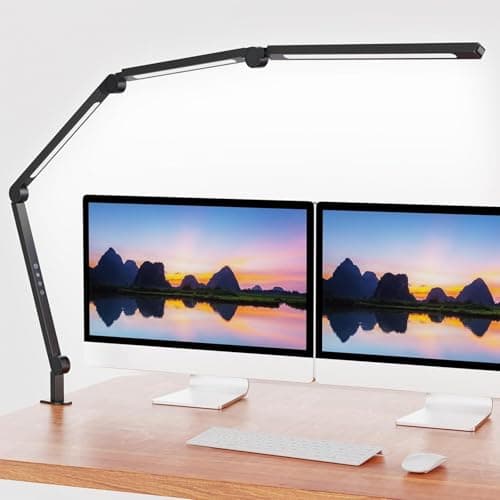
AILBTON AILBTON LED Architect Clamp Lamp
AILBTON LED Architect Clamp Lamp

The right answer to the placement problem rather than a workaround for it: clamped to the rear edge it uses no desk surface, and the swing arm puts the head exactly where the three rules above want it.

Putting the light where it should go, on any desk
8.9
$39.99Amazon
02
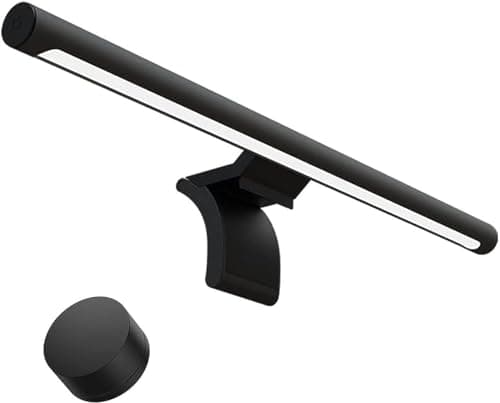
Xiaomi Xiaomi Computer Monitor Light Bar
Xiaomi Computer Monitor Light Bar

The fixture that solves placement by removing the decision: it rests on the monitor bezel, where no lamp belongs, and its asymmetric optic throws light forward onto the desk instead of down onto the screen.

A desk with no room for a lamp at all
8.5
$67.99Amazon
03
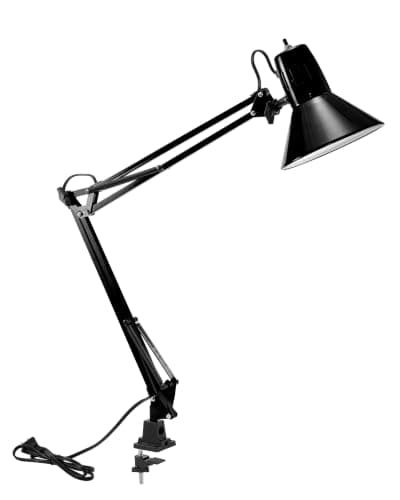
Bostitch Office Bostitch Office VLF100 Swing-Arm LED Lamp
Bostitch Office VLF100 Swing-Arm LED Lamp

The cheapest way to get a clamped swing arm, which is the mechanism that makes correct placement possible on a small desk. A USB charge port in the base is a useful second job for the same desk edge.

Reach, for under $25
8.6
$24.16Amazon
04
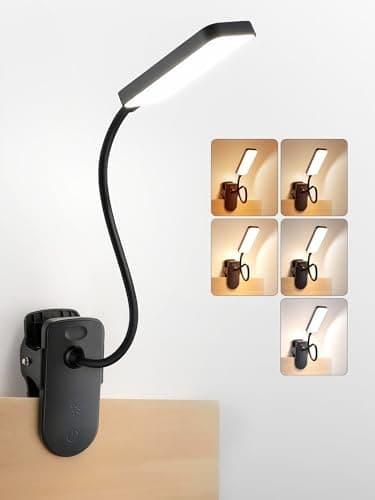
ReinHoo ReinHoo Rechargeable Clip-On Desk Light
ReinHoo Rechargeable Clip-On Desk Light

When the lamp has to go where there is no socket and no desk edge: it clips to a shelf, a headboard or a monitor arm, runs 5 to 48 hours on a charge, and the 11.8-inch gooseneck does the aiming.

Placement where there is no socket
8.9
$18.91Amazon

#ad · Live prices from the Amazon Product API, as of October 11, 2026. Where we have no verified live price we show none — we would rather leave a gap than print a number that has rotted.

In detail

The picks, in full

01
AILBTON AILBTON LED Architect Clamp Lamp

Putting the light where it should go, on any desk

AILBTON LED Architect Clamp Lamp

Mount
Clamp — no desk surface used
Arm
Adjustable swing arm and head
Dimming
4 levels
Color temp
Adjustable, warm to cool
Light
Flicker-free LED
8.9/10

The right answer to the placement problem rather than a workaround for it: clamped to the rear edge it uses no desk surface, and the swing arm puts the head exactly where the three rules above want it.

Desk space claimed
9.6
Position control
9.2
Glare control
7.6
Install ease
8.8
Value
9.4

Pros

  • Zero desk footprint, so the back corner stays available for the things that have to be on the desk
  • A long swing arm means the head can sit behind the screen plane and still reach over the work
  • Four dimming levels plus color temperature, so the same lamp works for paper and for screen work
  • The base stays at the desk edge where cables already run

Cons

  • Needs two or three inches of clear rear edge — the same edge a monitor arm wants
  • Clamp range is limited like any clamp; a very thick top may need checking
  • A tall arm over a shallow desk can intrude into the space above the screen

Skip this if…

…your rear edge is already taken by a monitor arm and a power strip. A clip-on or a light bar needs no edge at all.

$39.99View on Amazon

Price as of October 11, 2026. Prices change — Amazon's is the one that counts.

#ad · we may earn a commission from this link to AILBTON LED Architect Clamp Lamp

02
Xiaomi Xiaomi Computer Monitor Light Bar

A desk with no room for a lamp at all

Xiaomi Computer Monitor Light Bar

Mount
Rests on monitor bezel
Optic
Asymmetric, no screen glare
Color temp
2700–6500K
Controls
On-bar touch
Desk footprint
None
8.5/10

The fixture that solves placement by removing the decision: it rests on the monitor bezel, where no lamp belongs, and its asymmetric optic throws light forward onto the desk instead of down onto the screen.

Desk space claimed
9.8
Position control
5.4
Glare control
9.4
Install ease
9.6
Value
8.4

Pros

  • Takes no desk surface and no desk edge — the only fixture here that needs neither
  • The asymmetric optic is the whole reason it can sit above a screen without washing it out
  • 2700-6500K covers warm evening work and cool daytime work from one fixture
  • Nothing to position: the bezel decides height and distance for you

Cons

  • Lights the desk in front of the screen, so it is poor for paper work off to one side
  • Needs a monitor with a reasonably flat top bezel; sharply curved backs are the usual exception
  • No reach — you cannot aim it at a book

Skip this if…

…most of your work is on paper rather than on screen. A bar lights the keyboard zone well and a side-desk reading area badly.

$67.99View on Amazon

Price as of October 11, 2026. Prices change — Amazon's is the one that counts.

#ad · we may earn a commission from this link to Xiaomi Computer Monitor Light Bar

03
Bostitch Office Bostitch Office VLF100 Swing-Arm LED Lamp

Reach, for under $25

Bostitch Office VLF100 Swing-Arm LED Lamp

Mount
Clamp + swing arm
Controls
Dimmer + USB charge port
Color temp
Multiple modes
Brightness
Dimmable levels
Desk footprint
None (clamped)
8.6/10

The cheapest way to get a clamped swing arm, which is the mechanism that makes correct placement possible on a small desk. A USB charge port in the base is a useful second job for the same desk edge.

Desk space claimed
9.4
Position control
9
Glare control
7.4
Install ease
8.6
Value
9.4

Pros

  • A long articulated arm gets the head over the work and behind the screen plane at the same time
  • USB port on the clamp body, so the lamp earns its spot on the edge twice over
  • Cheapest fixture here by a distance
  • Multiple color modes, so it can go warm for evening reading

Cons

  • A long arm on a shallow desk is easy to knock
  • Build is plastic-forward at this price
  • Clamp needs clear rear edge like any clamp lamp

Skip this if…

…your desk edge is crowded or your top is unusually thick. Check the thickness before ordering any clamp fixture.

$24.16View on Amazon

Price as of October 11, 2026. Prices change — Amazon's is the one that counts.

#ad · we may earn a commission from this link to Bostitch Office VLF100 Swing-Arm LED Lamp

04
ReinHoo ReinHoo Rechargeable Clip-On Desk Light

Placement where there is no socket

ReinHoo Rechargeable Clip-On Desk Light

Battery
4000 mAh
Runtime
5–48 h by brightness
Output
48 LEDs, up to 450 lm
Color rendering
CRI ≥ 90
Gooseneck
11.8 in
8.9/10

When the lamp has to go where there is no socket and no desk edge: it clips to a shelf, a headboard or a monitor arm, runs 5 to 48 hours on a charge, and the 11.8-inch gooseneck does the aiming.

Desk space claimed
9.6
Position control
8.6
Glare control
7.8
Install ease
9.4
Value
9

Pros

  • No cable at all, so placement is decided by where the light should be rather than where the socket is
  • Clips to things that are not desks — a shelf above the desk is often the ideal height
  • CRI 90 or better published, which is unusual at this price and matters for anything color-critical
  • Up to 48 hours at low output means charging is a monthly job, not a daily one

Cons

  • 450 lumens maximum is a task light for one area, not a desk light for a whole surface
  • An 11.8-inch gooseneck limits how far it can reach from its clip point
  • Battery lamps dim as they drain, which you notice on long evenings

Skip this if…

…you need to light a whole 40-inch desk. This is a precision light for a reading area, not a general one.

$18.91View on Amazon

$24.9124% off

Price as of October 11, 2026. Prices change — Amazon's is the one that counts.

#ad · we may earn a commission from this link to ReinHoo Rechargeable Clip-On Desk Light

The placement rules in one table

DimensionTargetWhy
SideOpposite your writing handYour hand stops shadowing the work
DepthHead behind the screen planeKeeps light off the front of the panel
Height~15 in above the deskNear seated eye level; bulb stays out of view
AimDown and inward at the workPuts the pool where you look, not where you sit
Relative to a windowThe opposite sideAvoids one bright side and one dark one

The 60-second check once it is placed

Sit down and do three things. Look straight ahead: you should not be able to see the light source. Look at the screen:there should be no bright shape reflected in it — if there is, the lamp is too far forward, and moving it back two inches usually fixes what dimming it cannot. Put your hand where you write: the shadow should fall away from the page, not across it. All three failures are positional, and none of them is solved by a brighter lamp.

Small-desk placement, when the rules conflict

On a desk under about 40 inches wide and 20 inches deep, the correct lamp position and the monitor’s position want the same space. Three resolutions, in order of how well they work:

Clamp the lamp to the rear edge.No surface used, head high and back where it belongs. The caveat is that a monitor arm wants the same edge, so plan both at once — our clamp lamp picks publish the clamp ranges.

Go up instead of out. A lamp clipped to a shelf above the desk hits the height target for free and uses no desk or edge at all. Wall shelves above a desk covers the shelf, and a cordless clip-on avoids running a cable up the wall.

Give up on a lamp and light the screen zone.A monitor light bar occupies the one place on a desk that is already spoken for — the top of the panel. It is the honest answer on a genuinely tiny desk, and our light bar picks and the budget ones rank the category.

If you cannot drill and cannot clamp

It happens: a glass top, a top too thin or too thick for the clamp, a rear edge fully occupied. A cordless clip-on light clipped to the monitor arm itself, to a shelf or to a bookcase edge solves placement without needing either, which is why the ReinHoo is on this page rather than only on the rechargeable roundup. For the broader no-fixings version of the problem, see no-drill desk lighting.

Two lamps, and when it is worth it

One correctly placed task light plus some ambient light in the room beats two task lights every time. The reason is contrast: a bright pool on a dark desk in a dark room is the setup that makes eyes ache, and the fix is to lift the room, not to add a second spot. In a studio that usually means a bounced light at the wall behind the screen, or an LED strip under a shelf — our LED strip picks cover it, and desk lamps for eye strain explains the contrast arithmetic.
How we picked

We do not run a testing lab

We compiled the published manufacturer specifications, did the footprint and clearance math ourselves, and read aggregated owner reviews, then scored each product against a published rubric. The scores are judgments from documented research — they are not measurements we took, because we do not have a lab and we are not going to pretend we do. Every spec traces back to a listing or manual named in Sources.

Questions

Frequently asked

Which side should a desk lamp go on?
The side opposite your writing hand — left side if you are right-handed. That keeps your hand and pen from casting a shadow across whatever you are reading or writing. If you work almost entirely on screen it matters less, and the depth and height rules matter more.
How high should a desk lamp be?
Around 15 inches above the desk surface, which puts the head near your seated eye level, with the shade angled down and inward at the work. Higher spreads the light thinner; lower brings the light source itself into the edge of your vision, which is what causes the dull ache people usually blame on their monitor.
Should a desk lamp be in front of or behind the monitor?
Behind the plane of the screen, always. A lamp head forward of the panel throws light onto its face — a haze on a matte screen, a mirrored bulb on a glossy one. If the only socket is behind the desk, turn that lamp to wash the wall instead of facing you; indirect light behind a screen helps, direct light does not.
Can you put a desk lamp behind your screen?
Only as indirect light. A lamp behind the monitor pointing at you creates a bright background behind a darker screen, your eyes adapt to the bright thing, and the screen looks muddy all day. Aim it at the wall and it becomes useful ambient light that reduces contrast.
Where do you put a desk lamp when there is no room on the desk?
Three options, in order: clamp it to the rear edge so it uses no surface; clip it to a shelf above the desk, which also gets the height right for free; or skip the lamp and light the keyboard zone with a monitor light bar resting on the bezel. All three are covered in clamp lamp vs base lamp.
Is one desk lamp enough?
Usually, if the room also has some ambient light. A single bright pool in an otherwise dark room is the configuration that tires eyes fastest, because of the contrast your pupils keep adjusting to. Adding ambient light to the room helps more than adding a second task lamp to the desk.

Keep reading

Receipts

Sources

We do not run a testing lab, and we do not pretend to. Specifications come from the manufacturer or retailer listing; the footprint and clearance math is ours and reproducible. Where we could not verify a number, we say so on the page rather than quietly leaving it out. Read our full method.