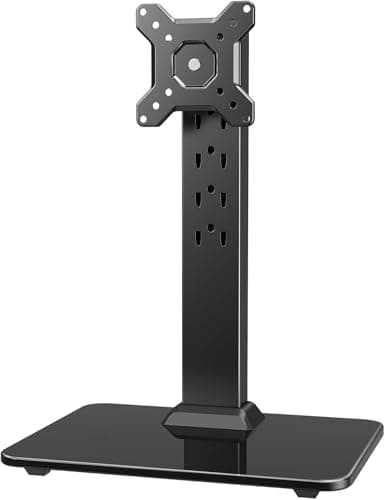
If a monitor arm is off the table, buy the HUANUO freestanding VESA stand: it puts a real VESA plate on a weighted column that simply stands on the desk, publishes a 44 lb capacity and five heights from 9.27 to 15.26 inches, and costs about half what a competent clamp arm does. If you miss an arm’s movement rather than its mounting, the VIVO STAND-V001Ris a pneumatic spring on a rotating base with a published 9.3–11.5 inch extension. For two screens, the VIVO STAND-V002FG deletes both monitor feet at once. And if you can drill, the WALI wall mount is the only thing here that returns the entire desk.
People look for an alternative to a monitor arm for four reasons, and they are all specific: the desk is glass, and every arm maker excludes it; the desk is rented, or the top is a hollow-core flat-pack panel a clamp would crush; there is a steel rail, an apron or a modesty panel within two inches of the back edge, so the clamp cannot reach; or the lease says no holes. None of those is solved by a different arm. They are solved by moving the load somewhere other than the desk edge.
The criterion: net depth returned, not depth claimed
Every page that sells you a monitor arm quotes the same number — a monitor base occupies eight to ten inches of depth across most of the desk’s width, and an arm returns all of it. That is true of an arm, because a clamp lives past the back edge and occupies no surface at all. It is nottrue of the alternatives, and this is the thing nobody says out loud: a freestanding stand returns the depth the monitor’s foot used and then puts its own base back down in the same region. What you gain is the difference between the two footprints, plus the fact that the base is a single flat pad rather than a splayed stand with a screen bolted to its front edge.
So the ranking on this page is net depth returned, in this order: a wall mount returns 100% of the desk, a freestanding stand returns most of it, and a riser returns none of it while fixing your eye level instead. That ordering is why the cheapest pick is ranked last rather than first, and it is the opposite of how the same five products get ranked on a general list. Our make a small desk feel bigger guide has the depth arithmetic for each move.
The surprise: a no-clamp stand can carry more than a clamp arm
You would expect the thing that bolts to your desk to be the strong one. It is usually the weak one. The HUANUO freestanding stand publishes 44 lb; the HUANUO clamparm in the same price band publishes 19.8 lb. The reason is mechanical rather than commercial: a clamp arm has to resist a bending moment at the desk edge — the screen hangs out in front and tries to lever the jaw off the top — while a freestanding column carries the same weight straight down into a base you are already sitting at. That makes a freestanding stand a genuinely good answer for a heavy panel on a desk you cannot trust, which is the exact case our heavy monitor roundup has to solve with a $100 arm instead.
Where every freestanding stand stops
There is one honest limit, and the VIVO dual stand’s own listing is the place it is written down: do not pull the screens far forward unless the stand is bolted down. A clamp or a bolt is what lets an arm hold a screen 24 inches out over your keyboard. A base cannot do that, because at full extension the load moves outside the base and the whole thing wants to tip. Freestanding stands are therefore excellent at height and getting the foot off the desk, and poor at reach. If reach is what you need — a deep desk you have to look across — the wall mount is the only no-clamp option that delivers it, at 19.3 inches.
If the desk is glass, this page is your whole shortlist
Glass is the single most common reason people search for this. Manufacturers exclude glass tops outright, and it is a safety exclusion rather than a cosmetic one — a moving load clamped to a glass edge concentrates stress exactly where glass is weakest. Our desk damage guide covers what each top material tolerates, and if you are shopping for the desk as well as the mount, our glass desk roundup prices this exact trade-off: one glass desk maker states on its own listing that a clamping arm must not be used on the top. On a glass desk your options are the three freestanding stands here, the wall mount, or the riser. There is no sixth answer.
The short answer
Quick picks
| # | Product | Best for | Score | Price |
|---|
| 01 | HUANUO Freestanding VESA Monitor StandThe best answer to the question for most people: a VESA plate on a weighted column that just stands on the desk, for about half the price of a decent clamp arm — and it takes more than twice the weight the cheap clamp arms do. | Most desks that cannot be clamped | | $22.99·Amazon |
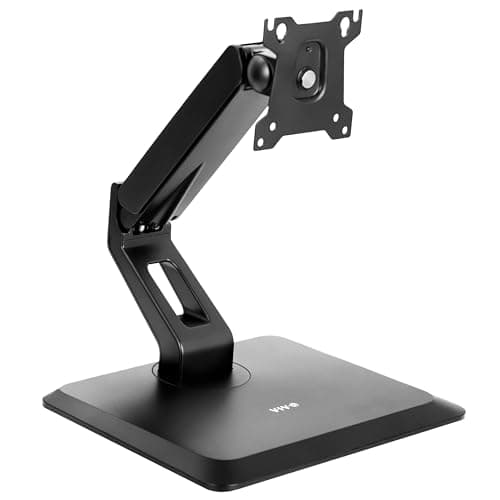
| 02 | VIVO Premium Freestanding Monitor Stand (STAND-V001R)The only pick here that genuinely behaves like an arm: a pneumatic spring on a rotating base, with a published 9.3–11.5 inch forward extension. If what you miss about an arm is the movement, this is the substitute. | Arm-like motion with nothing clamped | | $59.99·Amazon |
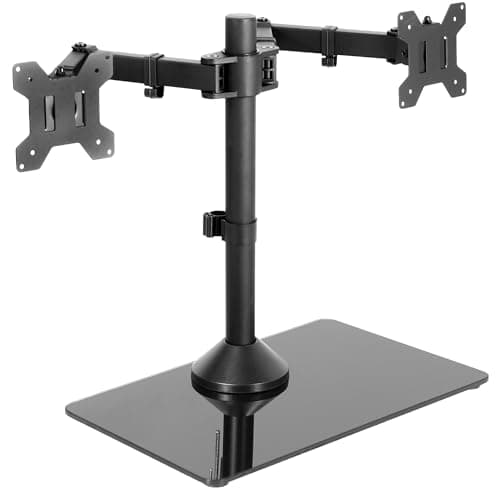
| 03 | VIVO Freestanding Dual Monitor Stand (STAND-V002FG)Two screens off their own feet with nothing touching the desk edge — the answer to "dual monitor arm without clamp", and the biggest absolute space gain on this page because it deletes two monitor bases instead of one. | Two screens, no clamp | | $59.99·Amazon |
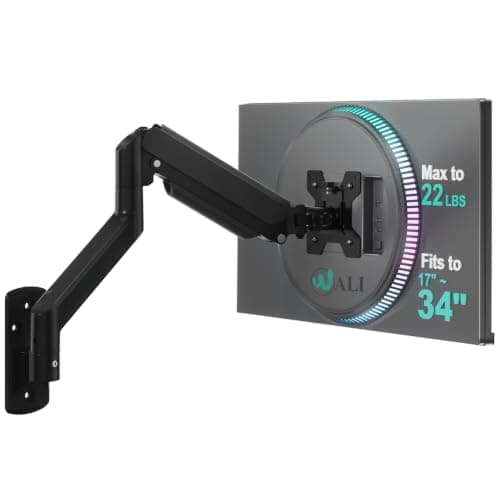
| 04 | WALI Single Monitor Wall MountThe only option on this page that returns the entire desk, including the part behind the keyboard. You pay for it with four holes in a wall you may not own. | Returning 100% of the desk | | $29.98·Amazon |
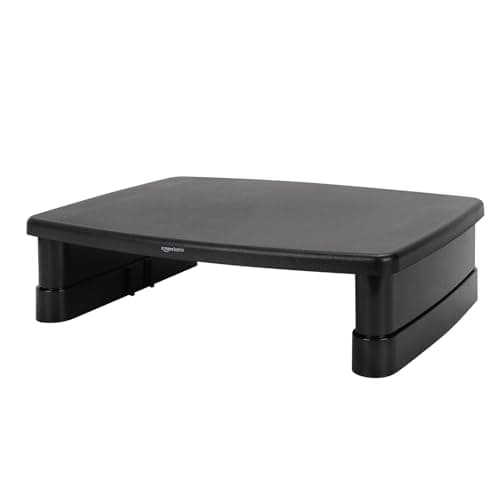
| 05 | Amazon Basics 3-Level Monitor RiserThe floor of the category, and the only pick here that works on a screen with no VESA holes at all. It raises the monitor without returning any depth — and sometimes that is the whole job. | No VESA pattern, no commitment | | $21.59·Amazon |
#ad · Live prices from the Amazon Product API, as of October 14, 2026. Where we have no verified live price we show none — we would rather leave a gap than print a number that has rotted.
In detail
The picks, in full
Most desks that cannot be clamped
HUANUO Freestanding VESA Monitor Stand
- Mounting
- Freestanding, no drilling
- Screen fit
- 13–34 in
- Capacity
- Up to 44 lb
- Heights
- 5 settings, 9.27–15.26 in
- Base
- Tempered glass, size not published
The best answer to the question for most people: a VESA plate on a weighted column that just stands on the desk, for about half the price of a decent clamp arm — and it takes more than twice the weight the cheap clamp arms do.
- Desk returned
- 8.4
- No tools needed
- 10
- Height range
- 8.6
- Load headroom
- 9.8
- Value
- 9.8
Pros
- +44 lb published capacity — more than double the 19.8 lb ceiling on the clamp arms in the same price band, because a weighted base carries the load straight down instead of levering on a desk edge
- +Five discrete height settings from 9.27 to 15.26 inches, which covers seated eye level on everything from a 16-inch-deep desk to a 29-inch kitchen table
- +17.24 in column means a 34-inch panel still clears a hutch or a monitor shelf
- +Swivel ±50°, tilt +10°/−15° and 360° rotation, so portrait mode is available without any desk hardware
- +Two cable clips route the cables down the back of the pillar, which is the one tidiness feature risers never have
Cons
- −The listing does not publish the base dimensions, so you cannot check the footprint on paper before it arrives — the one spec that decides whether this beats a riser on your desk
- −The base is tempered glass: stable and non-marking, but it is a flat object permanently occupying the middle-back of your desk
- −Five fixed heights, not a gas spring — you set it once, you do not nudge it during the day
- −Needs a real VESA pattern (75 x 75 or 100 x 100 mm); an all-in-one or a VESA-less panel is out
Skip this if…
…you want the screen to move while you work. Freestanding stands are a mounting solution, not a motion solution, and this one is a five-step column.
Arm-like motion with nothing clamped
VIVO Premium Freestanding Monitor Stand (STAND-V001R)
- Mechanism
- Pneumatic spring arm
- Screen fit
- 17–32 in (22 in max portrait)
- Capacity
- 4.4–22 lb
- Height / reach
- 3–12 in height, 9.3–11.5 in extension
- Base
- 9.9 x 12.8 in, rotates 85°
The only pick here that genuinely behaves like an arm: a pneumatic spring on a rotating base, with a published 9.3–11.5 inch forward extension. If what you miss about an arm is the movement, this is the substitute.
- Desk returned
- 7.6
- No tools needed
- 10
- Height range
- 8.6
- Load headroom
- 8.4
- Value
- 8.4
Pros
- +Pneumatic spring, so the screen moves under one hand — the single thing a riser and a fixed column cannot do
- +Published 9.3–11.5 inch forward extension: the screen can be pushed back over the base or pulled toward you, which on a 20-inch-deep desk is the difference between usable and not
- +The whole base rotates 85°, so you can turn the screen to someone beside you without dragging anything across the desk
- +4.4 lb lower limit — it still behaves with a light 24-inch panel, which heavy-duty gear does not
- +Published base footprint (9.9 x 12.8 in), so you can tape it out on your desk before ordering
Cons
- −That 9.9 x 12.8 inch base is the largest published footprint here, and it sits in the most valuable part of a shallow desk
- −22 lb ceiling, against 44 lb on the HUANUO above it
- −Portrait mode is capped at 22 inches even though landscape goes to 32
- −Costs roughly two and a half times the HUANUO for less load and less height
Skip this if…
…your desk is under about 20 inches deep. On a shallow top the base eats the depth the stand was meant to give back, and a wall mount returns more for less money.
Two screens, no clamp
VIVO Freestanding Dual Monitor Stand (STAND-V002FG)
- Screens
- 2, 13–32 in each
- Capacity
- 22 lb per screen
- Base
- Tempered glass, 15.2 x 10.2 in
- Motion
- +90°/−90° tilt, 360° swivel and rotation
- Height
- Adjustable along center pole
Two screens off their own feet with nothing touching the desk edge — the answer to "dual monitor arm without clamp", and the biggest absolute space gain on this page because it deletes two monitor bases instead of one.
- Desk returned
- 9
- No tools needed
- 10
- Height range
- 7
- Load headroom
- 8.4
- Value
- 7.6
Pros
- +Removes two monitor feet, which between them occupy far more depth than this stand's single 15.2 x 10.2 inch base
- +Both screens take 22 lb each, enough for most 27-inch panels
- +Height is set anywhere along the center pole rather than in steps, so the two screens can be levelled to each other exactly
- +Padded tempered-glass base, so it will not mark a laminate or a glass top
- +One pole for two screens means one cable route rather than two
Cons
- −The listing itself warns not to pull the monitors too far forward or backward unless the stand is bolted down — the honest ceiling on every freestanding mount, and this one states it in print
- −The base is a single rectangle in the middle of the desk, so the space directly behind the keyboard is gone
- −No published height range, only "adjustable along the pole"
- −Two 27-inch screens side by side still need about 48 inches of desk width whatever holds them up
Skip this if…
…you reposition your screens constantly. A freestanding dual stand is stable where it stands and unstable where you drag it, and the maker says so.
Returning 100% of the desk
WALI Single Monitor Wall Mount
- Mounting
- Wall plate, brick or wood
- Screen fit
- Up to 34 in
- Capacity
- Up to 22 lb
- Extension
- 19.3 in, retractable
- Motion
- +70°/−45° tilt, ±90° swivel, 360° rotation
The only option on this page that returns the entire desk, including the part behind the keyboard. You pay for it with four holes in a wall you may not own.
- Desk returned
- 10
- No tools needed
- 2
- Height range
- 7.5
- Load headroom
- 8.4
- Value
- 9
Pros
- +Zero desk footprint of any kind — no base, no clamp, no column. Nothing else here can say that
- +19.3 inches of extension pulls the screen off the wall and over the desk, then folds it back flat when you want the desk clear
- +Takes up to a 34-inch panel at 22 lb, matching the freestanding stands on load with none of their footprint
- +Wall plate is rated for brick as well as wood, which covers most apartment walls
- +Costs less than the freestanding stands above it
Cons
- −It is a drilled installation, which is exactly what most people asking for an arm alternative are trying to avoid
- −The screen height is fixed by where you drill, so the mount has to be positioned for your chair, not your eye
- −A plasterboard wall needs the fixings the hardware kit may not include for your wall type — check before you drill
- −If the desk ever moves, the screen does not
Skip this if…
…you rent and your lease or your deposit makes holes a problem. Read our renter guidance first — the adhesive mounts that claim to replace this do not hold a monitor.
No VESA pattern, no commitment
Amazon Basics 3-Level Monitor Riser
- Mounting
- Sits on the desk
- Heights
- 2.87 / 4.2 / 4.8 in
- Top surface
- Approx. 11.6 x 11 in
- Capacity
- Up to 22 lb
- Material
- ABS plastic, non-skid feet
The floor of the category, and the only pick here that works on a screen with no VESA holes at all. It raises the monitor without returning any depth — and sometimes that is the whole job.
- Desk returned
- 3
- No tools needed
- 10
- Height range
- 4
- Load headroom
- 8.4
- Value
- 9.6
Pros
- +Works with any monitor, including the all-in-ones and cheap panels with no VESA holes that disqualify every other pick here
- +Three stackable heights (2.87, 4.2 and 4.8 inches) hit the two inches of eye-level correction most people actually need
- +Cheapest item on the page, and reversible in thirty seconds if it does not suit
- +Non-skid feet and 2.56 lb of its own weight mean it will not slide on glass or laminate
- +Opens a usable slot underneath for a keyboard, which is depth you were not using anyway
Cons
- −Returns no desk depth — the monitor's own foot still sits on the riser, and the riser still sits on the desk
- −4.8 inches is the whole range; if your screen needs six inches of lift this cannot do it
- −ABS plastic, and the listing says so plainly rather than implying metal
- −No tilt, swivel or rotation of any kind
Skip this if…
…your problem is desk space rather than screen height. A riser fixes your neck, not your desk, and on a 16-inch-deep top the monitor foot is the thing you are trying to get rid of.
What each class costs you, in one table
| Class | Desk depth returned | Desk footprint | Needs |
|---|
| Wall mount (WALI) | All of it | None | A drill and permission |
| Freestanding single (HUANUO) | Most of it | Base, size not published | A VESA pattern |
| Freestanding pneumatic (VIVO V001R) | Most of it | 9.9 x 12.8 in | A VESA pattern, 20 in depth |
| Freestanding dual (VIVO V002FG) | Two monitor feet | 15.2 x 10.2 in | Two VESA patterns |
| Riser (Amazon Basics) | None | 11.6 x 11 in | Nothing at all |
Every figure in that table is published by the listing itself. The HUANUO base is the one gap: its listing describes a tempered-glass base and gives no dimensions, so the cell says so rather than carrying a guess. If the footprint is the deciding factor for you, buy the VIVO, which publishes one.
How to choose, in four checks
One: find out whether your monitor has VESA holes. Four screw holes in a square on the back, 75 or 100 mm apart. Everything on this page except the riser needs them. If they are not there, mounting a monitor without VESA covers the adapter route and when it is not worth it.
Two: measure your desk depth and subtract the base. On a 24-inch-deep desk a 9.9 x 12.8 inch base is a non-event. On a 16-inch-deep desk it is most of the back half, and the honest answer is the wall mount or a clamp arm on a different desk. Our desk size guide has the depth bands.
Three: weigh the screen. The figure is on the back of the panel or in the manual. The riser and both VIVOs stop at 22 lb; only the HUANUO goes to 44. A 32-inch 4K panel can exceed 20 lb on its own, and monitor arm weight capacity explains why the published number is not a suggestion.
Four: decide whether you need the screen to move.If the answer is no — and for most single-screen desks it is — a fixed column is better value than a spring. If the answer is yes, only the VIVO V001R and the wall mount qualify, and the wall mount qualifies more.
Four alternatives that are not on this list, and why
Adhesive and suction mounts. No. Monitor weight on an adhesive pad is a failure waiting for a warm afternoon, and damage-free mounting weight limits has the published ratings for what the strips actually hold — which is a fraction of a monitor.
A monitor shelf that clamps to the desk.It is a clamp. If the reason you are here is “my desk cannot be clamped”, a clamp-on shelf has the same problem as an arm. See monitor risers and shelves for the ones that clamp and the ones that do not.
A wall shelf with the monitor standing on it.Legitimate, genuinely cheap, and it keeps the monitor’s own foot — so it returns desk depth while giving up all adjustment. Wall shelves above a desk ranks the ones rated for the weight, including no-drill options for rentals.
A laptop stand, if the screen is a laptop.Different problem, better answer. A laptop does not have VESA holes and does not need any of this — laptop stands lift the screen and open the space underneath for a keyboard.
What you give up versus a real arm
Three things, and it is worth naming them before you buy. Reach:no freestanding base can safely hold a screen far out over the desk, so the “pull the monitor to my face for a video call” move is gone. Fine height control: a gas spring moves in a continuous range under one hand; a column moves in steps with an Allen key. Desk-edge thinking:an arm lets you treat the whole top as free surface, which on a 40 x 16 inch desk is the reason arms are the site’s most recommended single purchase. If none of those three matter to you, a $23 freestanding stand does the useful 80% for a quarter of the money — and if they do, the honest advice is to fix the desk rather than the mount. Our will a monitor arm fit my deskcheck takes two minutes and often ends with “yes, actually”.
How we picked
We do not run a testing lab
We compiled the published manufacturer specifications, did the footprint and clearance math ourselves, and read aggregated owner reviews, then scored each product against a published rubric. The scores are judgments from documented research — they are not measurements we took, because we do not have a lab and we are not going to pretend we do. Every spec traces back to a listing or manual named in Sources.
Questions
Frequently asked
What can I use instead of a monitor arm?+
Four things, in descending order of desk space returned: a wall mount (returns the whole desk, needs drilling), a freestanding VESA stand (returns most of it, needs nothing but a VESA pattern), a wall shelf with the monitor standing on it, and a riser that lifts the screen without returning any depth. On a glass desk those are your only options, because every clamp arm maker excludes glass.
Is there a monitor arm that does not clamp to the desk?+
Yes — they are sold as freestanding monitor stands, and they are a real product class rather than a workaround. The HUANUO stand here publishes 44 lb and five heights; the VIVO STAND-V001R is a pneumatic spring on a rotating base. Both put a standard 75 or 100 mm VESA plate on a weighted column that just stands on the desk.
Do freestanding monitor stands actually save desk space?+
Less than an arm, more than a riser. They remove the monitor's own splayed foot and put a single flat base down in roughly the same region, so what you gain is the difference between the two footprints. On a desk 24 inches deep or more that is a real gain; on a 16-inch-deep top the base can cancel it out, which is why we rank on net depth returned rather than on the usual marketing claim.
Can you mount two monitors without clamping anything?+
Yes. The VIVO STAND-V002FG holds two screens up to 32 inches and 22 lb each on one pole with a 15.2 x 10.2 inch tempered-glass base. It is the biggest absolute space gain on this page because it deletes two monitor feet. Its own listing warns against pulling the screens far forward unless the stand is bolted down — see
two monitors on a small desk for the width arithmetic before you buy either way.
Why can't I clamp a monitor arm to a glass desk?+
Manufacturers exclude it, and it is a safety exclusion. A moving load clamped to a glass edge concentrates stress exactly where glass is weakest, and at least one glass desk maker prints the same warning from the other direction — its listing states that a clamping arm should not be used on the top. Use a freestanding stand, a wall mount or a riser instead.
Is a freestanding monitor stand stable enough for a 32-inch monitor?+
On the published figures, yes — the HUANUO stand is rated to 34 inches and 44 lb, and the VIVO stands to 32 inches at 22 lb each. Stability comes from the base staying under the load, so the caveat is positional rather than structural: keep the screen roughly over the base, and do not use the stand as a way to push a big panel far forward.
Receipts
Sources
- HUANUO freestanding VESA monitor stand — listing (13–34 in, 44 lb, 5 heights 9.27–15.26 in, 17.24 in column, tempered-glass base)
- VIVO STAND-V001R premium freestanding monitor stand — listing (17–32 in, 4.4–22 lb, 3–12 in height, 9.3–11.5 in extension, 9.9 x 12.8 in rotating base)
- VIVO STAND-V002FG freestanding dual monitor stand — listing (2 x 13–32 in, 22 lb each, 15.2 x 10.2 in glass base, bolt-down note)
- WALI single monitor wall mount — listing (up to 34 in, 22 lb, 19.3 in extension, brick or wood wall plate)
- Amazon Basics 3-level monitor riser — listing (2.87 / 4.2 / 4.8 in heights, 22 lb, approx. 11.6 x 11 in top, ABS)
- HUANUO FlowLift clamp monitor mount — listing (19.8 lb ceiling, the clamp-arm comparison figure)
We do not run a testing lab, and we do not pretend to. Specifications come from the manufacturer or retailer listing; the footprint and clearance math is ours and reproducible. Where we could not verify a number, we say so on the page rather than quietly leaving it out. Read our full method.