Skip to content
Desk & Dowel

HUB 04 · Space-Saving Accessories

Portable Monitor vs a Second Monitor: Which Belongs on a Small Desk?

Both add a screen. One adds it to your bag, the other adds it to the air above your desk. On a shallow desk the deciding spec is not the panel — it is whether the thing can hang off an arm.

By Stephen V.Updated How we pick
#ad

We earn a commission when you buy through our Amazon links, at no extra cost to you. It never affects our rankings, and we say so when the cheaper product is the better buy. How this works.

If the second screen is permanent and your desk has a free rear edge, buy a 22-inch VESA panel and an arm — the KOORUI E2212H on an ErGear single arm is the cheapest version of that on this site, and it is the only route where the screen costs no desk depth at all. If you work in more than one place, or the desk has to clear in the evening, buy a portable: the ARZOPA Z1C at 16.1 inches and 780 g is the one to work on. If you want one screen that does both jobs, the KYY 14-inch is the only portable we rank that publishes a VESA pattern.

The comparison people expect is a panel-quality comparison: nits, contrast, color coverage. On a small desk that is the wrong axis. Both classes land on 1080p, both are bright enough for an apartment, and neither is a color-grading screen. What actually separates them is how much desk depth the screen consumes, and whether you can get rid of that depth later. A portable monitor consumes depth only while it is open. A desktop monitor consumes depth permanently — unless it has VESA holes, in which case it consumes none.

The short answer

Permanent second screen, desk with a clampable rear edge: desktop panel on an arm. A desk you share with dinner, a laptop you carry between rooms, or a rental where nothing may be clamped: portable. Both at once is a real answer too — a mounted 22-inch panel at the desk and a 14-inch portable in the bag is a common pair, and the two purchases do not overlap.

The decision table

FactorPortable monitorDesktop panel + arm
Desk depth when in usePanel plus its kickstand, in front of youNone — the clamp sits behind the top
Desk depth when stowedZero. It goes in a drawerStill none, but it is also still there
Screen size available14–16.1 in22–24 in and up
Height adjustmentKickstand angle only17.5 in of travel on the ErGear arm
CablesOne USB-C, often power includedVideo cable plus a mains brick
Portrait orientationOnly if the stand allows it (the ARZOPA does)Yes, 360° on the arm
Travels with youYes — that is the whole productNo

Why depth, not pixels, decides this

A monitor on its factory stand gives up eight to ten inches of desk depth to a plastic foot and the panel’s backward lean. That figure is the one that governs every page on this site, and it is why a single monitor arm is the highest-value thing most small desks can buy. Hang the screen instead and the entire footprint disappears: the clamp occupies about an inch of the rear edge, behind where you were working anyway.

A portable monitor does not remove that depth — it just does not claim it when the screen is away. A 16-inch panel on a kickstand still stands in front of you while you use it, and none of the makers publish the depth their kickstands occupy, which is worth saying plainly rather than estimating. What the portable gives you instead is the one thing an arm cannot: a desk that returns to being an empty surface. If your desk is also a kitchen table, that is not a nice-to-have, it is the requirement.

The pixel arithmetic nobody runs

Both classes here are 1920 × 1080, which means the same number of text rows on a smaller sheet of glass. A 1080p 22-inch panel is physically sharper than a 1080p 24, and a 16.1-inch portable is sharper still — but at 16 inches most people scale the display up, which gives the pixels back and leaves you with fewer usable rows than the 22. That is the hidden cost of the portable route, and it is why the ARZOPA ranks above the KYY: at 14 inches the row count drops far enough that the screen becomes a place to park a chat window.

If you want more pixels rather than more glass, the question changes shape and our ultrawide versus dual monitor page does that arithmetic instead. For viewing distance on a shallow desk — the reason a 22-inch panel can be the right answer over a 24 — see monitor size and distance for small desks.

The short answer

Quick picks

#ProductBest forScorePrice
01
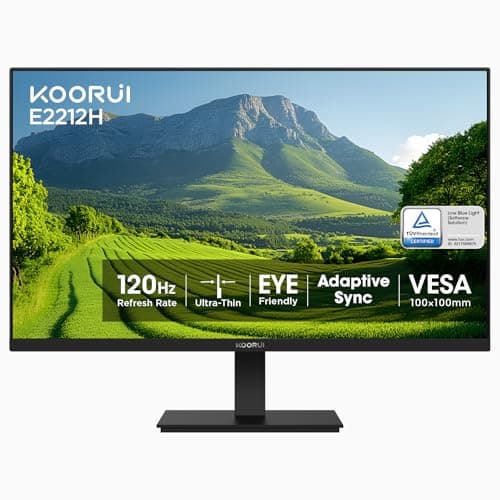
KOORUI KOORUI 22in VESA Monitor (E2212H)
KOORUI 22in VESA Monitor (E2212H)

The cheapest screen on the site that publishes a VESA pattern, which is the only specification that matters here: clamp it to an arm and the second screen costs zero desk depth. A 22-inch panel also sits comfortably at arm's length on a desk too shallow for a 24.

Best if the second screen is permanent
8.4
$69.99Amazon
02
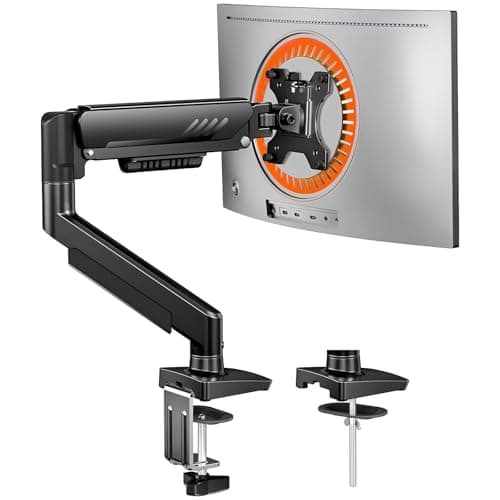
ErGear ErGear Single Monitor Arm (13–34in)
ErGear Single Monitor Arm (13–34in)

The half of the desktop-monitor answer that people forget to budget for. Without an arm, a second panel is a second plastic foot on a desk that did not have room for the first one; with it, the screen floats and the surface underneath comes back.

Best companion purchase — the part that makes a panel fit
8.9
$26.99Amazon
03
ARZOPA ARZOPA Z1C 16.1in (Gray)
ARZOPA Z1C 16.1in (Gray)

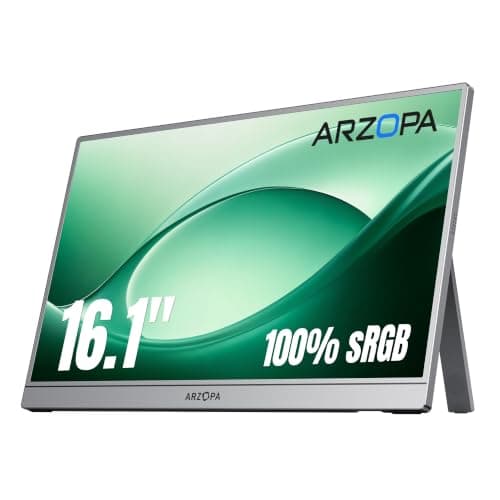
The best portable second screen on the site and the clearest demonstration of what the class is for: 16.1 inches on a metal kickstand built into the chassis, 780 g, 9.3 mm thick, and gone into a drawer in four seconds when the desk has to be a desk again.

Best portable — the screen that packs away
8.2
$84.98Amazon
04
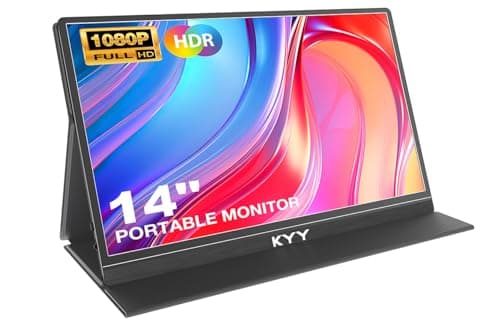
KYY KYY 14in Portable Monitor (K5-3)
KYY 14in Portable Monitor (K5-3)

The one pick that refuses to pick a side: a 1.1 lb portable panel that publishes a VESA 75 × 75 pattern, so it can travel in a bag this month and hang off an arm next month. KYY states the stand itself is not included.

Best of both — a portable that can be mounted
8.0
$69.99Amazon
05
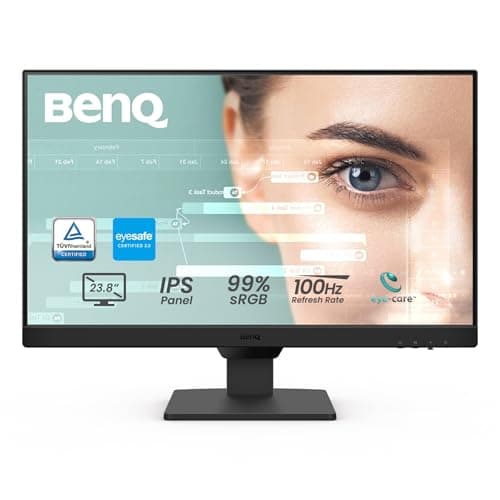
BenQ BenQ GW2490 24in IPS Monitor
BenQ GW2490 24in IPS Monitor

The desktop panel to buy if the second screen is the one you will actually work on: IPS, 100 Hz, VESA published, and a thin bezel, which is the specification that decides whether two screens side by side read as one workspace or as two.

Best if the second screen does the real work
8.3
$99.99Amazon

#ad · Live prices from the Amazon Product API, as of October 17, 2026. Where we have no verified live price we show none — we would rather leave a gap than print a number that has rotted.

In detail

The picks, in full

01
KOORUI KOORUI 22in VESA Monitor (E2212H)

Best if the second screen is permanent

KOORUI 22in VESA Monitor (E2212H)

Size
22 in
Panel
VA, FHD, 120 Hz
Mounting
VESA
Desk depth on an arm
None — clamp sits behind the top
Model
E2212H
8.4/10

The cheapest screen on the site that publishes a VESA pattern, which is the only specification that matters here: clamp it to an arm and the second screen costs zero desk depth. A 22-inch panel also sits comfortably at arm's length on a desk too shallow for a 24.

Depth consumed
9.6
Usable rows
8.6
Mountability
9.4
Cable simplicity
5.4
Value
9.2

Pros

  • VESA published, so the arm route is available on day one or later
  • 1080p across 22 inches is sharper than the same resolution stretched over 24
  • 22in sits at a workable viewing distance on a desk under 24 inches deep
  • The cheapest screen in our small-desk monitor roundup

Cons

  • VA panel has narrower viewing angles than the IPS picks here
  • Needs its own power brick and video cable, unlike a USB-C portable
  • Its factory stand still eats depth until you actually mount it

Skip this if…

…the desk has to clear completely in the evening, or you work in more than one room. A permanent panel is permanent — the portables below are the answer to a desk that has to become a dinner table.

$69.99View on Amazon

$89.9922% off

Price as of October 17, 2026. Prices change — Amazon's is the one that counts.

#ad · we may earn a commission from this link to KOORUI 22in VESA Monitor (E2212H)

02
ErGear ErGear Single Monitor Arm (13–34in)

Best companion purchase — the part that makes a panel fit

ErGear Single Monitor Arm (13–34in)

Screen fit
13–34 in
Weight limit
19.8 lb
Height travel
17.5 in
Reach
18.1 in
Motion
+80° / −50° tilt, ±90° swivel, 360° rotate
8.9/10

The half of the desktop-monitor answer that people forget to budget for. Without an arm, a second panel is a second plastic foot on a desk that did not have room for the first one; with it, the screen floats and the surface underneath comes back.

Depth returned
9.8
Adjustability
9
Fit range
8.8
Install effort
8
Value
9

Pros

  • 18.1 inches of reach means the second screen can be pushed back out of the way between tasks
  • Takes the panel's foot off the desk, which is where the depth saving actually comes from
  • Tool-free VESA plate, so swapping screens later is a two-minute job
  • 360-degree rotation lets a second screen stand in portrait for documents and code

Cons

  • No published minimum weight, so a very light 14-inch portable may float upward on it
  • Needs a flat rear desk edge with clearance behind it for the clamp
  • Adds a purchase to a route that already costs more than a portable

Skip this if…

…your desk is glass, hollow-core or pushed flush against a wall with no clamp clearance. Our no-drill and freestanding options cover those desks instead.

$26.99View on Amazon

$31.9916% off

Price as of October 17, 2026. Prices change — Amazon's is the one that counts.

#ad · we may earn a commission from this link to ErGear Single Monitor Arm (13–34in)

03
ARZOPA ARZOPA Z1C 16.1in (Gray)

Best portable — the screen that packs away

ARZOPA Z1C 16.1in (Gray)

Screen
16.1 in FHD IPS
Weight
1.7 lb (780 g published)
Stand
Built-in 80° kickstand
Mounting
None published
Warranty
2 years
8.2/10

The best portable second screen on the site and the clearest demonstration of what the class is for: 16.1 inches on a metal kickstand built into the chassis, 780 g, 9.3 mm thick, and gone into a drawer in four seconds when the desk has to be a desk again.

Depth consumed
7.8
Usable rows
7.6
Mountability
5
Cable simplicity
9.4
Value
9.2

Pros

  • Integrated kickstand rather than a folding cover, so nothing props out behind the panel
  • Stands in portrait as well as landscape — the better orientation for a second screen
  • 16.1 inches at 100% sRGB, the largest portable panel we rank
  • Stores flat: zero desk footprint when it is not in use, which no desktop panel can match

Cons

  • No VESA pattern or tripod socket published, so it cannot go on an arm
  • Neither brightness nor contrast is published for this model
  • Mini HDMI rather than full size, so an HDMI source needs the bundled cable

Skip this if…

…the screen is going to live on the desk permanently. If it never moves, you are paying a portability premium for fewer pixels and a stand you cannot raise — buy the KOORUI and the arm.

$84.98View on Amazon

$99.9915% off

Price as of October 17, 2026. Prices change — Amazon's is the one that counts.

#ad · we may earn a commission from this link to ARZOPA Z1C 16.1in (Gray)

04
KYY KYY 14in Portable Monitor (K5-3)

Best of both — a portable that can be mounted

KYY 14in Portable Monitor (K5-3)

Screen
14 in FHD IPS
Weight
1.1 lb
Stand
Magnetic cover
Mounting
VESA 75 × 75 mm
Warranty
12 months
8.0/10

The one pick that refuses to pick a side: a 1.1 lb portable panel that publishes a VESA 75 × 75 pattern, so it can travel in a bag this month and hang off an arm next month. KYY states the stand itself is not included.

Depth consumed
8.8
Usable rows
6.6
Mountability
8.4
Cable simplicity
9.4
Value
8.8

Pros

  • VESA 75 × 75 published — the only portable we rank that can go on an arm
  • 1.1 lb and 0.3 in, the lightest and thinnest panel on the site
  • 350 nits and 1500:1 are the highest published figures of any portable here
  • Two full-function USB-C ports plus mini HDMI, with portrait and extend modes

Cons

  • The magnetic cover gives fixed angles rather than a range
  • 14 inches is a real step down in usable text rows from 16.1 and from any 22in panel
  • At 1.1 lb it is below the published load floor of most gas-spring arms, so it may drift upward

Skip this if…

…this is the screen you will read and write on all day. Fourteen inches is a companion panel — the ARZOPA is the portable to work on, and the KOORUI is the one to work on permanently.

$69.99View on Amazon

Price as of October 17, 2026. Prices change — Amazon's is the one that counts.

#ad · we may earn a commission from this link to KYY 14in Portable Monitor (K5-3)

05
BenQ BenQ GW2490 24in IPS Monitor

Best if the second screen does the real work

BenQ GW2490 24in IPS Monitor

Size
24 in
Panel
IPS, 1920 × 1080, 100 Hz
Mounting
VESA wall/arm compatible
Bezel
Thin
Audio
Built-in speakers
8.3/10

The desktop panel to buy if the second screen is the one you will actually work on: IPS, 100 Hz, VESA published, and a thin bezel, which is the specification that decides whether two screens side by side read as one workspace or as two.

Depth consumed
9.2
Usable rows
9
Mountability
9.4
Cable simplicity
5.4
Value
8.4

Pros

  • VESA support published, so it can go on an arm on day one or later
  • Thin bezel matters when two screens sit side by side on a narrow desk
  • Built-in speakers remove two more objects from the desktop
  • IPS viewing angles hold up when a second screen sits at an angle to you

Cons

  • 1080p at 24in is standard rather than sharp — text is fine, not crisp
  • 24 inches of width is a lot to add next to a primary screen on a 40in desk
  • Factory stand is a plate, so it occupies desk depth until you mount it

Skip this if…

…your desk is under about 40 inches wide and already carries a main monitor. Two 24s need roughly 43 inches of width — that arithmetic is the whole of our ultrawide versus dual page.

$99.99View on Amazon

Price as of October 17, 2026. Prices change — Amazon's is the one that counts.

#ad · we may earn a commission from this link to BenQ GW2490 24in IPS Monitor

Check VESA before anything else

The spec that decides the desktop route is four screw holes. Both the KOORUI and the BenQ publish a VESA pattern; plenty of budget panels in the same price band do not, and a screen with no VESA holes can never be lifted off the desk. We do not assume a pattern that a listing does not state — the LG panel in our small-desk monitor roundup is a good screen whose listing never confirms VESA support, so it is ranked as a stand-only panel.

On the portable side, VESA is the exception rather than the rule. Of the portables we rank, only the KYY publishes a pattern (75 × 75 mm), and even then its 1.1 lb weight sits below the published load floor of most gas-spring arms, so it can float upward on an arm sized for a 34-inch screen. Our monitor arm weight capacity guide covers the minimum-load problem; a friction arm or a light-duty mount is the fix.

The cable difference is bigger than it sounds

A portable monitor runs off one USB-C cable carrying power and video from the laptop. A desktop panel needs a video cable and a mains adapter, which on a desk away from a wall means a power strip and a route for the cord. On a small desk that is two more things to hide, and it is the reason a second screen so often ends up looking worse than it works. Our cable management picks and the no-damage version for renters both apply here.

One caution on the portable route: a marginal USB-C port can make a portable flicker or restart, and makers say so in their own listings. If your laptop has one older USB-C port, plan on the panel’s separate power input — at which point you have two cables again and some of the simplicity argument evaporates.

The three compared on the one spec that matters

PickScreenPublished mountDesk depth in use
KOORUI E2212H22 in, FHD, 120 HzVESANone on an arm
BenQ GW249024 in, FHD IPS, 100 HzVESANone on an arm
KYY K5-314 in, FHD IPSVESA 75 × 75 (stand not included)Cover stand, depth not published
ARZOPA Z1C16.1 in, FHD IPSNone publishedKickstand, depth not published
ErGear single armCarries 13–34 inClamp or grommetAbout an inch of rear edge

No portable monitor maker in this class publishes the depth its stand occupies, and we are not going to estimate it for them. If the number matters to you — and on a desk under 20 inches deep it does — stand a book at the same angle on your own desk and measure what it takes.

When the honest answer is neither

Two cases. If your laptop is the only computer and the second screen is really about height rather than area, a stand costs a fraction of either option — see laptop stand versus monitor arm. And if the desk cannot take a clamp and cannot spare the depth, the answer is to fix the desk first: two monitors on a small desk works through the layouts that fit, and how to make a small desk feel bigger ranks every move by the depth it returns.

Prices on this page render from the live price layer and carry their own “as of” date. The desktop route is two purchases and the portable route is one, so compare the pair against the panel rather than the panel against the panel.
How we picked

We do not run a testing lab

We compiled the published manufacturer specifications, did the footprint and clearance math ourselves, and read aggregated owner reviews, then scored each product against a published rubric. The scores are judgments from documented research — they are not measurements we took, because we do not have a lab and we are not going to pretend we do. Every spec traces back to a listing or manual named in Sources.

Questions

Frequently asked

Is a portable monitor good enough as a permanent second monitor?
It works, but you pay for portability twice: fewer usable text rows than a 22-inch panel once you scale the display up, and a kickstand you cannot raise to eye level. If the screen will never leave the desk, a VESA panel on an arm gives you more screen, more adjustment and no desk footprint for similar money.
Can you put a portable monitor on a monitor arm?
Only if the panel publishes a VESA pattern, and most do not. Of the portables we rank, the KYY 14-inch is the only one that states 75 x 75 mm. Even then, at 1.1 lb it is lighter than the minimum load most gas-spring arms publish, so the arm may drift upward — a friction or light-duty mount suits it better.
How much desk space does a second monitor actually take?
On its factory stand, eight to ten inches of depth for the foot and the panel's backward lean. On an arm, effectively none: the clamp occupies about an inch of the rear edge behind where you work. That difference is the single biggest reason to check for VESA holes before buying any second screen for a small desk.
Is 22 inches too small for a second monitor?
Not on a shallow desk. A 22-inch 1080p panel is physically sharper than the same resolution at 24 inches, and it sits at a comfortable viewing distance on a desk under 24 inches deep where a 24-inch screen is too close. Our monitor size and distance guide has the geometry.
Do portable monitors need their own power?
Usually not — one USB-C cable carries power and video from the laptop. But makers state in their own listings that a weak or older USB-C port can cause flickering or restarts, and the fix is the panel's separate power input. Plan for that if your laptop has a single older USB-C port.
Should I buy both a portable and a desktop second screen?
It is a reasonable pair and the purchases do not overlap. A mounted 22-inch panel does the daily work with no desk footprint, and a 14-inch portable covers the days you work somewhere else. Buy the mounted screen first — it is the one that changes how the desk feels.

Keep reading

Receipts

Sources

We do not run a testing lab, and we do not pretend to. Specifications come from the manufacturer or retailer listing; the footprint and clearance math is ours and reproducible. Where we could not verify a number, we say so on the page rather than quietly leaving it out. Read our full method.