Skip to content
Desk & Dowel

HUB 05 · Small-Space Setups

How to Set Up a Laptop-Only Desk

A laptop is two devices bolted together at the wrong distance. Every good laptop setup is the same move: lift the screen, and put the keyboard back down where your hands are.

By Stephen V.Updated How we pick
#ad

We earn a commission when you buy through our Amazon links, at no extra cost to you. It never affects our rankings, and we say so when the cheaper product is the better buy. How this works.

Put the laptop on a stand at about six inches of lift, and type on a separate keyboard. That one move is the entire ergonomics of a laptop-only desk, and the Rain Design mStand plus the Logitech K480 is the version of it we would buy. Add a USB-C hubif the laptop leaves the desk daily — one cable to plug in rather than four — and stop there. Everything else in this category is optional.

The reason the fix is always the same is geometric. A laptop is two devices welded together: a screen that wants to be at eye level and a keyboard that wants to be at elbow level. Those are roughly 10 to 14 inches apart vertically, and the hinge holds them about two inches apart. You can satisfy one or the other, never both. Lifting the laptop satisfies the screen; the separate keyboard satisfies your hands. There is no third option, and no laptop posture that avoids the choice.

What height, exactly

The target is the topof the screen roughly level with your eyes when you are sitting upright — not the middle of the screen, which is the most common misreading. On a 13 or 14-inch laptop that usually means four to seven inches of lift, which is why almost every fixed laptop stand lands around six. If the top of the screen ends up well above your eye line you will tip your head back, which is worse than tipping it forward.

Then set the keyboard. Sit with your feet flat and your elbows at about 90 degrees: the keyboard belongs at the height of your forearms. On a standard 29 to 30-inch desk that usually means the desk is already too high rather than too low, which is a separate problem with its own fixes — see your desk is too high and the desk height guide for the numbers by body height.

The depth arithmetic on a shallow desk

This is where a laptop setup differs from a monitor setup, and it is good news. A laptop on a stand sits further backthan a laptop on the desk, because the stand’s footprint (10 by 7.5 inches on the mStand) can go right to the rear edge, and the keyboard occupies the strip in front of it. The practical minimum is about 16 inches of depth: roughly 7 for the stand, 6 for the keyboard, and a few inches of hand room. That is why the shallow writing desks on this site — 15.75 to 16 inches deep — work for laptop users and not for monitor users.

The screen distance looks wrong on paper and is usually fine in practice. A 13-inch laptop at 18 to 20 inches away is a comfortable reading distance; the figures in monitor size and distance for small desks scale down with the panel. What is notfine is a 16-inch laptop on a 15-inch desk with the keyboard in front of it — at that point the screen is six inches from your face and you need either a deeper desk or the laptop off to one side in a vertical stand with an external screen.

The three things people skip, in order of regret

1. The mouse.A separate keyboard without a separate mouse means reaching past it to the trackpad, which puts your shoulder in exactly the position the setup was meant to fix. Either buy a combo — the MK470 in our compact keyboard roundupincludes one — or add a small mouse to the K480.

2. Light. A laptop-only desk cannot take a monitor light bar, because there is no monitor bezel to clip one to. That rules out the entire class, and the answer is a clamp lamp or a cordless lamp instead: clamp desk lamps take no desk surface, and the rechargeable-versus-mains comparison covers the case where the desk has no socket.

3. The chair.Fixing the screen and the keyboard while sitting on a dining chair moves the problem to your back. In a small room the constraint is usually whether the chair tucks under at all — small office chairs and office chair fit cover the armrest and footprint arithmetic.

The short answer

Quick picks

#ProductBest forScorePrice
01
Rain Design Rain Design mStand Laptop Stand
Rain Design mStand Laptop Stand

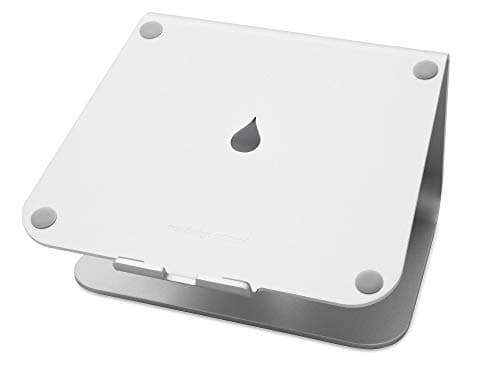
The stand to buy if the laptop lives on this desk: one forged aluminum plate, about six inches of lift, a 10 by 7.5 inch footprint and a cable slot at the back. It does not flex when you tap the screen, which is the difference you notice on day two.

Best overall — the stand that stays on the desk
8.6
$39.90Amazon
02
Logitech Logitech K480 Multi-Device Bluetooth Keyboard
Logitech K480 Multi-Device Bluetooth Keyboard

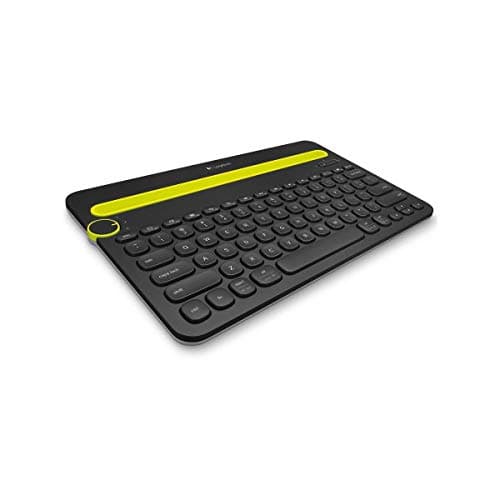
The other half of the fix, and the version of it that earns its desk space twice: Bluetooth to three devices on a dial, with a cradle that stands a phone or tablet upright so you do not need a second stand for it.

Best keyboard for the job — no dongle, three devices
8.8
$29.97Amazon
03
SOUNDANCE SOUNDANCE Aluminum Laptop Stand
SOUNDANCE Aluminum Laptop Stand

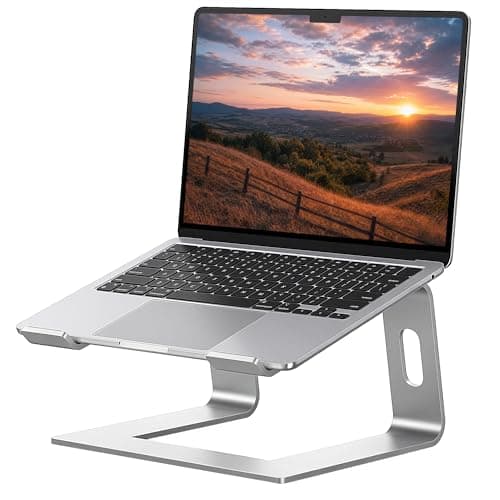
The budget version of the same six inches of lift: 5 mm aluminum, tool-free assembly, and it detaches to store flat. If the whole budget for this setup is small, spend the saving on the keyboard, because the keyboard is the half that fixes your wrists.

Best value stand
8.3
$17.99Amazon
04
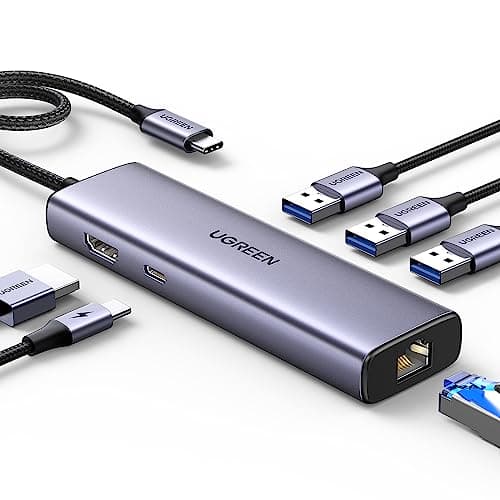
UGREEN UGREEN Revodok 6-in-1 USB-C Hub
UGREEN Revodok 6-in-1 USB-C Hub

What turns a laptop on a stand into a desk you can leave and come back to: one USB-C cable for power, peripherals and a wired network connection. The Ethernet port is the part that fixes video calls in a flat where the Wi-Fi is shared with four neighbours.

Best for one-cable docking
8.7
$19.99Amazon

#ad · Live prices from the Amazon Product API, as of October 17, 2026. Where we have no verified live price we show none — we would rather leave a gap than print a number that has rotted.

In detail

The picks, in full

01
Rain Design Rain Design mStand Laptop Stand

Best overall — the stand that stays on the desk

Rain Design mStand Laptop Stand

Material
Forged aluminum
Riser height
~6 in
Laptop size
Up to 16 in
Footprint
10 × 7.5 in
Adjustability
Fixed height
8.6/10

The stand to buy if the laptop lives on this desk: one forged aluminum plate, about six inches of lift, a 10 by 7.5 inch footprint and a cable slot at the back. It does not flex when you tap the screen, which is the difference you notice on day two.

Screen height gained
9
Stability
9.8
Desk footprint
7.6
Cable tidiness
9
Value
7.6

Pros

  • Forged from one aluminum plate — no wobble, no flex under a hard tap
  • Raises the screen close to eye level for a laptop-plus-keyboard setup
  • Open base leaves room to slide a keyboard underneath when it is not in use
  • Rear slot routes the charger cable out of sight

Cons

  • Fixed height — no angle or height adjustment
  • Premium price for what is mechanically a simple stand
  • Does not fold, so it is not the travel option

Skip this if…

…you want to change the height, or you carry the stand with you. This one stays put; the folding stands in our roundup pack into a bag instead.

$39.90View on Amazon

Price as of October 17, 2026. Prices change — Amazon's is the one that counts.

#ad · we may earn a commission from this link to Rain Design mStand Laptop Stand

02
Logitech Logitech K480 Multi-Device Bluetooth Keyboard

Best keyboard for the job — no dongle, three devices

Logitech K480 Multi-Device Bluetooth Keyboard

Connection
Bluetooth
Devices
3, switched by dial
Platforms
Windows, macOS, iPadOS, Android, ChromeOS
Extras
Integrated device cradle
Power
Batteries (long life)
8.8/10

The other half of the fix, and the version of it that earns its desk space twice: Bluetooth to three devices on a dial, with a cradle that stands a phone or tablet upright so you do not need a second stand for it.

Typing position
9
Desk footprint
8.4
Connectivity
9.6
Noise
9
Value
8.8

Pros

  • One board for laptop, tablet and phone — a desk saving, not just a keyboard saving
  • Built-in cradle holds a phone upright without a separate stand
  • No dongle, so the laptop's USB port stays free for the dock
  • Long battery life on replaceable cells rather than another charge cycle to remember

Cons

  • Thicker than a slim board because of the cradle
  • Membrane keys — quiet, but less positive than mechanical
  • No mouse in the box

Skip this if…

…you want the thinnest possible profile or a keyboard and mouse in one purchase. The MK470 combo is the flat option and includes the mouse.

$29.97View on Amazon

Price as of October 17, 2026. Prices change — Amazon's is the one that counts.

#ad · we may earn a commission from this link to Logitech K480 Multi-Device Bluetooth Keyboard

03
SOUNDANCE SOUNDANCE Aluminum Laptop Stand

Best value stand

SOUNDANCE Aluminum Laptop Stand

Material
Aluminum alloy (5mm)
Riser height
~6 in
Laptop size
10–15.6 in
Setup
Tool-free, detachable
Adjustability
Fixed height
8.3/10

The budget version of the same six inches of lift: 5 mm aluminum, tool-free assembly, and it detaches to store flat. If the whole budget for this setup is small, spend the saving on the keyboard, because the keyboard is the half that fixes your wrists.

Screen height gained
8.8
Stability
8
Desk footprint
8
Cable tidiness
7
Value
9.6

Pros

  • Thick 5 mm aluminum feels sturdier than the price suggests
  • Lifts the screen about six inches toward eye level
  • Detaches for tool-free setup and flatter storage
  • Open frame vents heat off the base of the laptop

Cons

  • Fixed height with no adjustment
  • Tops out at 15.6-inch laptops
  • Less rigid than the forged mStand under a firm tap

Skip this if…

…you run a 16 or 17-inch laptop. This is sized for machines up to 15.6 inches and the mStand takes the larger ones.

$17.99View on Amazon

Price as of October 17, 2026. Prices change — Amazon's is the one that counts.

#ad · we may earn a commission from this link to SOUNDANCE Aluminum Laptop Stand

04
UGREEN UGREEN Revodok 6-in-1 USB-C Hub

Best for one-cable docking

UGREEN Revodok 6-in-1 USB-C Hub

Ports
6-in-1
Video
4K HDMI
Network
Gigabit Ethernet
Connection
USB-C
Format
Compact hub
8.7/10

What turns a laptop on a stand into a desk you can leave and come back to: one USB-C cable for power, peripherals and a wired network connection. The Ethernet port is the part that fixes video calls in a flat where the Wi-Fi is shared with four neighbours.

Cable reduction
9.4
Desk footprint
9.2
Expandability
7
Call quality
9
Value
9.2

Pros

  • Gigabit Ethernet fixes the call-quality problems apartment Wi-Fi often causes
  • 4K HDMI, so one external screen is available later without replacing the hub
  • The smallest dock we rank — it disappears behind a laptop stand
  • Cheapest way to get down to one cable at the desk

Cons

  • One display only
  • Six ports means choosing what stays plugged in
  • Adds a small object and a short cable to a desk you were decluttering

Skip this if…

…you run two external monitors now or plan to. Buy a dual-display dock rather than replacing this one in six months.

$19.99View on Amazon

$29.9833% off

Price as of October 17, 2026. Prices change — Amazon's is the one that counts.

#ad · we may earn a commission from this link to UGREEN Revodok 6-in-1 USB-C Hub

Do you need a riser stand or a vertical stand?

A riser stand holds the laptop open and uses its screen. A vertical stand holds it closed on its edge and uses almost no desk at all — but that only makes sense if you have another screen to look at. On a laptop-only desk the riser is the right object, every time. If you are weighing a riser against lifting the machine on an arm with a tray, our laptop stand versus monitor arm page does that comparison with picks on both sides.

Fixed height or adjustable?

Fixed, for most people. Both stands here are fixed at about six inches, and the reason that works is that your eye height when seated does not change day to day. Adjustable stands earn their money in two cases: a desk shared by people of different heights, and a laptop that alternates between a desk and a standing surface. Our laptop stand roundup ranks the adjustable and folding models, including the travel options that pack into a bag.

Heat, and why the stand shape matters

A laptop vents from its underside and its rear edge. A closed-platform stand can trap that air against a flat surface; an open-frame or forged stand leaves the base exposed, which is why both picks here are open underneath. If your machine is a fan-cooled model that gets hot under load, that is a real functional reason to prefer the open shape over a solid block.

When to add a screen after all

Two honest triggers. If you spend your day with two documents side by side, a 13-inch panel is genuinely too small and no stand fixes it. And if you work in more than one place, a portable panel may suit you better than a desktop monitor, because it packs away — the trade is worked through in portable monitor versus a second monitor. Either way, keep the stand: the laptop becomes the second screen, usually off to one side, and the stand is what keeps it at a matching height.

The four picks, and what each one fixes

PickWhat it fixesKey figureDesk cost
Rain Design mStandScreen height~6 in lift, 10 × 7.5 in baseA rear-edge footprint
SOUNDANCE standScreen height, cheaply~6 in lift, up to 15.6 in laptopsA rear-edge footprint
Logitech K480Typing height and wrist angle3 Bluetooth devices, built-in cradleAbout 6 in of depth
UGREEN Revodok hubCable count, call quality6-in-1, Gigabit Ethernet, 4K HDMIAlmost none — hides behind the stand

One honest gap: neither stand publishes a load rating, and neither publishes a height tolerance for a thicker gaming laptop. The figures we quote — the six inches of lift, the 10 by 7.5 inch footprint, the 15.6 and 16-inch laptop limits — are what the makers state. For anything heavier than a mainstream 16-inch laptop, check the listing before you assume the stand carries it.

Prices render from the live price layer with their own “as of” date. If you buy in stages, buy the keyboard first: a laptop on books with a good keyboard in front of it is a better setup than a beautiful stand with your hands on the built-in keys. Our small apartment desk setup guide puts the whole desk together in the same order.
How we picked

We do not run a testing lab

We compiled the published manufacturer specifications, did the footprint and clearance math ourselves, and read aggregated owner reviews, then scored each product against a published rubric. The scores are judgments from documented research — they are not measurements we took, because we do not have a lab and we are not going to pretend we do. Every spec traces back to a listing or manual named in Sources.

Questions

Frequently asked

What is the correct way to use a laptop at a desk?
Raise the laptop until the top of the screen is roughly level with your eyes — about six inches of lift on a 13 to 14 inch machine — and type on a separate keyboard and mouse at forearm height. A laptop's screen and keyboard want to be 10 to 14 inches apart vertically and the hinge holds them two inches apart, so splitting them is the only fix.
How much desk depth do you need for a laptop setup?
About 16 inches: roughly 7 for the stand's footprint at the rear edge, 6 for a keyboard in front of it, and a few inches of hand room. That is why shallow 15.75 to 16 inch writing desks work for laptop users but not for monitor users, where a factory stand alone claims 8 to 10 inches.
Do I need a separate keyboard if I use a laptop stand?
Yes — the stand puts the built-in keyboard out of reach at an unusable angle, so the two purchases are one purchase. If the budget only covers one, buy the keyboard: a laptop raised on books with a good keyboard in front of it beats a premium stand with your hands on the built-in keys.
Can you use a monitor light bar with a laptop?
No. A light bar needs a monitor's top bezel to clip or rest on, and a laptop lid is too thin and moves every time you adjust the screen. The zero-footprint alternatives are a clamp lamp on the desk edge or a cordless lamp if the desk has no socket nearby.
Is a laptop stand bad for cooling?
The opposite, if the stand is open underneath. Laptops vent from the base and the rear edge, so a stand that lifts the machine off a flat surface improves airflow — both picks here use an open frame or a forged shape for that reason. A closed solid platform is the one shape to avoid on a hot machine.
Should I buy an external monitor instead of a laptop stand?
Only if the screen size is your actual complaint. A monitor needs 8 to 10 inches of desk depth on its own foot — or an arm and a clampable edge — while a stand and a keyboard fit on a 16-inch-deep desk. If you do want a second screen later, keep the stand: the laptop becomes the secondary display at a matching height.

Keep reading

Receipts

Sources

We do not run a testing lab, and we do not pretend to. Specifications come from the manufacturer or retailer listing; the footprint and clearance math is ours and reproducible. Where we could not verify a number, we say so on the page rather than quietly leaving it out. Read our full method.