Skip to content
Desk & Dowel

HUB 05 · Small-Space Setups

Standing Desk Ergonomics: How to Set One Up Properly

A standing desk has two correct heights and most people only ever set one of them. Here is the order that gets both right, plus the mistake that pulls your monitor cable out at full extension.

By Stephen V.Updated How we pick
#ad

We earn a commission when you buy through our Amazon links, at no extra cost to you. It never affects our rankings, and we say so when the cheaper product is the better buy. How this works.

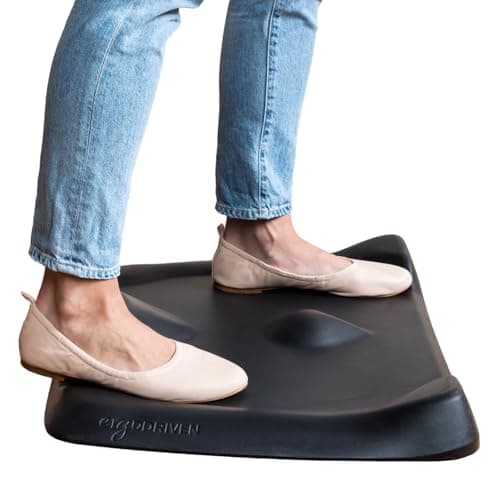
Set the desk to your standing elbow height, then raise the screen again — because your eye line went up with you. That second step is the one almost everybody skips, and it is why so many standing desks end up with the user looking down at a monitor that was perfectly placed when they were sitting. Then sort the floor (a mat), the cable slack, and a third position to perch on. The Ergodriven Topo Mini is the mat we would buy for a small room.

Step 1: the desk height, standing

Stand with your shoulders relaxed and your upper arms hanging straight down. Bend your elbows to about 90 degrees. The underside of your forearms is where the keyboard belongs, so measure from the floor to that point — that is your standing desk height, and for most adults it falls somewhere between 38 and 46 inches.

Two things follow. First, check your frame actually reaches it: plenty of budget frames top out around 46 to 48 inches, which is fine for most people and short for a tall one, and the converter class often tops out lower still. Second, write the number down — or mark the column with a strip of tape, because most frames in this price range have no height memory and a desk set by eye each time is a desk set wrong most times. Our desk height guide has the seated numbers, and standing desks for short people covers the frames whose bottom of range is low enough to matter.

Step 2: the screen, again

Your seated eye height and your standing eye height differ by roughly a foot. A monitor set correctly for sitting is therefore well below your eye line when you stand, and the usual result is a dropped chin and a sore neck blamed on the desk.

There are only three honest answers. An arm, which is why standing desks and monitor arms are bought together so often — 17.5 inches of travel on a mid-priced arm covers the whole difference, and it moves in a second (are monitor arms worth it has the arithmetic, and arms for standing desks covers the clamp question on a moving frame). A compromise height, set between the two and slightly wrong in both. Or standing less, which is a real choice and not a failure. A riser cannot do this job: it is a fixed lift, so it is either right sitting or right standing.

Step 3: the floor

Standing still on a hard floor is the thing people actually find difficult, and it is a floor problem rather than a standing problem. A three-quarter-inch mat spreads the load and lets your feet shift; a contoured mat goes further and gives them somewhere to go. In a small apartment the catch is storage — a full-size flat mat is 4.4 square feet that lives in front of the desk permanently, which is a lot of floor in a studio. The anti-fatigue mat roundup ranks the thin, storable models alongside the full-size ones for exactly that reason. Shoes, incidentally, do most of this job for free: standing barefoot on laminate is the hardest version of the exercise.

Step 4: the cable slack nobody plans for

This is the failure specific to a desk that moves, and it happens on the first full extension. Cables that reach comfortably at sitting height are 10 to 14 inches short at standing height, so the monitor cable tightens, the power brick lifts off the floor, and something either unplugs or gets yanked at the connector.

The fix is to set the desk to its highestposition and route every cable there, with a visible loop of slack left at the frame. Then lower it and tidy the excess into a tray or a sleeve under the top — never cable-tie anything to the frame itself, because the frame is the part that changes length. Our cable management picks cover the under-desk trays, and cable management without wall damage is the renter version.

Step 5: the third position

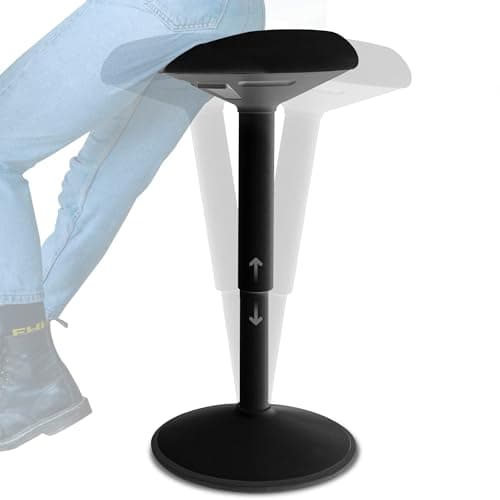
Standing all day is not the goal and nobody manages it. What makes a standing desk work in practice is having three positions rather than two: sitting, standing, and perching — a high stool that takes the weight off your feet without returning the desk to sitting height. A perch is also the smallest-footprint seat there is, which matters in a room where a five-star chair base and a mat are already competing for the same square yard. Our standing desk stool roundup ranks the class by height range and base size.

How long to stand for is personal and we are not going to invent a number or cite a study we have not run. The pattern most people settle into is short, frequent standing spells rather than one long one — and the practical test is whether you are still standing in week three, not in hour three.

The short answer

Quick picks

#ProductBest forScorePrice
01
Ergodriven Ergodriven Topo Mini Not-Flat Standing Mat
Ergodriven Topo Mini Not-Flat Standing Mat

The mat to buy if standing still is the part you find hard. Its contoured terrain gives your feet somewhere to go — calf stretch, edge, flat middle — which turns one static position into four. At 25.2 by 19.2 inches it is the small-room size of the format.

Best overall — the mat that makes you move
8.4
$79.00Amazon
02
ComfiLife ComfiLife Anti-Fatigue Floor Mat (20 × 32 in)
ComfiLife Anti-Fatigue Floor Mat (20 × 32 in)

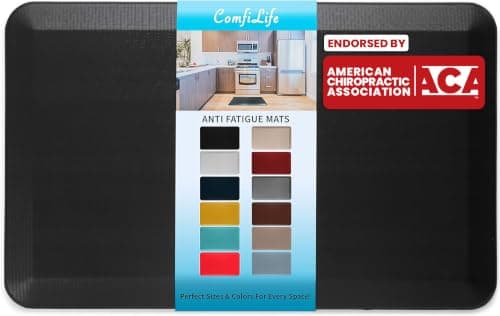
The standard-issue answer, and the size most people find they actually want: 20 by 32 inches of three-quarter-inch foam with a non-slip bottom. On a hard floor it is the difference between standing for twenty minutes and standing for an hour.

Best value — the size most people end up buying
8.2
$49.99Amazon
03
Backerz Backerz Standing Desk Stool (21–31 in)
Backerz Standing Desk Stool (21–31 in)

The third position, and the one most standing-desk setups are missing. A perch at 21 to 31 inches lets you take the weight off your feet without dropping the desk all the way back to sitting height — which is what stops a standing desk quietly becoming a tall sitting desk.

Best perch for a shorter user or a mid-height desk
8.3
$159.95Amazon

#ad · Live prices from the Amazon Product API, as of October 17, 2026. Where we have no verified live price we show none — we would rather leave a gap than print a number that has rotted.

In detail

The picks, in full

01
Ergodriven Ergodriven Topo Mini Not-Flat Standing Mat

Best overall — the mat that makes you move

Ergodriven Topo Mini Not-Flat Standing Mat

Size
25.2 × 19.2 in
Footprint
~3.4 sq ft
Height
2.47 in at highest
Weight
4 lb
Warranty
16 years
8.4/10

The mat to buy if standing still is the part you find hard. Its contoured terrain gives your feet somewhere to go — calf stretch, edge, flat middle — which turns one static position into four. At 25.2 by 19.2 inches it is the small-room size of the format.

Position variety
9.6
Cushioning
8.8
Floor claimed
8
Storability
5
Value
7.6

Pros

  • Contoured terrain encourages position changes rather than only cushioning one position
  • 3.4 sq ft sits between the small and full-size flat mats — the right size for a small room
  • 16-year published warranty against manufacturing defects, the longest in the category
  • Polyurethane foam stated free of PFAs, PVC and added flame retardants

Cons

  • Costs roughly three times a basic flat mat for the same core job
  • The 2.47 in raised profile cannot slide under anything to be stored
  • 4 lb to move, which you will do daily in a shared room

Skip this if…

…you want a mat that disappears when you sit down. Its shape is the whole point and that shape does not pack away — a thin portable mat is the one that stores.

$79.00View on Amazon

Price as of October 17, 2026. Prices change — Amazon's is the one that counts.

#ad · we may earn a commission from this link to Ergodriven Topo Mini Not-Flat Standing Mat

02
ComfiLife ComfiLife Anti-Fatigue Floor Mat (20 × 32 in)

Best value — the size most people end up buying

ComfiLife Anti-Fatigue Floor Mat (20 × 32 in)

Size
20 × 32 in
Footprint
~4.4 sq ft
Thickness
3/4 in
Bottom
Non-slip
Finish
Stain resistant
8.2/10

The standard-issue answer, and the size most people find they actually want: 20 by 32 inches of three-quarter-inch foam with a non-slip bottom. On a hard floor it is the difference between standing for twenty minutes and standing for an hour.

Position variety
6
Cushioning
9
Floor claimed
6.6
Storability
6
Value
9.6

Pros

  • 20 × 32 in is the size most people settle on once they have stood on one
  • Non-slip bottom is the spec that stops a mat wandering across a hard floor
  • Stain resistant, which matters when the desk is also where lunch happens
  • 3/4 in is the thickness the category has converged on

Cons

  • 4.4 sq ft is a real claim on a small room's floor, and there is no handle to move it
  • No published weight, so how easy it is to lift is unstated
  • Flat, so it cushions one position rather than offering several

Skip this if…

…the floor in front of your desk has another job in the evening. A full-size flat mat lives where you put it; a thinner portable one stores upright behind the desk.

$49.99View on Amazon

Price as of October 17, 2026. Prices change — Amazon's is the one that counts.

#ad · we may earn a commission from this link to ComfiLife Anti-Fatigue Floor Mat (20 × 32 in)

03
Backerz Backerz Standing Desk Stool (21–31 in)

Best perch for a shorter user or a mid-height desk

Backerz Standing Desk Stool (21–31 in)

Seat height
21–31 in
Base footprint
13.8 × 13.8 in (listing)
Capacity
220 lb (this listing)
Weight
13.2 lb
Seat
2.4 in HR60 molded foam
8.3/10

The third position, and the one most standing-desk setups are missing. A perch at 21 to 31 inches lets you take the weight off your feet without dropping the desk all the way back to sitting height — which is what stops a standing desk quietly becoming a tall sitting desk.

Position variety
9.2
Comfort
8
Floor claimed
9
Height range
7.4
Value
8.4

Pros

  • 21 in floor is the lowest we rank, so a shorter user gets a real perch at a mid-rise desk
  • 13.8-inch base is a fraction of a five-star chair base — it fits where a chair does not
  • Names its seat foam (HR60, 2.4 in) and a 10,000-cycle mechanism test, which this price band rarely does
  • Non-slip rubber footplate and two buttons under the seat rather than a lever

Cons

  • 31 in maximum means a taller user at a 42-inch desk will be sitting, not perching
  • This listing states 220 lb while other color variants state 300 lb — treat 220 as the figure that applies
  • No warranty term published on the listing

Skip this if…

…you are tall and your desk stands at 42 inches or more. The 31-inch ceiling will not reach a perch for you — our standing stool roundup has the taller frames.

$159.95View on Amazon

Price as of October 17, 2026. Prices change — Amazon's is the one that counts.

#ad · we may earn a commission from this link to Backerz Standing Desk Stool (21–31 in)

The keyboard, and why standing changes it

When you stand, your wrists tend to extend further back than they do seated, because your arms come at the keyboard from a slightly different angle. Two things help: a flat or negatively tilted keyboard(feet down, not up — the little flip-out legs on the back of a keyboard are the wrong way round for this), and a keyboard tray if the desk itself cannot reach your standing elbow height. Trays on a moving desk are their own problem, because the tray has to clear the frame through the whole travel; keyboard trays for standing desks is the page for that, and the install guide covers the clearance measurements.

What a converter changes

If your standing desk is a converter on top of a fixed desk, two things differ. The keyboard deck is usually several inches above the desk surface even at its lowest, so the seatedheight is the one that ends up wrong — check it against your seated elbow height before blaming the chair. And the screen sits on the upper deck at a fixed offset, so the eye-line problem in step 2 is baked in. Our standing desk versus converter comparison covers the trade, and small desk converters ranks the shallow ones.

The setup checklist

StepTargetCommon mistake
Desk heightYour standing forearm heightSetting it by eye, with no memory preset
Screen heightTop of panel near eye level, standingLeaving it where it was for sitting
Screen distanceRoughly an arm’s lengthComing closer when standing, without noticing
FloorMat, or shoesBarefoot on laminate
Keyboard tiltFlat or slightly negativeFlip-out feet up, tilting it towards you
CablesRouted at full height, with slackRouted sitting down, tied to the frame
Third positionA perch stoolOnly sitting and standing, so standing stops

The small-room version of all of this

Three constraints this site’s readers have that a corporate ergonomics checklist does not. Floor: a mat plus a chair plus a stool is three objects on the same patch, which is why the Topo Mini’s 3.4 square feet and the Backerz’s 13.8-inch base are the specs quoted above rather than the comfort claims. Height overhead: a desk at 44 inches with a monitor on an arm above it needs clearance under a sloped ceiling or a high window sill — measure before you raise it fully for the first time. And noise: a motor at 7 a.m. in a studio is a shared event, which is one reason some people buy a converter instead. Standing desk in a small room works through the placement side of all three.

If you have not bought the desk yet

Read whether a standing desk is worth it in a small apartment first — it makes the case honestly in both directions, including the two setups where the money is better spent on a chair and an arm. If you have decided, small standing desks and shallow standing desks rank the frames that fit a room this size, with their published height ranges.

Prices on this page render from the live price layer with their own “as of” date. Of the three picks, the mat is the one to buy first: it is the cheapest, and standing on a hard floor is the single most common reason a standing desk stops being used.
How we picked

We do not run a testing lab

We compiled the published manufacturer specifications, did the footprint and clearance math ourselves, and read aggregated owner reviews, then scored each product against a published rubric. The scores are judgments from documented research — they are not measurements we took, because we do not have a lab and we are not going to pretend we do. Every spec traces back to a listing or manual named in Sources.

Questions

Frequently asked

What height should a standing desk be?
Your standing forearm height: stand with your shoulders relaxed and elbows at about 90 degrees, and measure from the floor to the underside of your forearm. For most adults that lands between 38 and 46 inches. Write the number down or mark the column, because most frames in this price range have no height memory.
Where should the monitor be on a standing desk?
With the top of the panel near your eye level while standing — which is roughly a foot higher than your seated eye level. This is the step most people miss: a screen set correctly for sitting is too low for standing, and the usual symptom is a sore neck blamed on the desk. A monitor arm is the only fix that moves in a second.
Do you need a mat for a standing desk?
On a hard floor, effectively yes — standing still on laminate or tile is the part people find difficult, and a three-quarter-inch mat spreads the load and lets your feet shift. Shoes do much of the same job for free. On carpet a mat matters less, and in a small room the trade-off is the 3.4 to 4.4 square feet it permanently occupies.
How long should you stand at a standing desk?
Short, frequent spells rather than one long one — and the honest answer is that it is personal. We are not going to publish a number we have not measured. The useful test is whether you are still standing in week three: a setup that makes standing comfortable gets used, and one that does not gets left at sitting height.
Why do my cables come unplugged when the desk goes up?
Because they were routed at sitting height. A desk rising 10 to 14 inches needs that much slack at the frame. Set the desk to its highest position, route every cable there with a visible loop of slack, then tidy the excess underneath — and never cable-tie anything to the frame itself, since the frame is the part that changes length.
Should the keyboard be tilted on a standing desk?
Flat, or tilted slightly away from you. Standing tends to extend your wrists further back than sitting does, so the flip-out feet on the back of a keyboard — which tilt the board towards you — make it worse. If the desk cannot reach your standing elbow height, a keyboard tray is the better correction.

Keep reading

Receipts

Sources

We do not run a testing lab, and we do not pretend to. Specifications come from the manufacturer or retailer listing; the footprint and clearance math is ours and reproducible. Where we could not verify a number, we say so on the page rather than quietly leaving it out. Read our full method.