Skip to content
Desk & Dowel

HUB 05 · Small-Space Setups

Seated Desk Ergonomics: Setting Up a Desk You Sit At

Every ergonomics checklist tells you to set the desk first. On a $120 desk that height is welded in at 29 inches, so the real sequence runs the other way — chair to desk, then feet, then screen, then hands.

By Stephen V.Updated How we pick
#ad

We earn a commission when you buy through our Amazon links, at no extra cost to you. It never affects our rankings, and we say so when the cheaper product is the better buy. How this works.

A seated workstation has four heights in it: the seat, the typing surface, the screen, and the floor under your feet. They all have to agree, and the reason most ergonomics advice fails in a small apartment is that it assumes you can set them in the textbook order — desk first, then chair, then screen.

You cannot, because on a desk that cost $120 the typing surface is the one height that does not move. Fixed desks are built at 29 to 30 inches, which is a correct seated height for an adult near six feet tall, and that is the whole design input. If you are 5ft4in, your forearms want a surface around 25 to 26 inches, the desk is three to five inches too high, and no amount of sitting up straight closes that gap.

So the order inverts. On a height-adjustable desk you set your body first and bring the desk to it. On a fixed desk you set the chair to the desk, and then fix everything the chair just broke. That is the sequence below, and it is the opposite of what a generic checklist gives you.

Step one: the measurement that drives everything

Sit in the chair you will actually use. Put your feet flat, let your shoulders drop, and bend your elbows to about 90 degrees with your upper arms hanging straight down. Now measure from the floor to the underside of your forearm. That number is your seated typing height, and it is the only measurement in this guide you cannot look up — it depends on your torso and arm length, not just your height. Our desk height guide publishes the typical bands by height if you want a sanity check, but measure yours.

Compare it to your desk. The difference is your deficit, and the deficit decides what you buy:

  • Desk is lower than your forearm height.This is the easy direction, because a desk can be raised — see desk too low.
  • Desk is 0 to 2 inches too high. Raise the chair, add a footrest. Done, and it costs about $30.
  • Desk is 2 to 6 inches too high. Raise the chair, add a footrest, and drop the typing surface with an under-desk tray.
  • Desk is more than 6 inches too high.You are past what accessories fix. Either replace the desk with one that goes lower — our standing desks under $400page explains why the three-stage frames bottom out around 23 inches — or read desk too high for the full list, including the two things you must not do.

Step two: raise the chair, then put the floor back

Here is the part that trips people up. When you raise the seat so your forearms meet a 29-inch desk, your feet come off the floor. A seated posture with dangling feet puts the whole weight of your lower legs on the front edge of the seat pan, which is the single most common setup error on a fixed desk — and it is not a posture problem, it is a geometry problem you created by solving the desk.

A footrest is the fix, and the size of footrest you need is exactly the number of inches you raised the chair. Anything that puts your feet on something solid works; a foam wedge is quiet and a stepped platform is precise. What does not work is a stack of books, because the stack is not stable under a foot that moves, and neither is sitting on a cushion — that raises your hips without raising your elbows relative to your hips, so it does nothing for your arms and takes your thighs out of contact with the seat.

Step three: the screen, which is independent of all of this

Screen height is the one part of the chain that your desk does not control, which makes it the easiest win and the one most people leave alone. Two targets, both geometric:

  • Height: the top of the screen at or slightly below seated eye level, so your gaze drops a few degrees to the middle of the display.
  • Distance: roughly an arm's length. Our monitor size and distance guide has the figures by panel size, and the summary is that a 27-inch screen needs more depth than most small desks have.

A monitor's factory stand usually sets the screen two to four inches too low, and it eats eight to ten inches of desk depth doing it. A monitor armfixes the height and returns the depth in one purchase, which is why it is the highest-value item on this page by a wide margin — the argument in full is on are monitor arms worth it. If your monitor has no VESA pattern, a riser raises the screen but gives nothing back: monitor arm vs monitor stand covers the difference.

Step four: the hands

Two things matter at the keyboard and both are about angle rather than equipment. Your wrists should be straight or very slightly dropped, not bent upward — which means the flip-out feet on the back of most keyboards are the wrong way round for typing, because they tilt the far edge up and cock your wrists back. Leave them folded. If your keyboard sits on a tray, a slight negative tilt (far edge lower) is the position those trays exist to provide.

The second is mouse distance. A mouse parked to the right of a full-size keyboard with a number pad puts your hand six to eight inches further out than it needs to be, and that reach comes from the shoulder. On a small desk this is also a width problem, which is why a compact keyboard is on this site at all: a tenkeyless or 65% board brings the mouse back toward your body and gives it room to move at the same time.

Three things not to do

Do not cut the legs off a flat-pack desk. It destroys the foot, voids any published load rating, and the cut is never square. Do not sit on a cushion to fix desk height— it moves your hips and your elbows together, so the relationship you were trying to change does not change. Do not buy a keyboard tray before you have measured the thickness of your desk at the front edge, which is a different number from the thickness of the apron and is the specification that most often makes a tray un-installable — see desk thickness for clamp-on gear.

Where this page sits next to the others

Standing desk ergonomics is the same job for a desk that moves, and it runs in the opposite direction: there the desk adjusts to you and the interesting problem is that a standing desk has two correct heights rather than one. The desk height guide publishes the target numbers. Desk too low and desk too high each fix one direction of deficit in depth. And if there is no external monitor in your setup at all, laptop-only desk setup is the page you want, because a laptop welds two of these four heights together and the advice changes.

The short answer

Quick picks

#ProductBest forScorePrice
01
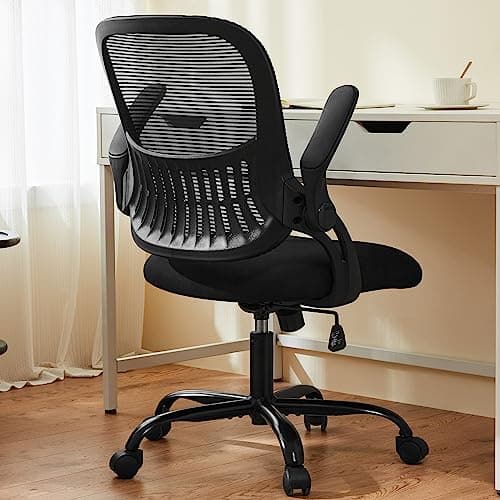
Sweetcrispy Sweetcrispy Mid-Back Mesh Task Chair with Flip-Up Arms
Sweetcrispy Mid-Back Mesh Task Chair with Flip-Up Arms

The first purchase in the sequence, because the chair is the only part of a fixed-desk setup with a height dial on it. Flip-up arms matter twice over on a small desk: forearm support when you are working, and a full tuck-under when you are not.

Step one — the only height you can actually set
8.8
$53.99Amazon
02
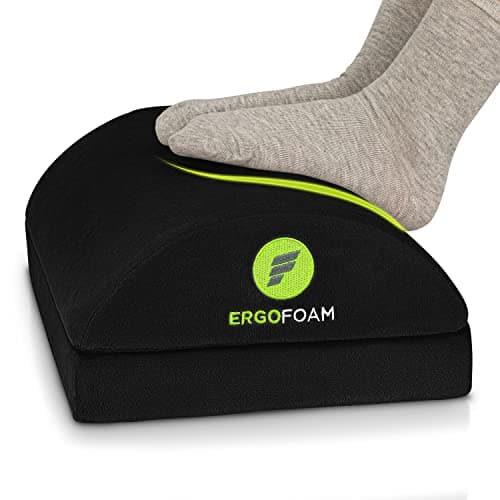
ErgoFoam ErgoFoam Adjustable Under-Desk Foot Rest
ErgoFoam Adjustable Under-Desk Foot Rest

Step two, and the step people skip. Once the chair is set to the desk rather than to your legs, your feet are off the floor — and a footrest is what puts the bottom of the chain back on something solid. The arched top flips for a second height.

Step two — closing the gap the chair just opened
8.3
$41.95Amazon
03
Amazon Basics Amazon Basics Gas Spring Single Monitor Arm
Amazon Basics Gas Spring Single Monitor Arm

Step three. A monitor's factory foot sets your screen height once, at the wrong height, and charges you eight to ten inches of desk depth for the privilege. An arm fixes both at once, which is why it is the highest-value purchase in this whole sequence.

Step three — screen height and the depth it costs
9.0
$27.29Amazon
04
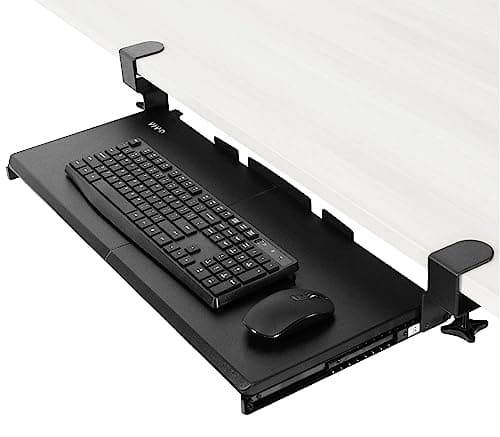
VIVO VIVO Clamp-On Keyboard Tray (MOUNT-KB05E)
VIVO Clamp-On Keyboard Tray (MOUNT-KB05E)

Step four, and the only part that can lower a surface a fixed desk welded too high. A 26.8 by 11-inch platform on two C-clamps drops the typing plane below the desktop with nothing screwed into the desk — which is what makes it a renter's tool.

Step four — the only way to lower a fixed desk
8.5
$49.99Amazon

#ad · Live prices from the Amazon Product API, as of October 21, 2026. Where we have no verified live price we show none — we would rather leave a gap than print a number that has rotted.

In detail

The picks, in full

01
Sweetcrispy Sweetcrispy Mid-Back Mesh Task Chair with Flip-Up Arms

Step one — the only height you can actually set

Sweetcrispy Mid-Back Mesh Task Chair with Flip-Up Arms

Overall size
41.6 × 26.4 × 17.5 in
Arms
Flip-up
Support
Molded mid-back lumbar
Capacity
250 lb (published)
Base
Swivel, rolling casters
8.8/10

The first purchase in the sequence, because the chair is the only part of a fixed-desk setup with a height dial on it. Flip-up arms matter twice over on a small desk: forearm support when you are working, and a full tuck-under when you are not.

Fit range
8.4
Tuck-under
9.4
Support
8.6
Published detail
8.8

Pros

  • Publishes a 250 lb capacity, which most chairs in this price band omit entirely
  • Flip-up arms are the small-room answer: arms down for support, arms up and the chair disappears under a 24-inch-deep desk
  • The lumbar curve is molded into the mid-back rather than strapped on as a separate pad, so it cannot slide out of position
  • A mesh back rather than foam, which matters when the desk shares a room with a bed
  • Rolling casters and a swivel base, so the seat height is adjusted standing next to it rather than by feel

Cons

  • Mid-back, so there is no headrest and no support above the shoulder blades
  • The seat pan depth is not independently adjustable, which is the specification that decides fit for a shorter leg — our chair fit guide covers what to do about it
  • Flip-up arms are a moving part, and moving parts in this price class are the first thing to develop play
  • Published seat-height range is not stated on the listing, so if your required seat height is unusual this is the one figure you cannot check before buying

Skip this if…

…you are under about 5ft2in. The constraint then is the lowest seat height rather than the back, and our office chairs for short people page ranks on exactly that.

$53.99View on Amazon

Price as of October 21, 2026. Prices change — Amazon's is the one that counts.

#ad · we may earn a commission from this link to Sweetcrispy Mid-Back Mesh Task Chair with Flip-Up Arms

02
ErgoFoam ErgoFoam Adjustable Under-Desk Foot Rest

Step two — closing the gap the chair just opened

ErgoFoam Adjustable Under-Desk Foot Rest

Dimensions
17.3 × 11.5 × 5.9 in
Material
High-density foam
Cover
Velvet
Adjustment
Flip for a second height and angle
Weight
1.5 lb
8.3/10

Step two, and the step people skip. Once the chair is set to the desk rather than to your legs, your feet are off the floor — and a footrest is what puts the bottom of the chain back on something solid. The arched top flips for a second height.

Fit range
7.6
Footprint
8.8
Support
8.6
Published detail
8

Pros

  • 17.3 inches wide, so both feet sit on it without hunting for the edge — several cheaper rests are a single-foot size
  • High-density foam rather than the soft fill that goes flat in a fortnight
  • Flipping it gives a second height and angle from one cushion, which is as close to adjustable as a foam rest gets
  • Silent. A plastic tilting platform clicks every time you move, which in a studio apartment at 11pm is a real consideration
  • 1.5 lb, so it moves out of the way with a foot and stores anywhere

Cons

  • Foam cannot be set to an exact height. If your deficit is a specific 3 inches, a stepped platform is the more precise tool
  • 5.9 inches is the tall orientation, and that is the maximum — a larger gap needs a different fix, which usually means lowering the typing surface instead
  • A velvet cover in a carpeted room collects dust and is not machine washable
  • It occupies the floor space your chair base wants to roll through, so it has to be positioned rather than dropped

Skip this if…

…your feet are flat on the floor already with your forearms level at the desk. A footrest solves a deficit; it is not a general-purpose upgrade and it does nothing for a setup that already fits.

$41.95View on Amazon

Price as of October 21, 2026. Prices change — Amazon's is the one that counts.

#ad · we may earn a commission from this link to ErgoFoam Adjustable Under-Desk Foot Rest

03
Amazon Basics Amazon Basics Gas Spring Single Monitor Arm

Step three — screen height and the depth it costs

Amazon Basics Gas Spring Single Monitor Arm

Screen fit
15–27 in (published)
Weight range
4.4–15.4 lb (published)
VESA
75 × 75 / 100 × 100 mm
Mount
C-clamp, adjustable tension
Arm weight
4.18 lb
9.0/10

Step three. A monitor's factory foot sets your screen height once, at the wrong height, and charges you eight to ten inches of desk depth for the privilege. An arm fixes both at once, which is why it is the highest-value purchase in this whole sequence.

Fit range
8
Footprint
9.8
Support
9
Published detail
9.2

Pros

  • Returns the eight to ten inches of depth a monitor stand occupies, which on a 24-inch-deep desk is the difference between a screen at arm's length and a screen in your face
  • Sets the top of the screen at or just below eye level independently of the desk height — the one height in the chain that a cheap desk does not fight you on
  • A gas spring, so the screen moves with one hand and stays where it is put rather than needing a tool
  • Adjustable tension, which is what lets the same arm hold a light 24-inch panel and a heavier 27-inch one
  • Standard 75 and 100 mm VESA patterns cover most monitors sold in the last decade

Cons

  • The published window is 15 to 27 inches and 4.4 to 15.4 lb. A heavy 32-inch panel is outside it — check your monitor's weight, not just its size
  • Needs VESA holes. Plenty of budget monitors have none, and then a riser is the fallback
  • A C-clamp needs a flat, free rear edge with clearance behind it, which rules out a desk flush to the wall with no gap and most hutch desks
  • 4.18 lb of arm hanging off one inch of desk edge is a point load — on a thin or hollow top that is a question worth answering before you clamp

Skip this if…

…your monitor has no VESA pattern and no manufacturer adapter. A monitor riser is the honest alternative, and it is on our risers page — it just will not give you the depth back.

$27.29View on Amazon

Price as of October 21, 2026. Prices change — Amazon's is the one that counts.

#ad · we may earn a commission from this link to Amazon Basics Gas Spring Single Monitor Arm

04
VIVO VIVO Clamp-On Keyboard Tray (MOUNT-KB05E)

Step four — the only way to lower a fixed desk

VIVO Clamp-On Keyboard Tray (MOUNT-KB05E)

Tray size
26.8 × 11 in (32.5 in with clamps)
Slide travel
8.5 in from the edge
Capacity
Up to 11 lb
Desk thickness
1.25 in maximum
Mount
Two C-clamps, no drilling
8.5/10

Step four, and the only part that can lower a surface a fixed desk welded too high. A 26.8 by 11-inch platform on two C-clamps drops the typing plane below the desktop with nothing screwed into the desk — which is what makes it a renter's tool.

Fit range
7.4
Footprint
9.2
Support
8.4
Published detail
9

Pros

  • Lowers the typing surface below the desktop, which is the only move available when the desk is fixed at 29 or 30 inches and your forearms want 26
  • Clamps on with two C-clamps — nothing drilled, so it comes off at the end of a lease with no trace
  • 26.8 × 11 inches takes a full-size keyboard and a mouse side by side, so you are not forced into a compact board as well
  • Slides 8.5 inches back under the desk when you want the floor space or the legroom
  • Returns the 10 to 11 inches of desktop that a keyboard and your hands were occupying, which on a shallow desk is the second-biggest depth gain available after a monitor arm

Cons

  • Needs 32.5 inches of clear width under the front edge for the clamps. Measure between the legs, not across the top
  • A hard 1.25-inch maximum desk thickness. Thicker tops and aprons are excluded by the maker, not merely tight
  • 11 lb capacity. Fine for a keyboard and a mouse, not for leaning on
  • Once the mouse is on the tray it is on a 11-inch-deep platform, which is less horizontal travel than a desktop gives — this is the trade-off our keyboard tray versus desk extender page is built around

Skip this if…

…your desk is already at or below your seated forearm height. A tray that drops a correct surface by three inches creates the opposite problem, and there is no version of this that is harmless to add speculatively.

$49.99View on Amazon

Price as of October 21, 2026. Prices change — Amazon's is the one that counts.

#ad · we may earn a commission from this link to VIVO Clamp-On Keyboard Tray (MOUNT-KB05E)

The deficit table

Measure floor to the underside of your forearm, elbows at 90 degrees, in the chair you use. Subtract that from your desk height. The answer is the row you are on.

Desk is too high byWhat fixes itRoughly
0–2 inRaise the chair; add a footrest to replace the floorOne purchase
2–6 inChair and footrest, plus a clamp-on keyboard tray to drop the typing planeTwo purchases
More than 6 inAccessories cannot close this. A lower desk, or a height-adjustable frame whose published floor is in the low 20sReplace the desk
Desk is too LOWRisers under the legs, or a taller desk — the easy directionSee desk too low

The four checks, in order

One: can the chair reach the height you need? Most task chairs cover roughly a four-inch seat range and the bottom of that range is the limiting number for a shorter user. Our office chairs for short people page ranks on exactly that, and office chair fit for small spaces covers the tuck-under question that decides whether the chair works in the room at all.

Two: is there 32-plus inches of clear width under your front edge? That is what a clamp-on tray needs, and desk legs or a modesty panel kill it. Measure before you buy.

Three: does your monitor have VESA holes, and what does it weigh? Both, not just the size. The arm on this page publishes a 4.4 to 15.4 lb window; monitors are heavier than people guess.

Four: is your desk's front edge thinner than 1.25 inches? That is the tray's published maximum. If you are over it, the tray is out and the chair-plus-footrest route is what you have.

What this page does not claim

Everything above is geometry and published specifications. We have not measured anyone's posture, we are not citing a study, and we are not telling you that a particular arrangement prevents an injury or treats one — that is a conversation for a clinician who can see you. What a correct setup reliably does is remove the reaching, the dangling and the head-tilting that a mismatched desk forces on you, and the four heights above are where that mismatch lives. Our methodology page states what our scores are and are not in those words.

If you are buying the desk as well

Then you can skip most of this, because a desk with a published minimum height in the low-to-mid 20s lets you set the surface to your forearms and stop. That is the single genuinely useful thing the mid-price band buys, and best standing desks under $400 ranks on it. If the budget is tighter, under $200is the page, with the caveat that most desks in that class floor out at 28 to 29 inches — which puts you straight back on the deficit table above.

How we picked

We do not run a testing lab

We compiled the published manufacturer specifications, did the footprint and clearance math ourselves, and read aggregated owner reviews, then scored each product against a published rubric. The scores are judgments from documented research — they are not measurements we took, because we do not have a lab and we are not going to pretend we do. Every spec traces back to a listing or manual named in Sources.

Questions

Frequently asked

What is the correct desk height for sitting?
The height of the underside of your forearm when you are sitting with your feet flat and your elbows at about 90 degrees. For most adults that lands between 25 and 29 inches, which is why a fixed 29 to 30-inch desk fits tall people and nobody else. Measure yours rather than reading it off a chart — arm and torso length vary more than overall height does. Our desk height guide has the typical bands.
What order should I set up a desk in?
On an adjustable desk: body first — chair, then desk to your forearms, then screen, then hands. On a fixed desk the order reverses, because the desk cannot move: chair up to the desk, footrest to replace the floor you just left, screen to eye level, keyboard flat or slightly negative. Setting the chair to your legs first on a fixed desk guarantees you end up reaching upward all day.
Do I need a footrest?
Only if your feet are not flat on the floor once your forearms are level with the desk. That is common on a fixed 29-inch desk and a shorter user, and it is not a general upgrade — if your setup already fits, a footrest adds nothing and takes floor space. The size you need is the number of inches you had to raise the chair.
How high should my monitor be when sitting?
Top of the screen at or just below seated eye level, with the middle of the display a few degrees below the horizontal, at roughly an arm's length. A factory monitor foot usually sets it two to four inches lower than that and charges you eight to ten inches of desk depth. A monitor arm fixes both; a riser fixes only the height. See monitor arm vs monitor stand.
Should I tilt my keyboard up at the back?
No. The flip-out feet on most keyboards raise the far edge, which bends your wrists backward — the opposite of what you want. Leave them folded. Flat is fine and a slight negative tilt, with the far edge lower than the near one, is better still; that angle is one of the reasons under-desk keyboard trays exist.
Can I fix a desk that is too high without buying a new one?
Up to about six inches, yes: raise the chair, add a footrest, and if you need more than two inches, drop the typing surface with a clamp-on tray. Past six inches the accessories run out and you are replacing the desk. What you should not do is cut the legs down — it destroys the foot and any published load rating. The full list is on desk too high.
Is a standing desk the answer to all of this?
It solves one part of it very well: a height-adjustable desk lets you set the typing surface to your forearms instead of working around a number someone else chose. It does not fix screen height, because when you stand your eye line rises further than the desk does — which is the finding our standing desk ergonomics guide is built around, and the reason standing desks and monitor arms get bought together.

Keep reading

Receipts

Sources

We do not run a testing lab, and we do not pretend to. Specifications come from the manufacturer or retailer listing; the footprint and clearance math is ours and reproducible. Where we could not verify a number, we say so on the page rather than quietly leaving it out. Read our full method.