Skip to content
Desk & Dowel

HUB 01 · Compact Desks

Standing Desk Alternatives

You have decided you want to stand. Here is every route to it, ranked by floor space rather than price — because in a small apartment the full desk is not the expensive option, it is the one there is no room for.

By Stephen V.Updated How we pick
#ad

We earn a commission when you buy through our Amazon links, at no extra cost to you. It never affects our rankings, and we say so when the cheaper product is the better buy. How this works.

This page assumes the argument is over: you want to spend part of the day on your feet. What it does not assume is that the answer is a standing desk. In a small apartment there are five genuinely different routes to a standing workstation, two of which involve buying no desk at all, and they are separated by one thing above all others — how much floor each one costs.

There is a finding here that inverts how this category is usually written. The reason to pick an alternative is notmoney. Compare the live prices in the table below and you will usually find the full electric standing desk sitting in the middle of the page rather than at the top of it — frequently below the converter that is supposed to be the budget option. What the alternatives actually buy you is floor space and reversibility: nothing above the last pick requires you to get rid of the desk you own, and nothing above it needs a second person to carry out of the flat.

Two adjacent pages answer narrower questions and are the better starting points if yours is one of them. Is a standing desk worth it in a small apartment is for anyone still deciding whether to bother, and standing desk vs standing desk converter is the head-to-head between the two products most people compare. This page is the wider list, including the routes those two do not cover: a surface you already own, and a laptop stand.

Every specification below is the listing’s own published figure, captured on 4 November 2026, and each product was confirmed available before being featured. Prices are live from Amazon and update on their own — they are not written into the text, which is why the comparison above is framed as “check the table” rather than as a number that would be wrong by next week. The methodology explains the scoring.

The short answer

Quick picks

#ProductBest forScorePrice
01
FLEXISPOT FLEXISPOT 28″ Standing Desk Converter
FLEXISPOT 28″ Standing Desk Converter

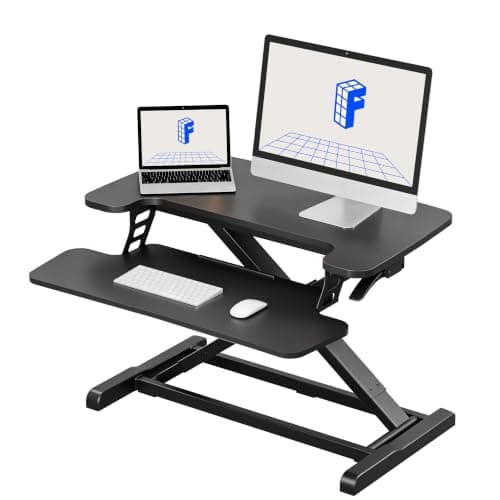
The route that comes closest to the real thing, and the only one here that adds no floor at all: a spring-lift riser that sits on the desk you already own and takes the top from 4.9 to 19.6 inches above it, with a separate keyboard tray underneath so your hands do not rise with the screen.

Closest to a real standing desk
8.7
$119.99Amazon
02
VIVO VIVO 24″ Monitor Riser (STAND-V000D)
VIVO 24″ Monitor Riser (STAND-V000D)

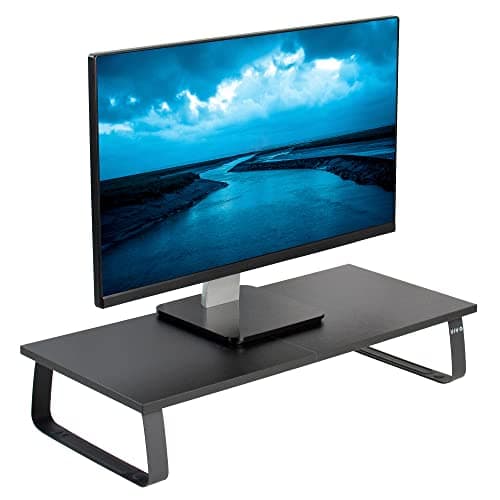
The cheapest route onto this page, and the one with the biggest caveat: a fixed 24-inch wood-and-steel platform rated to 44 lb. It raises the screen and nothing else, so it only produces a workable standing posture if your desk is unusually tall for you to begin with — which, for almost everyone, it is not.

Cheapest way to raise the screen
7.6
$34.99Amazon
03
ERGO COLLECT ERGO COLLECT Adult Wobble Stool (22.8–32.6 in)
ERGO COLLECT Adult Wobble Stool (22.8–32.6 in)

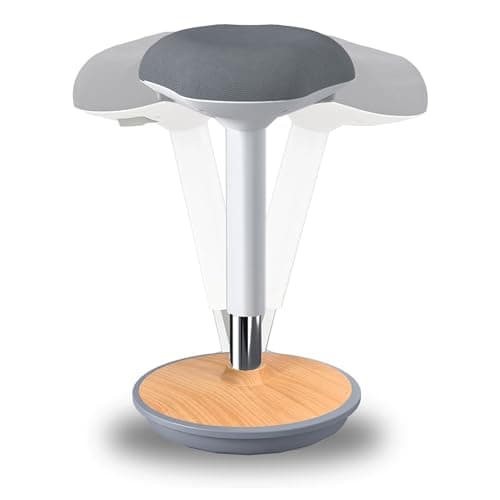
The route that buys no desk at all. Most apartments already contain a standing-height surface — a kitchen counter or a breakfast bar, typically around 36 inches — and the thing that makes it usable for a whole day is not a desk, it is somewhere to perch between stands. A 22.8-to-32.6-inch seat range covers counter height properly.

Using a counter you already own
8.4
$143.59Amazon
04
Rain Design Rain Design mStand Laptop Stand
Rain Design mStand Laptop Stand

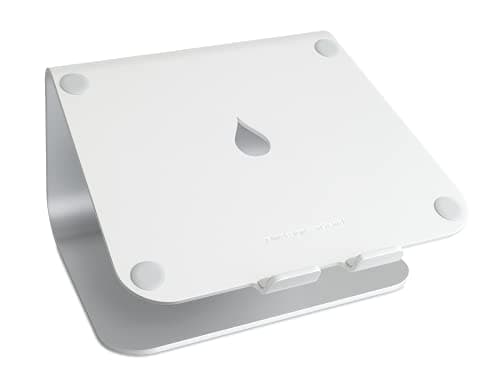
The other no-furniture route, and the one that makes the counter plan ergonomic rather than just tall: a single-piece aluminum stand that lifts a laptop screen 5.9 inches, which is roughly the gap between a laptop lid on a 36-inch counter and your actual eye level. It needs a separate keyboard, and that is not a flaw — it is the whole point.

The laptop-only standing setup
8.3
$39.90Amazon
05
FLEXISPOT FLEXISPOT EN1 48 × 24″ Standing Desk
FLEXISPOT EN1 48 × 24″ Standing Desk

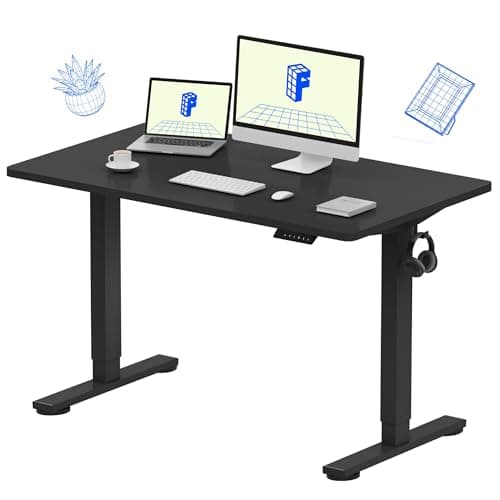
The baseline, included because it keeps the rest of the page honest: a one-piece 48 × 24-inch top on an electric frame adjusting 28.9 to 46.5 inches with four memory presets and a 176 lb rating. Check its live price against the converter above before you assume an alternative is the cheaper choice — on this page, it frequently is not.

When the room can take it
7.8
$109.96Amazon

#ad · Live prices from the Amazon Product API, as of November 4, 2026. Where we have no verified live price we show none — we would rather leave a gap than print a number that has rotted.

In detail

The picks, in full

01
FLEXISPOT FLEXISPOT 28″ Standing Desk Converter

Closest to a real standing desk

FLEXISPOT 28″ Standing Desk Converter

Floor added
None — sits on your desk
Travel
4.9–19.6 in above the desktop
Top capacity
33 lb
Keyboard tray
11 lb
Assembly
Attach the tray only
8.7/10

The route that comes closest to the real thing, and the only one here that adds no floor at all: a spring-lift riser that sits on the desk you already own and takes the top from 4.9 to 19.6 inches above it, with a separate keyboard tray underneath so your hands do not rise with the screen.

Floor cost
9.8
Standing quality
8.8
Reversibility
9.2
Desk space cost
7
Value
8.6

Pros

  • Adds nothing to the floor footprint, which is the only metric a studio cannot negotiate
  • A separate keyboard tier, so the screen and the hands rise to different heights — the thing a riser cannot do
  • Mechanical steel spring rather than a gas strut, so there is no slow pressure loss to manage
  • Arrives nearly assembled and lifts off in one piece when you move

Cons

  • Permanently occupies a 28-inch block of the desktop whether you are standing or not
  • Lowered, the top still sits 4.9 in above the desk, so your seated setup never comes all the way back down
  • 33 lb top rating rules out two heavy monitors

Skip this if…

…your desk is under about 31 inches wide, or already wobbles. A riser amplifies existing wobble and this one needs most of a small top.

$119.99View on Amazon

Price as of November 4, 2026. Prices change — Amazon's is the one that counts.

#ad · we may earn a commission from this link to FLEXISPOT 28″ Standing Desk Converter

02
VIVO VIVO 24″ Monitor Riser (STAND-V000D)

Cheapest way to raise the screen

VIVO 24″ Monitor Riser (STAND-V000D)

Floor added
None — sits on your desk
Top
24 in wooden desktop
Capacity
44 lb total
Travel
None — fixed height
Feet
Anti-slip silicone padding
7.6/10

The cheapest route onto this page, and the one with the biggest caveat: a fixed 24-inch wood-and-steel platform rated to 44 lb. It raises the screen and nothing else, so it only produces a workable standing posture if your desk is unusually tall for you to begin with — which, for almost everyone, it is not.

Floor cost
9.8
Standing quality
4.4
Reversibility
9.8
Desk space cost
6.4
Value
9.2

Pros

  • 44 lb capacity is the highest on this page, and higher than most converters
  • No mechanism at all, so there is nothing to sag, leak or wear out
  • Assembles in minutes and stores flat
  • Doubles as a monitor riser for the seated half of the day, which no converter does well

Cons

  • No height adjustment whatsoever — the single biggest limitation here
  • Raises the screen only; your keyboard stays at seated height, which is the wrong half of the problem
  • A 24-inch platform claims most of a small desktop permanently

Skip this if…

…you want to work standing for any length of time. Without a keyboard tier this gets the screen to eye level and leaves your hands below your elbows — fine for a ten-minute stand, not for an afternoon.

$34.99View on Amazon

Price as of November 4, 2026. Prices change — Amazon's is the one that counts.

#ad · we may earn a commission from this link to VIVO 24″ Monitor Riser (STAND-V000D)

03
ERGO COLLECT ERGO COLLECT Adult Wobble Stool (22.8–32.6 in)

Using a counter you already own

ERGO COLLECT Adult Wobble Stool (22.8–32.6 in)

Floor added
A 13 × 13 in base (maker figure)
Seat height
22.8–32.6 in
Capacity
300 lb (maker-tested claim)
Weight
11.9 lb
Assembly
3 parts, tool-free
8.4/10

The route that buys no desk at all. Most apartments already contain a standing-height surface — a kitchen counter or a breakfast bar, typically around 36 inches — and the thing that makes it usable for a whole day is not a desk, it is somewhere to perch between stands. A 22.8-to-32.6-inch seat range covers counter height properly.

Floor cost
7.8
Standing quality
8
Reversibility
9.6
Desk space cost
10
Value
8.4

Pros

  • Needs no desk, no riser and no money spent on a surface — the counter is already there
  • 9.8 inches of pneumatic travel, so it covers both a counter and a raised converter
  • 11.9 lb and three push-together parts, so it goes in a closet when the kitchen is a kitchen again
  • Rubber-coated feet rather than casters: nothing rolls and nothing marks a rental floor

Cons

  • It is a perch, not a chair — there is no backrest and it takes a few days to get used to
  • A counter is a fixed height, so if 36 inches is wrong for you nothing here adjusts it
  • Counters are rarely deep enough for a monitor, so this route is usually laptop-only

Skip this if…

…your kitchen counter is the only food-preparation surface you have. This route works when the counter is genuinely spare for part of the day, and that is a real condition, not a detail.

$143.59View on Amazon

Price as of November 4, 2026. Prices change — Amazon's is the one that counts.

#ad · we may earn a commission from this link to ERGO COLLECT Adult Wobble Stool (22.8–32.6 in)

04
Rain Design Rain Design mStand Laptop Stand

The laptop-only standing setup

Rain Design mStand Laptop Stand

Floor added
None
Screen rise
5.9 in
Base
8.8 × 9.9 in published
Build
Single-piece aluminum, acts as a heat sink
Fits
Laptops under 10.4 in deep
8.3/10

The other no-furniture route, and the one that makes the counter plan ergonomic rather than just tall: a single-piece aluminum stand that lifts a laptop screen 5.9 inches, which is roughly the gap between a laptop lid on a 36-inch counter and your actual eye level. It needs a separate keyboard, and that is not a flaw — it is the whole point.

Floor cost
10
Standing quality
7.2
Reversibility
9.8
Desk space cost
9.4
Value
9

Pros

  • Lifts the screen without raising the keyboard, which is the correct split for standing work
  • One piece of aluminum — nothing to adjust, nothing to fail, and it doubles as a heat sink
  • Stashes a keyboard underneath when you sit down, returning the surface
  • Light enough to move between the counter, the desk and the kitchen table

Cons

  • Fixed 5.9 in rise, so it only lands at eye level on a surface that is already near standing height
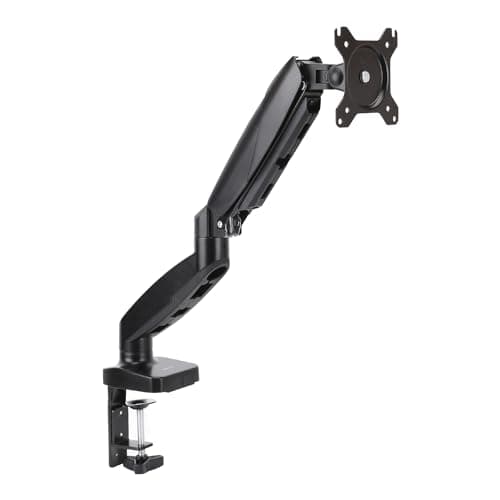
  • Laptop only — there is no version of this route with a monitor on it
  • Needs a separate keyboard and mouse to be worth doing at all
  • Published to fit laptops under 10.4 inches deep, which excludes some 17-inch machines

Skip this if…

…you work on a desktop or a docked two-screen setup. This route is for a laptop and nothing else; the converter at the top of the page is the one that carries a monitor.

$39.90View on Amazon

Price as of November 4, 2026. Prices change — Amazon's is the one that counts.

#ad · we may earn a commission from this link to Rain Design mStand Laptop Stand

05
FLEXISPOT FLEXISPOT EN1 48 × 24″ Standing Desk

When the room can take it

FLEXISPOT EN1 48 × 24″ Standing Desk

Floor added
A whole desk — 48 × 24 in
Height range
28.9–46.5 in
Capacity
176 lb
Presets
4 memory heights
Top
One-piece, no seam
7.8/10

The baseline, included because it keeps the rest of the page honest: a one-piece 48 × 24-inch top on an electric frame adjusting 28.9 to 46.5 inches with four memory presets and a 176 lb rating. Check its live price against the converter above before you assume an alternative is the cheaper choice — on this page, it frequently is not.

Floor cost
4
Standing quality
9.8
Reversibility
4.6
Desk space cost
9.6
Value
9

Pros

  • The whole surface rises, so nothing has to be relocated to stand up
  • 176 lb capacity carries two monitors, arms and a tower with room to spare
  • A one-piece top gives a monitor-arm clamp solid material to grip anywhere along the rear edge
  • Four presets mean two people and two positions each, which is the strongest case for buying one
  • 28.9 in bottom end also fixes a desk that was too tall for you seated

Cons

  • Replaces your desk rather than sitting on it — the one thing a small apartment may have no route to
  • 48 inches wide needs a clear wall run of about 50, which rules out most alcoves
  • A two-person lift and an assembly project at both ends of a move

Skip this if…

…you rent short-term or the desk shares a room with a bed. Everything above it on this page is reversible in minutes; this is furniture.

$109.96View on Amazon

$159.9931% off

Price as of November 4, 2026. Prices change — Amazon's is the one that counts.

#ad · we may earn a commission from this link to FLEXISPOT EN1 48 × 24″ Standing Desk

The five routes, by what each one costs you

RouteFloor addedDesk space takenHeight adjustable?Carries a monitor?Reversible
Desktop converterNoneA 28 in block, permanentlyYes — 4.9–19.6 inYes, to 33 lbLifts off in one piece
Fixed monitor riserNoneA 24 in platformNoYes, to 44 lbImmediately
Counter plus a perch stoolA 13 in stool baseNone — no desk involvedSeat only, 22.8–32.6 inRarely — counters are shallowStool goes in a closet
Counter plus a laptop standNoneNoneNo — fixed 5.9 in riseNo, laptop onlyImmediately
Full electric standing desk48 × 24 in of roomIt is the deskYes — 28.9–46.5 inYes, to 176 lbNo — it is furniture

Which column decides it

If the room is the constraint, read column two.Three of the five routes add nothing at all to the floor, because they sit on a surface that already exists. That is the single reason this category exists for a small-apartment reader, and it is worth being precise about what “no floor” means: a converter claims desk area rather than room area, which on a 40-inch top is a real cost but not the same cost. If you are planning a layout from scratch, standing desk in a small room has the clearance and cable figures the full-desk route needs.

If the posture is the constraint, read column four.This is where the cheap route falls over. A fixed riser lifts the screen and leaves your keyboard at seated height, which puts your hands below your elbows for as long as you stand — the exact posture standing desk ergonomics exists to prevent. Standing work needs the screen near eye level and the hands near elbow level, and that is two heights, not one. Only the converter and the full desk give you both on a desk; the counter routes get there by using a surface that is already at the right height for your hands and then raising only the screen.

If the lease is the constraint, read the last column. Everything except the full desk goes back in a box. That matters more than it sounds: a flat-pack desk survives one disassembly well and a second one badly, which is the argument running through moving-friendly desk gear.

The counter route, in more detail

It gets the least attention and it is free, so it deserves the space. A standard kitchen counter runs around 36 inches high, and a breakfast bar higher. For a person of about 5 ft 8 in, standing desk height lands near 42 to 44 inches at the elbow — so a counter is below ideal standing height for most adults, not above it. That makes it a good standing surface for a laptop with a stand under the screen, and a poor one for a keyboard at full standing height. The honest version of this route is therefore: counter, laptop stand, separate keyboard and mouse, and a perch stool for the half of the day you are not standing.

Two limits to know before you commit to it. Counters are typically 24 to 25 inches deep with a backsplash, so a monitor on a stand rarely fits and a monitor arm has nothing to clamp. And a counter is a shared surface in a way a desk is not — the pack-down discipline this needs is the same one in kitchen table office setup and the dining-table convertible office.

What every route needs that none of them includes

Something to stand on.Standing still on a hard floor is the actual cause of the ache people blame on standing desks, and a mat that invites you to shift your weight addresses more of the mechanism than a softer one does. In a small room the mat is furniture — it lives permanently on the floor in front of the desk — so published footprint matters as much as thickness: anti-fatigue mats ranks them on it.

Cable slack, if anything moves. A converter travels about 15 inches and a full desk about 18, and every lead needs a sleeved drop loop long enough at full height or it gets pulled out of the machine at the worst moment. Desk cable management has the loop arrangement; doing it without wall damageis the renter’s version.

A second posture, not a longer stand.Cornell’s ergonomics guidance is blunt that standing all day is unhealthy and that variety is the point. That is why the stool is on this page as a route in its own right rather than as an accessory — and why standing desk stools is worth reading whichever route you take.

What we checked and did not rank

  • A wall-mounted fold-down desk fixed at standing height. Genuinely the lowest-floor option of all, and it is covered in wall-mounted folding desks and floating desks. It is not a pick here because it is fixed at whatever height you drill it, which makes it a standing desk rather than an alternative to one — and it needs a landlord conversation that the rest of this page does not.
  • Stacking the laptop on books.It works, it costs nothing, and it is genuinely what a lot of people do first. We have not ranked it because it gets the screen up and leaves the keyboard attached to it, which is the riser problem without the 44 lb platform — the laptop stand above does the same job for the price of a takeaway and releases the keyboard.
  • Desk risers that clamp to the desk edge. Checked, and the clamp-on category tops out well below the load a standing workstation needs; those products are surface extenders rather than lifts. The comparison is in keyboard tray vs desk extender.
How we picked

We do not run a testing lab

We compiled the published manufacturer specifications, did the footprint and clearance math ourselves, and read aggregated owner reviews, then scored each product against a published rubric. The scores are judgments from documented research — they are not measurements we took, because we do not have a lab and we are not going to pretend we do. Every spec traces back to a listing or manual named in Sources.

Questions

Frequently asked

What is the cheapest standing desk alternative?
A fixed monitor riser, which has no mechanism and costs a fraction of anything else here - but it raises only the screen and leaves your keyboard at seated height, so it is the cheapest way to stand badly. The cheapest route that produces a correct standing posture is a counter you already own plus a laptop stand and a separate keyboard. Check the live prices in the table; the ordering moves.
Is a standing desk converter better than a standing desk?
For a small apartment, often yes - not because it is cheaper, which it frequently is not, but because it adds nothing to the floor and lifts off in one piece when you move. The full desk wins on everything else: the whole surface rises, it carries far more weight, and nothing has to be relocated to stand up.
Can I use a kitchen counter as a standing desk?
For a laptop, yes, with two caveats. A counter is usually around 36 inches high, which is below standing elbow height for most adults rather than above it, so it suits a laptop with a stand under the screen better than a keyboard at full standing height. And counters are typically 24 to 25 inches deep with a backsplash, so a monitor rarely fits and a monitor arm has nothing to clamp.
Do I need an anti-fatigue mat with a standing desk alternative?
If you stand for more than short stretches, yes, and the route you chose does not change it. Standing still on a hard floor is the thing that actually causes the ache, and a contoured mat that invites weight shifts addresses more of that than a thicker flat one. In a small room check the published footprint first - the mat lives on the floor permanently.
Will a converter work on any desk?
Not any. It needs enough width to leave working space beside it - the 28-inch model here wants about 31 inches minimum - and a desk that does not already wobble, because a riser amplifies existing movement rather than causing it. It also needs the desk's own load rating to cover the riser plus the monitor, which is a static figure worth checking on a light particleboard top.
What is the smallest-footprint way to work standing up?
A laptop stand on a surface you already own, which adds nothing to the floor and nothing to a desk. It is also the most limited: fixed rise, laptop only, and it needs a separate keyboard and mouse to be worth doing. Past that, a desktop converter is the smallest-footprint route that carries a monitor.

Finish the setup

Under $40: the parts that finish a small desk

A desk is the expensive decision. These are the cheap ones that decide whether it actually works in a small room — each is the top pick from one of our own roundups, and each clamps, sticks or stands rather than needing a drill. Prices live as of November 4, 2026.

Keep reading

Receipts

Sources

We do not run a testing lab, and we do not pretend to. Specifications come from the manufacturer or retailer listing; the footprint and clearance math is ours and reproducible. Where we could not verify a number, we say so on the page rather than quietly leaving it out. Read our full method.