Five products that fix five different cable problems, ranked on how much they hide, how much desk they cost and whether you can take them off the wall at the end of a lease.
We earn a commission when you buy through our Amazon links, at no extra cost to you. It never affects our rankings, and we say so when the cheaper product is the better buy. How this works.
The verdict: the best cable management buy for a small desk is the D-Line Cable Management Box— it hides the power strip and its wall warts, which is the single ugliest object in most small setups, and it is completely reversible. It is for the renter or apartment worker whose desk is in a room they also live in. The budget pick is the VELCRO ONE-WRAP 100-pack, and the honest truth is that it fixes the most common problem — slack, not quantity — for the least money of anything here.
There is no single best cable product, because “cable mess” is four different problems and each one has its own answer. Slack— three feet of cable for a one-foot run — is solved by ties. Quantity, five cords running in parallel, is solved by a sleeve. The power strip itself, which is a brick with six wall warts hanging off it, is solved by a box. And the run across the room, from the desk to the only outlet, is solved by a raceway on the wall or a cover on the floor — and which of those two depends entirely on where the desk sits.
So this page ranks on three criteria rather than picking a winner by category. How much it actually hides— ties organise, sleeves consolidate, boxes and raceways conceal. How much desk it costs— everything here lives on the floor, the wall or under the top, because surface is the scarce resource on a small desk. Whether a renter can undo it— four of the five leave no trace at all; the raceway is the one with an adhesive asterisk, and it is flagged on the pick.
If you want the method rather than the products, our desk cable management guide walks through the order to do it in, and cable management without wall damage is the renter-specific version. Prices below are live, with the as of date under each table.
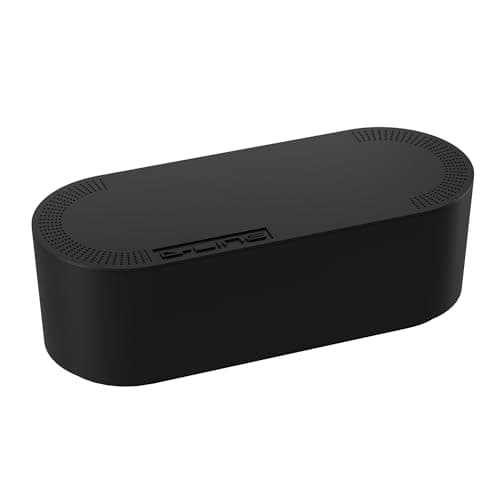
The single biggest visual improvement you can make to a small desk: a click-lock ABS box that swallows a power strip and its wall warts, with three rear entry slots so only the cords you need come out.
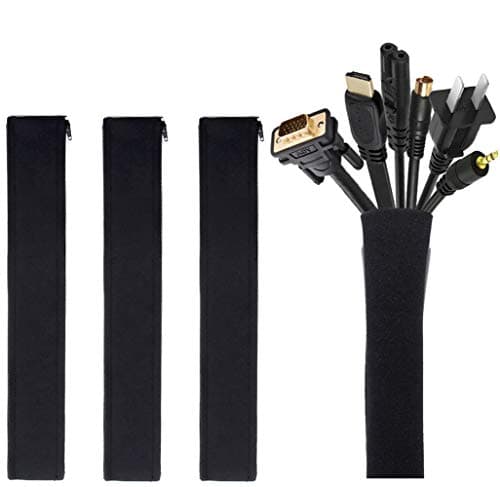
The budget pick and the one that does the most for a desk that moves: four neoprene zip-up sleeves that turn eight loose cords into one soft trunk you can unzip and re-route in a minute.
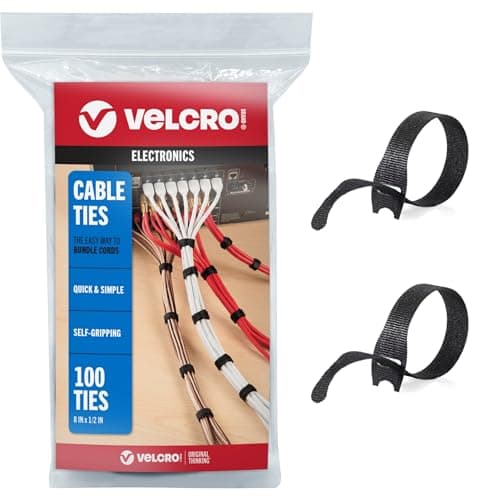
The cheapest thing on this page and the one that gets used most: a hundred reusable hook-and-loop ties, which is what turns a three-foot cable into a six-inch loop under the desk.
The best concealment on the page, with the biggest asterisk: 113 inches of paintable PVC raceway that makes a wall run disappear, stuck on with adhesive that a renter needs to think about before committing.
The answer when the desk is not against a wall: a low-profile floor cover that cuts to length, grips with a ribbed base instead of adhesive, and turns a trip hazard into a ramp you can walk over.
#ad · Live prices from the Amazon Product API, as of November 12, 2026. Where we have no verified live price we show none — we would rather leave a gap than print a number that has rotted.
In detail
The picks, in full
01
Best overall
D-Line Cable Management Box (Large)
Type
Cable box
Material
ABS plastic
Dimensions
16.5 × 6.5 × 5.25 in
Cord slots
3 rear entry
Lid
Click-lock
9.0/10
The single biggest visual improvement you can make to a small desk: a click-lock ABS box that swallows a power strip and its wall warts, with three rear entry slots so only the cords you need come out.
Concealment
9.2
Desk space claimed
9
Reversibility
9.8
Install effort
8.6
Value
8.6
Pros
+Hides the power strip, which is the single ugliest object in most small setups
+Click-lock lid stays shut, so a cat or a toddler cannot open it
+Three rear slots let you separate the runs instead of bundling them through one hole
+Completely reversible — it sits on the floor and leaves no trace
Cons
−16.5 in long, so it needs floor or shelf space it will not share
−It conceals the strip rather than removing it; the cords still have to travel somewhere
Skip this if…
…the desk sits in the middle of a room with no skirting to hide behind. A box on open floor is still a box - use the floor cord cover instead.
The budget pick and the one that does the most for a desk that moves: four neoprene zip-up sleeves that turn eight loose cords into one soft trunk you can unzip and re-route in a minute.
Concealment
7.6
Desk space claimed
9.6
Reversibility
9.8
Install effort
9
Value
9.6
Pros
+Four sleeves for less than the price of one box — the cheapest real improvement here
+Zips open, so adding or removing a cable takes a minute rather than a rebuild
+Flexible, so it follows a desk that gets dragged away from the wall
+No adhesive, no screws, nothing to leave behind at the end of a lease
Cons
−A tidy trunk is still a visible trunk — it organises rather than hides
−19-20 in per sleeve, so a long floor run needs several joined
Skip this if…
…the problem is a visible power strip rather than loose cords. Sleeves will not help with that; the box will.
The cheapest thing on this page and the one that gets used most: a hundred reusable hook-and-loop ties, which is what turns a three-foot cable into a six-inch loop under the desk.
Concealment
5.8
Desk space claimed
9.8
Reversibility
10
Install effort
9.6
Value
9.6
Pros
+Reusable, unlike zip ties — you will re-route your desk more often than you think
+A hundred of them, so there is no reason to ration
+Solves the actual problem on most small desks, which is slack rather than quantity
+Nothing to mount, nothing to remove
Cons
−Zero concealment — this is organisation, not hiding
−Over-tightening a bundle of power and data cables together is poor practice
Skip this if…
…you expected these to tidy the desk on their own. They are the first step, not the whole job.
The best concealment on the page, with the biggest asterisk: 113 inches of paintable PVC raceway that makes a wall run disappear, stuck on with adhesive that a renter needs to think about before committing.
Concealment
9.6
Desk space claimed
9.8
Reversibility
6
Install effort
7
Value
8
Pros
+Paintable, so on a painted wall it genuinely disappears
+113 in of total length covers a desk-to-outlet run with pieces to spare
+The only thing here that solves a wall-mounted monitor's trailing cable
+No drilling
Cons
−Adhesive on paint is the one semi-permanent product here — test a short piece first
−A 0.59 x 0.4 in channel is small; a thick power cord plus HDMI may not both fit
Skip this if…
…the wall is freshly painted or the lease is strict about surfaces. Our damage-free mounting guide covers what adhesive does and does not survive.
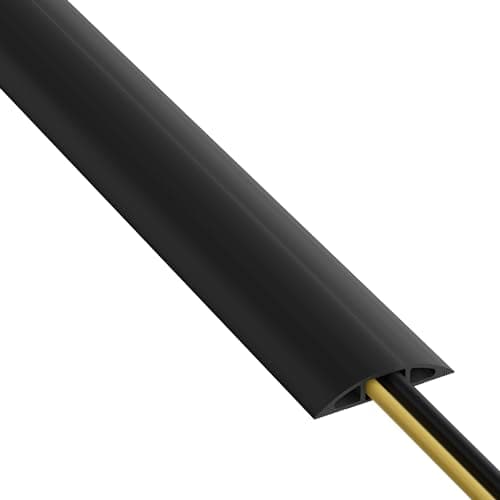
The answer when the desk is not against a wall: a low-profile floor cover that cuts to length, grips with a ribbed base instead of adhesive, and turns a trip hazard into a ramp you can walk over.
Concealment
7.8
Desk space claimed
9.8
Reversibility
9.8
Install effort
9
Value
9
Pros
+No adhesive at all — the most renter-safe fix on this page
+Cuts to length with a knife, so a 4 ft run does not need a 6 ft cover
+0.44 in high, low enough for a chair caster to roll across
+Solves the one problem a desk in the middle of a room always has
Cons
−Takes two cables of 0.31 in diameter — a power cord plus an Ethernet run, and that is the limit
−Visible on a hard floor, however low the profile
Skip this if…
…you need to run four cables. Split the run across two covers or move the power strip closer with a clamp-on strip instead.
#ad · Live prices from the Amazon Product API, as of November 12, 2026. Where we have no verified live price the button says so rather than showing a number that has rotted.
Match the product to your actual problem
If the desk is against a wall
Put the strip in the box on the floor behind the desk, sleeve the three or four cords that climb to the desktop, and tie the slack at the top. That combination costs less than most single accessories and removes essentially all of the visible mess. A desk-mounted power strip that clamps to the rear edge is the upgrade: it moves the sockets to where the devices are, so the long runs disappear entirely.
If the desk is in the middle of the room
Then the floor run is the whole problem and the floor cover is the answer — the ribbed base means no adhesive and no trace. Our desk in the middle of a room guide covers the layout properly, including why a single long extension to one clamp-on strip beats four separate runs.
If a monitor is on the wall
A wall-mounted screen puts the cable where everyone looks, and the raceway is the only product here that solves it. Paint it to match and it genuinely vanishes. Read damage-free mounting weight limits first if the lease is strict — adhesive on fresh paint is the one semi-permanent choice on this page.
Two things worth doing before you buy anything
First, reduce the number of cables. A single USB-C dock can replace four separate runs to a laptop with one, which removes more mess than any amount of tidying. Second, get the cords off the surface: an under-desk keyboard tray and a under-desk drawer both move objects and their cables below the top, where no one sees them. Tidying is the last step, not the first.
What we checked and did not rank
Single-use zip ties. Excluded. They are cheaper per tie and you will cut every one of them off the first time you move the desk.
Under-desk cable trays that screw into the top. Effective, and the wrong recommendation for a rental or a thin apartment desk, which is what this site is for.
Adhesive cable clips.Useful in small numbers, but they fail on textured paint and leave marks when pulled off — the raceway does the same job better over a long run.
How we picked
We do not run a testing lab
We compiled the published manufacturer specifications, did the footprint and clearance math ourselves, and read aggregated owner reviews, then scored each product against a published rubric. The scores are judgments from documented research — they are not measurements we took, because we do not have a lab and we are not going to pretend we do. Every spec traces back to a listing or manual named in Sources.
Questions
Frequently asked
What is the best cable management for a small desk?+
A cable box for the power strip, because the strip and its wall warts are the biggest single eyesore and a box removes all of it at once. Add a sleeve for the cords that climb to the desktop and reusable ties for the slack. That three-part combination costs very little and is completely reversible, which matters in a rental.
How do I hide cables on a desk without drilling?+
Work in this order: shorten slack with reusable hook-and-loop ties, bundle parallel cords into a zip-up sleeve, put the power strip in a lidded floor box, and cover the run to the outlet with a floor cord cover (no adhesive) or a paintable wall raceway (adhesive). Nothing in that sequence needs a drill, and only the raceway touches the paint.
Is a cable box safe to put a power strip in?+
A ventilated cable box designed for the purpose is, which is why the published material and the slot layout matter - heat needs somewhere to go and the cords need to enter without being pinched. Do not improvise with a sealed container, do not overload the strip, and keep the box off carpet pile where it can sit in its own heat.
What is the most renter-friendly way to manage desk cables?+
A floor cord cover with a ribbed non-slip base, because it uses no adhesive at all and lifts straight off at the end of a lease. Sleeves and reusable ties are equally trace-free. The one product to think twice about is an adhesive wall raceway: it conceals best and it is the only thing here that touches the paint.
We do not run a testing lab, and we do not pretend to. Specifications come from the manufacturer or retailer listing; the footprint and clearance math is ours and reproducible. Where we could not verify a number, we say so on the page rather than quietly leaving it out. Read our full method.