A stand lifts the laptop on the desk. A mount takes it off the desk. Five mounts ranked on how much surface they return and how much desk edge or wall they want in exchange.
We earn a commission when you buy through our Amazon links, at no extra cost to you. It never affects our rankings, and we say so when the cheaper product is the better buy. How this works.
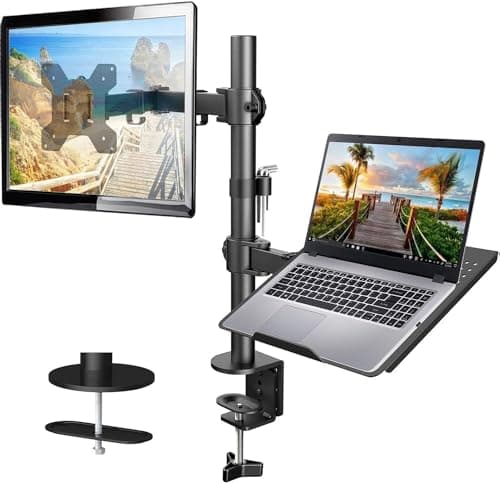
The verdict: the best laptop mount for a small desk is the HUANUO monitor arm with laptop tray— one clamp lifts both a 13–32″ monitor and a ventilated 14×12″ laptop tray, which puts the two objects that normally own a small desk into the air together. It is for the apartment worker running a laptop plus an external screen on a top under 24 inches deep. The budget pick is the ELETIUO under-desk holder two-pack, which parks a closed machine in space that is otherwise completely wasted — though it publishes no weight rating, which is why it is not higher.
The distinction this page turns on is simple and widely missed. A laptop stand raises the machine while leaving it on the desk, so you keep the footprint and gain a better screen height. A laptop mount takes the machine offthe surface entirely — onto an arm, under the top, or onto a wall — and gives you the footprint back. On a 40-inch desk a 14-inch laptop is roughly a quarter of the usable area, so the difference is not marginal.
There are five hardware routes and they trade against each other cleanly. A combination arm carries the monitor and the laptop on one clamp. A dedicated laptop arm does one device with more independent movement. A VESA tray bolts onto an arm you already own. An under-desk holder parks a closed machine for a few dollars. A wall mount uses none of the desk at all and costs you a drilled wall. The ranking below weighs surface returned against what the mount demands of your desk edge or your lease, which on this site is the trade that actually decides it.
Three neighbouring pages cover the routes this one does not: the on-desk option is best laptop stands, the drilled wall field in full is best laptop wall mounts, and the arm-plus-tray format in depth is monitor arms with a laptop tray. We do not run a lab; every figure is the listing’s own published number, and where one is not published — as with the ELETIUO’s weight rating — the spec row says so.
The most desk returned per dollar on this page: one clamp carries both a 13-32 in monitor and a ventilated 14 x 12 in laptop tray, so the two objects that normally own a small desk are both in the air.
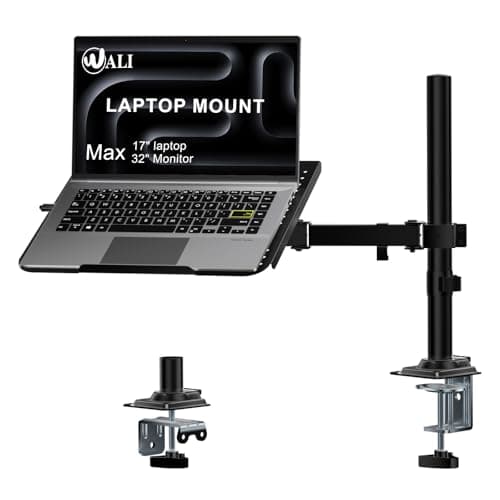
The pick when the laptop is the only screen: a dedicated desk-clamp arm with a 14 x 11 in tray, 16 in of height travel and a VESA plate as well, so the same mount can carry a monitor later.
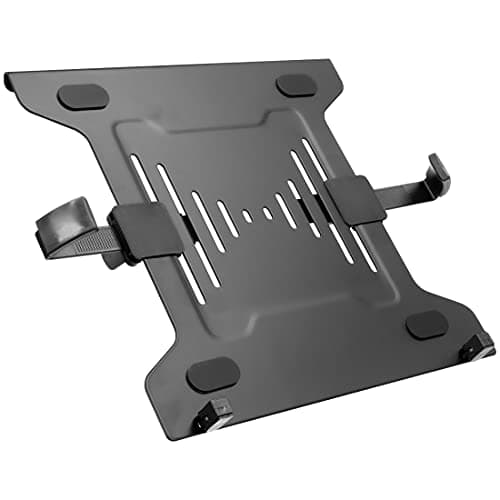
The cheapest route if you already own a monitor arm: a ventilated steel tray with adjustable clips that bolts straight onto any VESA 75 or 100 head, backed by a lifetime warranty.
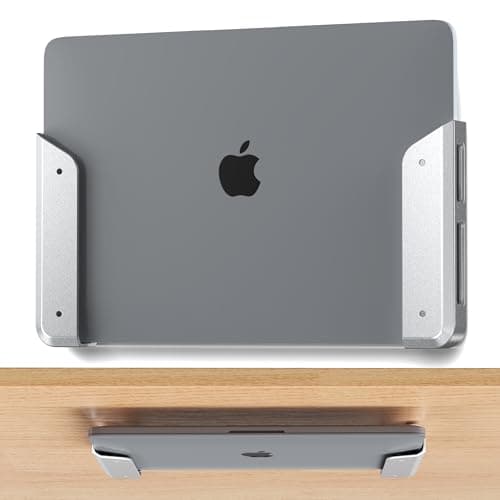
The budget pick and the smallest stowed profile here: a pair of simple brackets that hold a closed laptop flat under the desk or against a wall, fixed with adhesive strips or screws.
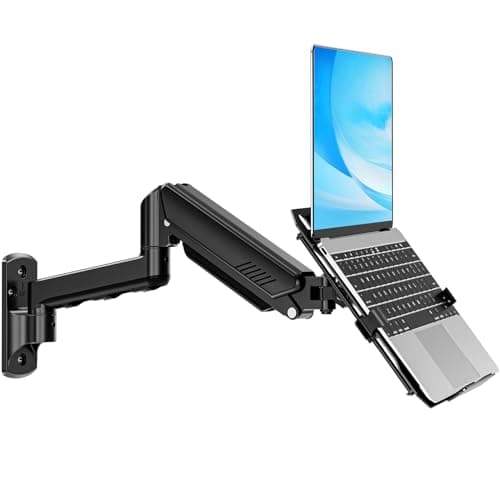
The option that uses none of the desk at all: a wall-mounted arm with a ventilated tray for a 17 in laptop or a VESA plate for a 32 in monitor, reaching 20.7 in off the wall. It needs studs and a drill.
#ad · Live prices from the Amazon Product API, as of November 12, 2026. Where we have no verified live price we show none — we would rather leave a gap than print a number that has rotted.
In detail
The picks, in full
01
Best overall
HUANUO Monitor Arm with Laptop Tray
Monitor fit
13–32 in, up to 22 lb
Laptop tray
14 × 12 in, ventilated
Height range
Up to 17 in
Clamp fits
0.39–3.07 in desk
Desk surface used
None
8.8/10
The most desk returned per dollar on this page: one clamp carries both a 13-32 in monitor and a ventilated 14 x 12 in laptop tray, so the two objects that normally own a small desk are both in the air.
Desk returned
9.6
Adjustment
9
Desk/wall demands
7
Laptop fit
8.4
Value
8.8
Pros
+Monitor and laptop on one clamp, which is one clamp fewer on a short rear edge
+0.39-3.07 in clamp range is wide enough for a thin apartment desk and a thick butcher block
+17 in of height range puts the monitor at eye level with the laptop below it
+Ventilated tray rather than a solid shelf
Cons
−Two devices on one clamp is a lot of leverage on a thin or hollow top
−The tray position is tied to the arm, so the laptop cannot be moved independently as far
−Not portable — this is a permanent installation
Skip this if…
…the desk edge is glass, or under 0.39 in. A single-device mount loads the same edge far less.
The pick when the laptop is the only screen: a dedicated desk-clamp arm with a 14 x 11 in tray, 16 in of height travel and a VESA plate as well, so the same mount can carry a monitor later.
Desk returned
8.8
Adjustment
8.8
Desk/wall demands
8.4
Laptop fit
9
Value
9.2
Pros
+4 in clamp ceiling is the highest here — it will close on an unusually thick top
+Takes a 17 in machine, which several trays will not
+Carries a VESA monitor instead if the setup changes
+A 0.6 in lip, which is what stops a laptop sliding off a tilted tray
Cons
−One device at a time; a monitor and a laptop need two mounts
−A grommet mount is limited to 2.2 in, well under the clamp's 4 in
Skip this if…
…you want the monitor up as well. The HUANUO combination mount does both on one clamp.
The cheapest route if you already own a monitor arm: a ventilated steel tray with adjustable clips that bolts straight onto any VESA 75 or 100 head, backed by a lifetime warranty.
Desk returned
9
Adjustment
7
Desk/wall demands
8.6
Laptop fit
8.4
Value
9.4
Pros
+A lifetime warranty, which nothing else on this page publishes
+Reuses an arm you already own, so the cost of entry is the tray alone
+Adjustable clips take 9.5-16.5 in machines
+Steel with traction pads rather than a bare plastic shelf
Cons
−Useless on its own — it is an accessory, not a mount
−3.2 lb of tray eats into the arm's published capacity before the laptop is on it
−Adjustment is whatever the host arm allows
Skip this if…
…you do not already have a spare VESA arm or a spare head. Buying an arm plus this tray costs more than the HUANUO combination mount.
The budget pick and the smallest stowed profile here: a pair of simple brackets that hold a closed laptop flat under the desk or against a wall, fixed with adhesive strips or screws.
Desk returned
9.2
Adjustment
3
Desk/wall demands
9.4
Laptop fit
6
Value
9.4
Pros
+By far the cheapest way to get a closed laptop off the desk
+Under-desk mounting uses space that is otherwise completely wasted
+Adhesive or screws, so a renter can choose the reversible route
+Two holders in the box — one for the laptop, one for a tablet or a keyboard
Cons
−No published weight rating at all, which is the reason it is not ranked higher
−Holds a CLOSED machine only — it is storage, not a working position
−1.02 in device limit rules out thicker gaming laptops
Skip this if…
…you want to work on the laptop while it is mounted. This parks it; it does not present it.
Price as of November 12, 2026. Prices change — Amazon's is the one that counts.
#ad · we may earn a commission from this link to ELETIUO Wall & Under-Desk Laptop Holder (2-pack)
05
Best for using no desk at all
MOUNTUP 2-in-1 Laptop Wall Mount
Laptop / monitor
Up to 17 in / up to 32 in
Load
4.4–22 lb (not split by mode)
Height travel
11 in
Reach
Up to 20.7 in
VESA
75 × 75 / 100 × 100
8.3/10
The option that uses none of the desk at all: a wall-mounted arm with a ventilated tray for a 17 in laptop or a VESA plate for a 32 in monitor, reaching 20.7 in off the wall. It needs studs and a drill.
Desk returned
10
Adjustment
8.6
Desk/wall demands
5.4
Laptop fit
8.6
Value
9
Pros
+Claims zero desk edge and zero desk surface — the only mount here that does both
+20.7 in of reach brings the machine right over the work area
+Swaps between laptop tray and monitor plate as the setup changes
+The right answer when the desk edge is glass or too thin to clamp
Cons
−A drilled wall installation, which most renters cannot take on
−The 4.4-22 lb load figure is published for the mount, not split between laptop and monitor modes
−11 in of height travel is the least here
Skip this if…
…you rent and the lease is strict. Our damage-free mounting guide explains what adhesive will and will not hold, and the honest answer for a 22 lb load is screws into studs.
#ad · Live prices from the Amazon Product API, as of November 12, 2026. Where we have no verified live price the button says so rather than showing a number that has rotted.
The em-dashes in that table are not gaps in our research — these five mounts publish genuinely different specification sets, because they are different kinds of hardware. The one column to read closely is the rating: the cheapest pick publishes none at all.
Three checks before you order
1. Measure the desk edge, and count what is already on it
Every clamp mount here wants a specific thickness: 0.39–3.07 in on the HUANUO, 0.4–4 in on the WALI. Measure the flat part of the rear edge, not the middle of the top. Then count what already clamps there — a monitor arm, a lamp, a power strip, a keyboard tray. A 40-inch desk runs out of rear edge faster than it runs out of surface, which is the practical argument for a combination mount over two separate ones. Our desk thickness for clamp-on gear table collects every published clamp range on this site.
2. Weigh the laptop, and remember the tray weighs something too
The Mount-It! tray is 3.2 lb before the laptop goes on it, and that comes out of the host arm’s published capacity. A 16-inch machine plus a steel tray is a real load for an arm rated 22 lb. Monitor arm weight capacity explains why running a mount near its ceiling causes the slow droop people blame on the mechanism.
3. Decide whether the lid is open or closed
An open lid needs a tray at a workable height. A closed lid — because an external monitor is doing the work — only needs parking, and the cheapest hardware on this page does that perfectly. A vertical laptop stand is the on-desk version of the same idea, and a USB-C dock is what makes a closed-lid setup practical in the first place.
What a mount does not fix
Getting the laptop off the surface does not fix the keyboard plane. If you work on the laptop’s own keyboard at a raised tray, your wrists sit above elbow height — the same problem a laptop stand creates. The complete answer is an external keyboard, ideally below the desk top on an under-desk keyboard tray, with the slim boards on best compact keyboards. And if the desk has to clear completely at the end of the day, a mount is the wrong purchase altogether — take a portable laptop stand instead.
What we checked and did not rank
Freestanding laptop carts and side tables. They take the laptop off the desk by putting it on a different piece of furniture, which a small room does not have space for. Best rolling desks covers them.
Adhesive-only wall holders rated for a laptop’s weight.Excluded where the listing publishes no figure for the adhesive itself. A 4 lb machine on a failed strip is a broken machine — see damage-free mounting weight limits.
Under-desk drawers and trays sold for storage. A different job; they are on under-desk storage.
How we picked
We do not run a testing lab
We compiled the published manufacturer specifications, did the footprint and clearance math ourselves, and read aggregated owner reviews, then scored each product against a published rubric. The scores are judgments from documented research — they are not measurements we took, because we do not have a lab and we are not going to pretend we do. Every spec traces back to a listing or manual named in Sources.
Questions
Frequently asked
What is the best laptop mount for a small desk?+
The HUANUO monitor arm with a laptop tray, because one clamp lifts both the external monitor and the laptop and a small desk usually has more surface to spare than rear edge. If the laptop is the only screen, the WALI desk-clamp mount gives it more independent movement; if you already own a monitor arm, the Mount-It! VESA tray is much the cheapest route in.
What is the difference between a laptop stand and a laptop mount?+
A stand raises the laptop while leaving it standing on the desk, so you keep the footprint and gain screen height. A mount clamps to the desk edge, the underside or a wall and removes the footprint entirely. On a 40-inch desk a 14-inch laptop is about a quarter of the usable area, so a mount returns real surface and a stand does not.
Can I put a laptop tray on a monitor arm I already own?+
Yes, if the arm has a standard VESA 75 x 75 or 100 x 100 head - a VESA laptop tray bolts straight on. Two cautions: the tray itself has weight (the Mount-It! here is 3.2 lb) and it counts against the arm's published capacity, and a tray hangs the load further from the clamp than a flat panel does, so check the rating before loading a 16-inch machine onto a budget arm.
Is an under-desk laptop holder strong enough?+
It depends entirely on the fixing, and the honest answer for the cheap bracket pairs is that most publish no weight rating at all - which is why the one on this page is the budget pick rather than the top one. Screwed into solid material they are fine for a closed machine; on adhesive strips, treat the manufacturer's silence as a reason to screw them instead.
Does mounting a laptop help ergonomics?+
Only halfway. Raising the screen toward eye level is right, but if you then type on the laptop's own keyboard your wrists end up above elbow height. The mount needs to be paired with a separate keyboard - ideally below the desk top on a tray - for the posture to actually improve.
We do not run a testing lab, and we do not pretend to. Specifications come from the manufacturer or retailer listing; the footprint and clearance math is ours and reproducible. Where we could not verify a number, we say so on the page rather than quietly leaving it out. Read our full method.