Ranked on what happens when the stand is not in use - folded thickness, weight, and whether it can leave the desk entirely. Four picks for a kitchen table, a dorm desk or a bag.
We earn a commission when you buy through our Amazon links, at no extra cost to you. It never affects our rankings, and we say so when the cheaper product is the better buy. How this works.
The verdict: the best portable laptop stand is the MOFT Invisible— an ultra-slim stick-free panel that travels attached to the laptop, so it never needs putting away at all. It is for the person whose desk is a kitchen table, a shared dorm desk, or an airport gate. The budget pick is the Nulaxy aluminium riser, which detaches into flat pieces and rebuilds without tools. If the laptop is closed because you work on an external screen, the OMOTON vertical dock removes it from the surface entirely.
This page deliberately ranks differently from our main best laptop stands roundup, and the order comes out close to reversed. That page ranks on ergonomics, build and stability, which is right when the stand lives on a permanent desk. Here the ranking is what the stand is like when you are not using it: how thick it is folded, how much it weighs, how long it takes to set up and break down, and whether it can get off the desk altogether.
That matters on this site because so many small-space desks are not desks. A kitchen table officehas to become a table again by seven o’clock. A dining-table setup gets packed into a drawer. A dorm deskis shared. In all three cases a stand that is fractionally more ergonomic but cannot be stowed in ten seconds simply stops being used — which makes it worse ergonomically than the one you will actually put under the laptop.
The honest caveat, stated up front: none of these is a substitute for a tall riser plus an external keyboardif the laptop is your only screen for a full working day. Portability costs lift. We do not run a lab; every figure is the listing’s own published number and the scores are editorial judgments against a published rubric.
The only stand here that never has to be put away, because it travels attached to the laptop: an ultra-slim stick-free panel that folds flat under the machine and gives two viewing angles when opened.
The best compromise between a real riser and a thing you can put in a drawer: an aluminium folding stand that takes up to a 17.3-inch machine, opens to a proper working height, and collapses flat when the desk becomes a table again.
The budget pick, and the most practical kind of portable: a detachable aluminium riser that comes apart into flat pieces for a bag, then goes back together without tools.
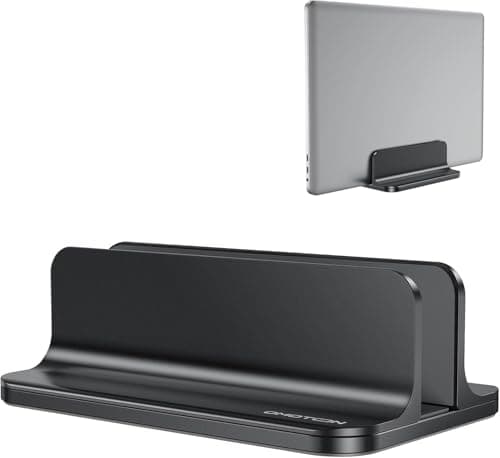
Not a riser at all, and on a desk that has to clear it is often the right answer: an adjustable-width dock that stands the closed laptop on its edge, taking the machine off the surface entirely instead of lifting it up.
#ad · Live prices from the Amazon Product API, as of November 12, 2026. Where we have no verified live price we show none — we would rather leave a gap than print a number that has rotted.
In detail
The picks, in full
01
Best overall portable stand
MOFT Invisible Laptop Stand
Profile
Ultra-slim
Attachment
Stick-free (no adhesive)
Angles
Two viewing angles
Laptop size
15 in and up
Portability
Folds flat
8.0/10
The only stand here that never has to be put away, because it travels attached to the laptop: an ultra-slim stick-free panel that folds flat under the machine and gives two viewing angles when opened.
Packed size
9.8
Weight
9.6
Ergonomic lift
6
Stability
6.4
Value
7.8
Pros
+Travels with the laptop rather than in a bag, which is the only form of portability that survives contact with real life
+Stick-free attachment — no adhesive residue on the lid, which matters on a work machine
+Folds flat, so it adds almost nothing to the closed thickness
+Two angles rather than one fixed rise
Cons
−The least ergonomic lift here — it tilts the keyboard rather than raising the screen to eye level
−Least stable of the five under a heavy hand
−Sized for 15 in and up; small ultrabooks are a poorer fit
Skip this if…
…the laptop is your main screen for eight hours a day. A tilt is not a riser; you want a tall stand and an external keyboard.
The best compromise between a real riser and a thing you can put in a drawer: an aluminium folding stand that takes up to a 17.3-inch machine, opens to a proper working height, and collapses flat when the desk becomes a table again.
Packed size
9
Weight
8.6
Ergonomic lift
8
Stability
7.2
Value
8.8
Pros
+Widest laptop range here at 10-17.3 in
+Folds flat, so it stores upright in a drawer or a bag pocket
+Aluminium rather than plastic, which is what keeps a folding hinge from flexing
+Open-grid base lets the underside breathe
Cons
−A folding hinge is always a little less rigid than a one-piece riser
−No published height figure, so the lift is a judgement rather than a number
Skip this if…
…you never move the stand. A fixed one-piece riser is steadier for the same money.
The budget pick, and the most practical kind of portable: a detachable aluminium riser that comes apart into flat pieces for a bag, then goes back together without tools.
Packed size
8.8
Weight
8.4
Ergonomic lift
8.2
Stability
7.8
Value
9.4
Pros
+Detachable rather than hinged, so the packed form is genuinely flat
+Tool-free assembly, which is the difference between portable and theoretical
+All-aluminium at the lowest price on this page
+Open heat-vent design under the machine
Cons
−Taking it apart and rebuilding it is slower than unfolding a hinge
−10-16 in range, so a 17 in machine needs the UGREEN
Skip this if…
…you move it daily. Detaching and reassembling twice a day gets old fast - a folding stand is the right trade.
Not a riser at all, and on a desk that has to clear it is often the right answer: an adjustable-width dock that stands the closed laptop on its edge, taking the machine off the surface entirely instead of lifting it up.
Packed size
7
Weight
6.6
Ergonomic lift
5
Stability
9.4
Value
9.2
Pros
+Stores the closed laptop on its edge, which is the smallest footprint any stand can give a laptop
+Weighted non-slip base — the steadiest thing on this page
+Adjustable slot width takes thick and thin machines
+Doubles as the parking spot when you plug into an external monitor
Cons
−It is a dock, not a riser — it does not raise the screen for working on the laptop itself
−Only useful if the laptop is closed, so it assumes an external keyboard and screen
−Heaviest item here, by design
Skip this if…
…the laptop IS your screen. This is for a closed-lid setup; take the UGREEN or the Nulaxy instead.
#ad · Live prices from the Amazon Product API, as of November 12, 2026. Where we have no verified live price the button says so rather than showing a number that has rotted.
The trade portability actually costs you
Raising a laptop screen toward eye level is the whole point of a stand, and it creates a second problem immediately: the keyboard goes up with it, so your wrists end up above elbow height. The complete fix is a tall riser plus a separate keyboard, which is covered in laptop-only desk setup and served by the slim boards on best compact keyboards. Every stand on this page trades some of that lift for packability. The MOFT trades the most — it tilts rather than raises — which is exactly why it is the most portable.
If you work on the laptop screen all day and the desk is permanent, the better purchase is probably not a portable stand at all. A monitor arm with a laptop tray lifts the machine off the desk and takes a monitor as well, and laptop stand vs monitor arm runs that comparison properly.
Three checks before you buy
1. Measure the drawer, not the desk
The constraint on a convertible desk is wherever the stand goes at the end of the day. A detachable riser packs flatter than a hinged one; a MOFT-style panel adds a few millimetres to the closed laptop and needs no storage at all. Decide the storage location first and the shortlist narrows itself.
2. Count the setup actions
One unfold beats three. The Nulaxy is cheaper and sturdier than the UGREEN but needs assembling; the UGREEN opens in one movement. If the stand goes up and down twice a day, that difference decides whether you keep using it.
3. Decide whether the lid is open or closed
This splits the page in two. An open lid wants a riser (MOFT, UGREEN, Nulaxy). A closed lid — because you are plugged into an external monitor — wants a vertical dock, which gives the laptop the smallest footprint it can have on any desk. Our best vertical laptop stands page ranks that format on its own, and USB-C docking stations covers the one-cable setup that makes a closed lid practical.
What we checked and did not rank
Fixed one-piece aluminium risers.Steadier and often better ergonomically, but they do not fold or detach, so they fail this page’s first criterion. They are on best laptop stands.
Height-adjustable floor-standing laptop carts.A different product for a different problem — best rolling desks covers them.
Cooling-pad stands with fans. Excluded as a class: a fan needs mains or USB power, which is one more cable to pack, and the fan is the part that fails.
How we picked
We do not run a testing lab
We compiled the published manufacturer specifications, did the footprint and clearance math ourselves, and read aggregated owner reviews, then scored each product against a published rubric. The scores are judgments from documented research — they are not measurements we took, because we do not have a lab and we are not going to pretend we do. Every spec traces back to a listing or manual named in Sources.
Questions
Frequently asked
What is the best portable laptop stand?+
The MOFT Invisible, because it travels attached to the laptop and so never has to be stored separately - which is the only kind of portability that survives daily use. The UGREEN folding stand is the best option if you want a real riser height and still need it to collapse, and the Nulaxy is the budget pick, detaching into flat pieces for a bag.
Are portable laptop stands stable enough to type on?+
The folding and detachable aluminium risers here are, within reason - they are rigid enough for normal typing but will flex more than a one-piece riser under a heavy hand. The ultra-slim stick-on panels are the least stable and are best thought of as a tilt rather than a stand. If stability is the priority and the desk is permanent, buy a fixed riser instead.
Does a laptop stand need an external keyboard?+
If you raise the screen toward eye level, yes - otherwise the keyboard rises with it and your wrists end up above elbow height, which is the thing the stand was supposed to fix. A slim wireless keyboard is the other half of the purchase. A low-tilt stand like the MOFT is the exception, because it barely changes the keyboard plane.
Is a vertical laptop stand better than a riser on a small desk?+
It is better at a different job. A vertical dock holds the laptop closed and on its edge, which is the smallest footprint a laptop can have, so it is the right choice when an external monitor is doing the work. A riser is for when the laptop screen is the screen. Several small desks end up with one of each.
We do not run a testing lab, and we do not pretend to. Specifications come from the manufacturer or retailer listing; the footprint and clearance math is ours and reproducible. Where we could not verify a number, we say so on the page rather than quietly leaving it out. Read our full method.