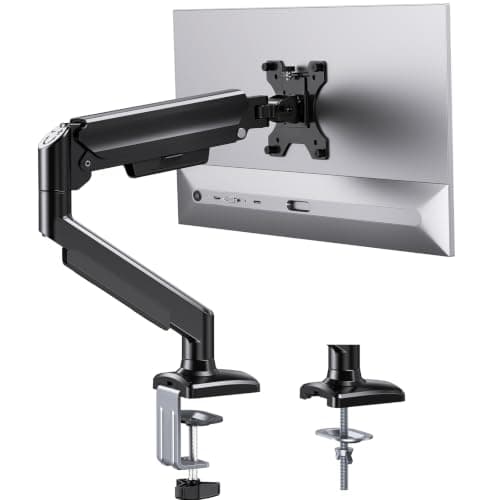
At 24 inches the weight gate never closes: the panel is 7 to 15 lb and every arm here is rated 19.8 to 22. So the decision moves to travel, rotation and the clamp window.
We earn a commission when you buy through our Amazon links, at no extra cost to you. It never affects our rankings, and we say so when the cheaper product is the better buy. How this works.
The verdict: the best monitor arm for a 24-inch monitor is the ErGear 13–36 in single arm— for anyone putting one 24-inch screen on a small desk and wanting it to stay where they left it, because 22 lb of capacity against a 7-to-15 lb panel, 17.5 inches of travel and a clamp window starting at 0.39 inches fits more apartment desks than anything else here. The budget pick is the RGB gas-spring arm with a USB hub, which costs less than a standalone desk hub and carries a 24-inch panel without complaint.
The finding that organizes this page is what doesn’t matter. At 24 inches, capacity is never the gate.A 24-inch 16:9 panel with its stand attached runs roughly 7 to 15 lb — the monitors we price on best monitors under $200publish 9.7 and 15 lb — and four of the five arms below are rated to 19.8 or 22 lb. The weight check that organizes our 32-inch arm page simply does not close here. Nor does the reach problem that organizes the 27-inch page: a 24-inch screen wants about 22 to 26 inches of viewing distance, which a 20-inch desk can almost supply on its own.
So what is left? Height travel and rotation— because 24 inches is the one diagonal where portrait actually fits a small desk. The arithmetic: a 16:9 panel with a 24-inch diagonal is about 20.9 inches wide and 11.8 inches tall. Rotate it and those swap: 11.8 inches of desk width, 20.9 inches of height. On a 40-inch desk that frees up genuine room beside it for a second screen or a notepad, which the same trick at 27 or 32 inches does not, because the rotated panel gets too tall to sit under a normal ceiling of desk clearance. Rotation needs travel, and travel is the spec this page ranks on.
One more thing worth saying plainly: the arm still has to fit the desk, not just the screen. The published clamp windows below range from 0.39 to 2.76 inches, and a cheap laminate apartment top is often 0.6 inches — under the floor of several arms sold for “any desk”. Will a monitor arm fit my desk is the measurement to take first, and how to choose a monitor armputs the checks in the order they have to be made. We do not run a lab: every number below is the manufacturer listing’s published figure, and the two specs nobody publishes are called out as unpublished rather than guessed.
The best all-round fit for a 24-inch screen: 22 lb of capacity against a panel that weighs a third of that, 17.5 inches of height travel, 15.3 inches of reach and a clamp window that starts at 0.39 inches for a thin apartment desktop.
The portrait pick, and 24 inches is the diagonal where portrait actually works: 360-degree rotation with 22.6 inches of height travel, which is the most published travel on this page and the thing a rotated panel needs.
The set-and-forget answer: a pole-and-lock mount rather than a gas spring, so there is no counterbalance to drift — and the only arm here with a lifetime warranty.
The option that returns the whole desk rather than most of it: a spring-assisted wall arm with a detachable VESA plate and cable covers, rated to 32 inches and 19.8 lb.
The budget pick and the cheapest way into the format: a gas-spring arm for 13-to-32-inch screens with a USB hub built into the base, for less than a standalone desk hub costs.
Budget pick — cheapest arm that still carries a 24-inch panel
#ad · Live prices from the Amazon Product API, as of November 22, 2026. Where we have no verified live price we show none — we would rather leave a gap than print a number that has rotted.
In detail
The picks, in full
01
Best overall for a 24-inch monitor
ErGear Single Monitor Arm (13–36in)
Screen fit
13–36 in
Weight limit
22 lb
Height travel
17.5 in
Reach
15.3 in
Clamp range
0.39–2.76 in
9.3/10
The best all-round fit for a 24-inch screen: 22 lb of capacity against a panel that weighs a third of that, 17.5 inches of height travel, 15.3 inches of reach and a clamp window that starts at 0.39 inches for a thin apartment desktop.
Fit at 24 in
9.6
Height travel
8.8
Desk compatibility
9.4
Depth returned
9.4
Value
9.2
Pros
+22 lb published capacity against a 24-inch panel that typically weighs 7 to 15 lb with its stand on — comfortable headroom with no gas spring fighting an under-loaded arm
+17.5 in of published height travel is enough to put the top bezel at eye level on a 29-inch desk and still drop it for a laptop session
+A 0.39-inch clamp floor is the figure that matters on apartment furniture, where 0.6-inch laminate tops are common and many arms start at 0.6
+13-inch bottom of range means the same arm carries a small secondary screen if the setup changes
+Recovers the 8 to 10 inches of depth the monitor's own stand occupies, which is the whole reason to buy one
Cons
−The monitor needs VESA holes, and a few budget 24-inch panels still ship without them
−Needs clearance behind the desk for the clamp to close, which a desk pushed flush to a wall denies
−15.3 in of reach is mid-pack here; the portrait ErGear publishes 20.6
Skip this if…
…your screen has no VESA pattern or your desk edge is outside 0.39 to 2.76 inches. Both are hard gates - run the fitment check first.
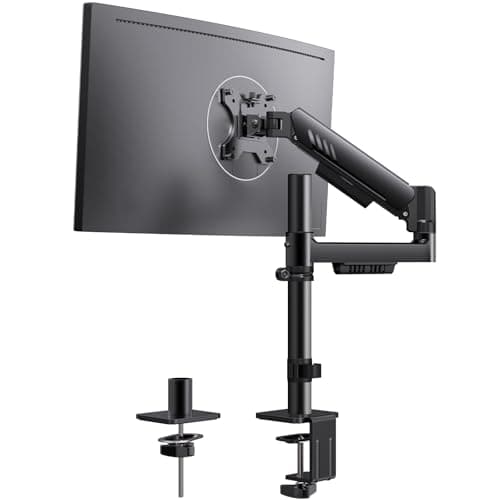
The portrait pick, and 24 inches is the diagonal where portrait actually works: 360-degree rotation with 22.6 inches of height travel, which is the most published travel on this page and the thing a rotated panel needs.
Fit at 24 in
9
Height travel
9.8
Desk compatibility
8.4
Depth returned
9.2
Value
8.6
Pros
+22.6 in of published height travel, the most here — a portrait panel's centre sits much higher than a landscape one and this is the arm that can put it there
+Full 360-degree rotation, so the flip between landscape and portrait is a movement rather than a reinstall
+20.6 in of published reach is also the most on the page, which matters because a portrait screen wants pushing further back
+Integrated C-clamp with anti-slip silicone padding, and hand-tightened VESA screws so no tools are needed
+19.8 lb rating still leaves comfortable headroom over a 24-inch panel
Cons
−17-inch bottom of range, so it will not carry a 13 or 15-inch secondary screen
−A rotated 24-inch panel stands about 20.9 inches tall, which needs real vertical clearance — a hutch or a shelf above the desk rules it out
−Single screen only; this is not a stacking mount
Skip this if…
…you want two screens. Stack or tile them with a dual arm instead of buying two of these and fighting for clamp space on the same edge.
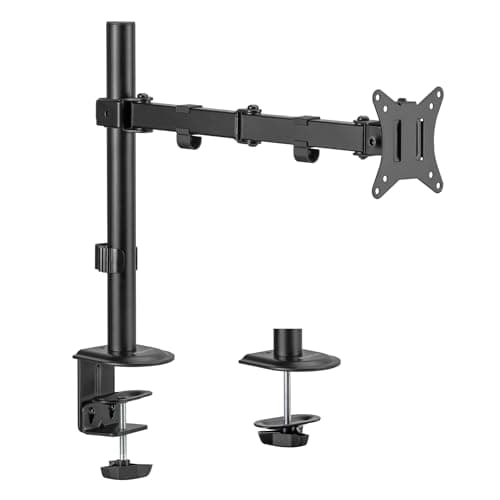
Mount-It! Single Monitor Arm Desk Mount (MI-4751BLK)
Screen fit
17–32 in
Weight limit
19.8 lb
Height travel
Pole slide, not published
Mechanism
Pole + lock
Warranty
Lifetime
8.3/10
The set-and-forget answer: a pole-and-lock mount rather than a gas spring, so there is no counterbalance to drift — and the only arm here with a lifetime warranty.
Fit at 24 in
8.8
Height travel
6.4
Desk compatibility
8.4
Depth returned
8.8
Value
9
Pros
+A pole lock cannot sag or drift, which is the commonest complaint about cheap gas-spring arms carrying a light panel
+Lifetime warranty, the longest cover of any arm on this page
+Rotates 180 degrees, so portrait is available without paying for the portrait-specific arm
+A built-in cable channel keeps the lead off the desk surface
Cons
−Height changes mean unlocking and sliding rather than a one-hand nudge
−HONEST GAP: travel along the pole is not published, so you cannot check eye-level range before buying — the one spec this page most wanted and could not get
−Less reach than a full articulating gas-spring arm
Skip this if…
…you move between sitting and standing, or reposition the screen daily. A gas spring is far nicer to live with for that.
Price as of November 22, 2026. Prices change — Amazon's is the one that counts.
#ad · we may earn a commission from this link to Mount-It! Single Monitor Arm Desk Mount (MI-4751BLK)
04
Best if the desk edge cannot take a clamp at all
VIVO Counterbalance Wall Mount (MOUNT-V001G)
Screen fit
Up to 32 in, 19.8 lb
VESA
75 × 75 / 100 × 100 mm, detachable plate
Motion
+90°/−90° tilt, 180° swivel, 360° rotate
Build
Steel and aluminum
Extras
Cable management covers
8.9/10
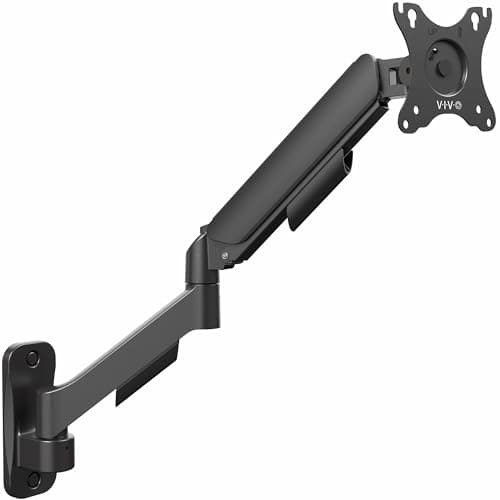
The option that returns the whole desk rather than most of it: a spring-assisted wall arm with a detachable VESA plate and cable covers, rated to 32 inches and 19.8 lb.
Fit at 24 in
8.6
Height travel
7.6
Desk compatibility
9.8
Depth returned
10
Value
8.4
Pros
+Nothing touches the desk, so 100 percent of the surface comes back — a clamp arm still occupies its base area and the rear edge
+Detachable VESA plate: hang the screen on the wall arm, then clip it in, which is a one-person job
+Full 90 degrees of tilt each way, useful because a wall mount usually ends up higher than a desk clamp would
+Cable covers hide the run down the wall, which is the part of wall-mounting people regret
+Hardware supplied for wood stud and for concrete or brick
Cons
−VIVO states plainly that it must not go into drywall alone — this needs a stud or masonry, so it is not a renter-safe fitting
−No published extension figure, so reach cannot be compared against the clamp arms here
−Holes in a wall are not reversible at the end of a lease
Skip this if…
…you rent, or you cannot locate a stud. The listing is explicit about the drywall limit and a falling monitor is an expensive lesson - take the ErGear clamp arm instead.
Budget pick — cheapest arm that still carries a 24-inch panel
RGB Gas Spring Monitor Arm with USB Hub (13–32in)
Screens
1, 13–32 in
Mechanism
Gas spring
Ports
USB hub
Class
Single desk mount
Extras
RGB lighting
8.4/10
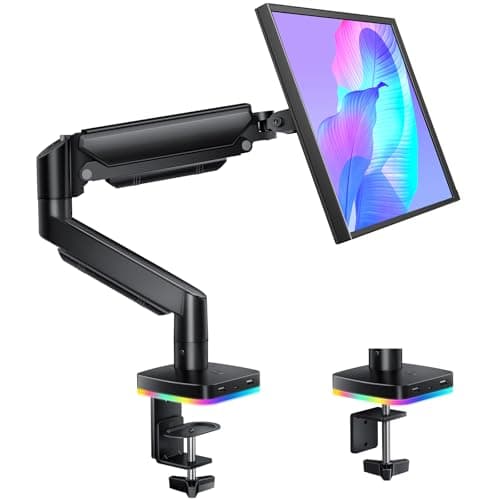
The budget pick and the cheapest way into the format: a gas-spring arm for 13-to-32-inch screens with a USB hub built into the base, for less than a standalone desk hub costs.
Fit at 24 in
8.4
Height travel
7.4
Desk compatibility
8
Depth returned
8.8
Value
9.6
Pros
+Cheapest pick here by a clear margin, and a 24-inch panel sits in the middle of its stated 13 to 32-inch range
+The USB hub arrives on the same clamp and the same cable run, so it removes an object from the desk rather than adding one
+Gas spring gives smooth one-hand height changes, which the pole-and-lock Mount-It does not
Cons
−HONEST GAP: no published weight capacity at all. A 24-inch panel is light enough that this is a low risk, but it is the reason this arm is the budget pick and not the top one
−USB generation is not published either, so hub speed is unknown
−RGB lighting is a permanent feature of the product, not a mode, which not every living room wants
Skip this if…
…you plan to move up to a 32-inch or curved panel later. With no published load figure there is nothing to check it against, and the 32-inch page covers that case properly.
#ad · Live prices from the Amazon Product API, as of November 22, 2026. Where we have no verified live price the button says so rather than showing a number that has rotted.
Why the weight column is the least useful one on the page
Pick
Published capacity
Typical 24-inch panel
Headroom
What binds instead
ErGear 13–36 in
22 lb
7–15 lb
Comfortable
Nothing — it is the all-rounder
ErGear portrait
19.8 lb
7–15 lb
Comfortable
Vertical clearance for a rotated panel
Mount-It! MI-4751BLK
19.8 lb
7–15 lb
Comfortable
Travel is not published
VIVO MOUNT-V001G
19.8 lb
7–15 lb
Comfortable
Needs a stud; not renter-safe
RGB gas spring
Not published
7–15 lb
Unknown
The missing load figure itself
Four of five rows say “comfortable” and the fifth says “unknown”. That is the whole capacity story at this size. One caveat that applies at every size and catches people out: a listing’s item weight usually includes the stand, so subtract two to four pounds before you check it against an arm’s window, and never use a shipping weight.
The three specs that do decide it
1. Height travel, because this is where eye level comes from
Published travel here runs from 17.5 to 22.6 inches, with one arm not publishing it at all. You need enough to put the top bezel roughly level with your eyes when seated: on a standard 29-inch desk with a 24-inch panel that is usually a lift of a few inches, but if you also use a keyboard tray or a sit-stand frame the screen has to travel further. Seated desk ergonomics has the four heights that have to agree.
2. Rotation, because 24 inches is the portrait size
Two picks rotate a full 360 degrees and one manages 180. If you write code, read documents or run a chat column, a portrait 24-inch panel costs you under 12 inches of desk width. Check the clearance above your desk first — a rotated panel stands about 21 inches tall before you add the arm’s own lift, so a hutch or a wall shelf usually rules it out.
3. The clamp window, which is about your desk and not your screen
The widest window here starts at 0.39 inches. That matters more than it sounds: budget apartment desks are frequently 0.6 to 0.7 inches of laminate over particle board, and arms whose clamp starts at 0.8 inches simply will not grip them. Measure the edge, then check it against the published range — desk thickness for clamp-on gear covers the measurement and the edge shapes that cause trouble.
Two 24-inch screens, and when to stop
Two 24-inch panels side by side are about 42 inches of glass before bezels, which overhangs a 40-inch desk. If that is the plan, buy one dual arm rather than two singles — two clamps competing for the same rear edge is a worse problem than it sounds, and dual arm vs two single arms works through the trade. Two monitors on a small desk has the width arithmetic, and one of the honest answers it reaches is a single 24-inch landscape panel with a second one turned portrait beside it, which is exactly what the rotation spec above buys you.
What we checked and did not rank
The arms on our 27-inch and 32-inch pages. Deliberately left off, all of them. Those pages exist because reach and capacity bind at those sizes, and re-ranking the same five arms here would make three size pages into one list printed three times. There is zero ASIN overlap between this page and either of them.
Monitor risers and freestanding stands. A 24-inch panel is light enough that a riser is a legitimate alternative, and cheaper. It is also the option that gives back the least depth, because the base goes straight back down on the desk. That trade is ranked properly at monitor arm alternatives.
Gas-spring arms with no published load figure, other than the budget pick. Several exist. We ranked one, as the cheapest route in and with the gap stated as a con, and did not fill the page with them.
Laptop-tray arms.A different job — they hold a laptop beside the screen rather than carrying the screen better. They are at monitor arms with a laptop tray.
How we picked
We do not run a testing lab
We compiled the published manufacturer specifications, did the footprint and clearance math ourselves, and read aggregated owner reviews, then scored each product against a published rubric. The scores are judgments from documented research — they are not measurements we took, because we do not have a lab and we are not going to pretend we do. Every spec traces back to a listing or manual named in Sources.
Questions
Frequently asked
Do I need a heavy-duty monitor arm for a 24-inch monitor?+
No. A 24-inch panel runs roughly 7 to 15 lb with its stand attached, and ordinary arms are rated to 19.8 or 22 lb. Paying for a 37 or 44 lb arm buys headroom you will not use, and some heavy-duty arms have a published load FLOOR as well as a ceiling - below it the counterbalance pushes a light screen upward instead of holding it. Check both ends of the window.
Can you rotate a 24-inch monitor to portrait on a small desk?+
Yes, and 24 inches is the size where it makes most sense. A 16:9 24-inch panel is about 20.9 inches wide and 11.8 inches tall; rotated, it occupies under 12 inches of desk width and stands about 21 inches tall. You need an arm that rotates 360 degrees and enough vertical clearance above the desk - a hutch or a wall shelf usually rules it out.
How much desk does a monitor arm actually give back at this size?+
Roughly 8 to 10 inches of depth, which is the footprint a 24-inch monitor's own stand occupies. On a 20-inch-deep desk that is close to half the surface. A wall mount gives back all of it because nothing touches the desk at all, at the cost of holes in the wall.
What is the one spec these listings do not publish?+
Height travel, on two of the five. The pole-mount arm publishes no travel figure along its post and the budget gas-spring arm publishes no weight capacity at all. Both gaps are called out as cons on their cards rather than filled in with an estimate - you cannot check eye-level range against a number nobody stated.
We do not run a testing lab, and we do not pretend to. Specifications come from the manufacturer or retailer listing; the footprint and clearance math is ours and reproducible. Where we could not verify a number, we say so on the page rather than quietly leaving it out. Read our full method.