Five arms that carry a live price under $100, ranked on what the band actually buys. Spoiler: it is not a better single arm - it is a second and third screen on the same clamp.
We earn a commission when you buy through our Amazon links, at no extra cost to you. It never affects our rankings, and we say so when the cheaper product is the better buy. How this works.
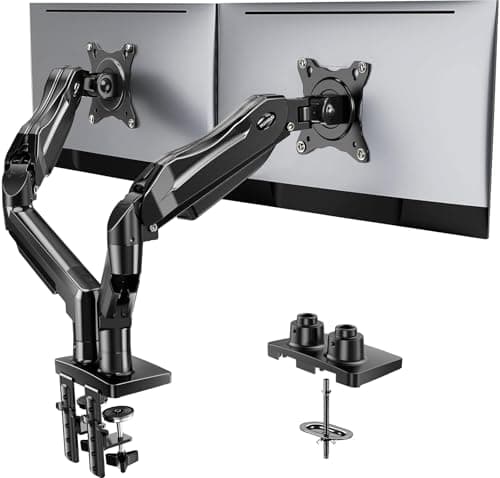
The verdict: the best monitor arm under $100 is the HUANUO FlowLift dual mount— for anyone who already has, or will soon have, a second screen, because it carries two 32-inch panels at up to 19.8 lb each on one clamp and publishes a weight floor as well as a ceiling. The budget pick is the monTEK USB arm, the cheapest here and the one with the most published capacity per dollar on the page: 26.4 lb, a 40-inch ceiling and a USB hub in the base.
The finding that organizes this page is what the band is for. Under $100, the money does not buy a better single arm — it buys more screens. A perfectly good single gas-spring arm can be had for well under half this ceiling, and our budget monitor arm roundup ranks that rung. Between there and $100 the motion barely improves, the finish barely improves, and warranties mostly stay absent. What does change is the display count: three of the five picks below carry two or three screens on a single clamp point. If you are buying one arm for one monitor, the honest advice is that you can spend less.
The second thing this band buys is published headroom. The monTEK’s 26.4 lb and 40-inch ceiling, and the ARES WING’s 49-inch range, are specifications you simply do not get below it — and they matter if an ultrawide or a 32-inch panel is in your future. Note the asymmetry, though: the arms that publish the most generous ranges are also the ones that publish the least about warranty and, in one case, nothing at all about weight. The table below has a “published capacity” column for exactly that reason, and one of its cells reads “not published”.
Above this ceiling sits best monitor arms under $200, where the money starts buying warranties and all-metal construction — the monTEK appears on both pages, as that one’s cheapest rung and this one’s budget pick, and we would rather say so than pretend the two lists do not touch. Everything on this page clamps or grommets to a desk, so run will a monitor arm fit my desk before ordering, and how to choose a monitor arm puts the gates in the order they have to be checked. Live prices sit on every card with the date they were read; we do not quote a price in prose.
The best use of a $100 arm budget: two screens on one clamp, 4.4 to 19.8 lb per arm, 15.75 inches of lift and a clamp window from 0.59 to 3.54 inches — a second display for less than most single arms in the band above.
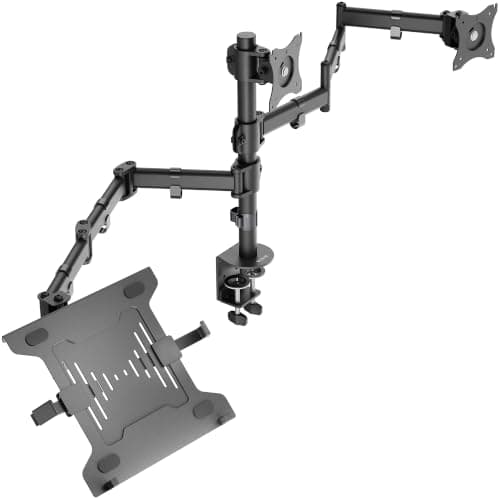
Three displays from one clamp point, still inside the band: two 13-to-27-inch monitors plus a 10-to-15.6-inch laptop on a ventilated tray, with 1.1 inches of independent VESA trim per plate so mismatched screens line up.
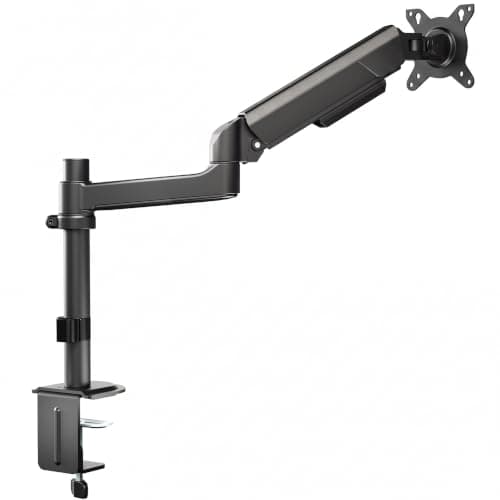
The best single arm in the band, and the one to take if what you want is the feel of a premium arm: a pneumatic lift with heavy-duty clamp and grommet hardware both in the box, for 17-to-32-inch screens.
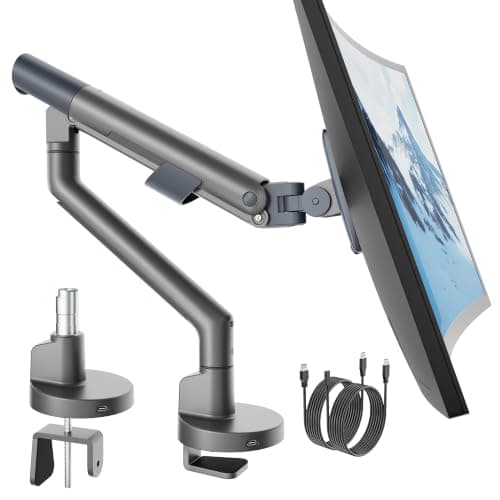
The budget pick and the cheapest arm in the band: a published 26.4 lb capacity, a 40-inch screen ceiling and an integrated USB hub, which beats several arms costing four times as much on the numbers that are actually printed.
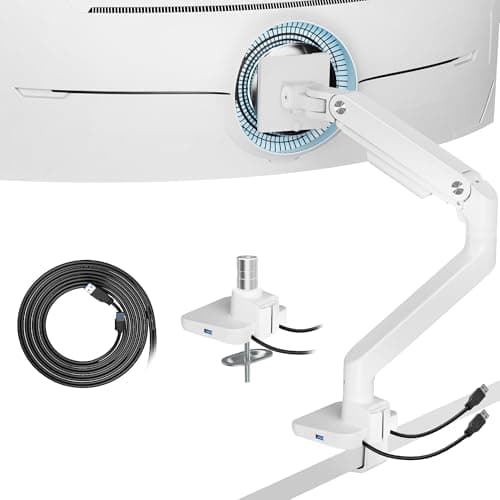
The widest published screen range in the band at 17 to 49 inches, and the only arm here in white — which on a pale apartment desk is the difference between furniture and office equipment.
Best for an ultrawide, and for a desk that is not black
#ad · Live prices from the Amazon Product API, as of November 22, 2026. Where we have no verified live price we show none — we would rather leave a gap than print a number that has rotted.
In detail
The picks, in full
01
Best overall under $100
HUANUO FlowLift Dual Monitor Stand
Monitors
2 × 13–32 in
Weight range
4.4–19.8 lb per arm
Lift
Up to 15.75 in
Mount
Dual C-clamp or grommet, 0.59–3.54 in
Motion
+85°/−50° tilt, ±90° swivel, 360° rotate
9.0/10
The best use of a $100 arm budget: two screens on one clamp, 4.4 to 19.8 lb per arm, 15.75 inches of lift and a clamp window from 0.59 to 3.54 inches — a second display for less than most single arms in the band above.
Screens per dollar
9.6
Published detail
9.2
Desk compatibility
8
Motion quality
8.8
Value in band
9.4
Pros
+Two 32-inch panels at up to 19.8 lb each, which is more published headroom per screen than most single arms in this band offer for one
+Publishes a weight FLOOR as well as a ceiling (4.4 lb) — the spec that stops a light panel floating up on a counterbalance, and one most listings omit
+A dual C-clamp spreads the load over a larger base plate, which is what stops two screens wobbling as you type
+15.75 inches of lift puts both panels at eye level over a closed laptop
+One-handed movement, so a screen can come forward for a spreadsheet and go back afterwards
Cons
−Wooden desks only, and the underside has to be free of cross beams
−Two 32-inch panels are about 56 inches of glass — the arm fits a small desk, the screens may not
−Does nothing for a laptop; that needs a dock or a vertical stand alongside
Skip this if…
…your desk is glass, hollow-core or has a sit-stand crossbeam under the rear edge. A dual clamp on a weak top is the worst case in this category.
Three displays from one clamp point, still inside the band: two 13-to-27-inch monitors plus a 10-to-15.6-inch laptop on a ventilated tray, with 1.1 inches of independent VESA trim per plate so mismatched screens line up.
Screens per dollar
9.8
Published detail
9
Desk compatibility
7.4
Motion quality
8.4
Value in band
9
Pros
+One clamp point for three displays, which is the only way to do it at all on a desk under 48 inches
+±1.1 in of VESA trim per plate is the feature that makes two different monitors line up at the same height
+A ventilated laptop tray with rubber tabs: the machine lifts off in a second for a commute
+Padded clamp plus a grommet base in the box for desks with a cable hole
+Puts three screens up for less than a single premium arm costs
Cons
−27 inches is the monitor ceiling — two 32-inch panels will not fit this mount
−Three displays on one post concentrates real leverage on one clamp point
−15.4 lb per monitor is the lowest published per-screen ceiling here
Skip this if…
…your desktop is hollow-core, glass, or under about 0.6 inches thick. Three displays on a single clamp is the hardest case in this whole category for a weak top.
VIVO Heavy Duty Pneumatic Single Arm (STAND-V101H)
Screens
1, 17–32 in
Lift
Pneumatic spring
Mount
Heavy-duty C-clamp or grommet
Motion
Full motion — tilt, swivel, rotate
Series
STAND-V101H
8.1/10
The best single arm in the band, and the one to take if what you want is the feel of a premium arm: a pneumatic lift with heavy-duty clamp and grommet hardware both in the box, for 17-to-32-inch screens.
Screens per dollar
6.4
Published detail
7.6
Desk compatibility
8.8
Motion quality
9.4
Value in band
8.4
Pros
+Pneumatic lift gives the one-hand motion that separates a good arm from a stiff one, which is the only quality this band genuinely improves on the rung below
+Clamp and grommet hardware both supplied, so it fits a desk with a cable hole or without one
+VIVO hardware recurs across our arm and riser picks, so replacement plates and bolts are easy to source
+Full motion in all three axes rather than tilt-only
Cons
−One screen. In a band where the same money buys two or three mounts, that is the thing to be clear-eyed about
−32-inch screen ceiling, against 40 and 49 on the two single arms below it here
−Shorter reach than the dearer arms in the band above, which is the spec it gives up
Skip this if…
…your desk is pushed hard against a wall and the screen has to come a long way forward. Reach is what this arm trades away for build and motion.
Price as of November 22, 2026. Prices change — Amazon's is the one that counts.
#ad · we may earn a commission from this link to VIVO Heavy Duty Pneumatic Single Arm (STAND-V101H)
04
Budget pick — most published capacity per dollar
monTEK USB Monitor Arm (17–40in)
Screens
1, 17–40 in
Capacity
26.4 lb
Ports
Integrated USB
Mechanism
Full motion
Warranty
None published
8.2/10
The budget pick and the cheapest arm in the band: a published 26.4 lb capacity, a 40-inch screen ceiling and an integrated USB hub, which beats several arms costing four times as much on the numbers that are actually printed.
Screens per dollar
7
Published detail
7.4
Desk compatibility
8.8
Motion quality
8.2
Value in band
9.6
Pros
+26.4 lb published capacity is more than the per-arm ceiling of either dual mount here, and more than plenty of arms at four times the price
+A 40-inch screen ceiling covers a single ultrawide without moving up a band
+A USB hub in the base removes a separate dock from the desk and shortens the cable run
+Single-arm loading is gentler on a thin apartment desktop than a dual clamp
+The cheapest pick on this page by a clear margin
Cons
−No published warranty period at all, which is the trade at this price
−The listing does not state the USB generation, so hub speed is unknown
−One screen only
Skip this if…
…you want a warranty behind a part that is holding up a monitor worth several times the arm. That is precisely what the band above sells.
Best for an ultrawide, and for a desk that is not black
ARES WING Ultrawide Monitor Arm with USB
Screens
1, 17–49 in
Ports
Integrated USB
Finish
White
Class
Ultrawide monitor arm
Motion
Full motion
7.3/10
The widest published screen range in the band at 17 to 49 inches, and the only arm here in white — which on a pale apartment desk is the difference between furniture and office equipment.
Screens per dollar
6.6
Published detail
5.4
Desk compatibility
8.2
Motion quality
8.2
Value in band
8
Pros
+A 49-inch ceiling covers super-ultrawide panels nothing else in this band takes
+White finish is genuinely rare in this category and matters in a room that is also a bedroom
+One ultrawide on an arm frees more desk than two smaller screens on two arms do
+The hub sits at screen height rather than under the desk
Cons
−HONEST GAP: the listing publishes no weight capacity figure, which on a 49-inch panel is the specification you most need
−A 49-inch screen on a small desk is a questionable idea regardless of what holds it up
−The dearest pick in the band, right at the ceiling
Skip this if…
…you cannot confirm your screen's weight against a published figure, because this listing does not supply one. Our monitor arm weight capacity guide covers how to source the number from the panel maker instead.
#ad · Live prices from the Amazon Product API, as of November 22, 2026. Where we have no verified live price the button says so rather than showing a number that has rotted.
What the band actually buys, pick by pick
Pick
Displays carried
Published capacity
Screen range
Published warranty
HUANUO FlowLift dual
2
4.4–19.8 lb per arm
13–32 in
Not published
VIVO STAND-V013L
3 (2 + laptop)
15.4 lb each, 9.9 lb tray
13–27 in
Not published
VIVO STAND-V101H
1
Not published
17–32 in
Not published
monTEK USB arm
1
26.4 lb
17–40 in
None published
ARES WING
1
Not published
17–49 in
Not published
Read the last column first. Not one arm in this band publishes a warranty period. That is the honest cost of the ceiling, and it is the single clearest reason to step up a band if the monitor on top is expensive. Read the second column next: the two mounts carrying multiple screens are the ones that make the band make sense.
The three gates, before price
1. The desk edge
Published clamp windows here run from 0.59 to 3.54 inches on the FlowLift and up to 3.2 inches on the VIVO triple. Measure your top at the clamp position, check there are one to two inches of clear space behind it, and confirm nothing structural runs under the rear edge — a sit-stand crossbeam will stop a clamp closing. Desk thickness for clamp-on gear has the measurement, and clamp vs grommet covers the alternative if your desk has a cable hole.
2. The load window, at both ends
Above the ceiling an arm sags; below a published floora counterbalance pushes a light panel upward and it will not stay down. Only the FlowLift publishes both ends here (4.4–19.8 lb), which is why it ranks first. Remember that a listing’s item weight usually includes the stand — subtract two to four pounds, and never use the shipping weight. Monitor arm weight capacity covers sourcing the real panel weight when a listing is unhelpful.
3. How many screens are really coming
This is the one that decides the band. If the answer is one, buy from the rung below and spend the difference on the screen. If it is two, the dual mount here costs less than two single arms and solves the alignment problem that two separate clamps create — dual arm vs two single arms works through it. If it is two plus a laptop, only one mount here does it at all.
Where the screens will not fit even if the arm does
Two 32-inch panels are roughly 56 inches of glass before bezels. The FlowLift will hold them; a 40-inch desk will not seat them. Two monitors on a small desk runs the width arithmetic and ultrawide vs dual monitors covers when one wider panel is the better answer — which is the case the ARES WING exists for.
What we checked and did not rank
The sub-$50 single arms. Several are excellent and they are ranked at best budget monitor arms and at best monitor arms for 24-inch monitors. Including them here would turn a band page into a copy of the rung below it, and the whole point of this page is that a single arm does not need this budget.
Arms from the band above. The Ergotron LX, the HUANUO TitanLift and the Mount-It gas-spring arm are all over the ceiling at our last price read and are ranked at best monitor arms under $200. A band page that lists products outside its own band is not a band page.
Triple-monitor mounts for three full-size panels.Nothing in this band carries three monitors proper — the one triple-display pick here is two screens plus a laptop tray, and it says so. We will not promise a format the registry cannot supply.
How we picked
We do not run a testing lab
We compiled the published manufacturer specifications, did the footprint and clearance math ourselves, and read aggregated owner reviews, then scored each product against a published rubric. The scores are judgments from documented research — they are not measurements we took, because we do not have a lab and we are not going to pretend we do. Every spec traces back to a listing or manual named in Sources.
Questions
Frequently asked
Is a monitor arm under $100 any good?+
Yes, and for one screen you can spend considerably less. The useful question in this band is not quality but display count: three of the five picks here carry two or three screens on one clamp, which is what the money buys. The honest trade is warranties - not one arm on this page publishes a warranty period, and that is the main thing the band above sells.
Is a dual monitor arm cheaper than two single arms?+
Usually, and it is also better. Two separate clamps compete for the same rear desk edge, and nothing makes the two screens line up at the same height. A dual mount shares one base plate and one post, which is what keeps two panels level and stops them wobbling when you type. Our dual arm vs two single arms page works through the exceptions.
What should I check before buying any arm in this band?+
Three things in order: your desk edge thickness against the published clamp range with one to two inches of clear space behind it; your monitor's weight against the arm's window at BOTH ends, after subtracting the stand from the listing weight; and whether your panel has VESA holes at all. Price comes fourth - a cheap arm that fits beats an expensive one that does not.
Why do these arms not publish a warranty?+
Because at this price most are sold by brands without a service operation behind them. It is the clearest difference between this band and the one above, where an all-metal arm with a multi-year warranty becomes available. If the monitor on top is worth several hundred dollars, that is a reasonable reason to step up.
We do not run a testing lab, and we do not pretend to. Specifications come from the manufacturer or retailer listing; the footprint and clearance math is ours and reproducible. Where we could not verify a number, we say so on the page rather than quietly leaving it out. Read our full method.